badascii-doc
| Crates.io | badascii-doc |
| lib.rs | badascii-doc |
| version | 0.4.1 |
| created_at | 2025-04-22 15:24:17.865425+00 |
| updated_at | 2025-04-27 16:16:31.142602+00 |
| description | Proc-macro to include BadASCII diagrams into your rustdoc output. Block diagrams in ASCII. |
| homepage | https://badascii.me |
| repository | https://github.com/samitbasu/badascii |
| max_upload_size | |
| id | 1644207 |
| size | 24,029 |
 Samit Basu (samitbasu)
documentation
README
BADASCII For RustDoc
Use badascii as a macro, and inject cool SVG diagrams into your
rustdoc, or wherever you might need them in your rust code.
Using it is super simple.
cargo add badascii-doc
And then in your code, simply use
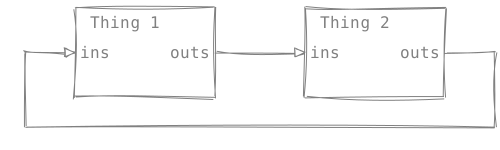
#![doc = badascii!("
       +-------------+        +-------------+
       | Thing 1     |        | Thing 2     |
       |             |        |             |
  +--->|ins      outs+------->|ins      outs+----+
  |    |             |        |             |    |
  |    |             |        |             |    |
  |    +-------------+        +-------------+    |
  |                                              |
  +----------------------------------------------+
")]
And you will get a nice SVG rendering in your generated markdown. The SVG generated by these macros is meant to be theme-agnostic. They look like this:
If you prefer a more formal diagram use the
badascii_formal! macro, which gives straight
lines and no backtalk.
If you are worried about compile time performance,
well, then you can use badascii-cli to process
the comments yourself and generate svg images.