cairo_viewport
| Crates.io | cairo_viewport |
| lib.rs | cairo_viewport |
| version | 0.2.2 |
| created_at | 2025-10-28 12:14:39.592082+00 |
| updated_at | 2025-12-31 22:41:18.500461+00 |
| description | A viewport for cairo-rs to simplify creating images |
| homepage | |
| repository | https://github.com/StefanMathis/cairo_viewport.git |
| max_upload_size | |
| id | 1904670 |
| size | 114,682 |
 (StefanMathis)
documentation
README
cairo_viewport
This crate adds the Viewport abstraction on top of the excellent
cairo-rs crate, which itself is a Rust
wrapper around the cairo library. A
Viewport can be created from a BoundingBox and automatically configures
a cairo Context so it fits the underlying bounding box. This is useful to
simplify creating images of bounded objects, as shown below:
use cairo_viewport::{SideLength, Viewport};
use bounding_box::BoundingBox;

struct Circle {
    center: [f64; 2],
    radius: f64,
}

impl Circle {
    fn draw(&self, cr: &cairo::Context) -> Result<(), cairo::Error> {
        use std::f64::consts::PI;

        // Set the background to white
        cr.set_source_rgb(1.0, 1.0, 1.0);
        cr.paint()?;

        cr.move_to(self.center[0] + self.radius, self.center[1]);
        cr.arc(self.center[0], self.center[1], self.radius, 0.0, PI);
        cr.arc(self.center[0], self.center[1], self.radius, PI, 0.0);
        cr.set_source_rgba(0.0, 0.0, 1.0, 1.0);
        cr.set_line_width(0.2);
        return cr.stroke();
    }

    fn bounding_box(&self) -> BoundingBox {
        return BoundingBox::new(
            self.center[0] - self.radius - 0.5,
            self.center[0] + self.radius + 0.5,
            self.center[1] - self.radius - 0.5,
            self.center[1] + self.radius + 0.5,
        );
    }
}

let c = Circle {center: [1000.0, 1000.0], radius: 2.0};

// The context is transformed so that the larger side (width or height) of the
// bounding box has 500 units when creating the image (e.g. 500 pixel for PNG).
let viewport = Viewport::from_bounding_box(&c.bounding_box(), SideLength::Long(500));

// Use the viewport to create an image
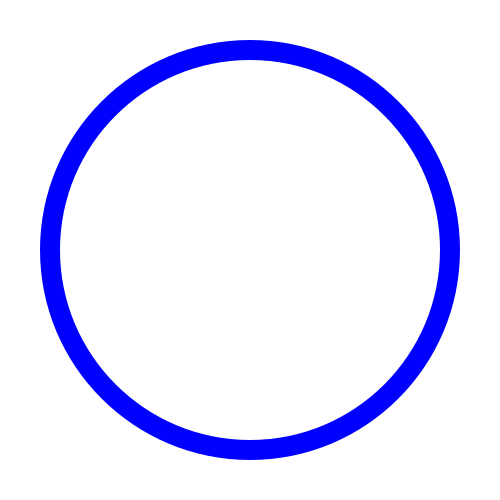
viewport.write_to_file("docs/circle.svg", |cr: &cairo::Context| {c.draw(cr)}).expect("image can be created");
File "docs/circle.svg":
Compare images
If the image-compare feature is enabled, the visual representation of objects
can be easily compared using the Viewport::compare_to_image function (only
for .png images). This is useful for testing:
use cairo_viewport::{SideLength, Viewport};
use bounding_box::BoundingBox;

struct Circle {
    center: [f64; 2],
    radius: f64,
}

impl Circle {
    fn draw(&self, cr: &cairo::Context) -> Result<(), cairo::Error> {
        use std::f64::consts::PI;

        // Set the background to white
        cr.set_source_rgb(1.0, 1.0, 1.0);
        cr.paint()?;

        cr.move_to(self.center[0] + self.radius, self.center[1]);
        cr.arc(self.center[0], self.center[1], self.radius, 0.0, PI);
        cr.arc(self.center[0], self.center[1], self.radius, PI, 0.0);
        cr.set_source_rgba(0.0, 0.0, 1.0, 1.0);
        cr.set_line_width(0.2);
        return cr.stroke();
    }

    fn bounding_box(&self) -> BoundingBox {
        return BoundingBox::new(
            self.center[0] - self.radius - 0.5,
            self.center[0] + self.radius + 0.5,
            self.center[1] - self.radius - 0.5,
            self.center[1] + self.radius + 0.5,
        );
    }
}

let c = Circle {center: [1000.0, 1000.0], radius: 2.0};
let viewport = Viewport::from_bounding_box(&c.bounding_box(), SideLength::Long(500));
viewport.compare_to_image("docs/circle.png", |cr: &cairo::Context| {c.draw(cr)}, 0.99).expect("images are identical");
It is also possible to circumvent the usage of Viewport entirely by directly
calling the underlying free function compare_to_image. The convience wrapper
compare_or_create (also exists as method Viewport::compare_or_create)
either calls compare_to_image if the specified reference image exists or
creates the file if it doesn't.
Documentation
The full API documentation is available at https://docs.rs/cairo_viewport/0.2.2/cairo_viewport/.