carl
| Crates.io | carl |
| lib.rs | carl |
| version | 0.6.0 |
| created_at | 2021-12-11 09:22:55.707544+00 |
| updated_at | 2026-01-17 09:40:14.921241+00 |
| description | A colorful commandline calendar with ical support. Similar to `cal`, but with features. |
| homepage | |
| repository | https://codeberg.org/birger/carl |
| max_upload_size | |
| id | 496161 |
| size | 217,590 |
 Birger Schacht (b1rger)
documentation
README

carl is a calendar for the commandline. It tries to mimic the various
cal(1) implementations out there, but also adds enhanced features like colors
and ical support.
If you find any bugs or have ideas for additional features, please don't hesitate to create a bug report or a feature request on codeberg.
|
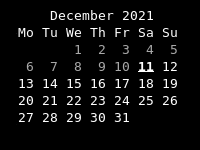
Default output of |
|
|---|---|
|
|
|
|
|
|
|
|
|
Installation
cargo install carl
Commandline flags
- -1, --one: Display single month output. (This is the default.)
- -3, --three: Display prev/current/next month output.
- -n, --months NUMBER: Display current and following months.
- -s, --sunday: Display Sunday as the first day of the week.
- -m, --monday: Display Monday as the first day of the week.
- -j, --julian: Display Julian dates (days one-based, numbered from January 1).
- -y, --year: Display a calendar for the current year.
- -V, --version: Display version information and exit.
- -h, --help: Display help screen and exit.
- --theme THEME: Set the theme that should be used
- --themestyletype TYPE: "dark" or "light", use the theme styles marked for "dark" or for "light" backgrounds. Defaults to "light"
- -a, --agenda: Display agenda (a listing of all the events that occur in the the displayed calendar timespan) below the calendar
Commandline options
- YYYY: Display the current date from the given year
- MM YYYYY: Display the given month in the given year
- DD MM YYYY: Display the given date
Configuration file
The configuration file is located XDG_CONFIG_DIRS/carl/config.toml or XDG_CONFIG_HOME/.carl/config.toml (the latter has precedence).
It can be used to define the name of a themefile as well as one or more icalfiles.
A sample configuration file is located in data/config.toml.
Ical Files
Icalfile listings contain paths to icalfiles and can be combined with their own
styledefinitions. All the events from those icalfiles are then highlighted
using either the IsEvent property (see below) or using the style defined
togehter with the ical listing.
When using the -a or --agenda switch, the event summary is displayed below
the calendar in a bullet list, with the bullet also highlighted with the
corresponding style.
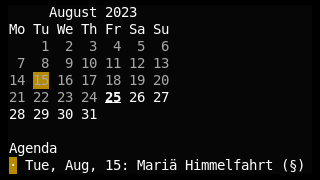
Icalfile listings can be specified using the [[ical]] setting:
[[ical]]
file = "/home/user/birthdays.ics"
stylenames = ['FGPurple']
If the file setting points to a directory, carl uses all the files in the directory it can parse.
Themefile
Themefiles contain listings of date properties together with styledefintions.
The name of a theme is simple specified using the theme = setting:
theme = "default"
The themefile is read from XDG_CONFIG_DIRS/carl/<themename>.toml or XDG_CONFIG_HOME/.carl/<themename>.toml (the latter has precedence).
Templates
The output of carl is rendered using Jinja templates. It is possible to use custom template files and adapt the calendar layout.
The location of custom templates is configured using the template_dir setting of the configuration.
The default templates can be found in the source repository. It is either possible to override them individually or simply
override the main template, which has to be called carl.tmpl, and include custom templates there.
Styles
Themefiles and Icalfile listings can contain custom style settings. A style changes how a specific date in the calendar is displayed.
A style consists of a list of stylenames and optionally a weight and a styletype ('Dark' or 'Light'). If no styletype is set, the style is effective in either case.
The various possible stylenames are listed at the bottom.
Example:
stylenames = ['Dimmed']
weight = 10
styletype = 'Dark'
Themefile
A themefile consists of a collection of datestyles:
Datestyles
A datestyle consists of a list of properties of a date and a style. The date has to fullfill all of the properties for the style to be applied.
Example:
[[date]]
properties = ['CurrentDate']
stylenames = ['FGRed']
weight = 3
styletype = 'Light'
Possible properties
FirstDayOfMonthBeforeFirstDayOfMonthBeforeCurrentDateCurrentDate(deprecated: the current day of the month for every month displayed)AfterCurrentDateAfterLastDayOfMonthBeforeTodayTodayAfterTodayBeforeSpecifiedDateSpecifiedDate(the date passed as commandline arguments, if a specific date was passed)AfterSpecifiedDateLastDayOfMonthIsEventMondayTuesdayWednesdayThursdayFridaySaturdaySundayEvenOdd
A sample theme file is located in data/default.theme.
Stylenames
Styles
BoldDimmedItalicUnderlineBlinkReverseHiddenStrikethrough
Foreground color names
FGBlackFGRedFGGreenFGYellowFGBlueFGPurpleFGCyanFGWhite{ FGRGB = {r = x, g = y, b = z }}where x, y and z are the RGB values{ FGFixed = x }a color number from 0 to 255, see the color chart

Background color names
BGBlackBGRedBGGreenBGYellowBGBlueBGPurpleBGCyanBGWhite{BGRGB = { r = x, g = y, b = z }}where x, y and z are the RGB values{BGFixed = x }a color number from 0 to 255, see the color chart
Multiple styles and colors can be combined using lists: ["Bold", "FGRed", "Underline"]