damdara
| Crates.io | damdara |
| lib.rs | damdara |
| version | 0.8.4 |
| created_at | 2025-04-22 01:07:28.774976+00 |
| updated_at | 2025-06-26 13:51:30.923786+00 |
| description | Dragon Quest Core Module, created in Rust. |
| homepage | https://github.com/retrodig/damdara |
| repository | https://github.com/retrodig/damdara |
| max_upload_size | |
| id | 1643472 |
| size | 3,103,973 |
 daisuke.takayama (panicdragon)
documentation
README
🏰 Damdara 🦀





Damdara is a core logic crate for retro-fantasy that can be built in Rust,
fully recreating the “Fukkatsu no Jumon” system from the NES version of Dragon Quest,
while also having the ability to generate status by player name, equip items, and handle combat.
Table of Contents
Features
- Generate resurrection "Fukkatsu no Jumon" from parameters (Parameters to Password)
- Parameters generated from resurrection "Fukkatsu no Jumon" (Password to Parameters)
- Calculate parameters enhanced by name
- See list of monsters
- Refer to any monster information
- See parameter list
- Refer to any parameter
- See list of Item
- Refer to any Item information
- See list of Weapon
- Refer to any Weapon information
- See list of Armor
- Refer to any Armor information
- See list of Shield
- Refer to any Shield information
- Reproduction of battle scenes
- See list of Town
- Refer to any Town information
- Refer to any World information
- See list of Message
- Explore the field
- Explore the Town
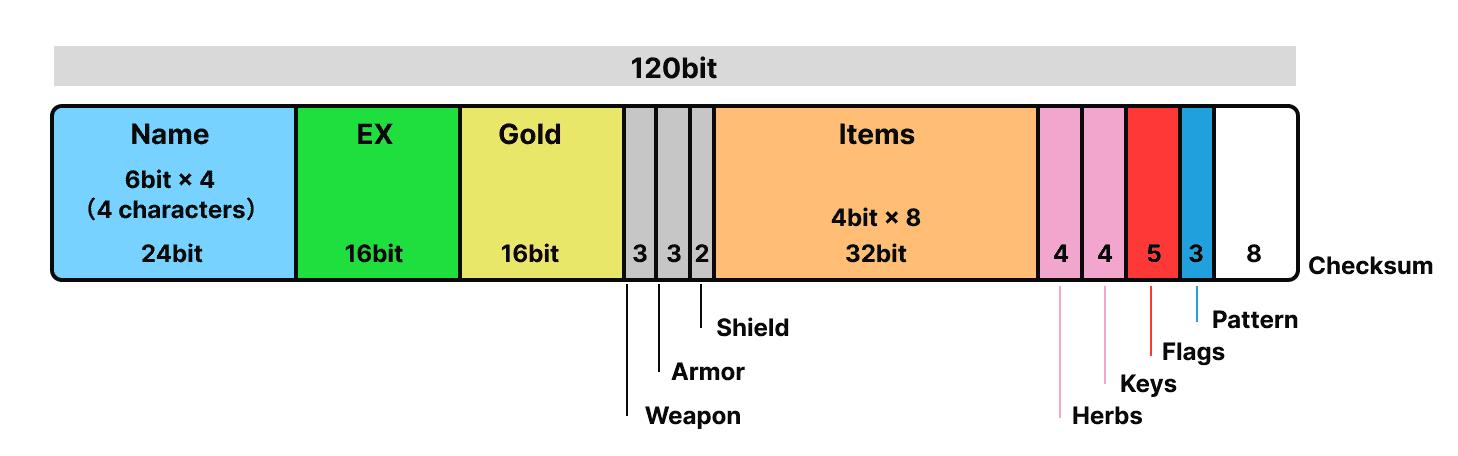
This diagram shows the 120-bit structure of the “Fufutsu no Jumon”.
The name, experience value, gold, items, equipment, key items, flag information, etc. are packed and stored strictly in bits.
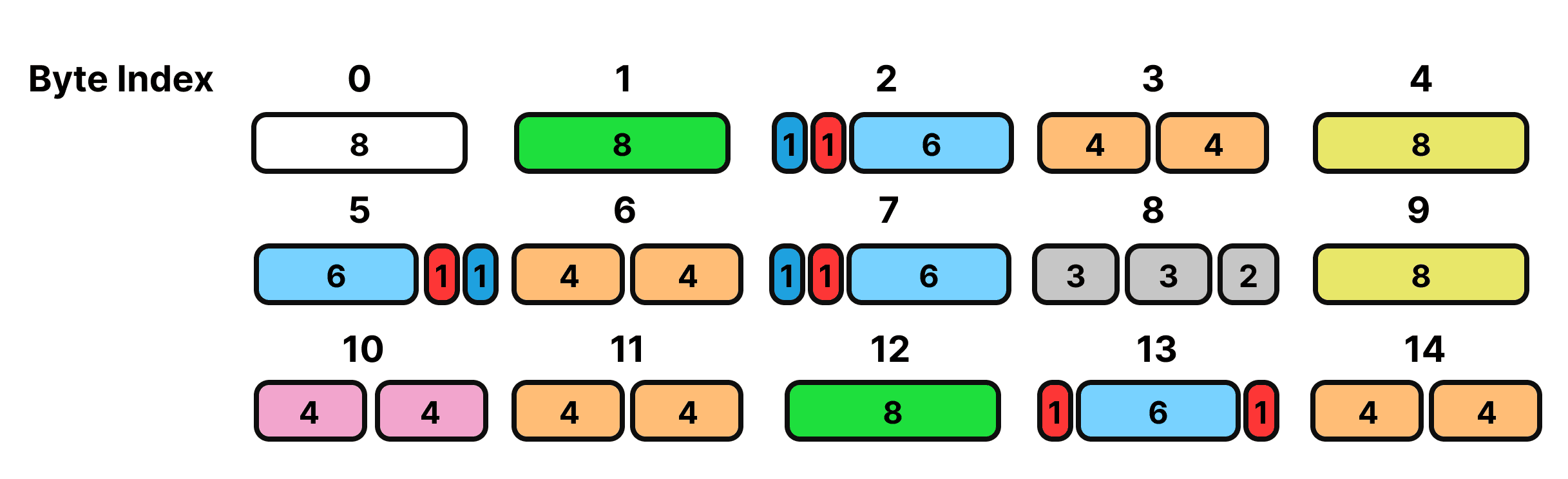
From this structure, the structure rearranged to generate the “Fufutsu no Jumon” is as follows.
Bit configuration mapping table for password generation.
| Byte Index | Field Description | Bits (from MSB to LSB) |
|---|---|---|
| 0 | Checksum (CRC-8) | [7:0] |
| 1 | Experience (lower 8 bits) | [7:0] |
| 2 | Pattern[2] (1) + Necklace (1) + Name[2] (6) | [7], [6], [5:0] |
| 3 | Item[3] + Item[2] | [7:4], [3:0] |
| 4 | Gold (lower 8 bits) | [7:0] |
| 5 | Name[0] (6) + Golem (1) + Pattern[1] (1) | [7:2], [1], [0] |
| 6 | Item[7] + Item[6] | [7:4], [3:0] |
| 7 | Pattern[0] + Dragon (1) + Name[3] (6) | [7], [6], [5:0] |
| 8 | Weapon (3) + Armor (3) + Shield (2) | [7:5], [4:2], [1:0] |
| 9 | Gold (upper 8 bits) | [7:0] |
| 10 | Keys + Herbs | [7:4], [3:0] |
| 11 | Item[5] + Item[4] | [7:4], [3:0] |
| 12 | Experience (upper 8 bits) | [7:0] |
| 13 | DragonScale (1) + Name[1] (6) + WarriorRing (1) | [7], [6:1], [0] |
| 14 | Item[1] + Item[0] | [7:4], [3:0] |
Installation
Cargo
cargo install damdara
Add to project
cargo add damdara
Brew
brew tap webcyou-org/tap
brew install damdara
Usage
cargo run <input>
or
damdara <input>
If input is not present, the default brave value is returned.
cargo run

player name: ゆうてい
summary: PlayerSummary { name: "ゆうてい", level: 1, hp: 15, mp: 0, gold: 0, experience: 0 }
strength_status: StrengthStatus { level: 1, strength: 4, agility: 3, max_hp: 15, max_mp: 0, attack_power: 4, defense_power: 1, weapon: "なし", armor: "なし", shield: "なし" }
item: ["なし", "なし", "なし", "なし", "なし", "なし", "なし", "なし"]
The name can be specified by giving -n
cargo run -- -n だい

player name: た゛い
summary: PlayerSummary { name: "た゛い\u{3000}", level: 1, hp: 14, mp: 0, gold: 0, experience: 0 }
strength_status: StrengthStatus { level: 1, strength: 4, agility: 4, max_hp: 14, max_mp: 0, attack_power: 4, defense_power: 2, weapon: "なし", armor: "なし", shield: "なし" }
By granting options, you can change parameters, possess items, change equipment, and do many other things.
If you want to give 200 experience. The level is automatically reflected.
cargo run -- -n だい -e 200

player name: た゛い
summary: PlayerSummary { name: "た゛い\u{3000}", level: 5, hp: 32, mp: 20, gold: 0, experience: 200 }
strength_status: StrengthStatus { level: 5, strength: 11, agility: 10, max_hp: 32, max_mp: 20, attack_power: 11, defense_power: 5, weapon: "なし", armor: "なし", shield: "なし" }
Furthermore, if you wish to grant 300 Gold.
cargo run -- -n だい -e 200 -g 300

player name: た゛い
summary: PlayerSummary { name: "た゛い\u{3000}", level: 5, hp: 32, mp: 20, gold: 300, experience: 200 }
strength_status: StrengthStatus { level: 5, strength: 11, agility: 10, max_hp: 32, max_mp: 20, attack_power: 11, defense_power: 5, weapon: "なし", armor: "なし", shield: "なし" }
If you want to change the item possession, pass the corresponding item IDs separated by commas.
cargo run -- -n だい -i 2,3,4

player name: た゛い
summary: PlayerSummary { name: "た゛い\u{3000}", level: 1, hp: 14, mp: 0, gold: 0, experience: 0 }
strength_status: StrengthStatus { level: 1, strength: 4, agility: 4, max_hp: 14, max_mp: 0, attack_power: 4, defense_power: 2, weapon: "なし", armor: "なし", shield: "なし" }
item: ["せいすい", "キメラのつばさ", "りゅうのうろこ", "なし", "なし", "なし", "なし", "なし"]
It is also possible to put on any equipment by specifying ID.
cargo run -- -n だい -w 3 -a 5 -s 3

summary: PlayerSummary { name: "た゛い\u{3000}", level: 1, hp: 14, mp: 0, gold: 0, experience: 0 }
strength_status: StrengthStatus { level: 1, strength: 4, agility: 4, max_hp: 14, max_mp: 0, attack_power: 14, defense_power: 46, weapon: "どうのつるぎ", armor: "はがねのよろい", shield: "みかがみのたて" }
item: ["なし", "なし", "なし", "なし", "なし", "なし", "なし", "なし"]
flags are a group of flags that indicate whether a player has equipped a particular item or defeated a boss monster.
They can be specified collectively as a 5-digit bit string with the command line argument --flags.
cargo run -- -n だい --flags 01010
List of CLI options
| option | type | default value | Description |
|---|---|---|---|
-n, --name |
String | "ゆうてい" |
Main character's name |
-e, --exp |
u16 | 0 |
XP |
-g, --gold |
u16 | 0 |
Gold in possession |
-w, --weapon |
u8 | 0 |
The number of the weapon you are equipped with |
-a, --armor |
u8 | 0 |
The number of the armor you are equipped with |
-s, --shield |
u8 | 0 |
The number of the shield you are equipped with |
-i, --item |
Vec |
not in possession | List of item numbers |
-y, --herbs |
u8 | 0 |
Number of herbs held |
-k, --keys |
u8 | 0 |
Number of keys held |
--flags |
Flags structure | All false | status flag |
-p, --password |
String | Maximum Strengthened Password | Fukkatsu no Jumon |
Flags option details(--flags)
| digit position | bit | Field Name | Description |
|---|---|---|---|
| 1st digit | 0/1 | has_dragon_scale | Equipped with the scales of a dragon? |
| 2st digit | 0/1 | has_warrior_ring | Are you equipped with a warrior's ring? |
| 3st digit | 0/1 | has_cursed_necklace | Did you get the beak necklace? |
| 4st digit | 0/1 | defeated_dragon | You slayed the dragon. |
| 5st digit | 0/1 | defeated_golem | You beat the golem. |
- Specify with 5 digits 0/1 like
--flags 01000. - If not specified, default
“00000”(all false)
Mode
You can specify the mode by giving --mode or the shortcut -m.
cargo run -- --mode <input>
cargo run -- -m <input>
| Mode Name | Description |
|---|---|
| start | Calculate enhanced parameters from name only |
| save | Generate "Fukkatsu no Jumon" from arbitrary parameters (e.g. exp, gold, etc.) |
| load | Restore name/parameters from the "Fukkatsu no Jumon" |
| display | Supports list and individual display of master data |
| battle | Can battle any monster. |
■ Start Mode
Generate parameters from the names of brave men
example
player name: た゛い
summary: PlayerSummary { name: "た゛い\u{3000}", level: 1, hp: 14, mp: 0, gold: 0, experience: 0 }
strength_status: StrengthStatus { level: 1, strength: 4, agility: 4, max_hp: 14, max_mp: 0, attack_power: 4, defense_power: 2, weapon: "なし", armor: "なし", shield: "なし" }
The default setting of the mode is here, so if you omit it, the default brave will be generated
example
cargo run

player name: ゆうてい
summary: PlayerSummary { name: "ゆうてい", level: 1, hp: 15, mp: 0, gold: 0, experience: 0 }
strength_status: StrengthStatus { level: 1, strength: 4, agility: 3, max_hp: 15, max_mp: 0, attack_power: 4, defense_power: 1, weapon: "なし", armor: "なし", shield: "なし" }
item: ["なし", "なし", "なし", "なし", "なし", "なし", "なし", "なし"]
■ Save Mode
Generates the "Fukkatsu no Jumon" from the parameters of the hero.
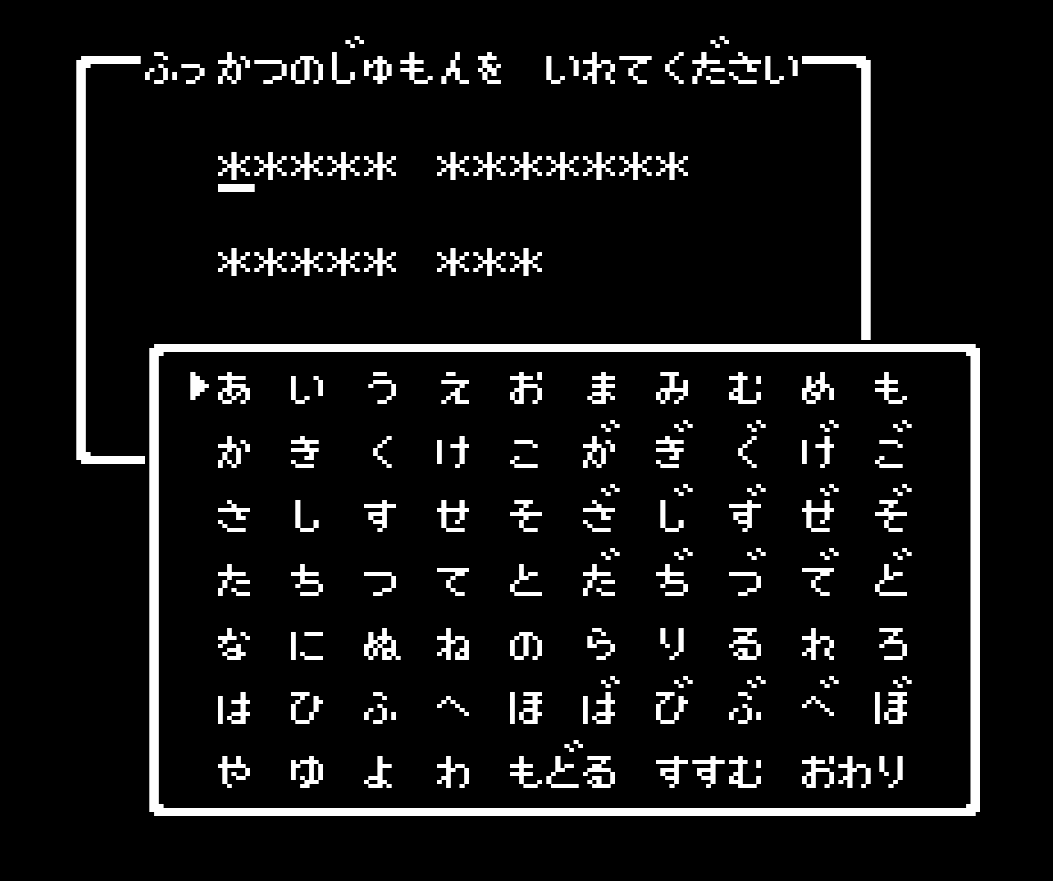
example
cargo run -- -n だい -m save

ぢばげぞでぶいまももれぎざぞでぶいよごぜ
After giving the options explained above and changing the parameters, the Fufutsu no Jumon can be generated.
cargo run -- -n だい -e 7000 -m save

きがよわげずぢなののみやりわげずてだいか
■ Load Mode
Generates a brave man from the "Fukkatsu no Jumon" of fortune.
example
cargo run -- -m load -p ぢばげぞでぶいまももれぎざぞでぶいよごぜ

new_player from Password
player name: た゛い
summary: PlayerSummary { name: "た゛い\u{3000}", level: 1, hp: 14, mp: 0, gold: 0, experience: 0 }
strength_status: StrengthStatus { level: 1, strength: 4, agility: 4, max_hp: 14, max_mp: 0, attack_power: 4, defense_power: 2, weapon: "なし", armor: "なし", shield: "なし" }
■ Display Mode
cargo run -- -m display --view item
[Equipment { name: "なし", price: 0, sell: 0, attack: 0, defense: 0 }, Equipment { name: "たいまつ", price: 8, sell: 4, attack: 0, defense: 0 }, Equipment { name: "せいすい", price: 12, sell: 6, attack: 0, defense: 0 }, Equipment { name: "キメラのつばさ", price: 24, sell: 12, attack: 0, defense: 0 }, Equipment { name: "りゅうのうろこ", price: 20, sell: 10, attack: 0, defense: 2 }, Equipment { name: "ようせいのふえ", price: 0, sell: 0, attack: 0, defense: 0 }, Equipment { name: "せんしのゆびわ", price: 0, sell: 0, attack: 2, defense: 0 }, Equipment { name: "ロトのしるし", price: 0, sell: 0, attack: 0, defense: 0 }, Equipment { name: "おうじょのあい", price: 0, sell: 0, attack: 0, defense: 0 }, Equipment { name: "のろいのベルト", price: 0, sell: 0, attack: 0, defense: 0 }, Equipment { name: "ぎんのたてごと", price: 0, sell: 0, attack: 0, defense: 0 }, Equipment { name: "しのくびかざり", price: 0, sell: 0, attack: 0, defense: 0 }, Equipment { name: "たいようのいし", price: 0, sell: 0, attack: 0, defense: 0 }, Equipment { name: "あまぐものつえ", price: 0, sell: 0, attack: 0, defense: 0 }, Equipment { name: "にじのしずく", price: 0, sell: 0, attack: 0, defense: 0 }]
cargo run -- -m display --view item 5
item: Equipment { name: "ようせいのふえ", price: 0, sell: 0, attack: 0, defense: 0 }
Display Patterns
- item
- weapon
- armor
- shield
- status
- monster
- town
- message
■ Battle Mode
Now, if you have given birth to a brave man, let's head into battle.
Enter commands and defeat the slime!
cargo run -- -m battle

スライムがあらわれた!

ゆうてい HP: 15
スライム HP: 3

--- ゆうていのターン ---
コマンド?
1: たたかう
2: じゅもん
3: どうぐ
4: にげる
If you've been hit, then take on the challenge with the best equipment!
cargo run -- -n だい -o max -m battle

スライムがあらわれた!

た゛い  HP: 190
スライム HP: 3

--- た゛い のターン ---
コマンド?
1: たたかう
2: じゅもん
3: どうぐ
4: にげる
You can fight any monster by specifying the id of the enemy in the --view option.
You can fight the last boss right away.
cargo run -- -n だい -o max -m battle --view 39

りゅうおうがあらわれた!

た゛い  HP: 190
りゅうおう HP: 129

--- た゛い のターン ---
コマンド?
1: たたかう
2: じゅもん
3: どうぐ
4: にげる
Beware of strong flames.
 りゅうおうは  ほのおをはいた!
 た゛い は 44ポイントの
 ダメージを うけた

た゛い  HP: 146
りゅうおう HP: 129
Status Option
--option or the shortcut -o can be used to specify status options
cargo run -- -o <input>
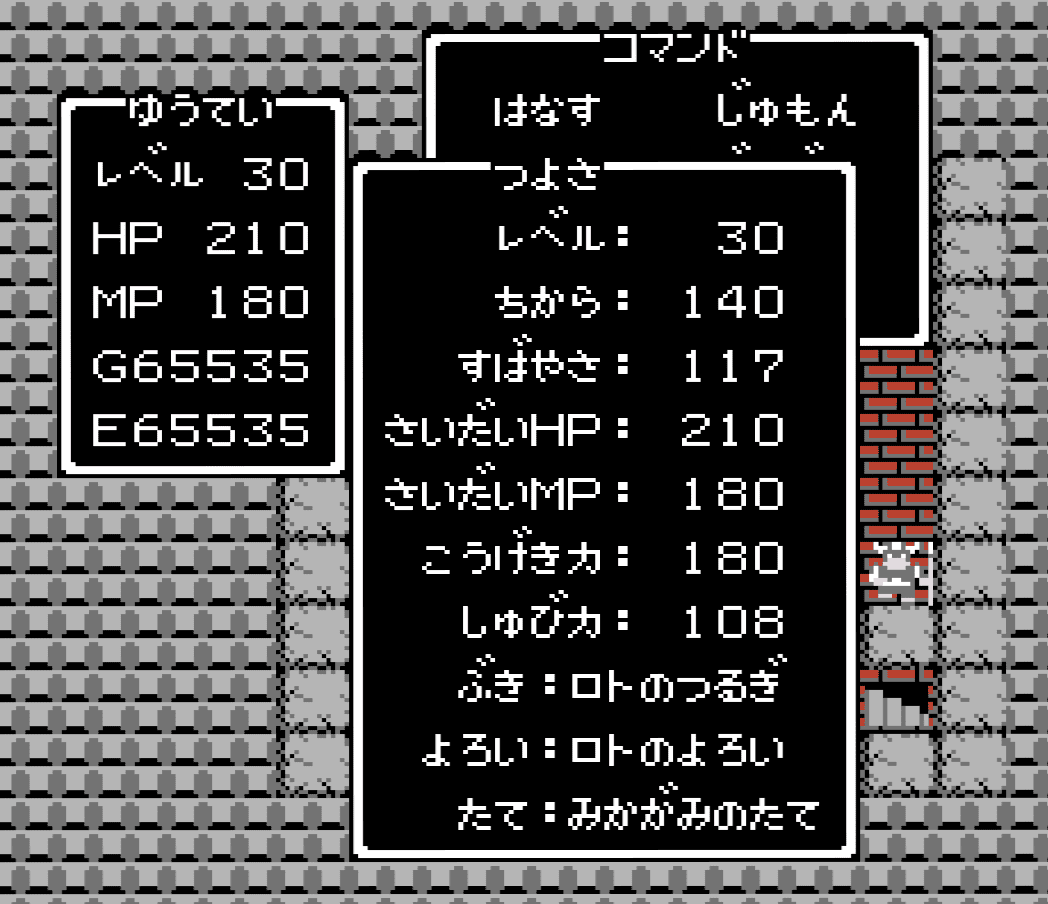
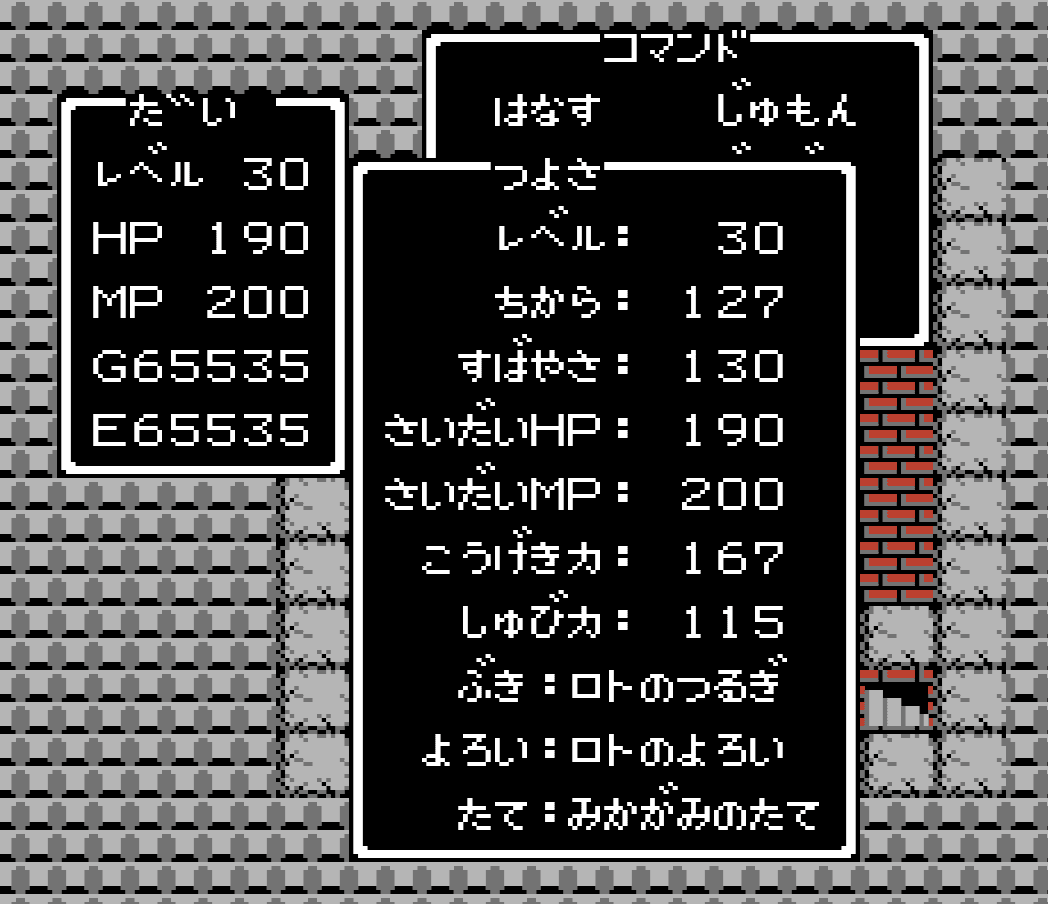
If max is specified, the parameter and story state will be the strongest
example
cargo run -- -o max
player name: ゆうてい
summary: PlayerSummary { name: "ゆうてい", level: 30, hp: 210, mp: 180, gold: 65535, experience: 65535 }
strength_status: StrengthStatus { level: 30, strength: 140, agility: 117, max_hp: 210, max_mp: 180, attack_power: 182, defense_power: 108, weapon: "ロトのつるぎ", armor: "ロトのよろい", shield: "みかがみのたて" }
item: ["りゅうのうろこ", "せんしのゆびわ", "ロトのしるし", "おうじょのあい", "ぎんのたてごと", "たいようのいし", "あまぐものつえ", "にじのしずく"]
Format Option
The output format can be changed by giving the --format.
cargo run -- --format <input>
| Format Name | Description |
|---|---|
| It will be a print statement output. This is the default setting. | |
| json | Output in JSON format |
Example
Additional Resources
Contributing to Damdara
To contribute to Damdara, follow these steps:
- Fork this repository.
- Create a branch:
git checkout -b <branch_name>. - Make your changes and commit them:
git commit -m '<commit_message>'. - Push your changes to your branch:
git push origin <branch_name>. - Create a pull request.
Alternatively, consult the GitHub documentation on how to create a pull request.
Other Languages
References
- 名前による成長率タイプの変化
- DQ1の「ふっかつのじゅもん」の仕組みを全解説
- 復活の呪文を解析してみたよ
- ふっかつのじゅもんって何?基本の使い方から仕組み・原理まで、動画一本で全てわかる!【FC】【ゆっくり解説】
- ドラゴンクエスト 攻略・解析
- ドラゴンクエスト (FC) 復活の呪文計算機
- 主人公の名前と能力成長の基礎 FCDQ1
- DQ1(FC版)強さ判断プログラム
License
This project is licensed under the MIT License. See the LICENSE file for details.
All monsters, images and other copyrights belong to Square Enix.
Author
Daisuke Takayama