dear-imguizmo
| Crates.io | dear-imguizmo |
| lib.rs | dear-imguizmo |
| version | 0.8.0 |
| created_at | 2025-09-26 15:48:48.755701+00 |
| updated_at | 2026-01-02 18:13:59.632527+00 |
| description | High-level Rust bindings for ImGuizmo (C API) with Dear ImGui integration |
| homepage | https://github.com/Latias94/dear-imgui-rs |
| repository | https://github.com/Latias94/dear-imgui-rs |
| max_upload_size | |
| id | 1856154 |
| size | 154,450 |
 Latias94 (Latias94)
documentation
README
Dear ImGuizmo - Rust Bindings


High-level Rust bindings for ImGuizmo, built on the C API (cimguizmo) and integrated with dear-imgui-rs.
This project is a Rust wrapper around the C shim (cimguizmo), not a direct C++ binding.
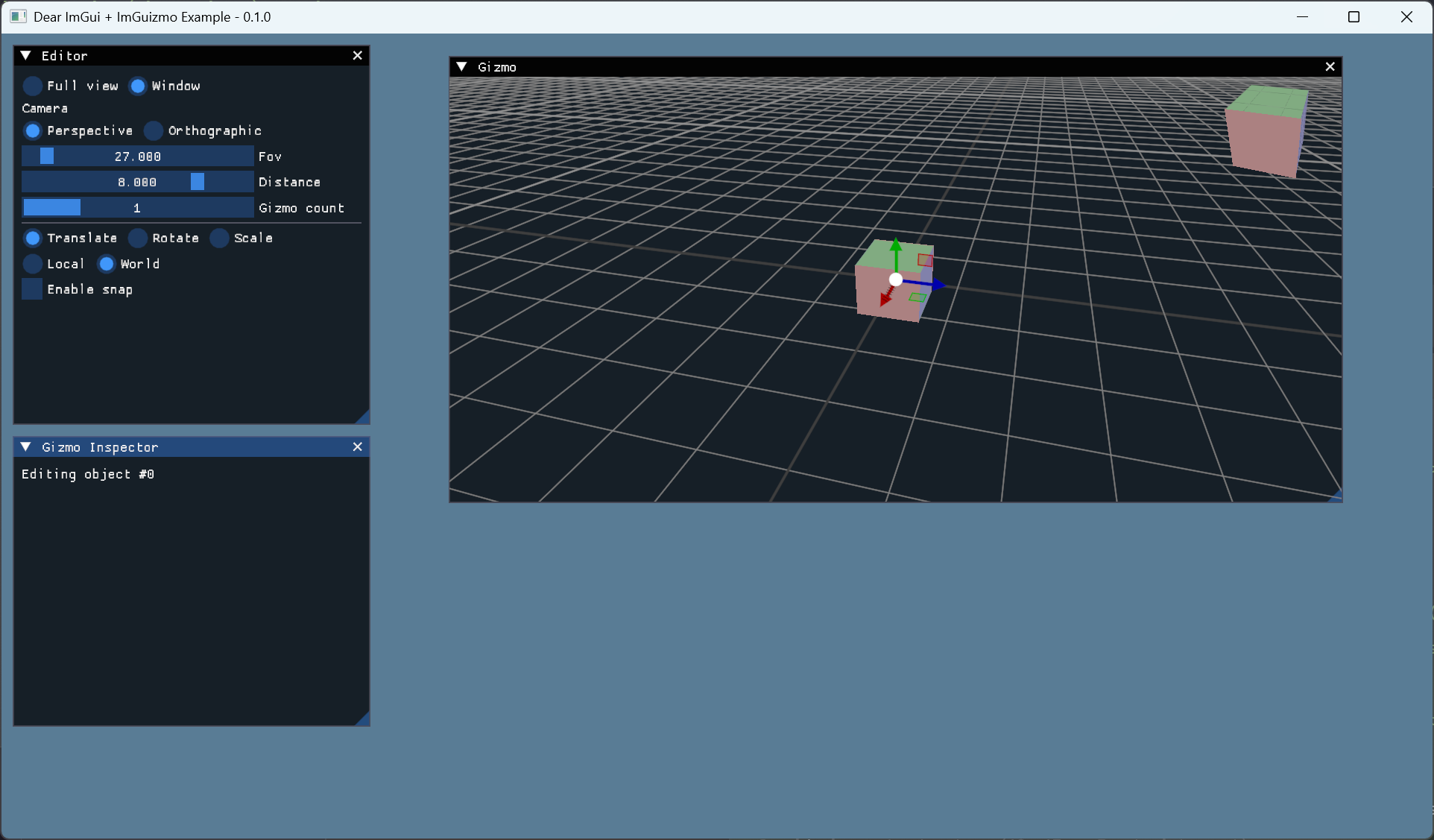
Links
Crate Layout
dear-imguizmo(this crate): safe, idiomatic wrapper integrated withdear-imgui-rs.dear-imguizmo-sys: low-level FFI generated from the C API (cimguizmo). Prefer not using it directly unless you need raw bindings.
Compatibility
| Item | Version |
|---|---|
| Crate | 0.8.x |
| dear-imgui-rs | 0.8.x |
| dear-imguizmo-sys | 0.8.x |
See also: docs/COMPATIBILITY.md for the full workspace matrix.
WASM (WebAssembly) support
This crate has experimental support for wasm32-unknown-unknown targets via the same import-style design used by the core ImGui bindings:
dear-imguizmo+dear-imguizmo-sysexpose awasmfeature which:- Enables import-style FFI that links against the shared
imgui-sys-v0provider module. - Avoids compiling C/C++ during the Rust build for wasm.
- Enables import-style FFI that links against the shared
- The provider module (
imgui-sys-v0) is built once using Emscripten and contains:- Dear ImGui + cimgui (from
dear-imgui-sys) - ImGuizmo + cimguizmo (from
dear-imguizmo-sys)
- Dear ImGui + cimgui (from
To try the web demo with ImGuizmo enabled:
# 1) Generate pregenerated wasm bindings (Dear ImGui core + ImGuizmo)
cargo run -p xtask -- wasm-bindgen imgui-sys-v0
cargo run -p xtask -- wasm-bindgen-imguizmo imgui-sys-v0

# 2) Build the main wasm + JS (includes an "ImGuizmo (Web)" window)
cargo run -p xtask -- web-demo imguizmo

# 3) Build the provider (Emscripten imgui-sys-v0 with ImGui + ImGuizmo)
cargo run -p xtask -- build-cimgui-provider

# 4) Serve and open in a browser
python -m http.server -d target/web-demo 8080
Notes:
- The
dear-imgui-web-democrate inexamples-wasmcan enable theimguizmofeature; when present, an “ImGuizmo (Web)” window is shown if bindings + provider are available. - This is an early, experimental path; API and build steps may evolve in future releases. For production use, pin to a specific
0.6.xrelease and follow changes indocs/WASM.md.
Features
glam(default): Useglam::Mat4seamlessly in the high-level API.mint(optional): Usemint::ColumnMatrix4<f32>seamlessly.- Without those features, you can always pass
[f32; 16](column-major) matrices.
All matrix arguments in the API are generic over a Mat4Like trait, implemented for [f32; 16], and when enabled, for glam::Mat4 and mint::ColumnMatrix4<f32>.
Quick Start
[dependencies]
dear-imgui-rs = "0.8"
dear-imguizmo = "0.8"
Minimal usage (dear-imgui-style API):
use dear_imgui_rs::Context;
use dear_imguizmo::{Operation, Mode, GuizmoExt};
use glam::Mat4;

let mut ctx = Context::create();
let ui = ctx.frame();

// Begin ImGuizmo for this frame via Ui extension
let giz = ui.guizmo();

// Set the drawing rectangle to the full viewport
let ds = ui.io().display_size();
giz.set_rect(0.0, 0.0, ds[0], ds[1]);

// Choose where to draw (window/background/foreground)
giz.set_drawlist_window();

// Matrices (column-major). With the default `glam` feature, use `glam::Mat4`.
let mut model = Mat4::IDENTITY;
let view = Mat4::IDENTITY;
let proj = Mat4::IDENTITY;

// Manipulate the model matrix
let used: bool = giz
    .manipulate_config(&view, &proj, &mut model)
    .operation(Operation::TRANSLATE)
    .mode(Mode::Local)
    //.snap([1.0, 1.0, 1.0])
    //.bounds([minx,miny,minz], [maxx,maxy,maxz])
    .build();

if used { /* object moved */ }
See examples/imguizmo_basic.rs for a full demo with camera controls, snapping, bounds and helpers.
Per-frame pattern
Typical usage order within a single frame:
let giz = ui.guizmo(); // call once per frame

// 1) Configure drawing area and destination
let ds = ui.io().display_size();
giz.set_rect(0.0, 0.0, ds[0], ds[1]);
giz.set_drawlist_window(); // or Background/Foreground

// 2) Manipulate
let used = giz
    .manipulate_config(&view, &proj, &mut model)
    .operation(Operation::UNIVERSAL)
    .mode(Mode::Local)
    .build();
Notes:
- Call
ui.guizmo()exactly once per frame, then setset_rect(...)and a draw target before callingmanipulate/draw_*. - You can select draw target with
giz.set_drawlist(DrawListTarget::Window|Background|Foreground). - Use RAII ID helpers:
let _id = giz.push_id(i);. - Style access:
let mut st = giz.style(); st.set_color(Color::Selection, [1.0,0.2,0.2,1.0]);. More fields:translation_line_arrow_size(),rotation_outer_line_thickness(),scale_line_circle_size(),hatched_axis_line_thickness(), etc. view_manipulate/view_manipulate_with_cameraaccept anyInto<[f32;2]>for position/size;set_rect_pos_sizeis available as a convenience.- Matrices are column-major;
Mat4Likesupports[f32;16], and (with features)glam::Mat4,mint::ColumnMatrix4<f32>.
Builder extras:
.drawlist(DrawListTarget::...),.rect(x,y,w,h),.orthographic(bool),.gizmo_size_clip_space(f32).axis_mask(AxisMask::X | AxisMask::Z).translate_snap([f32;3]),.rotate_snap_deg(f32),.scale_snap([f32;3])(also accepts(f32,f32,f32),glam::Vec3,mint::Vector3<f32>)
Extra helpers
Simple utility methods you may find handy:
// Hover test near a world-space position (in pixels)
// Call after you've established view/projection for the frame
// via manipulate/draw_grid/draw_cubes.
let hovered = giz.is_over_at([0.0, 0.0, 0.0], 8.0);

// Compute an ImGuizmo hashed ID from a pointer
let id_from_ptr = giz.get_id_ptr(&model as *const _);
Draw helpers
// Draw a grid aligned with a model transform (size in world units)
giz.draw_grid(&view, &proj, &model, 10.0);

// Draw multiple cubes from a list of model matrices
let matrices = vec![model, other_model];
giz.draw_cubes(&view, &proj, &matrices);
Notes
- This crate depends on
dear-imguizmo-sys(C API + bindgen). Linking to the base ImGui static library is provided bydear-imgui-sys; you do not need to configure it here.
Graph Editor (pure Rust, optional)
We provide a minimal, pure-Rust graph editor aligned with dear-imgui style, under dear_imguizmo::graph. It aims to mirror ImGuizmo's GraphEditor UX without relying on the C++ API.
use dear_imguizmo::graph::{Graph, GraphView};
use dear_imguizmo::graph::GraphEditorExt; // Ui extension

let mut graph = Graph::new();
let mut view = GraphView::default();
// populate graph.nodes/links ...

ui.window("Graph")
  .size([600.0, 400.0], dear_imgui_rs::Condition::FirstUseEver)
  .build(|| {
      // Simple draw with defaults
      let _resp = ui.graph_editor().draw(&mut graph, &mut view);

      // Or configure style via builder
      let _resp = ui
          .graph_editor_config()
          .graph(&mut graph)
          .view(&mut view)
          .grid_visible(true)
          .grid_spacing(28.0)
          .link_thickness(2.0)
          .build();
  });
Current features:
- Grid (toggle visibility, custom spacing/color)
- Panning (MMB), node dragging (LMB)
- Selection (click, Ctrl multi-select, box select)
- Link creation (drag from output to input), link selection
- Link reconnection (drag near a link endpoint onto another pin)
- Deletion via Delete key or helper
delete_selected(&mut Graph, &mut GraphView) - Fit helpers:
fit_all_nodes(...),fit_selected_nodes(...)
Notes:
- Pin hover, node/link hover outlines are shown using
GraphStylecolors. - Simple 2D interop:
graph::Vec2Likesupports(f32,f32),[f32;2],mint::Vector2<f32>, and (withglam)glam::Vec2. - This module is pure Rust and independent of the C++ GraphEditor; improvements are welcome.