driver-5011as
| Crates.io | driver-5011as |
| lib.rs | driver-5011as |
| version | 0.1.0 |
| created_at | 2025-12-24 12:16:18.632862+00 |
| updated_at | 2025-12-24 12:16:18.632862+00 |
| description | A simple driver for the 5011as 7-segment display using `embedded-hal`. |
| homepage | https://github.com/TgZ39/driver-5011as |
| repository | https://github.com/TgZ39/driver-5011as |
| max_upload_size | |
| id | 2003090 |
| size | 26,243 |
 TgZ39 (TgZ39)
documentation
README
5011as 7-segment display driver for Rust


)

This library provides a very simple driver for the 5011as 7-segment display.
This crate provides 2 drivers for the display:
LED5011AS: Use this if all your pins have the same type (e.g.OutputPin<'_>)GenericLED5011AS: Use this if your pins don't have the same type (e.g.OutputPin<'_>andFlex<'_>(from esp-hal))
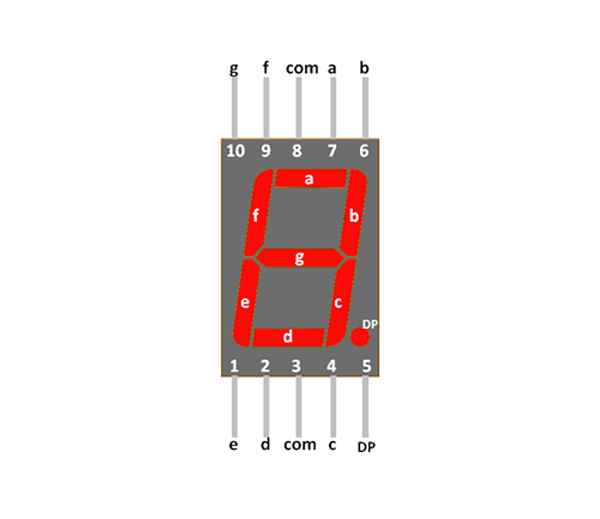
This is the pin layout for the display:
Usage
For this example I'm using an ESP32 C6 with esp-hal with the LED5011AS driver.
// setup pins
let peripherals = esp_hal::init(config);

let cfg = OutputConfig::default();

let mut a = Output::new(peripherals.GPIO6, Level::Low, cfg);
let mut b = Output::new(peripherals.GPIO7, Level::Low, cfg);
let mut c = Output::new(peripherals.GPIO8, Level::Low, cfg);
let mut d = Output::new(peripherals.GPIO1, Level::Low, cfg);
let mut e = Output::new(peripherals.GPIO0, Level::Low, cfg);
let mut f = Output::new(peripherals.GPIO5, Level::Low, cfg);
let mut g = Output::new(peripherals.GPIO4, Level::Low, cfg);
let mut dp = Output::new(peripherals.GPIO10, Level::Low, cfg);

// create LED5011AS
let mut display = LED5011AS::new(
   &mut a,
   &mut b,
   &mut c,
   &mut d,
   &mut e,
   &mut f,
   &mut g,
   &mut dp,
);

// set a digit
display.set_digit(3)?;
display.set_digit(7)?;  // overrides the '3' so you don't have to clear the display inbetween

// clear the display
display.clear()?;

// write a custom figure to the display
display.write_byte(0b01110111)?;    // writes an 'A' to the display
License
This project is licensed under the Apache License 2.0.