enc_file
| Crates.io | enc_file |
| lib.rs | enc_file |
| version | 0.6.3 |
| created_at | 2020-01-04 09:48:11.428732+00 |
| updated_at | 2025-11-20 14:33:26.466988+00 |
| description | Password-based file encryption tool with a versioned header, AEAD, Argon2id KDF, and streaming mode. Library + CLI + GUI. |
| homepage | https://crates.io/crates/enc_file |
| repository | https://github.com/ArdentEmpiricist/enc_file |
| max_upload_size | |
| id | 195079 |
| size | 2,752,904 |
 Hendrik Lux (ArdentEmpiricist)
documentation
README







enc_file

Password-based, authenticated file encryption with a small versioned header and Argon2id KDF. Ships as a library, CLI, and GUI application.
[!CAUTION] Security note: This project is neither audited nor reviewed. It protects data at rest but cannot defend against a compromised host or advanced side channels. Use at your own risk. For highly sensitive information, use audited tools like VeraCrypt or age.
Table of Contents
- Features
- Installation
- GUI Usage
- CLI Usage
- Library Usage
- Hash Algorithms
- Error Handling
- Technical Details
- Security Best Practices
- Tips
- License
- Contributing
Features
- Cross-platform GUI with modern, intuitive interface (optional feature).
- Command-line interface for automation and scripting.
- Rust library for programmatic integration.
- File and byte array encryption/decryption.
- Multiple AEAD algorithms: XChaCha20-Poly1305 (default), AES-256-GCM-SIV.
- Streaming mode for large files with constant memory usage and configurable
chunk_size. - Password-based key derivation using Argon2id with hardened defaults.
- Key map management for named symmetric keys.
- Flexible hashing API supporting BLAKE3, SHA2, SHA3, Blake2b, XXH3, and CRC32.
- ASCII armor for encrypted data (Base64 encoding).
- Compact binary header (magic, version, algorithm IDs, KDF parameters, salt, nonce, length).
- Secure by default: Uses
secrecywrappers and zeroizes sensitive buffers.
Installation
GUI Application
Option 1: Install from crates.io
cargo install enc_file --features gui
# Then run: enc-file-gui
Option 2: Download pre-built binaries
Download from the Releases page (includes both CLI and GUI versions for Windows, macOS, and Linux).
Option 3: Build from source
git clone https://github.com/ArdentEmpiricist/enc_file.git
cd enc_file
cargo build --release --features gui
./target/release/enc-file-gui
CLI Tool
Option 1: Install from crates.io
cargo install enc_file
Option 2: Download pre-built binaries
Download from the Releases page.
Library
Add to your Cargo.toml:
[dependencies]
enc_file = "0.6"
GUI Usage
The GUI provides an intuitive interface for file encryption, decryption, and hashing:
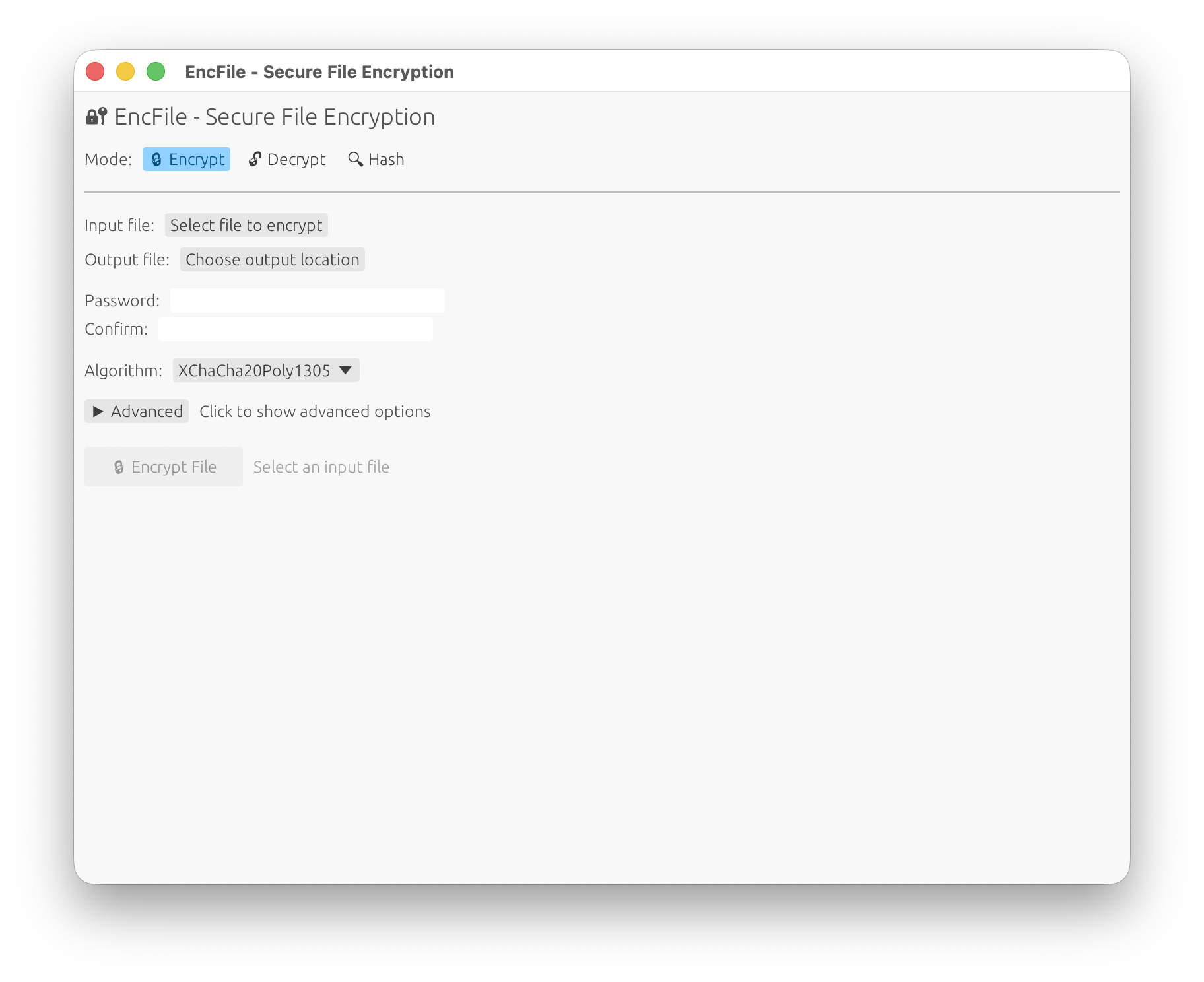
GUI Features
- Modern Interface: Clean, responsive design that works across all platforms
- Basic Mode: Simple file selection, password entry, and one-click operations
- Advanced Options: Expandable panel with:
- Algorithm selection (XChaCha20-Poly1305, AES-256-GCM-SIV)
- Streaming mode for large files
- Custom chunk sizes
- ASCII armor output
- KDF parameter tuning (memory cost, iterations, parallelism)
- Progress Indication: Real-time progress bars and status messages
- Results Display: Copyable output with hash values and file paths
- Password Strength Indicator: Visual feedback for password security
- File Browser Integration: Native file picker dialogs
Available Operations
- Encrypt Mode: Select files, set passwords, choose algorithms, and configure advanced options
- Decrypt Mode: Decrypt files with automatic output path detection or custom output paths
- Hash Mode: Calculate file hashes with support for multiple algorithms
- Cross-Platform: Runs on Windows, macOS, and Linux
CLI Usage
enc-file <SUBCOMMAND>

Subcommands:
  enc     Encrypt a file (use --stream for large files)
  dec     Decrypt a file
  key     Manage an encrypted key map
  hash    Compute a file hash and print it as hex
Encrypt
Simple usage (prompts for password, outputs to same directory with .enc extension):
enc-file enc --in secret.pdf
Advanced usage with custom output, algorithm selection, and password file:
# Use AES-256-GCM-SIV and read password from file
enc-file enc -i secret.pdf -o hidden.enc -a aes -p /path/to/password.txt
Streaming mode for large files:
# Enable streaming with custom chunk size
enc-file enc -i large_video.mp4 --stream --chunk-size 2097152
Available options: Available options:
  -i, --in <file>            Input file (required)
  -o, --out <file>           Output file (default: input + ".enc")
  -a, --alg <algorithm>      AEAD algorithm (xchacha [default], aes)
      --stream               Enable streaming mode for large files
      --chunk-size <bytes>   Chunk size in streaming mode
                             Default (0): adaptive sizing based on file size:
                               • ≤ 1 MiB         → 64 KiB
                               • 1 MiB–100 MiB   → 1 MiB
                               • > 100 MiB       → scales up to 8 MiB max
                             Must be ≤ 4,294,967,279 (u32::MAX - 16)
  -f, --force                Overwrite output if it exists
      --armor                ASCII-armor output (Base64; streaming not supported)
  -p, --password-file <path> Read password from file (trailing newline trimmed)
Decrypt
Simple usage:
enc-file dec --in secret.enc
With custom output:
# Use --force (or -f) to overwrite existing files
enc-file dec --in secret.enc --out secret.pdf --force
Available options:
  -i, --in <file>            Input file (required)
  -o, --out <file>           Output file (default: auto-detected)
  -p, --password-file <path> Read password from file
  -f, --force                Overwrite output if it exists
Hash
Default (BLAKE3):
enc-file hash README.md
Specific algorithm:
enc-file hash README.md --alg sha256
See Hash Algorithms section for all supported algorithms.
Key Map (optional)
### Decrypt

```bash
# Use --force (or -f) to overwrite existing file
enc-file dec --in secret.enc --out secret.pdf
Hash
# Default blake3
enc-file hash README.md
# Specific algorithm (see below)
enc-file hash README.md --alg sha256
Key map (optional)
If you use the library’s key map helpers, the CLI can provide small helpers to init/save/load. Check enc-file key --help for available subcommands.
Library Usage
Encrypt / Decrypt bytes
use enc_file::{encrypt_bytes, decrypt_bytes, EncryptOptions, AeadAlg};
use secrecy::SecretString;

let pw = SecretString::new("correct horse battery staple".into());
let opts = EncryptOptions {
    alg: AeadAlg::XChaCha20Poly1305,
    ..Default::default()
};

let ct = encrypt_bytes(b"hello", pw.clone(), &opts)?;
let pt = decrypt_bytes(&ct, pw)?;
assert_eq!(pt, b"hello");
# Ok::<(), enc_file::EncFileError>(())
Encrypt / Decrypt files
use enc_file::{encrypt_file, decrypt_file, EncryptOptions, AeadAlg};
use secrecy::SecretString;
use std::path::Path;

let pw = SecretString::new("pw".into());
let opts = EncryptOptions {
    alg: AeadAlg::XChaCha20Poly1305, // or AeadAlg::Aes256GcmSiv
    stream: false,  // set true for large files
    armor: false,
    ..Default::default()
};

let out = encrypt_file(Path::new("in.bin"), Some(Path::new("out.enc")), pw.clone(), opts)?;
let back = decrypt_file(&out, Some(Path::new("back.bin")), pw)?;
assert!(back.exists());
# Ok::<(), enc_file::EncFileError>(())
Streaming encryption
use enc_file::{encrypt_file_streaming, EncryptOptions, AeadAlg};
use secrecy::SecretString;
use std::path::Path;

let pw = SecretString::new("pw".into());
let opts = EncryptOptions {
    alg: AeadAlg::XChaCha20Poly1305,
    stream: true,
    chunk_size: 1024 * 1024, // 1 MiB chunks (example)
    ..Default::default()
};
let out = encrypt_file_streaming(Path::new("big.dat"), None, pw, opts)?;
# Ok::<(), enc_file::EncFileError>(())
Chunk size:
In streaming mode,--chunk-size 0(the default) enables an adaptive helper that picks an optimal frame size based on the total file length:
- ≤ 1 MiB → 64 KiB
- 1 MiB – 100 MiB → 1 MiB
- Files larger than 100 MiB → scales up (max 8 MiB)
You can override this by passing any non-zero byte count. The absolute maximum is
u32::MAX - 16bytes (each frame encodes its length as a 32-bit ciphertext-byte count plus a 16-byte AEAD tag), and any larger value will be rejected.
Hash helpers
Hash Algorithms
Both the CLI and library support multiple hashing algorithms for files and byte slices:
| Algorithm | CLI --alg value(s) |
Output length | Cryptographic |
|---|---|---|---|
| BLAKE3 | blake3 (default) |
32 bytes | ✓ |
| BLAKE2b-512 | blake2b |
64 bytes | ✓ |
| SHA-256 | sha256 |
32 bytes | ✓ |
| SHA-512 | sha512 |
64 bytes | ✓ |
| SHA3-256 | sha3-256, sha3256, sha3_256 |
32 bytes | ✓ |
| SHA3-512 | sha3-512, sha3512, sha3_512 |
64 bytes | ✓ |
| XXH3-64 | xxh3-64, xxh364 |
8 bytes | ✗ |
| XXH3-128 | xxh3-128, xxh3128 |
16 bytes | ✗ |
| CRC32 | crc32 |
4 bytes | ✗ |
[!CAUTION] XXH3 and CRC32 are non-cryptographic! They provide fast checksums for data integrity but offer no security guarantees. Do not use them for security-critical applications.
CLI Example:
# Compute SHA3-512 hash of a file
enc-file hash --file data.bin --alg sha3-512

# Use XXH3-64 (fast, non-cryptographic)
enc-file hash --file data.bin --alg xxh3-64
Library Example:
use enc_file::{hash_file, to_hex_lower, HashAlg};
let digest = hash_file(std::path::Path::new("data.bin"), HashAlg::Sha3_512)?;
println!("{}", to_hex_lower(&digest));
# Ok::<(), enc_file::EncFileError>(())
use enc_file::{hash_bytes, hash_file, to_hex_lower, HashAlg};

let digest = hash_bytes(b"abc", HashAlg::Sha256);
assert_eq!(
    to_hex_lower(&digest),
    "ba7816bf8f01cfea414140de5dae2223b00361a396177a9cb410ff61f20015ad"
);

let file_digest = hash_file(std::path::Path::new("README.md"), HashAlg::Blake3)?;
println!("{}", to_hex_lower(&file_digest));
# Ok::<(), enc_file::EncFileError>(())
Keyed BLAKE3 (MAC-style)
use enc_file::hash_bytes_keyed_blake3;
let key = [0u8; 32];
let tag = hash_bytes_keyed_blake3(b"message", &key);
assert_eq!(tag.len(), 32);
# Ok::<(), ()>(())
Key map helpers
use enc_file::{KeyMap, load_keymap, save_keymap};
use secrecy::SecretString;
use std::path::Path;

let mut km = KeyMap::new();
km.insert("service".into(), "supersecret".into());

let pw = SecretString::new("pw".into());
let path = Path::new("keymap.enc");
save_keymap(&km, path, pw.clone())?;

let loaded = load_keymap(path, pw)?;
assert_eq!(loaded, km);
# Ok::<(), enc_file::EncFileError>(())
Error handling
All fallible APIs return Result<_, EncFileError>. The error type implements thiserror::Error and covers all expected failures without panicking.
Error variants:
Io(std::io::Error): I/O failures (file read/write issues, permissions)Crypto: AEAD encryption/decryption failures (wrong password, data tampering, authentication failure)UnsupportedVersion(u16): File format version not supported by this versionUnsupportedAead(u8): AEAD algorithm ID not recognizedUnsupportedKdf(u8): Password KDF algorithm ID not recognizedMalformed: Corrupt or invalid file structure (truncated, missing headers)Invalid(&'static str): Invalid argument or operation (e.g., streaming with armor, invalid chunk size)Cbor(ciborium::de::Error): CBOR deserialization errorsCborSer(ciborium::ser::Error): CBOR serialization errors
All errors are returned as Err(EncFileError) and never panic for expected failures.
Technical Details
KDF defaults and bounds
KDF defaults and bounds
This library uses Argon2id for password-based key derivation with hardened, security-focused defaults:
- Time cost (iterations): 3 passes (minimum recommended for 2024+)
- Memory cost: 64 MiB (65,536 KiB) minimum
- Parallelism: min(4, number of CPU cores) to balance performance and DoS prevention
These parameters are enforced at the library level and provide strong protection against brute-force attacks while maintaining reasonable performance. The CLI uses compliant defaults automatically.
Why these values?
- Higher memory cost makes GPU/ASIC attacks more expensive
- Multiple iterations increase computational cost
- Limited parallelism prevents resource exhaustion attacks
Streaming and armor
- Streaming mode provides constant memory usage for large files using chunked framing
- ASCII armor is not compatible with streaming mode - only non-streaming payloads can be armored
- Maximum chunk size is 4,294,967,279 bytes (u32::MAX - 16) due to 32-bit frame length + 16-byte AEAD tag
- Adaptive chunk sizing automatically selects optimal chunk sizes based on file size when
--chunk-size 0is used
Compatibility policy
This library maintains backward compatibility for reading encrypted files across versions (starting from v0.5).
- Files encrypted with older versions can be decrypted by newer versions
- Backward-compatible format extensions (optional header fields) may be added between minor releases
- Breaking changes to the file format will result in a major version bump
- The
versionfield in the header enables graceful handling of format changes
Security Best Practices
While enc_file uses strong cryptography, security depends on proper usage:
Password Guidelines
- Use strong, unique passwords: Minimum 16+ characters with mixed case, numbers, and symbols
- Use a password manager to generate and store passwords securely
- Never reuse passwords across different files or services
- Avoid dictionary words or predictable patterns
Operational Security
- Secure password entry: Use
--password-filecarefully; ensure file permissions are restrictive (chmod 600) - Clean up: Delete password files after use if no longer needed
- Verify decryption: Always test that encrypted files can be decrypted before deleting originals
- Secure deletion: Use
shredor similar tools to securely delete plaintext files after encryption
Threat Model Limitations
This tool is designed for data-at-rest protection. It does NOT protect against:
- ❌ Compromised host: Malware, keyloggers, or rootkits can steal passwords and keys
- ❌ Side-channel attacks: Power analysis, timing attacks (use hardware security modules for high-security needs)
- ❌ Memory forensics: Plaintext may temporarily reside in RAM during operation
When to Use Audited Alternatives
For highly sensitive data or compliance requirements, consider audited tools:
- VeraCrypt: Full disk encryption, audited
- age: Modern file encryption, reviewed
- GPG: Industry standard, long-term support
Tips
- Use streaming mode (
--stream) for files larger than available RAM to keep memory usage constant - Enable ASCII armor (
--armor) when transferring files through systems that might corrupt binary data - For CLI automation, prefer
--password-fileover interactive prompts - Test decryption immediately after encryption to verify the file and password are correct
- Backup important files before encryption, and verify successful decryption before deleting originals
- Use specific algorithms when needed - XChaCha20-Poly1305 (default) for general use, AES-256-GCM-SIV for AES-NI hardware acceleration
- Adjust KDF parameters only if you understand the security implications
- Check file integrity using the hash command before and after transfer
License
Licensed under either of:
at your option.
Contribution
Any contribution intentionally submitted for inclusion in this work shall be dual licensed as above, without any additional terms or conditions.
Contributing
Contributions are welcome! Please follow these guidelines:
- Open an issue first for major changes to discuss your proposal
- Follow Rust conventions: Run
cargo fmtandcargo clippybefore submitting - Add tests for new functionality
- Update documentation including README and doc comments
- Keep commits atomic with clear, descriptive messages
See the Issues page for known bugs and feature requests, or start a discussion for questions and ideas.
Project Structure
src/lib.rs- Public library APIsrc/main.rs- CLI applicationsrc/gui_main.rs- GUI application (requiresguifeature)src/crypto.rs- Core encryption/decryption logicsrc/format.rs- File format definitionssrc/hash.rs- Hashing implementationssrc/kdf.rs- Key derivation functionssrc/streaming.rs- Streaming mode implementationtests/- Integration tests
Note on Binary Names
The library crate is named enc_file (snake_case), which is the name you use when importing it in Rust code:
use enc_file::{hash_file, HashAlg};
The compiled CLI binary is named enc-file (kebab-case), which is the name you use when invoking it from the shell:
enc-file hash --file test.txt
This naming separation is intentional and follows common Rust conventions.
Feedback & Support
- Bug reports: Open an Issue
- Feature requests: Open an Issue or Discussion
- Questions: Start a Discussion
- Security concerns: Please report security vulnerabilities privately by email to the repository owner