gemlab
| Crates.io | gemlab |
| lib.rs | gemlab |
| version | 2.0.0 |
| created_at | 2021-10-23 05:02:36.033838+00 |
| updated_at | 2025-11-20 05:33:40.764575+00 |
| description | Geometry and meshes laboratory for finite element analyses |
| homepage | https://github.com/cpmech/gemlab |
| repository | https://github.com/cpmech/gemlab |
| max_upload_size | |
| id | 469755 |
| size | 11,976,213 |
 Dorival Pedroso (cpmech)
documentation
README
Geometry, meshes, and numerical integration for finite element analyses



Contents
Introduction
This crate contains structures and functions for geometry computations, generate meshes, and perform numerical integration for finite element analyses (FEM/FEA).
Documentation
Installation
At this moment, Gemlab works on Linux (Debian/Ubuntu; and maybe Arch).
TL;DR (Debian/Ubuntu/Linux)
First:
sudo apt-get install -y --no-install-recommends \
    g++ \
    gdb \
    gfortran \
    liblapacke-dev \
    libmumps-seq-dev \
    libopenblas-dev \
    libsuitesparse-dev
Then:
cargo add gemlab
Details
This crates depends on russell_lab and, hence, needs some external libraries. See the installation of required dependencies on russell_lab.
Setting Cargo.toml

👆 Check the crate version and update your Cargo.toml accordingly:
[dependencies]
gemlab = "*"
Examples
MSH file format
The MSH file format contains three mandatory sections and two optional sections. The MSH file is a plain text file where comments are marked with # and empty lines are allowed. The mandatory sections are header, points, and cells. We use "cells" here to refer to 2D polygons or 3D polyhedra (aka Elements in the Finite Element Method). The header section specifies the space dimension (2 or 3), the number of points, the number of cells, and the optional number of marked edges and faces. The optional sections specify the marked edges and faces. An example of MSH file is shown below:
#
#           8-------------11
#          /.             /|
#     {-5}/ .        {-5}/ |
#        /  .   {-9}    /  |{123}
#       /   .          /   |       id = 1
# 2.0  9-------------10    |       marker = 2
#      |    .         |    |
#      |    4---------|----7*
#      |   /.         |   /|
#      |  / .         |  / |
#      | /  .         | /  |{-4}
#      |/   .         |/   |
# 1.0  5--------------6    |       id = 0
#      |    .         |{-8}|       marker = 1
#      |    0---------|----3  0.0
#      |   /          |   /
#      |  /           |  /
#      | /            | /
#      |/             |/
# 0.0  1*-------------2*  1.0
#     0.0            1.0
#
# header
# ndim npoint ncell nmarked_edge nmarked_face
     3     12     2            4            2

# points
# id marker x y z
   0  0 0.0 0.0 0.0
   1 -1 1.0 0.0 0.0
   2 -1 1.0 1.0 0.0
   3  0 0.0 1.0 0.0
   4  0 0.0 0.0 1.0
   5  0 1.0 0.0 1.0
   6  0 1.0 1.0 1.0
   7 -1 0.0 1.0 1.0
   8  0 0.0 0.0 2.0
   9  0 1.0 0.0 2.0
  10  0 1.0 1.0 2.0
  11  0 0.0 1.0 2.0

# cells
# id marker kind points
   0  1  hex8  0 1 2 3 4 5  6  7
   1  2  hex8  4 5 6 7 8 9 10 11

# marked edges
# marker p1 p2
123 7 11
-5 11 10
-4 7 3
-5 8 9

# marked faces
# marker p1 p2 p3 {p4}
-8 3 2 7 6
-9 8 10 9 11
Numerical integration
use gemlab::integ::Gauss;
use gemlab::mesh::{At, Features, Mesh};
use gemlab::shapes::Scratchpad;
use gemlab::StrError;
use std::collections::HashSet;

fn main() -> Result<(), StrError> {
    // Input the raw mesh data using a text file
    //
    // 1.0  5------,6.------7
    //      | [3],'   `.[4] |
    //      |  ,'       `.  |
    //      |,'           `.|
    // 0.5  3      [2]      4
    //      |`.           .'|
    //      |  `.       .'  |
    //      | [0]`.   .'[1] |
    // 0.0  0------`1'------2
    //     0.0     0.5     1.0
    let path = "./data/meshes/four_tri3_one_qua4.msh";
    let mesh = Mesh::read(path)?;

    // Extract features such boundary edges and faces.
    // Search entities along the boundary of the mesh given coordinates.
    // The `At` enum provides an easy way to define the type of the
    // constraint such as line, plane, circle, etc.
    let feat = Features::new(&mesh, false);
    assert_eq!(feat.search_point_ids(At::Y(0.5), |_| true)?, &[3, 4]);
    assert_eq!(feat.search_edge_keys(At::X(1.0), |_| true)?, &[(2, 4), (4, 7)]);

    // Perform numerical integration to compute
    // the area of cell # 2
    let ndim = 2;
    let cell_2 = &mesh.cells[2];
    let mut pad = Scratchpad::new(ndim, cell_2.kind)?;
    mesh.set_pad(&mut pad, &cell_2.points);
    let gauss = Gauss::new(cell_2.kind);
    let mut area = 0.0;
    for p in 0..gauss.npoint() {
        let iota = gauss.coords(p);
        let weight = gauss.weight(p);
        let det_jac = pad.calc_jacobian(iota)?;
        area += weight * det_jac;
    }
    assert_eq!(area, 0.5);
    Ok(())
}
Roadmap
-
Implement read/write mesh functions
-
Add tests for the numerical integrations
-
Implement triangle and tetrahedron generators
-
Implement drawing functions
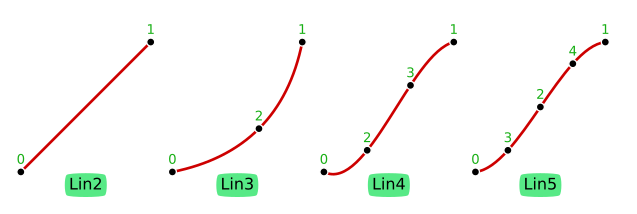
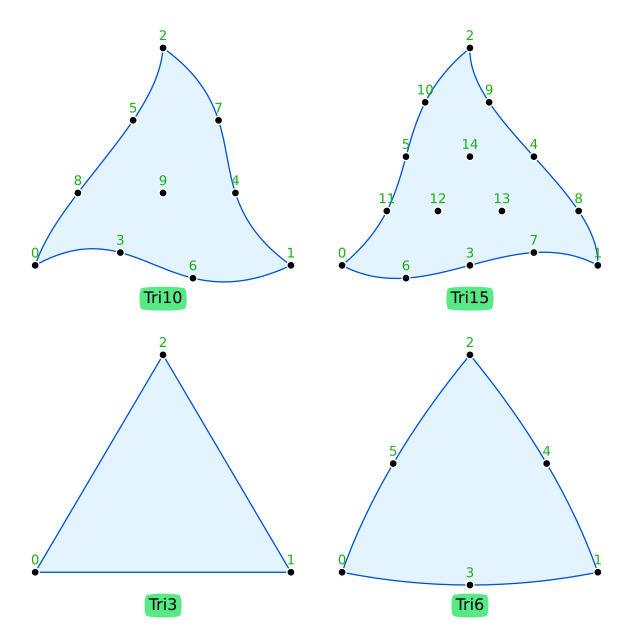
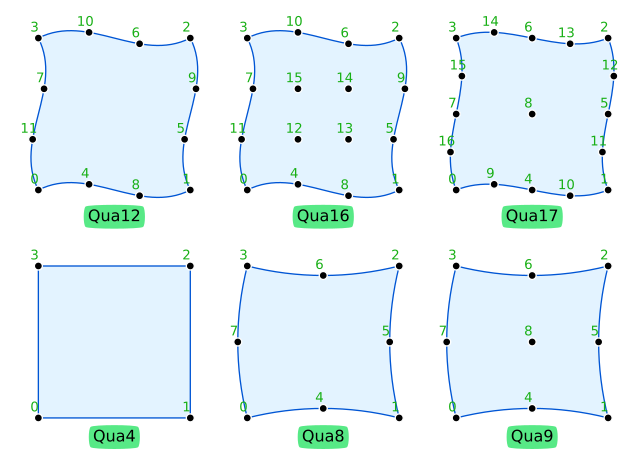
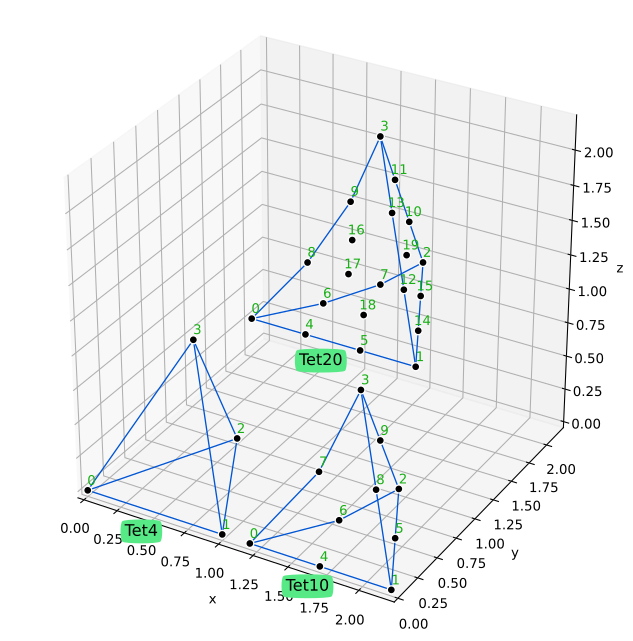
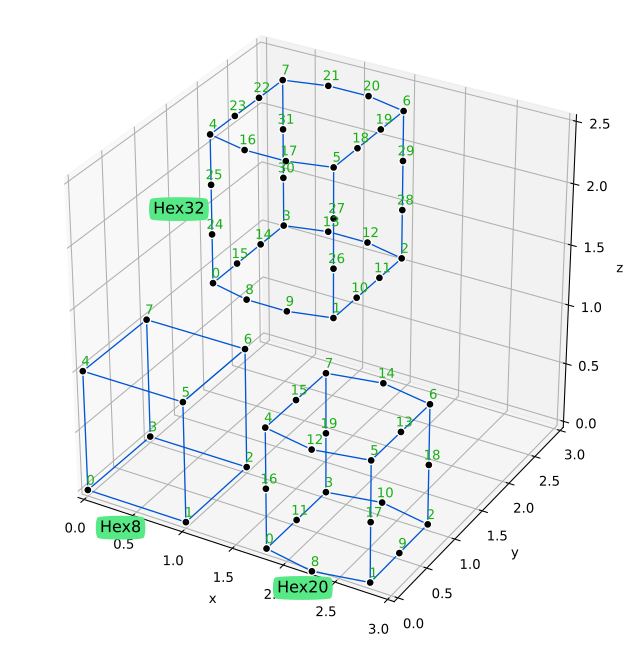
Appendix A - Shapes and local numbering of nodes
Lines (Lin)
Triangles (Tri)
Quadrilaterals (Qua)
Tetrahedra (Tet)
Hexahedra (Hex)
Appendix B - Geometry versus space dimensions
The following table shows what combinations of geometry-number-of-dimensions (geo_ndim) and
space-number-of-dimensions (space_ndim) are possible. There are three cases:
- Case
CABLE--geo_ndim = 1andspace_ndim = 2 or 3; e.g., line in 2D or 3D (cables and rods) - Case
SHELL--geo_ndim = 2andspace_ndim = 3; e.g. Tri or Qua in 3D (shells and surfaces) - Case
SOLID--geo_ndim = space_ndim; e.g., Tri and Qua in 2D or Tet and Hex in 3D
geo_ndim |
space_ndim = 2 |
space_ndim = 3 |
|---|---|---|
| 1 | CABLE |
CABLE |
| 2 | SOLID |
SHELL |
| 3 | impossible | SOLID |