handlr-regex
| Crates.io | handlr-regex |
| lib.rs | handlr-regex |
| version | 0.13.0 |
| created_at | 2022-04-02 18:49:43.741961+00 |
| updated_at | 2025-05-29 00:08:45.557583+00 |
| description | Fork of handlr with regex support |
| homepage | |
| repository | https://github.com/Anomalocaridid/handlr-regex |
| max_upload_size | |
| id | 561028 |
| size | 616,158 |
 (Anomalocaridid)
documentation
README

handlr-regex
Manage your default applications with ease using handlr! Now with the power of regular expressions!
Fork of the original handlr
Features
- Set default handler by extension or mime-type
- Set arbitrary commands as handlers based on regular expressions
- Intelligent mime type detection from files based on extension and content
- Open multiple files at once
- Set multiple handlers for mime/extension and use
rofi/dmenuto pick one - Optional wildcard support like
text/* - Automatically removes invalid/wrong
.desktopentries frommimeapps.list - Helper commands like
launch,get --json,mime --jsonfor your scripting needs - Unnecessarily fast (written in Rust)
- Single compiled binary with no dependencies
Usage
# Open a file/URL
handlr open ~/.dotfiles/pacman/packages.txt
handlr open https://google.ca

# Set default handler for png files
handlr set .png feh.desktop

# Set wildcard handler for all text files
handlr set 'text/*' nvim.desktop
# Set wildcard handler for all OpenDocument formats
# NOTE: startcenter.desktop is usually LibreOffice's main desktop entry
handlr set 'application/vnd.oasis.opendocument.*' startcenter.desktop

# Set default handler based on mime
handlr set application/pdf evince.desktop

# List default apps
handlr list

# Get the handler for a mime/extension
$ handlr get .png
feh.desktop

# Launch a handler with given path/URL
handlr launch x-scheme-handler/https -- https://google.ca

# Get the mimetypes of given paths/URLs
handlr mime https://duckduckgo.com . README.md
Compared to xdg-utils
- Can open multiple files/URLs at once
- Can have multiple handlers and use rofi/dmenu to pick one at runtime
- Far easier to use with simple commands like
get,set,list - Can operate on extensions, no need to look up or remember mime types
- useful for common tasks like setting a handler for png/docx/etc files
- Superb autocomplete (currently fish, zsh and bash), including mimes, extensions, and
.desktopfiles - Optional json output for scripting
- Properly supports
Terminal=trueentries
Setting default terminal
Unfortunately, there isn't an XDG spec and thus a standardized way for handlr to get your default terminal emulator to run Terminal=true desktop entries. There was a proposal floating around a few years ago to use x-scheme-handler/terminal for this purpose. It seems to me the least worst option, compared to handling quirks of N+1 distros or using a handlr-specific config option.
Now if x-scheme-handler/terminal is present, handlr will use it.
Otherwise, handlr will find an app with TerminalEmulator category and use it instead.
On the upside, Terminal=true entries will now work outside of interactive terminals, unlike xdg-utils.
[!NOTE] For
handlr-regexv0.11.2 and older, whenx-scheme-handler/terminalis not present, this process is used instead:
- Find an app with
TerminalEmulatorcategory- Set it as the default for
x-scheme-handler/terminal- Send you a notification to let you know it guessed your terminal and provide instructions to change it if necessary
This was changed in order to match how other mimetypes are handled and also so that
mimeapps.listis not edited without the user's permission.
Terminal emulator compatibility
handlr should work with pretty much any terminal emulator.
However, some slight configuration may be necessary depending on what command line arguments your terminal emulator supports or required to directly run a command in it.
If it uses/supports -e (i.e. xterm, xfce4-terminal, foot, etc.) then you do not need to do anything.
If it requires something else, then set term_exec_args in ~/.config/handlr/handlr.toml to the necessary arguments like so:
// Replace 'run' with whatever arguments you need
term_exec_args = 'run'
If it does not require any arguments or if its arguments are already included in its .desktop file, but it does not use -e, (i.e. wezterm, kitty, etc.) set term_exec_args to ''.
Feel free to open an issue or pull request if there's a better way to handle this.
Setting multiple handlers
-
Open
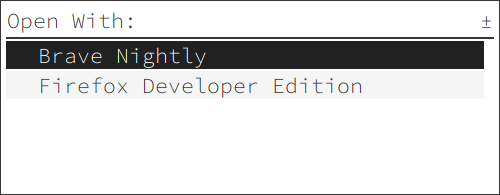
~/.config/handlr/handlr.tomland setenable_selector = true. Optionally, you can also tweak theselectorto your selector command (using e.g. rofi or dmenu). -
Add a second/third/whatever handler using
handlr add, for example
handlr add x-scheme-handler/https firefox-developer-edition.desktop
- Now in this example when you open a URL, you will be prompted to select the desired application.
Setting regex handlers
Inspired by a similar feature in mimeo
Open ~/.config/handlr/handlr.toml and add something like this:
[[handlers]]
exec = "freetube %u" # Uses desktop entry field codes
terminal = false # Set to true for terminal apps, false for GUI apps (optional; defaults to false)
regexes = ['(https://)?(www\.)?youtu(be\.com|\.be)/*.'] # Use single-quote literal strings
For more information:
Smart table output
Starting with v0.10.0, commands with table output (i.e. handlr list and handlr mime) switch to outputting tab-separated values when piped for use with commands like cut.
Optional wildcards
When expand_wildcards is set to true in ~/.config/handlr/handlr.toml, rather than wildcard mimes being saved directly to mimeapps.list, they will be expanded into all matching mimetypes.
This is off by default and will not automatically expand wildcards already present in mimeapps.list when enabled. Simply use handlr remove and handlr add to manually expand them.
In addition, regardless of settings, literal wildcards are preferred when using handlr remove and handlr unset. (e.g. When using handlr remove text/*, if text/* is present, it will be removed, but text/plain, etc. will not be.)
Completion scripts
To generate a shell completion script, run COMPLETE=<shell> handlr, where <shell> is the name of the target shell (e.g. bash, zsh, fish, elvish, powershell, etc.). Note that this will only print it to stdout rather than creating a file or installing the script automatically.
If you usually install handlr-regex from your distribution's repository, and you are not involved with packaging it, you probably do not need to worry about this.
See clap_complete's documentation for the list of currently supported shells.
[!NOTE] This currently relies on unstable features of the
clap_completecrate and may potentially change in the future.
Logging
Since v0.13.0, handlr-regex supports logs to help with troubleshooting.
Logs are output in three ways:
- stderr
- notifications (only when neither running in an interactive terminal nor with
--disable-notificationsactive) - log file at
$XDG_CACHE_HOME/handlr/handlr.log
By default, for stderr and notifications, only warning and error logs are shown. This can be configured with --verbose and --quiet as well as with $RUST_LOG. All logs are printed to the log file regardless.
For more information on the syntax for $RUST_LOG, see the documentation for tracing_subscriber::Envfilter
Screenshots

|

|
Installation
Arch Linux
sudo pacman -S handlr-regex
Optionally, you can also use handlr-regex as a replacement for xdg-open by shadowing it with a script in $HOME/.local/bin/ (or any other user-scoped $PATH directory). Use the following script as an example:
#!/bin/sh

handlr open "$@"
Rust/Cargo
cargo install handlr-regex
Binaries
- Download the latest release binary and put it somewhere in
$PATH - Download completions for fish:
curl https://raw.githubusercontent.com/Anomalocaridid/handlr/master/completions/handlr.fish --create-dirs -o ~/.config/fish/completions/handlr.fish
Attribution
Icons made by Eucalyp from www.flaticon.com
Cover photo by creativebloq.com