headson
| Crates.io | headson |
| lib.rs | headson |
| version | 0.15.0 |
| created_at | 2025-10-22 07:56:43.560229+00 |
| updated_at | 2026-01-18 23:34:30.753611+00 |
| description | Budget‑constrained JSON preview renderer |
| homepage | https://github.com/kantord/headson |
| repository | https://github.com/kantord/headson |
| max_upload_size | |
| id | 1895286 |
| size | 4,278,526 |
 Dániel Kántor (kantord)
documentation
README

Features · Install · Usage · Python bindings
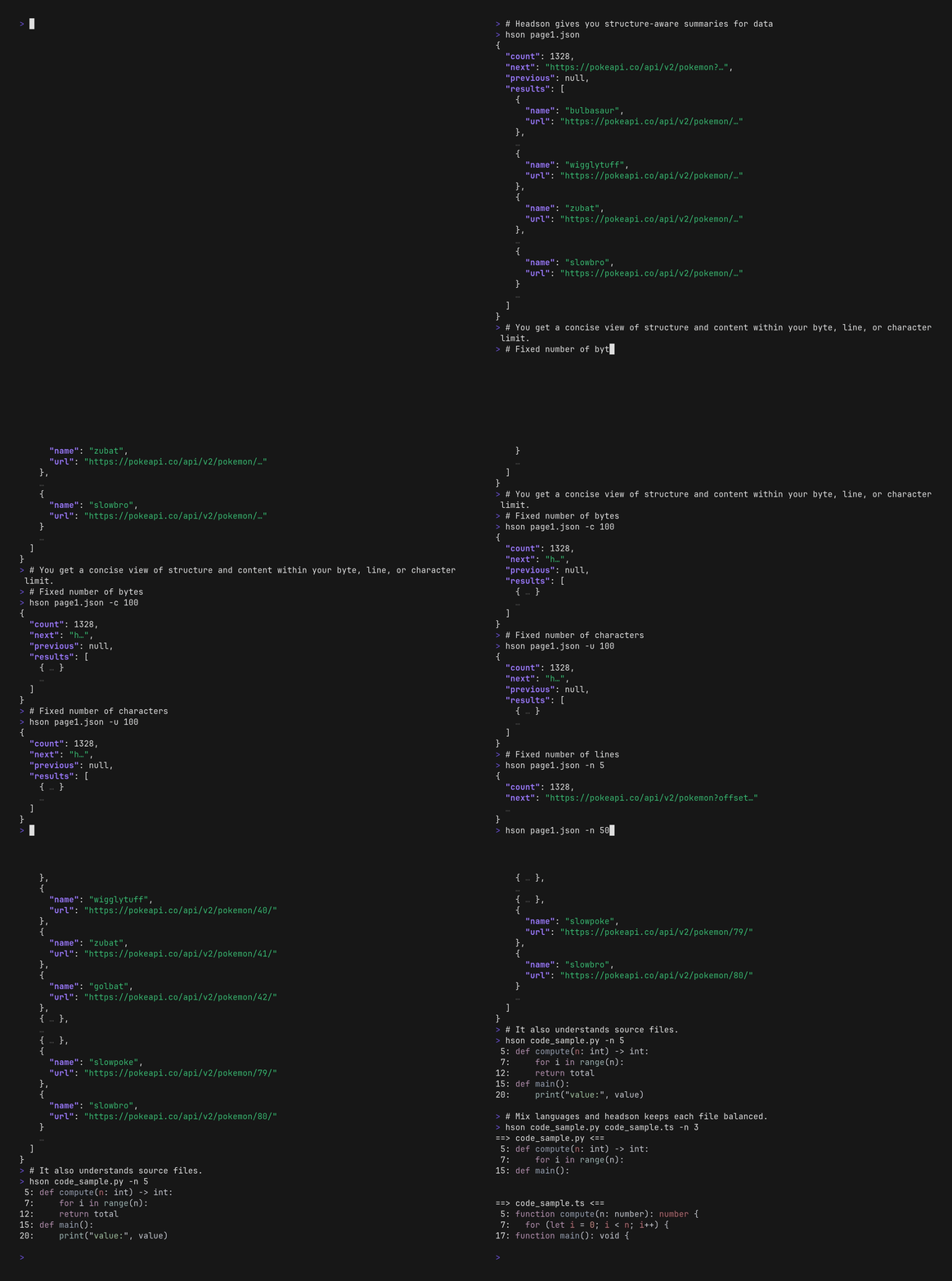
head/tail for JSON, YAML — but structure‑aware. Get a compact preview that shows both the shape and representative values of your data, all within a strict byte budget. (Just like head/tail, hson can also work with unstructured text files.)
Available as:



Features
- Budgeted output: specify exactly how much you want to see (bytes/chars/lines; per-file and global caps)
- Output formats:
auto | json | yaml | textwith stylesstrict | default | detailed - Structure-aware parsing: full JSON/YAML parsing (preserves tree shape under truncation)
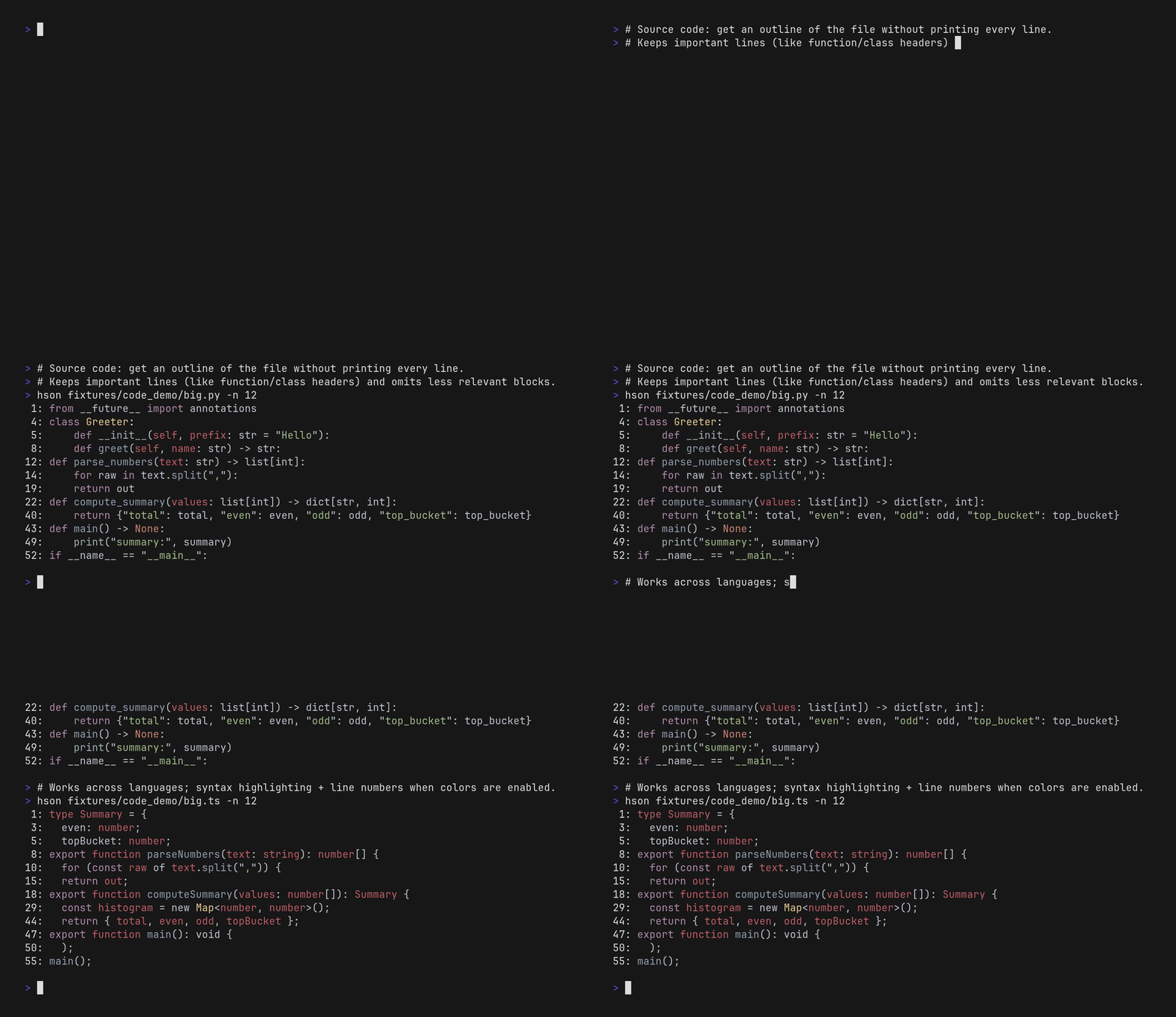
- Source code support: heuristic, indentation-aware summaries that keep lines atomic
- Multi-file mode: preview many files at once (paths,
--glob ..., or--recursiveon directories) with shared or per-file budgets - Repo-aware ordering: in git repos, frequent+recent files show up first (rarely touched files drift to the end; mtime fallback)
grep-like search andtree-like view:--grep <regex>and--treeemulate the workflows while still summarizing file contents inline- Fast: processes gigabyte‑scale files in seconds (mostly disk‑bound)
- Available as a CLI app and as a Python library
Extra features
Source code mode
For source code files, headson uses an indentation-aware heuristic to build an outline, then picks representative lines from across that structure (while keeping lines atomic so omissions never split a line). Syntax highlighting is available when colors are enabled.
Learn more: Source code support
Grep mode
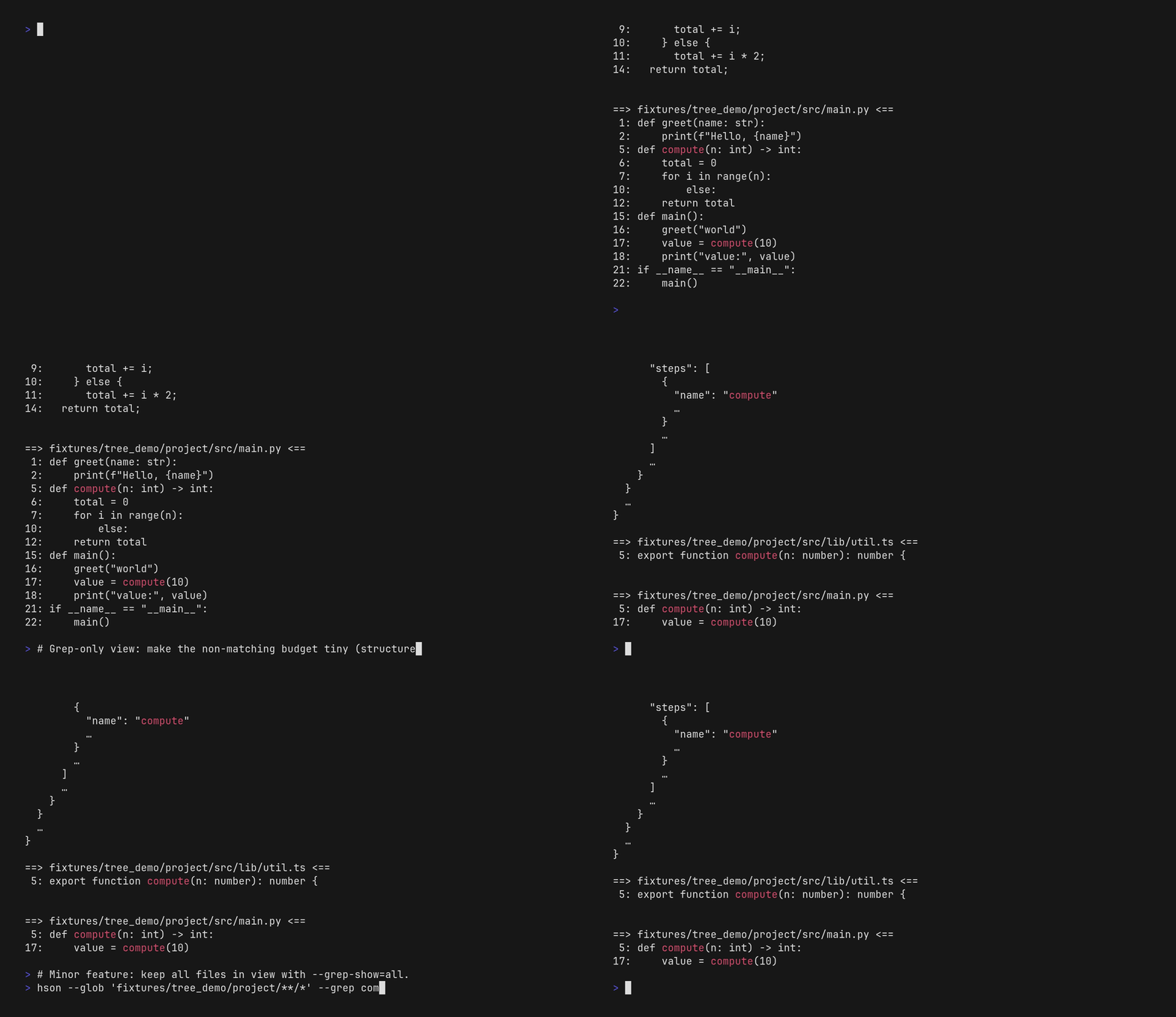
Guarantee that matching keys/values stay in view under tight budgets (supports multi-file mode via --glob).
Tree mode
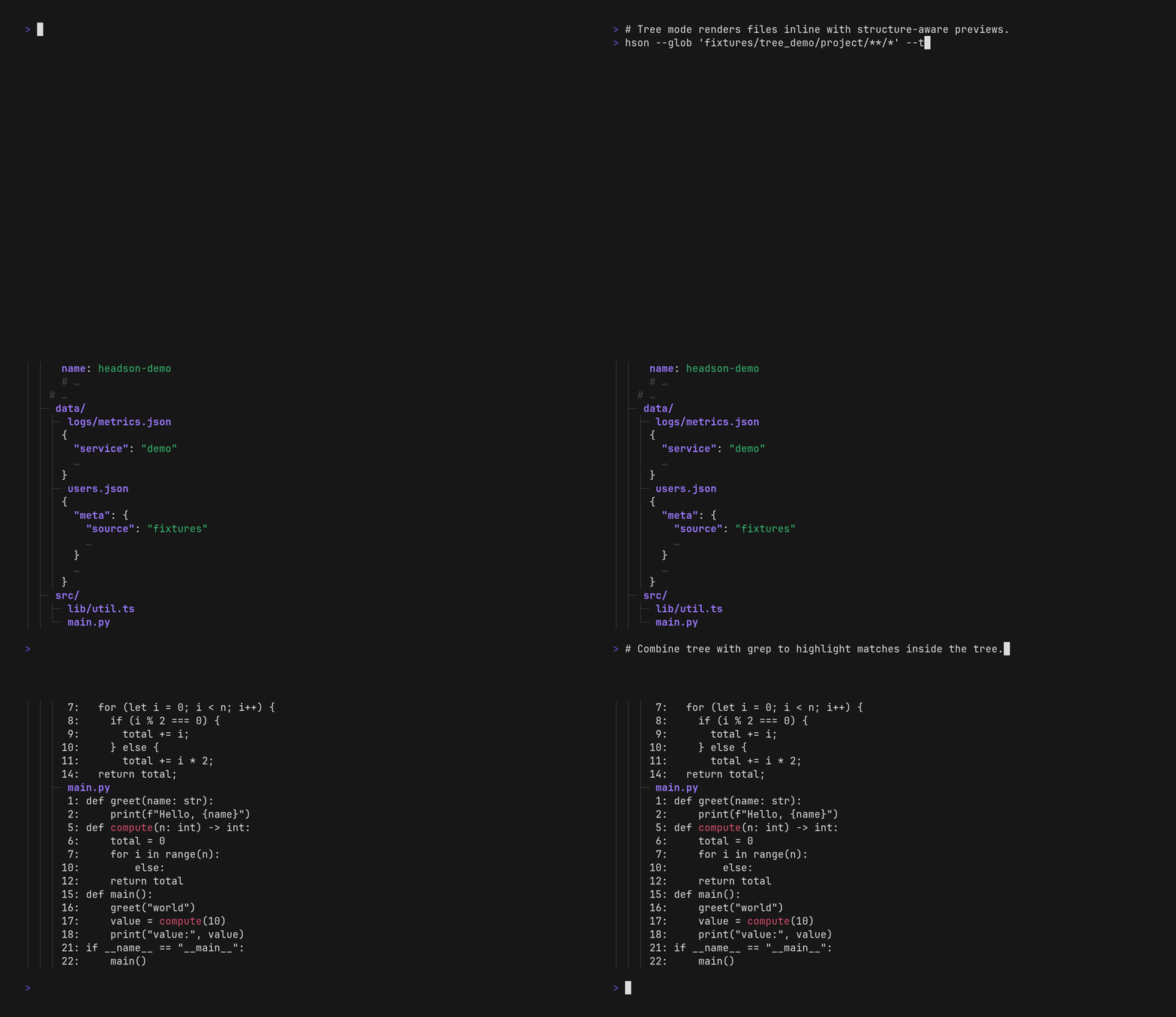
Preview many files at once in a directory tree layout (inline previews, round‑robin fairness; supports multi-file mode via --glob).
Sorting
In multi-file mode, inputs are ordered so frequently and recently touched files show up first, and rarely touched files drift to the end (using git history when available, with mtime fallback). Use a global byte budget (--global-bytes) to get an up‑to‑date repo snapshot within a strict overall limit (and --chars when you want a per-file character cap).
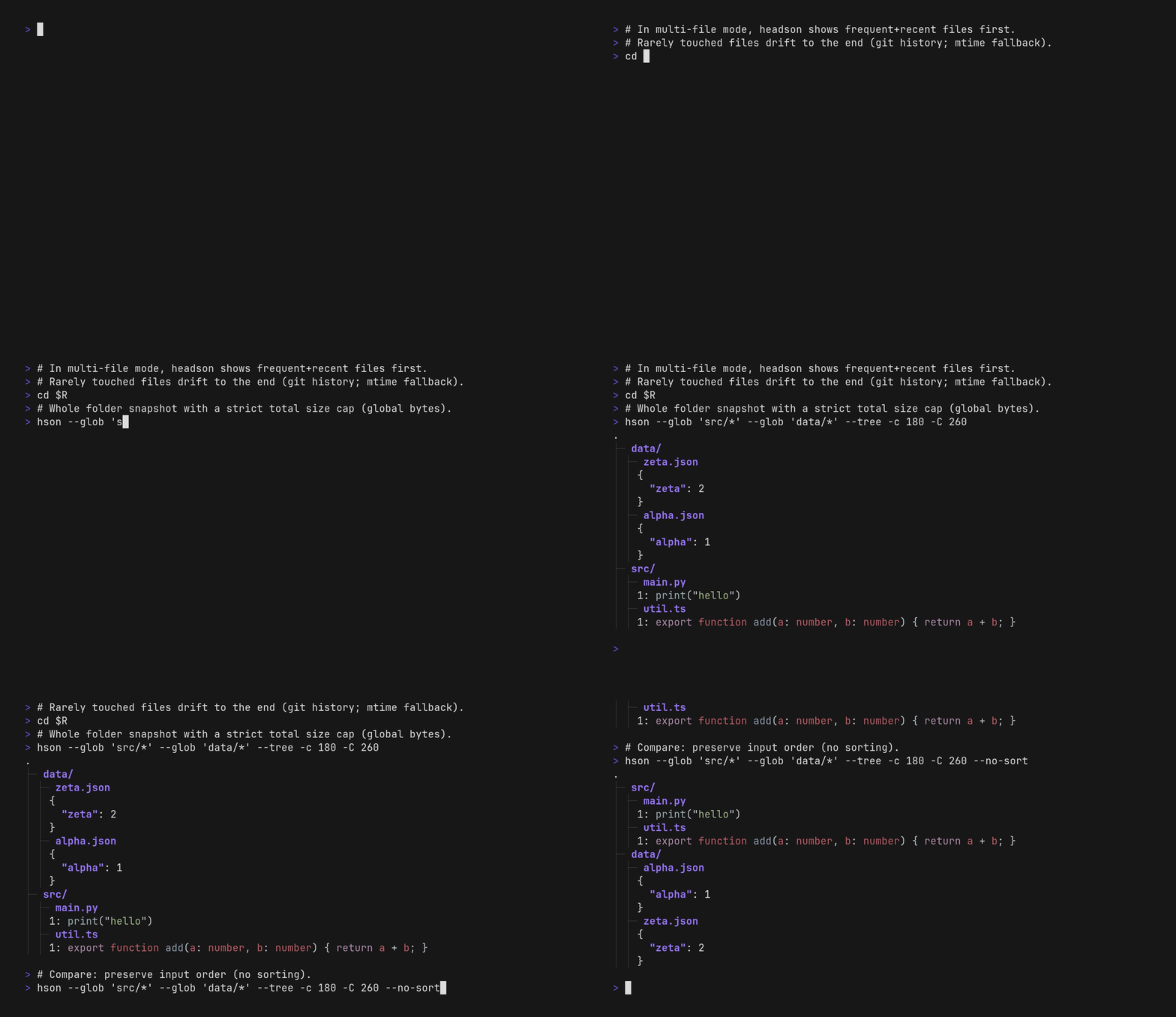
Install
Using Cargo:
cargo install headson
Note: the package is called
headson, but the installed CLI command ishson. All examples below usehson ....
From source:
cargo build --release
target/release/hson --help
Usage
hson [FLAGS] [INPUT...]
- INPUT (optional, repeatable): file path(s). If omitted, reads from stdin. Multiple input files are supported.
- Prints the preview to stdout. On parse errors, exits non‑zero and prints an error to stderr.
Quick examples
Peek a JSON stream from stdin:
curl -sS 'https://pokeapi.co/api/v2/pokemon?limit=151' | hson -c 800
Preview many files with a single total budget:
hson -c 200 -C 1200 logs/*.json
Machine-readable preview (strict JSON):
hson -c 200 -f json -t strict data.json
YAML with detailed comments:
hson -c 400 -f yaml -t detailed config.yaml
Keep matches visible (grep-like) while still summarizing structure:
hson --grep 'error|warning' -c 200 -C 1200 logs/*.json
Tree-like view with inline previews:
hson --tree --glob 'src/**/*' -c 160 -C 1200
Source code outline (keeps lines intact; omits blocks under tight budgets):
hson -n 20 src/main.py
Detailed documentation
Common flags
-c, --bytes <BYTES>: per‑file output budget (bytes). For multiple inputs, default total budget is<BYTES> * number_of_inputs.-u, --chars <CHARS>: per‑file output budget (Unicode code points). Behaves like--bytesbut counts characters instead of bytes.-C, --global-bytes <BYTES>: total output budget across all inputs. With--bytes, the effective total is the smaller of the two.-f, --format <auto|json|yaml|text>: output format (default:auto).- Auto: stdin → JSON family; multi-file mode → per‑file based on extension (
.json→ JSON family,.yaml/.yml→ YAML, unknown → Text).
- Auto: stdin → JSON family; multi-file mode → per‑file based on extension (
-t, --template <strict|default|detailed>: output style (default:default).- JSON family:
strict→ strict JSON;default→ Pseudo;detailed→ JS with inline comments. - YAML: always YAML; style only affects comments (
strictnone,default“# …”,detailed“# N more …”).
- JSON family:
-i, --input-format <json|yaml|text>: ingestion format (default:json). In multi-file mode with--format auto, ingestion is chosen by extensions.-m, --compact: no indentation, no spaces, no newlines--no-newline: single line output--no-header: suppress per-file section headers (useful when embedding output in scripts)--tree: render multi-file previews as a directory tree with inline previews (keeps code line numbers); uses per-file auto formatting.--no-space: no space after:in objects--indent <STR>: indentation unit (default: two spaces)--string-cap <N>: max graphemes to consider per string (default: 500)--grep <REGEX>: guarantee inclusion of values/keys/lines matching the regex (ripgrep‑style). Matches + ancestors are "free" against both global and per-file caps; budgets apply to everything else. If matches consume all headroom, only the must‑keep path is shown. Colors follow the normal on/auto/off rules; when grep is active, syntax colors are suppressed and only the match highlights are colored. JSON/YAML structural punctuation is not highlighted—only the matching key/value text.--igrep <REGEX>: case-insensitive variant of--grep.-r, --recursive: recursively expand directory inputs (likegrep -r). Directory paths are required; stdin is not supported. Incompatible with--glob.--head: prefer the beginning of arrays when truncating (keep first N). Strings are unaffected. Display styles place omission markers accordingly; strict JSON remains unannotated. Mutually exclusive with--tail.--tail: prefer the end of arrays when truncating (keep last N). Strings are unaffected. Display styles place omission markers accordingly; strict JSON remains unannotated. Mutually exclusive with--head.
Notes:
- Multiple inputs:
- With newlines enabled, file sections are rendered with human‑readable headers (pass
--no-headerto suppress them). In compact/single‑line modes, headers are omitted. - Order: in git repos, files are ordered so frequently and recently touched files show up first, with mtime fallback; pass
--no-sortto keep the original input order without repo scanning. - Fairness: file contents are interleaved round‑robin during selection so tight budgets don’t starve later files.
- With newlines enabled, file sections are rendered with human‑readable headers (pass
- In
--format auto, each file uses its own best format: JSON family for.json, YAML for.yaml/.yml.- Unknown extensions are treated as Text (raw lines) — safe for logs and
.txtfiles. --global-bytesmay truncate or omit entire files to respect the total budget.- Directories are ignored unless
--recursiveis set; binary files are ignored with a warning. Glob/recursive expansion respects.gitignoreplus.ignore/.rgignore. Stdin reads the stream as‑is. - Head vs Tail sampling: these options bias which part of arrays are kept before rendering; strict JSON stays unannotated.
- Unknown extensions are treated as Text (raw lines) — safe for logs and
Multi-file mode
- Budgets: per-file caps (
--bytes/--chars/--lines) apply to each input; global caps (--global-*) constrain the combined output when set. Default byte/char budgets scale by input count when no globals are set; line caps stay per-file unless you pass--global-lines. - One metric per level: pick at most one per-file budget flag (
--bytes|--chars|--lines) and at most one global flag (--global-bytes|--global-lines). Mixing per-file and global kinds is allowed (e.g., per-file lines + global bytes); conflicting flags error. - Inputs: pass file paths directly, use
--glob <PATTERN>to expand additional files, or--recursiveto expand directory inputs (incompatible with--glob). Glob patterns are positive-only; use ignore files (.gitignore,.ignore,.rgignore) for exclusions. - Sorting: inputs are ordered so frequently and recently touched files appear first (git metadata when available, mtime fallback). Pass
--no-sortto preserve the order you provided and skip repo scanning. - Headers: multi-file output gets
==>headers when newlines are enabled; hide them with--no-header. Compact and single-line modes omit headers automatically. - Formats: in
--format auto, each file picks JSON/YAML/Text based on extension; unknowns fall back to Text so mixed inputs “just work.” - Parse failures: in multi-file mode, JSON/YAML parse failures are reported on stderr and the file renders as a header/tree entry with an empty body (when headers/tree entries are visible). In compact/no‑newline output, fileset rendering falls back to a plain object, so parse failures may appear as
{}like valid empty objects. - Per-file caps: omission markers count toward per-file line budgets; a per-file line cap of zero suppresses the file entirely, even when headers are counted.
Grep mode
Use --grep <REGEX> to guarantee inclusion of values/keys/lines matching the regex (ripgrep-style). Matches plus their ancestors are "free" against budgets; everything else must fit the remaining headroom.
- Matching: values/lines are checked; object keys match too. Filenames do not match by themselves (a file must have a matching value/line/key).
- Colors: only the matching text is highlighted; syntax colors are suppressed in grep mode. Disable color entirely with
--no-color. - Multiple patterns: all grep flags are repeatable. Multiple patterns combine with OR semantics—values matching any pattern are included/highlighted. Example:
--grep foo --grep barmatches "foo" or "bar". - Case-insensitive: use
--igrep <REGEX>for case-insensitive matching. Can be combined with--grep:--grep Foo --igrep barmatches "Foo" (exact case) or "bar"/"BAR"/"Bar" (any case). - Weak grep:
--weak-grep <REGEX>biases priority toward matches but does not guarantee inclusion, expand budgets, or filter files. Budgets stay exact and matches can still be pruned if they do not fit. Use--weak-igrep <REGEX>for case-insensitive weak grep. Weak grep can be combined with strong grep: strong matches are guaranteed while weak matches are prioritized. - Multi-file mode (strong
--greponly):- Default (
--grep-show=matching): files without matches are dropped from the render and summary. If no files match at all, the output is empty and the CLI prints a warning to stderr. --grep-show=all: keep non-matching files in the render; only matching files are highlighted.- Headers respect
--no-headeras usual.
- Default (
--grep-showrequires--grepor--igrep.- Context: there are no explicit
-C/-B/-Astyle flags; per-file budgets decide how much surrounding structure/lines can stay alongside the must-keep matches. - Budgets: matches and ancestors always render; remaining budget determines what else can appear. Extremely tight budgets may show only the must-keep path.
- Text/source code: works with
-i textand source code files; when using--format auto, file extensions still decide ingest/rendering.
Tree mode
Use --tree to render multi-file output as a directory tree (like tree) with inline structured previews instead of per-file headers. Works with grep/weak-grep; matches are shown inside the tree.
- Layout: classic tree branches (
├─,│,└─) with continuous guides; code gutters stay visible under the tree prefix. - Headers:
--treeis mutually exclusive with--no-header; tree mode never prints==>headers and relies on the tree structure instead. Files are still auto-formatted per extension (--formatmust beautoin multi-file mode). - Budgets: tree scaffolding is treated like headers (free unless you set
--count-headers); per-file budgets always apply to file content and omission markers, and global caps apply only when provided. Tight budgets can truncate file previews within the tree, and entire files may be omitted under tiny global line budgets—omitted entries are reported as… N more itemson the relevant folder/root. When scaffold is free, the final output can exceed the requested caps by the tree gutters/indentation; set--count-headersif those characters must be bounded. - Empty sections: under very small per-file caps (or a tiny global cap, if set), files or code blocks may render only their header/tree entry with no body; omission markers appear only when at least one child fits. This is expected when nothing fits beneath the budget.
- Sorting: respects
--no-sort; otherwise uses the usual repo-aware ordering (frequent+recent first; mtime fallback) before tree grouping. - Fairness: file contents are interleaved round‑robin in the priority order so later files still surface under tight budgets.
Budget modes
-
Bytes (
-c/--bytes,-C/--global-bytes)- Measures UTF‑8 bytes in the output.
- Default per‑file budget is 500 bytes when neither
--linesnor--charsis provided. - Multiple inputs: total default budget is
<BYTES> * number_of_inputs;--global-bytescaps the total.
-
Characters (
-u/--chars)- Measures Unicode code points (not grapheme clusters).
-
Lines (
-n/--lines,-N/--global-lines)- Caps the number of lines in the output.
- Incompatible with
--no-newline. - Multiple inputs:
<LINES>is enforced per file; add--global-linesif you also need an aggregate cap. - Per-file headers, blank separators, and summary lines do not count toward the line cap by default; only actual content lines are considered. Pass
-H/--count-headersto include headers/summaries in the line budget. - Tiny caps may yield omission markers instead of bodies (e.g.,
…for text/code,{…}/[…]for objects/arrays); a single-line file still renders when it fits.
-
Interactions and precedence
- All active budgets are enforced simultaneously. The render must satisfy all of: bytes (if set), chars (if set), and lines (if set). The strictest cap wins.
- Outputs stay non-empty unless you explicitly set a per-file cap of zero; in that case that slot can be suppressed entirely (matching the CLI’s
-n 0semantics). Extremely tight nonzero caps that cannot fit even an omission marker can also yield empty output; multi-file/tree output may show only omission counts in that scenario. - When only lines are specified, no implicit byte cap applies. When neither lines nor chars are specified, a 500‑byte default applies.
Text mode
-
Single file (auto):
hson -c 200 notes.txt -
Force Text ingest/output (useful when mixing with other extensions, or when the extension suggests JSON/YAML):
hson -c 200 -i text -f text notes.txt # Force text ingest even if the file looks like JSON hson -i text notes.json -
Styles on Text:
- default: omission as a standalone
…line. - detailed: omission as
… N more lines …. - strict: no array‑level omission line (individual long lines may still truncate with
…).
- default: omission as a standalone
Note: In multi-file mode, each file uses its own auto format/template. When you need to preview a directory of mixed formats, skip
-f textand let-f autopick the right renderer for each entry.
Source code support
For source code files, headson uses an indentation-aware heuristic to build an outline, then samples representative lines from across that structure.
- Lines are kept atomic: omission markers never split a line in half.
- Under tight budgets, it tends to keep block-introducing lines (like function/class headers) and omit less relevant blocks from the middle.
- With colors enabled, you also get syntax highlighting and line numbers.
Show help:
hson --help
Note: flags align with head/tail conventions (-c/--bytes, -C/--global-bytes).
What’s wrong with just using head/tail?
Input:
{"users":[{"id":1,"name":"Ana","roles":["admin","dev"]},{"id":2,"name":"Bo"}],"meta":{"count":2,"source":"db"}}
If you head -c a JSON file/stream, you can cut it in the middle of a value and end up with a confusing snippet:
head -c 80 users.json
# {"users":[{"id":1,"name":"Ana","roles":["admin","dev"]},{"id":2,"name":"Bo"}],"me
With hson, you still get a compact preview, but it stays structure-aware:
hson -c 120 -f json -t default users.json
# {
#   users: [
#     { id: 1, name: "Ana", roles: [ "admin", … ] },
#     …
#   ]
#   meta: { count: 2, … }
# }
If you need machine-readable output, use strict mode:
hson -c 120 -f json -t strict users.json
# {"users":[{"id":1,"name":"Ana","roles":["admin"]}],"meta":{"count":2}}
Python Bindings
A thin Python extension module is available on PyPI as headson.
Install
pip install headson (ABI3 wheels for Python 3.10+ on Linux/macOS/Windows).
Usage
API:
headson.summarize(text: str, *, format: str = "auto", style: str = "default", input_format: str = "json", byte_budget: int | None = None, skew: str = "balanced") -> strformat:"auto" | "json" | "yaml"(auto maps to JSON family for single inputs)style:"strict" | "default" | "detailed"input_format:"json" | "yaml"(ingestion)byte_budget: maximum output size in bytes (default: 500)skew:"balanced" | "head" | "tail"(affects display styles; strict JSON remains unannotated)
Examples:
import json
import headson

data = {"foo": [1, 2, 3], "bar": {"x": "y"}}
preview = headson.summarize(json.dumps(data), format="json", style="strict", byte_budget=200)
print(preview)

# Prefer the tail of arrays (annotations show with style="default"/"detailed")
print(
    headson.summarize(
        json.dumps(list(range(100))),
        format="json",
        style="detailed",
        byte_budget=80,
        skew="tail",
    )
)

# YAML support
doc = "root:\n  items: [1,2,3,4,5,6,7,8,9,10]\n"
print(headson.summarize(doc, format="yaml", style="default", input_format="yaml", byte_budget=60))
Algorithm

Footnotes
- [1] Optimized tree representation: An arena‑style tree stored in flat, contiguous buffers. Each node records its kind and value plus index ranges into shared child and key arrays. Arrays are ingested in a single pass and may be deterministically pre‑sampled: the first element is always kept; additional elements are selected via a fixed per‑index inclusion test; for kept elements, original indices are stored and full lengths are counted. This enables accurate omission info and internal gap markers later, while minimizing pointer chasing.
- [2] Priority order: Nodes are scored so previews surface representative structure and values first. Arrays can favor head/mid/tail coverage (default) or strictly the head; tail preference flips head/tail when configured. Object properties are ordered by key, and strings expand by grapheme with early characters prioritized over very deep expansions.
- [3] Choose top N nodes (binary search): Iteratively picks N so that the rendered preview fits within the byte budget, looping between “choose N” and a render attempt to converge quickly.
- [4] Render attempt: Serializes the currently included nodes using the selected template. Omission summaries and per-file section headers appear in display templates (pseudo/js); json remains strict. For arrays, display templates may insert internal gap markers between non‑contiguous kept items using original indices.
- [5] Diagram source: The Algorithm diagram is generated from
docs/diagrams/algorithm.mmd. Regenerate the SVG withcargo make diagramsbefore releasing.
Comparison with alternatives
head/tail: byte/line-based, so output often breaks structure in JSON/YAML or surfaces uninteresting details.jq: powerful, but you usually need to write filters to get a compact preview of large JSON.
License
MIT