make_colors
| Crates.io | make_colors |
| lib.rs | make_colors |
| version | 1.0.2 |
| created_at | 2025-12-07 17:43:49.675987+00 |
| updated_at | 2025-12-07 17:43:49.675987+00 |
| description | A simple, powerful and cross-platform Rust library for adding colors to your terminal output with support for hex colors, RGB, and rich markup |
| homepage | https://github.com/cumulus13/make_colors_rust |
| repository | https://github.com/cumulus13/make_colors_rust |
| max_upload_size | |
| id | 1971984 |
| size | 461,373 |
 cumulus13 (cumulus13)
documentation
README
🎨 make_colors
A simple, powerful, and cross-platform Rust library for adding colors to your terminal output with support for hex colors, RGB values, and rich text attributes.



✨ Features
- 🎨 Standard terminal colors - 16 ANSI colors with light variants
- 🌈 Hex color support - Use colors like
#00FFFF,#FF5500 - 🎯 RGB color support - Full 24-bit color with RGB values (0-255)
- 🎭 16.7 Million Colors - True Color (24-bit) support like Python's
rich - 📝 Simple API - Easy to use functions and builder pattern
- 🖋 Text attributes - Bold, italic, underline, dim, blink, and more
- 🔧 Flexible notation - Full names, abbreviations, multiple formats
- 🚀 Zero dependencies - Lightweight and fast
- 🖥️ Cross-platform - Works on Windows, Linux, and macOS
📸 Screenshots
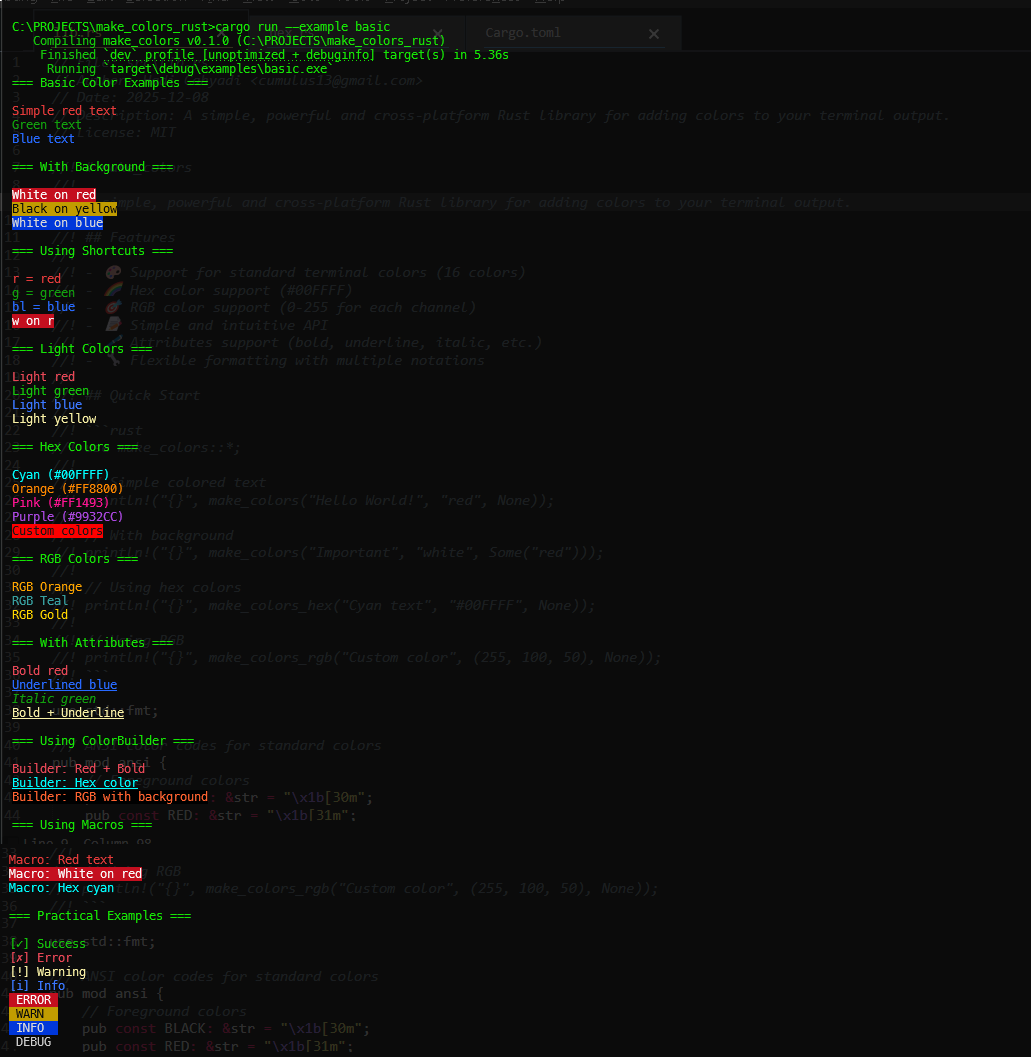
Basic Colors Example
Hex Colors & Gradients
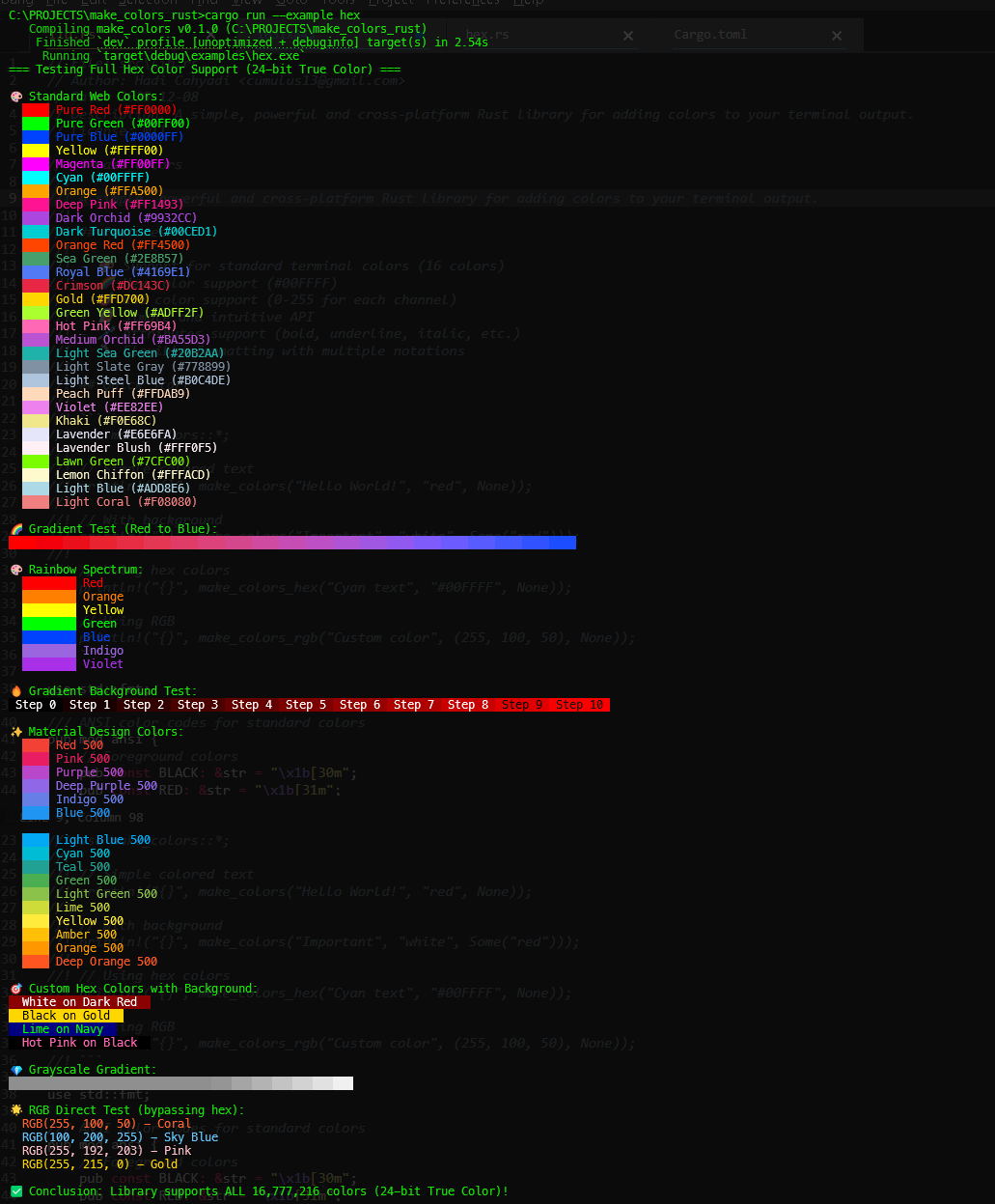
Screenshots show output from cargo run --example basic and cargo run --example hex_test
📦 Installation
Add this to your Cargo.toml:
[dependencies]
make_colors = "0.1"
🚀 Quick Start
use make_colors::*;

fn main() {
    // Simple colored text
    println!("{}", make_colors("Hello World!", "red", None));

    // Text with background
    println!("{}", make_colors("Important Message", "white", Some("red")));

    // Using shortcuts
    println!("{}", make_colors("Quick and easy", "r", Some("bl")));

    // Hex colors (24-bit True Color)
    println!("{}", make_colors_hex("Cyan text", "#00FFFF", None).unwrap());

    // RGB colors (16.7 Million colors)
    println!("{}", make_colors_rgb("Custom color", (255, 100, 50), None));

    // With attributes
    println!("{}", make_colors_with_attrs("Bold text", "red", None, &["bold"]));

    // Builder pattern
    let colored = ColorBuilder::new("Styled text")
        .fg("green")
        .bold()
        .underline()
        .build();
    println!("{}", colored);
}
🎨 Color Reference
Available Colors
| Color Name | Shortcuts | Light Variant | Light Shortcut |
|---|---|---|---|
| black | b, bk | lightblack | lb |
| red | r, rd, re | lightred | lr |
| green | g, gr, ge | lightgreen | lg |
| yellow | y, ye, yl | lightyellow | ly |
| blue | bl | lightblue | lb |
| magenta | m, mg, ma | lightmagenta | lm |
| cyan | c, cy, cn | lightcyan | lc |
| white | w, wh, wi, wt | lightwhite | lw |
Color Preview
// Standard colors
println!("{}", make_colors("■ Black text", "black", None));
println!("{}", make_colors("■ Red text", "red", None));
println!("{}", make_colors("■ Green text", "green", None));
println!("{}", make_colors("■ Yellow text", "yellow", None));
println!("{}", make_colors("■ Blue text", "blue", None));
println!("{}", make_colors("■ Magenta text", "magenta", None));
println!("{}", make_colors("■ Cyan text", "cyan", None));
println!("{}", make_colors("■ White text", "white", None));

// Light variants
println!("{}", make_colors("■ Light Red", "lightred", None));
println!("{}", make_colors("■ Light Green", "lightgreen", None));
println!("{}", make_colors("■ Light Blue", "lightblue", None));
println!("{}", make_colors("■ Light Yellow", "lightyellow", None));
💡 Usage Examples
Basic Usage
use make_colors::*;

// Full color names
println!("{}", make_colors("Error", "red", Some("white")));

// Using shortcuts
println!("{}", make_colors("Success", "g", None));

// Mixed notation
println!("{}", make_colors("Warning", "yellow", Some("b")));
Hex Colors (24-bit True Color)
// Basic hex color
println!("{}", make_colors_hex("Cyan text", "#00FFFF", None).unwrap());

// Hex with background
println!("{}", make_colors_hex("Custom", "#FF5500", Some("#001122")).unwrap());

// Various hex colors
println!("{}", make_colors_hex("Orange", "#FF8800", None).unwrap());
println!("{}", make_colors_hex("Pink", "#FF1493", None).unwrap());
println!("{}", make_colors_hex("Purple", "#9932CC", None).unwrap());

// Material Design colors
println!("{}", make_colors_hex("Material Red", "#F44336", None).unwrap());
println!("{}", make_colors_hex("Material Blue", "#2196F3", None).unwrap());
println!("{}", make_colors_hex("Material Green", "#4CAF50", None).unwrap());
RGB Colors (16.7 Million Colors)
// Basic RGB
println!("{}", make_colors_rgb("Orange", (255, 165, 0), None));

// RGB with background
println!("{}", make_colors_rgb("Custom", (255, 100, 50), Some((0, 0, 0))));

// Various RGB colors
println!("{}", make_colors_rgb("Teal", (0, 128, 128), None));
println!("{}", make_colors_rgb("Gold", (255, 215, 0), None));
println!("{}", make_colors_rgb("Coral", (255, 127, 80), None));

// Create gradients
for i in 0..=10 {
    let r = 255 - (i * 25);
    let g = 0;
    let b = i * 25;
    print!("{}", make_colors_rgb("█", (r, g, b), None));
}
println!();
Text Attributes
// Single attribute
println!("{}", make_colors_with_attrs("Bold text", "red", None, &["bold"]));
println!("{}", make_colors_with_attrs("Underlined", "blue", None, &["underline"]));
println!("{}", make_colors_with_attrs("Italic", "green", None, &["italic"]));

// Multiple attributes
println!("{}", make_colors_with_attrs(
    "Bold + Underline",
    "yellow",
    None,
    &["bold", "underline"]
));

// Available attributes: bold, dim, italic, underline, blink, reverse, hidden, strikethrough
ColorBuilder Pattern
// Basic builder
let text = ColorBuilder::new("Styled text")
    .fg("red")
    .bold()
    .build();
println!("{}", text);

// Builder with hex colors
let text = ColorBuilder::new("Hex styled")
    .fg_hex("#00FFFF").unwrap()
    .bg_hex("#000000").unwrap()
    .underline()
    .build();
println!("{}", text);

// Builder with RGB
let text = ColorBuilder::new("RGB styled")
    .fg_rgb(255, 100, 50)
    .bg_rgb(0, 0, 0)
    .bold()
    .italic()
    .build();
println!("{}", text);

// Chaining multiple attributes
let text = ColorBuilder::new("Multiple styles")
    .fg("green")
    .bg("black")
    .bold()
    .underline()
    .italic()
    .build();
println!("{}", text);
Macros
// Simple macro usage
println!("{}", color!("red", "Error message"));
println!("{}", color!("white", "red", "Important notice"));

// Hex color macro
println!("{}", color_hex!("#00FFFF", "Cyan text"));
println!("{}", color_hex!("#FF5500", "#000000", "Custom colors"));
Practical Examples
Status Messages
fn show_status(service: &str, status: &str) -> String {
    match status {
        "running" => make_colors(&format!("[✓] {}", service), "lightgreen", None),
        "stopped" => make_colors(&format!("[✗] {}", service), "lightred", None),
        _ => make_colors(&format!("[?] {}", service), "lightyellow", None),
    }
}

println!("{}", show_status("Web Server", "running"));
println!("{}", show_status("Database", "stopped"));
println!("{}", show_status("Cache", "unknown"));
Log Levels
fn log_message(level: &str, message: &str) -> String {
    let (fg, bg) = match level {
        "ERROR" => ("white", Some("red")),
        "WARN" => ("black", Some("yellow")),
        "INFO" => ("white", Some("blue")),
        "DEBUG" => ("white", Some("black")),
        _ => ("white", None),
    };

    format!(
        "{} {}",
        make_colors(&format!(" {} ", level), fg, bg),
        message
    )
}

println!("{}", log_message("ERROR", "Connection failed"));
println!("{}", log_message("WARN", "Deprecated method"));
println!("{}", log_message("INFO", "Server started"));
println!("{}", log_message("DEBUG", "Variable value: 42"));
Progress Bar
fn progress_bar(current: usize, total: usize, width: usize) -> String {
    let percentage = current as f32 / total as f32;
    let filled = (width as f32 * percentage) as usize;
    let bar = "█".repeat(filled) + &"░".repeat(width - filled);

    let color = if percentage < 0.5 {
        "red"
    } else if percentage < 0.8 {
        "yellow"
    } else {
        "green"
    };

    make_colors(
        &format!("[{}] {}/{} ({:.1}%)", bar, current, total, percentage * 100.0),
        color,
        None
    )
}

// Usage
for i in (0..=100).step_by(10) {
    println!("{}", progress_bar(i, 100, 30));
}
Menu System
fn create_menu() {
    let options = vec![
        ("1", "Start Application", "green"),
        ("2", "Settings", "yellow"),
        ("3", "Help", "blue"),
        ("4", "Exit", "red"),
    ];

    println!("{}", make_colors(" 🎯 Main Menu ", "white", Some("blue")));
    println!();

    for (key, option, color) in options {
        println!("  {} {}",
            make_colors(key, "white", Some(color)),
            option
        );
    }
    println!();
}

create_menu();
Gradient Generator
// Horizontal gradient
fn gradient_horizontal(text: &str, from_hex: &str, to_hex: &str) {
    let (r1, g1, b1) = hex_to_rgb(from_hex).unwrap();
    let (r2, g2, b2) = hex_to_rgb(to_hex).unwrap();

    let len = text.len();
    for (i, ch) in text.chars().enumerate() {
        let ratio = i as f32 / len as f32;
        let r = (r1 as f32 + (r2 as f32 - r1 as f32) * ratio) as u8;
        let g = (g1 as f32 + (g2 as f32 - g1 as f32) * ratio) as u8;
        let b = (b1 as f32 + (b2 as f32 - b1 as f32) * ratio) as u8;
        print!("{}", make_colors_rgb(&ch.to_string(), (r, g, b), None));
    }
    println!();
}

gradient_horizontal("GRADIENT TEXT", "#FF0000", "#0000FF");
🔧 API Reference
Functions
make_colors(text: &str, fg: &str, bg: Option<&str>) -> String
Main function to colorize text with named colors.
make_colors_with_attrs(text: &str, fg: &str, bg: Option<&str>, attrs: &[&str]) -> String
Colorize text with attributes (bold, italic, etc.).
make_colors_hex(text: &str, fg_hex: &str, bg_hex: Option<&str>) -> Result<String, MakeColorsError>
Colorize text using hex color codes (#RRGGBB).
make_colors_hex_with_attrs(text: &str, fg_hex: &str, bg_hex: Option<&str>, attrs: &[&str]) -> Result<String, MakeColorsError>
Colorize text using hex colors with attributes.
make_colors_rgb(text: &str, fg_rgb: (u8, u8, u8), bg_rgb: Option<(u8, u8, u8)>) -> String
Colorize text using RGB values.
make_colors_rgb_with_attrs(text: &str, fg_rgb: (u8, u8, u8), bg_rgb: Option<(u8, u8, u8)>, attrs: &[&str]) -> String
Colorize text using RGB values with attributes.
hex_to_rgb(hex: &str) -> Result<(u8, u8, u8), MakeColorsError>
Convert hex color string to RGB tuple.
ColorBuilder
Builder pattern for creating colored text:
ColorBuilder::new(text: &str)
    .fg(color: &str)                    // Set foreground color by name
    .bg(color: &str)                    // Set background color by name
    .fg_hex(hex: &str)                  // Set foreground by hex
    .bg_hex(hex: &str)                  // Set background by hex
    .fg_rgb(r: u8, g: u8, b: u8)        // Set foreground by RGB
    .bg_rgb(r: u8, g: u8, b: u8)        // Set background by RGB
    .bold()                             // Add bold attribute
    .italic()                           // Add italic attribute
    .underline()                        // Add underline attribute
    .dim()                              // Add dim attribute
    .blink()                            // Add blink attribute
    .reverse()                          // Add reverse attribute
    .attr(attr: &str)                   // Add custom attribute
    .build()                            // Build the colored string
Macros
color!(fg, text)                        // Simple colored text
color!(fg, bg, text)                    // Text with background
color_hex!(hex, text)                   // Hex colored text
color_hex!(fg_hex, bg_hex, text)        // Hex text with background
🖥️ Platform Support
Windows
- ✅ Windows 10+ (full ANSI support with 24-bit color)
- ✅ Windows Terminal - Excellent True Color support
- ✅ PowerShell 7+ - Full support
- ⚠️ CMD - Basic support (may need Windows Terminal for best results)
- ⚠️ Older Windows may require ANSICON
Linux/Unix
- ✅ Most modern terminals (xterm, gnome-terminal, konsole, etc.)
- ✅ Tmux/Screen - Full True Color support
- ✅ SSH sessions - Supported when terminal supports colors
- ✅ 24-bit True Color in most modern terminals
macOS
- ✅ Terminal.app - Full support
- ✅ iTerm2 - Excellent True Color support
- ✅ Other terminals - Generally well supported
True Color Support
This library uses 24-bit True Color (16.7 million colors) via ANSI escape sequences:
\x1b[38;2;R;G;Bmfor foreground colors\x1b[48;2;R;G;Bmfor background colors
For best results, use a terminal that supports True Color:
- Windows Terminal ✅
- iTerm2 (macOS) ✅
- Gnome Terminal ✅
- Konsole ✅
- VSCode integrated terminal ✅
🎯 Best Practices
- Use hex or RGB for precise colors - When you need exact brand colors or gradients
- Use named colors for common cases - Simpler and more readable code
- Test on target terminals - Ensure colors display correctly
- Provide fallbacks - Handle environments without color support gracefully
- Use attributes sparingly - Too many can reduce readability
- Check True Color support - Not all terminals support 24-bit color
📚 Examples
Run the included examples:
# Basic colors and features
cargo run --example basic

# Full hex color test with gradients
cargo run --example hex_test
🧪 Testing
Run the test suite:
cargo test
Build documentation:
cargo doc --open
🆚 Comparison with Other Libraries
| Feature | make_colors | colored | termcolor | ansi_term |
|---|---|---|---|---|
| Hex colors | ✅ | ❌ | ❌ | ❌ |
| RGB (24-bit) | ✅ | ✅ | ❌ | ❌ |
| Named colors | ✅ | ✅ | ✅ | ✅ |
| Abbreviations | ✅ | ❌ | ❌ | ❌ |
| Builder pattern | ✅ | ❌ | ❌ | ✅ |
| Macros | ✅ | ❌ | ❌ | ❌ |
| Zero deps | ✅ | ❌ | ❌ | ❌ |
| True Color | ✅ 16.7M | ✅ Limited | ❌ | ❌ |
🤝 Contributing
Contributions are welcome! Please feel free to submit a Pull Request.
- Fork the repository
- Create your feature branch (
git checkout -b feature/amazing-feature) - Commit your changes (
git commit -m 'Add some amazing feature') - Push to the branch (
git push origin feature/amazing-feature) - Open a Pull Request
📝 Changelog
Version 0.1.0
- Initial release
- Support for 16 standard ANSI colors
- Hex color support (#RRGGBB)
- RGB color support (24-bit True Color)
- Text attributes (bold, italic, underline, etc.)
- Builder pattern
- Convenience macros
- Zero dependencies
📄 License
Licensed under the MIT License. See LICENSE for details.
👨💻 Author
Hadi Cahyadi
📧 cumulus13@gmail.com
🔗 GitHub: https://github.com/cumulus13
🔗 Repository: https://github.com/cumulus13/make_colors_rust


🙏 Acknowledgments
Inspired by:
- make_colors (Python) - Original Python library
- rich (Python) - Python's rich text library
- colored (Rust) - Rust colored library
🌟 Related Projects
- make_colors (Python) - Python version with similar API
✨ Made with ❤️ for colorful Rust terminal experiences!
Support 16,777,216 colors ! 🎨🌈