markd
| Crates.io | markd |
| lib.rs | markd |
| version | 0.3.0 |
| created_at | 2023-07-08 13:25:43.590141+00 |
| updated_at | 2025-09-10 05:42:54.686982+00 |
| description | Bookmark directories for easy directory-hopping in the terminal |
| homepage | |
| repository | https://github.com/voltaireNoir/markd |
| max_upload_size | |
| id | 911467 |
| size | 37,171 |
 Maaz Ahmed (VoltaireNoir)
documentation
README




markd
Bookmark directories for easy directory-hopping in the terminal.

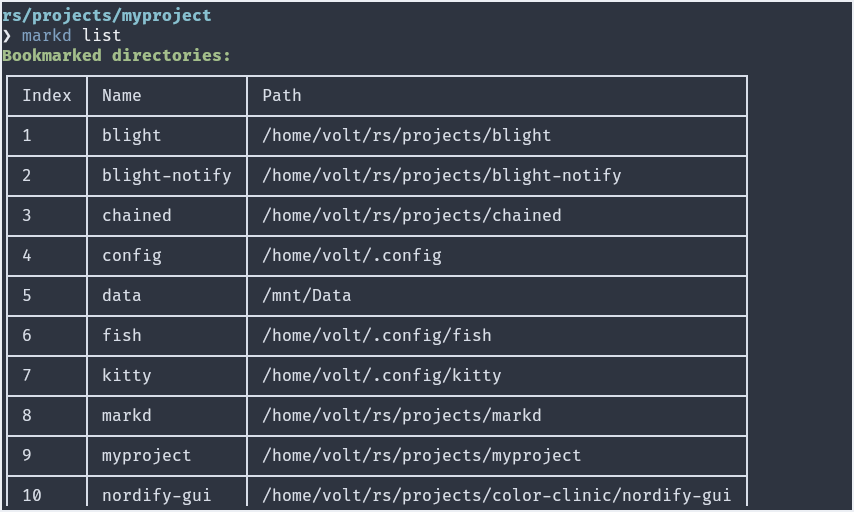
All it takes is one command markd to bookmark your current directory, or use the -p / --path to specify custom path and -a / --alias to set a custom bookmark name. The CLI tool also provides the necessary functionality to search and clean your bookmarks. For example, the purge command will check all the paths and remove the ones that no longer exist, and the list command supports --filter, --start and --end for advanced searching.
All paths are ensured to be valid ones, relative paths are stored in their expanded forms and names are always lowercase. No duplicate names are allowed (use an alias instead).
Run markd help for a full list of supported commands and arguments. Run markd <COMMAND> --help to get more info on the command.
Note: bookmarks are stored in
bookmarks.tomlfile in the user home directory in the form ofname = "path", which can also be directly edited if necessary.
Shell Support
Since 'cd' is a built-in shell command, you need to use 'command substitution' to make use of markd to switch directories.
To make it work, simply add a function definition to your shell config file. After adding the necessary code to your shell config, you should be able to jump between directories using the command goto <bookmark-name>.
The latest version supports fuzzy search when the user invokes the goto fn/command without any arguments (requires fzf). Users upgrading from an older version need to update the respective shell function definition.
Note: The function name used here is 'goto' but you can change it to whatever you prefer. The following shell functions can also be generated to stdout by running the command
markd shell <shell_name>
Fish
- Create a
functionsdirectory in fish config folder (usually/home/user/.config/fish) - Inside the folder, create a file named
goto.fish - Copy and paste the following code and save it
function goto
    if test (count $argv) -eq 0; and type -q fzf
        set -f dir (markd list --plain | fzf | awk -F: '{ print $1 }')
        if test -n "$dir"
            cd $(markd g --failsafe $dir)
        end
    else
        cd $(markd g --failsafe $argv)
    end
end
Zsh and Bash
- Add the following code to your
.zshrcor.bashrcgoto() { if [[ $# -eq 0 && -n $(command -v fzf) ]]; then dir=$(markd list --plain | fzf | awk -F: '{ print $1 }') if [[ -n "$dir" ]]; then cd "$(markd g --failsafe "$dir")" fi else cd "$(markd g --failsafe "$1")" fi }
Powershell
- Open powershell and open your config file by running
notepad $profile - Add the following code and save it
function goto([string]$Bookmark) {
    if (-not $Bookmark -and (Get-Command fzf -ErrorAction SilentlyContinue)) {
        $dir = markd list --plain | fzf | ForEach-Object { ($_ -split ':')[0] }
        if ([string]::IsNullOrWhiteSpace($dir) -eq $false) {
            Set-Location (markd g --failsafe $dir)
        }
    } else {
        Set-Location (markd g --failsafe $Bookmark)
    }
}
Install
- Using cargo:
cargo install markd, ensure$HOME/.cargo/binis in path. - Pre-built binary: download the appropriate pre-built binary from the release section, place the binary in path.