mctext
| Crates.io | mctext |
| lib.rs | mctext |
| version | 1.1.5 |
| created_at | 2025-12-27 23:46:25.946759+00 |
| updated_at | 2026-01-11 14:05:49.239713+00 |
| description | Minecraft text formatting, parsing, and rendering |
| homepage | |
| repository | https://github.com/hexze/mctext |
| max_upload_size | |
| id | 2008041 |
| size | 81,796 |
 (Hexze)
documentation
https://docs.rs/mctext
README
mctext
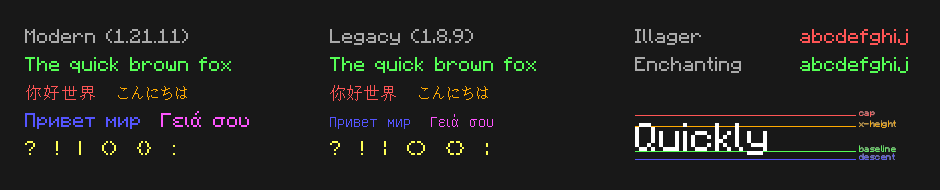
Minecraft text formatting, parsing, and rendering library. Features all the exact glyphs used ingame, for the fonts of both pre and post-1.13.
Language Support
| Language | Package | Registry |
|---|---|---|
| Rust | mctext |
crates.io |
| Python | mctext |
PyPI |
| JavaScript | @hexze/mctext |
npm |
Features
- Builder API - Fluent interface for constructing formatted text
- Color Support - All 16 named Minecraft colors plus RGB hex colors
- Style Handling - Bold, italic, underlined, strikethrough, obfuscated
- Font Rendering - Measure and render text with authentic Minecraft fonts
- Legacy Support - Parse
§formatting codes and JSON chat components
Font Showcase
Fonts Only
Looking for just the TTF files? Download them from the releases page:
minecraft-fonts-modern.zip- Latest Minecraft fonts (updated, cleaner look)minecraft-fonts-legacy.zip- Classic fonts for those who prefer pre-1.13minecraft-fonts-special.zip- Enchanting and Illager fonts
Usage
Rust
[dependencies]
mctext = "1.0"

# With legacy fonts:
mctext = { version = "1.0", features = ["legacy-fonts"] }
use mctext::{MCText, NamedColor};

let text = MCText::new()
    .span("Red ").color(NamedColor::Red)
    .then("Bold").color(NamedColor::Red).bold()
    .build();

for span in text.spans() {
    println!("{}: {:?}", span.text, span.color);
}
Python
pip install mctext
import mctext

text = mctext.MCText().span("Red ").color("red").then("Bold").color("red").bold().build()

for span in text.spans():
    print(f"{span.text}: {span.color}")
JavaScript
npm install @hexze/mctext
import init, { MCText } from '@hexze/mctext';

await init();

let text = new MCText().span("Red ").color("red").then("Bold").color("red").bold().build();

for (const span of text.spans()) {
    console.log(`${span.text}: ${span.color}`);
}
License
MIT