mdbook-content-collections
| Crates.io | mdbook-content-collections |
| lib.rs | mdbook-content-collections |
| version | 0.1.8 |
| created_at | 2025-11-27 17:19:26.604904+00 |
| updated_at | 2025-12-07 21:49:40.229548+00 |
| description | An mdBook preprocessor that provides Astro-like content collections with typed frontmatter, validation, and structured content indexing |
| homepage | https://github.com/saylesss88/mdbook-rss-feed |
| repository | https://github.com/saylesss88/mdbook-content-collections |
| max_upload_size | |
| id | 1954124 |
| size | 288,713 |
 T. Sawyer (saylesss88)
documentation
README
mdbook-content-collections
Astro-style Content Collections for mdBook, zero JavaScript, pure Rust, blazing fast.
Bring the utility of
Astro's Content Collections
to your mdBook projects. Automatically discover, parse, sort, and index all your
Markdown files with rich frontmatter, including previews, tags, collections,
drafts, and more, and get a single content-collections.json file in your built
book.
Perfect for blogs, documentation sites, personal wikis, or any mdBook project that needs a structured content index for dynamic themes, search, filtering, or RSS enhancements.
Example frontmatter:
---
title: Unencrypted BTRFS Impermanence with Flakes
date: 2025-11-27
author: saylesss88
collection: blog
tags: ["nixos", "btrfs", "impermanence"]
draft: false
---
And this is the generated json output, showing a few chapters for context:
{
  "entries": [
    {
      "author": "saylesss88",
      "collection": "blog",
      "date": "2025-11-27T00:00:00+00:00",
      "description": null,
      "draft": false,
      "path": "Nix_Pull_Requests_11.md",
      "preview_html": "<p><img src=\"images/gruv16.png\" alt=\"gruv16\" /></p><p><strong>Pull requests</strong> communicate changes...</p>",
      "tags": [
        "nixos",
        "nixpkgs"
      ],
      "title": "Nix Pull Requests"
    },
    {
      "author": "saylesss88",
      "collection": "blog",
      "date": "2025-11-24T00:00:00+00:00",
      "description": null,
      "draft": false,
      "path": "installation/unenc/unenc_impermanence.md",
      "preview_html": "<p>Figure 1: Impermanence Logo: Image of the Impermanence logo. Sourced from the</p><p><a href=\"https://github.com/nix-community/impermanence\">Impermanence repo</a></p><p>This guide is for an unencrypted setup, there are a few links at the end for\nencrypted setups. This guide follows the previous\n<a href=\"https://saylesss88.github.io/installation/unencrypted_setups.html\">minimal install guide</a>\nbut you should be able to adjust it carefully to meet your needs.</p>",
      "tags": [
        "nixos",
        "btrfs",
        "impermanence"
      ],
      "title": "Unencrypted BTRFS Impermanence with Flakes"
    },
Example truncated for brevity
Your theme or external tools can then consume this index to build blog listings, tag pages, feeds, or search indexes.
No extra build system. No Node.js. Just Rust + mdBook.
Features
-
Full frontmatter parsing (YAML)
-
Smart date parsing (
2025-11-24or RFC3339) -
Fallback to file modification time
-
Automatic HTML preview generation (first 3 paragraphs, cleaned)
-
Intelligent boilerplate stripping (skips TOCs, metadata blocks)
-
Supports collection, tags, draft, author, description
-
Draft filtering (
draft: true→ excluded in production if you filter) -
Sorted newest first
-
Outputs
content-collections.jsondirectly into your built book -
Works as a standalone mdBook preprocessor (just drop in
book.toml)
Installation
cargo install mdbook-content-collections
Version Check:
mdbook-content-collections --version
Usage
Add to your book.toml:
[preprocessor.content-collections]
renderers = ["html"]
That’s it.
Run as usual:
mdbook build
# or
mdbook serve
Your content index will be available at:
http://localhost:3000/content-collections.json
# or
https://your-site/content-collections.json
Outputs content-collections.json directly into your built book. (i.e.,
src/content-collections.json, and book/content-collections.json)
Frontmatter expectations
✔️ Frontmatter Expectations
Each chapter you want to index must use YAML frontmatter at the top of the file:
---
title: "My first post"
date: 2025-12-07
author: "Jane Doe"
description: "Short summary shown in lists."
collection: "blog"
tags:
  - rust
  - mdbook
draft: false
---

# My first post

Body content…
You can also use tags: ["rust", "mdbook"] if you prefer this syntax.
The frontmatter is mapped to this struct:
pub struct FrontMatter {
    pub title: String,
    pub date: Option<DateTime<Utc>>,
    pub author: Option<String>,
    pub description: Option<String>,
    pub collection: Option<String>,
    pub tags: Option<Vec<String>>,
    pub draft: Option<bool>,
}
Required vs Optional
-
title(required)- If parsing fails or there is no frontmatter, title falls back to the file
stem (e.g.
posts/hello-world.md→"hello-world")
- If parsing fails or there is no frontmatter, title falls back to the file
stem (e.g.
-
date(optional but strongly recommended)- Accepted formats:
- Full RFC 3339, for example
2025-12-07T10:30:00Z - Simple data
YYYY-MM-DD, for example2025-12-07
- Full RFC 3339, for example
- If
dateis missing or invalid, the file's modification time is used instead (if available) - Entries are sorted newest -> oldest by this value.
- Accepted formats:
-
author(optional)- Free-form string, passed through as-is into
ContentEntry.author
- Free-form string, passed through as-is into
-
description(optional)- Short summary you want to prefer for previews
- If missing, the body text is used instead when generating
preview_html
-
collection(optional)-
Free‑form bucket name such as
"blog","notes","changelog". -
Used downstream to group entries (for example into
collections.blogorcollections.noteson the loader side). -
If omitted, the entry just has collection: null in JSON.
-
-
tags(optional)-
YAML array of strings, for example
tags: ["rust", "mdbook"]. -
Missing tags become an empty
[]in the JSON.
-
-
draft(optional)-
Boolean flag
true/false. -
The index JSON includes
draftas given; consumers likemdbook-content-loadercan filter outdraft: trueentries before rendering.
-
Behavior with missing or invalid frontmatter
If the YAML frontmatter is missing or cannot be parsed, the file is still indexed with sensible defaults:
-
title: file stem. -
date: file modification time (if available), otherwise null. -
author: null. -
description: full markdown body. -
collection: null. -
tags:[]. -
draft:false.
The generated content-collections.json has one entries array, where each entry
is:
{
  "path": "relative/path.md",
  "title": "...",
  "date": "2025-12-07T00:00:00Z",
  "author": "Jane Doe",
  "description": "Short summary...",
  "collection": "blog",
  "tags": ["rust", "mdbook"],
  "draft": false,
  "preview_html": "<p>First paragraphs of the body…</p>"
}
preview_html is automatically derived from the markdown body: leading
boilerplate (title, TOC‑like blocks) is stripped, then up to the first 3
paragraphs / 800 characters are rendered to HTML.
Use Cases
-
Blog post listings
-
Tag pages
-
Author archives
-
Search indexing (pair with mdbook-searcher or Lunr)
-
Dynamic navigation
-
RSS feed enhancement (pair with mdbook-rss-feed)
-
Theme-powered collections (e.g. /blog, /notes, /til)
Remove frontmatter from rendered HTML
Why This Exists
Astro made content fun again. mdBook is amazing for documentation and long-form writing. But until now, it lacked a first-class way to query and list your content. This crate closes that gap. No more hardcoding post lists. No more fragile JS scraping. Just write Markdown with frontmatter, and get a powerful content API for free.
✔️ Click to Expand Example standalone Usage
We can take advantage of this generated content-collections.json to show a
rendered preview of your last modified content. This is just an example and not
production ready but pretty cool nonetheless.
Extend your theme/index.hbs scroll down and find the <main> element and
place the "content-collections-list" within it.
Find this code block in index.hbs:
<main>
    {{{ content }}}
    <!-- place "content-collections-list" snippet here-- >
</main>
And place the following code right below {{{ content }}}:
  <div id="content-collections-list" class="content-collections-list">
    <!-- Populated by mdbook-content-collections -->
  </div>

   <script>
    (function () {
      var indexUrl = window.location.origin + window.location.pathname.replace(/\/[^\/]*$/, '') + '/content-collections.json';

      if (window.location.protocol === 'file:') {
        indexUrl = 'content-collections.json';
      }

      fetch(indexUrl)
        .then(function (res) {
          if (!res.ok) throw new Error('Failed to load content-collections.json');
          return res.json();
        })
        .then(function (data) {
          if (!data || !Array.isArray(data.entries)) return;

          var container = document.getElementById('content-collections-list');
          if (!container) return;

          var entries = data.entries
            .filter(function (e) {
              return !e.draft && (!e.collection || e.collection === 'blog');
            })
            .slice(0, 10);

          if (entries.length === 0) {
            container.textContent = 'No posts yet.';
            return;
          }

          var list = document.createElement('ul');
          list.className = 'content-collections-items';

          entries.forEach(function (e) {
            var li = document.createElement('li');
            li.className = 'content-collections-item';

            var link = document.createElement('a');
            var htmlPath = e.path.replace(/\.md(?:own|arkdown)?$/i, '.html');
            link.href = htmlPath;
            link.textContent = e.title || e.path;

            var meta = document.createElement('div');
            meta.className = 'content-collections-meta';

            if (e.date) {
              var d = new Date(e.date);
              meta.textContent = d.toISOString().slice(0, 10);
            }

            var preview = document.createElement('div');
            preview.className = 'content-collections-preview';
            preview.innerHTML = e.preview_html || '';

            li.appendChild(link);
            if (meta.textContent) li.appendChild(meta);
            li.appendChild(preview);
            list.appendChild(li);
          });

          container.innerHTML = '';
          container.appendChild(list);
        })
        .catch(function (err) {
          console.warn('mdbook-content-collections:', err);
        });
    })();
  </script>
Now, your books landing page will have an extension above the prev-next chapter
buttons showing a rendered list/overview of your last modified content. Taken
from the generated content-collections.json:
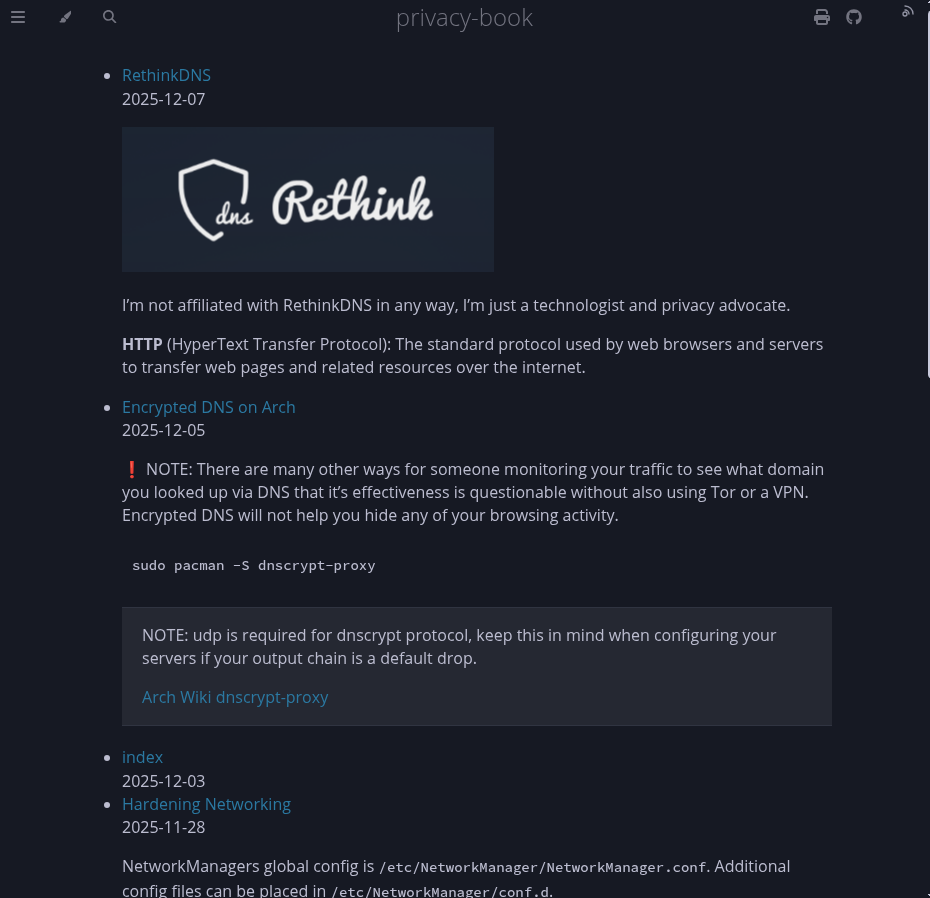
Example: “Latest posts” preview on your landing page
If you want a zero‑fetch setup, pair this crate with the companion preprocessor
mdbook-content-loader. That
preprocessor reads the generated content-collections.json at build time and
injects it into every page as window.CONTENT_COLLECTIONS, so your theme JS can
render widgets without any extra HTTP requests.
Project built using mdbook-content-collections
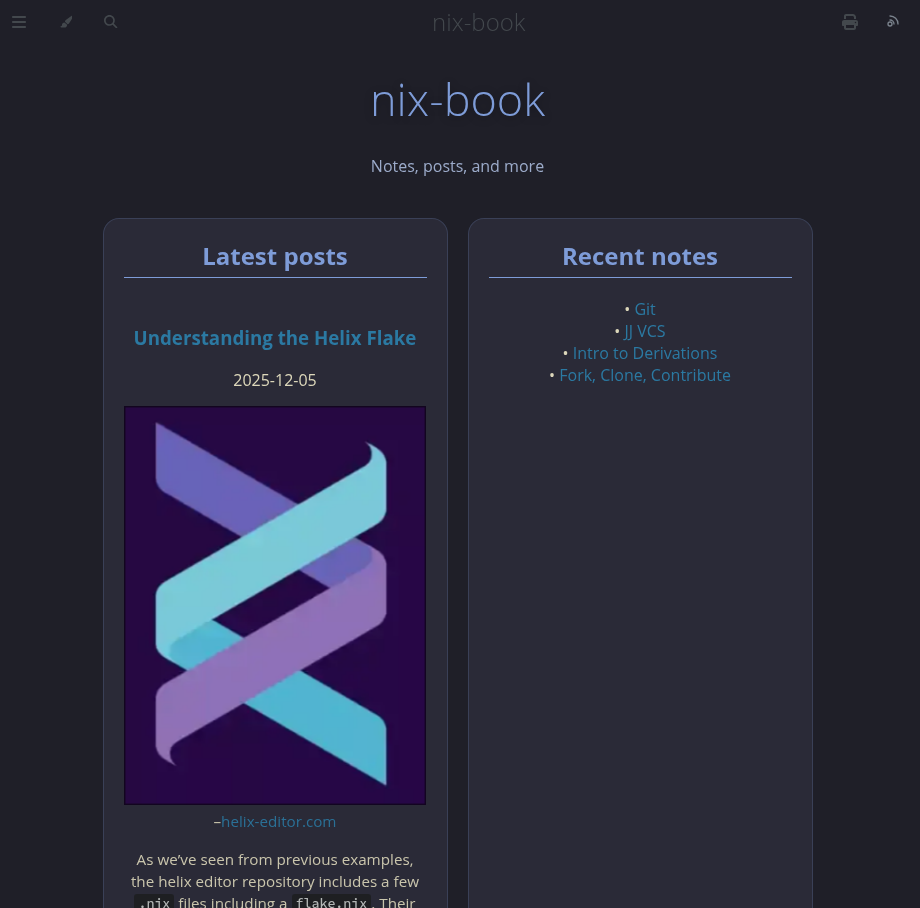
mdbook-kanagawa-theme shows
how to use content-collections.json to drive a dynamic landing page: it reads
the generated collections, builds cards for posts/notes based on frontmatter,
and injects them into index.md. All of the wiring (JS, HTML, CSS) lives in the
preprocessor and theme, so you can get a “Latest posts” layout without editing
theme/index.hbs yourself.
License
Inspired by Astro Content Collections · Powered by pulldown-cmark · Works great with mdbook-rss-feed, mdbook-frontmatter-strip, and mdbook-content-loader.