mdbook-kanagawa-theme
| Crates.io | mdbook-kanagawa-theme |
| lib.rs | mdbook-kanagawa-theme |
| version | 1.1.5 |
| created_at | 2025-11-29 15:52:25.400326+00 |
| updated_at | 2026-01-21 19:18:13.897215+00 |
| description | Stunning Kanagawa‑inspired interactive mdBook landing page with flexible layouts, rich theming, and a built‑in content collections showcase. |
| homepage | https://github.com/saylesss88/mdbook-kanagawa-theme |
| repository | https://github.com/saylesss88/mdbook-kanagawa-theme |
| max_upload_size | |
| id | 1956880 |
| size | 4,393,662 |
 T. Sawyer (saylesss88)
documentation
README
mdbook-kanagawa-theme
mdbook-kanagawa-theme provides an interactive, blog‑like landing page and
a full visual theme override for the HTML renderer. It does not replace
mdBook’s HTML backend, but it does replace the default theme/css/chrome.css
with a Kanagawa‑inspired variant. You can easily swap in any colorscheme you
like, with Dracula, Tokyo Night, and Catppuccin-Mocha example palettes included.
By tweaking per‑chapter frontmatter date, you can choose which pages are featured on the landing (for example, as “Latest Posts” or “Recent Notes”). Your book's structure stays the same, only your landing page is replaced. (This also works with no date listed by using timestamps).
mdBook's build-in theme selector still works, but each base theme is re-skinned with Kanagawa variables.
The landing page replaces index.md with a configurable side‑by‑side or
top-over-bottom layout:
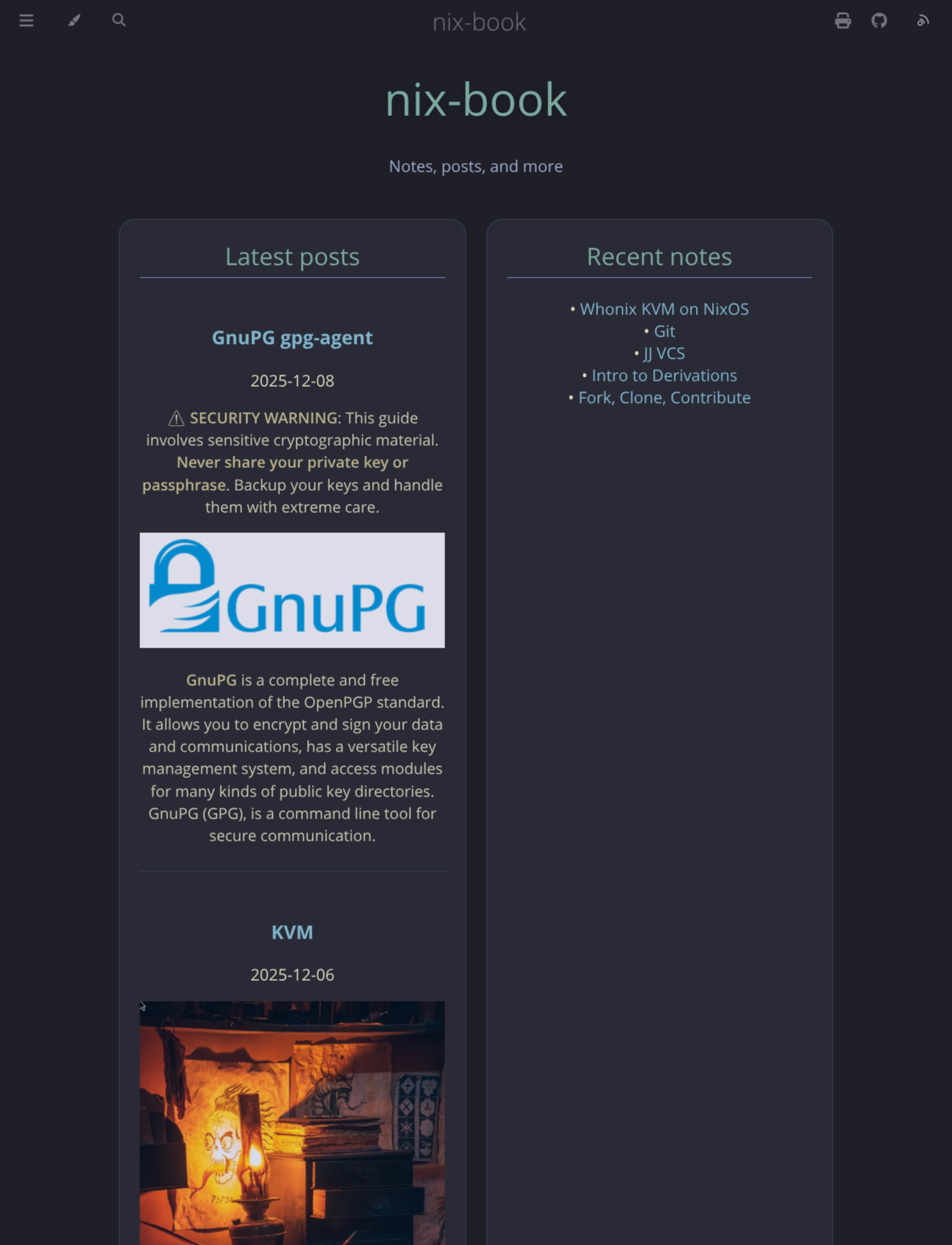
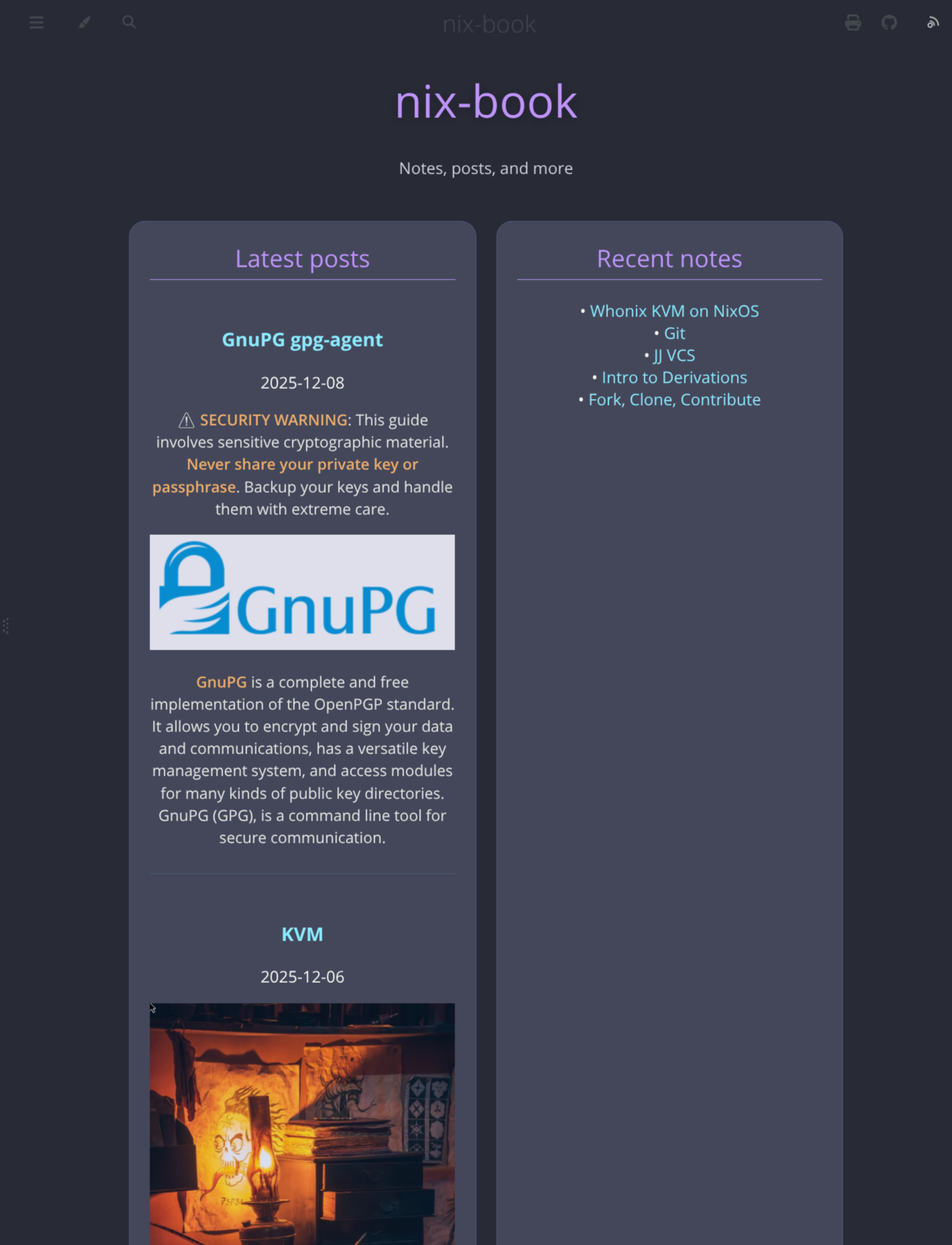
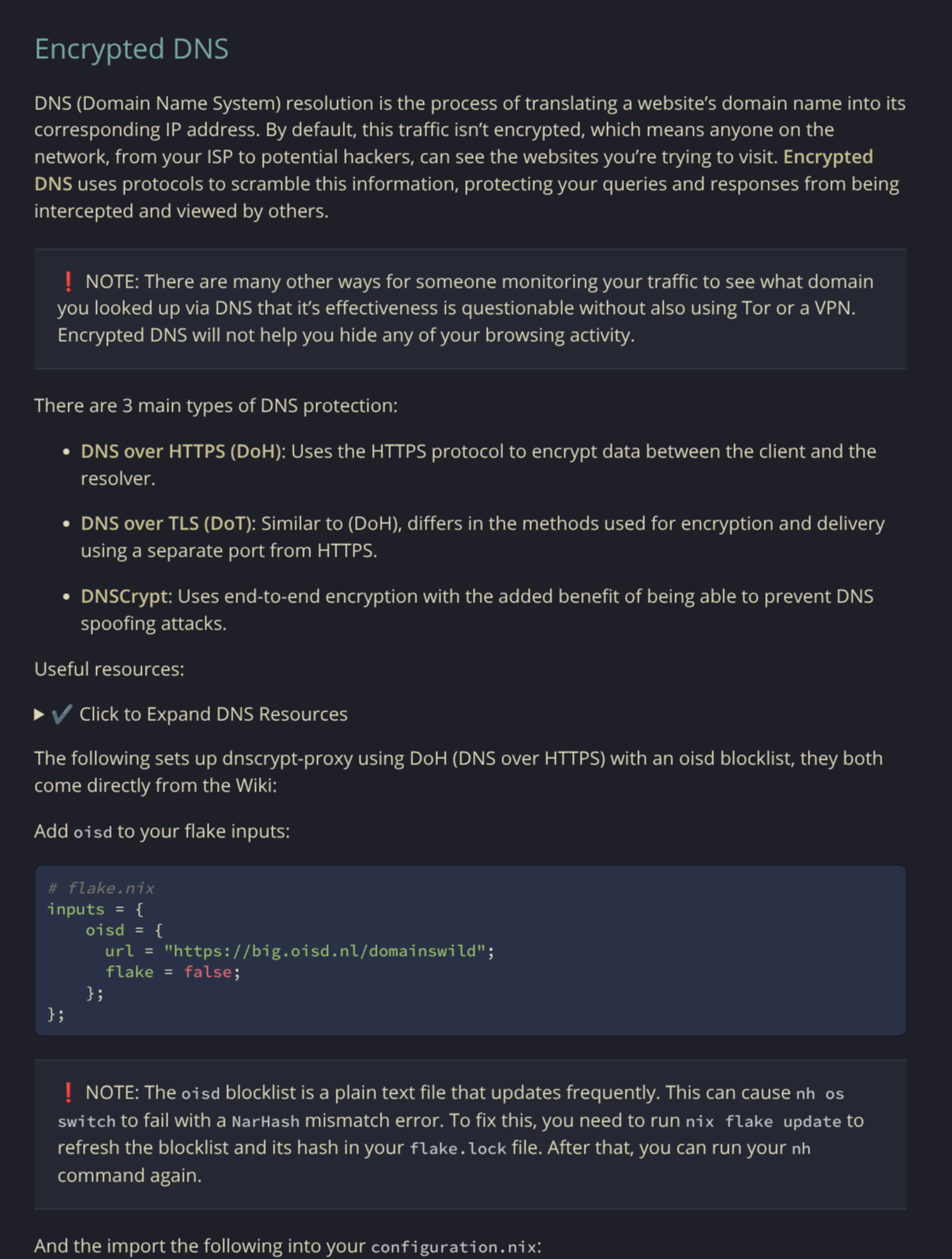 Live Demo / Showcase
✔️ Dracula
✔️ Tokyo-Night
✔️ Catppuccin-Mocha
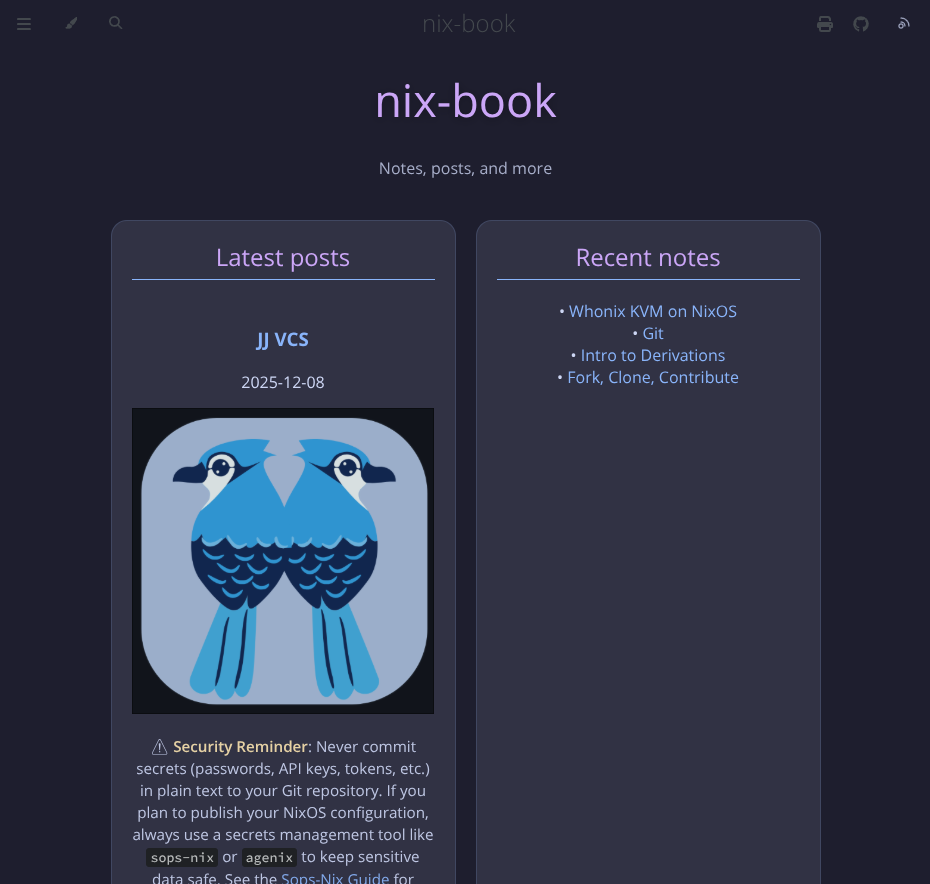
- Latest Posts
- Recent Notes
- Popular Tags
The content comes from:
Together they generate content-collections.json and expose a
window.CONTENT_COLLECTIONS global that this theme uses to render the cards.
✔️ Popular tags Example
You can click on the tag to bring up the associated chapters.

✔️ Content Example
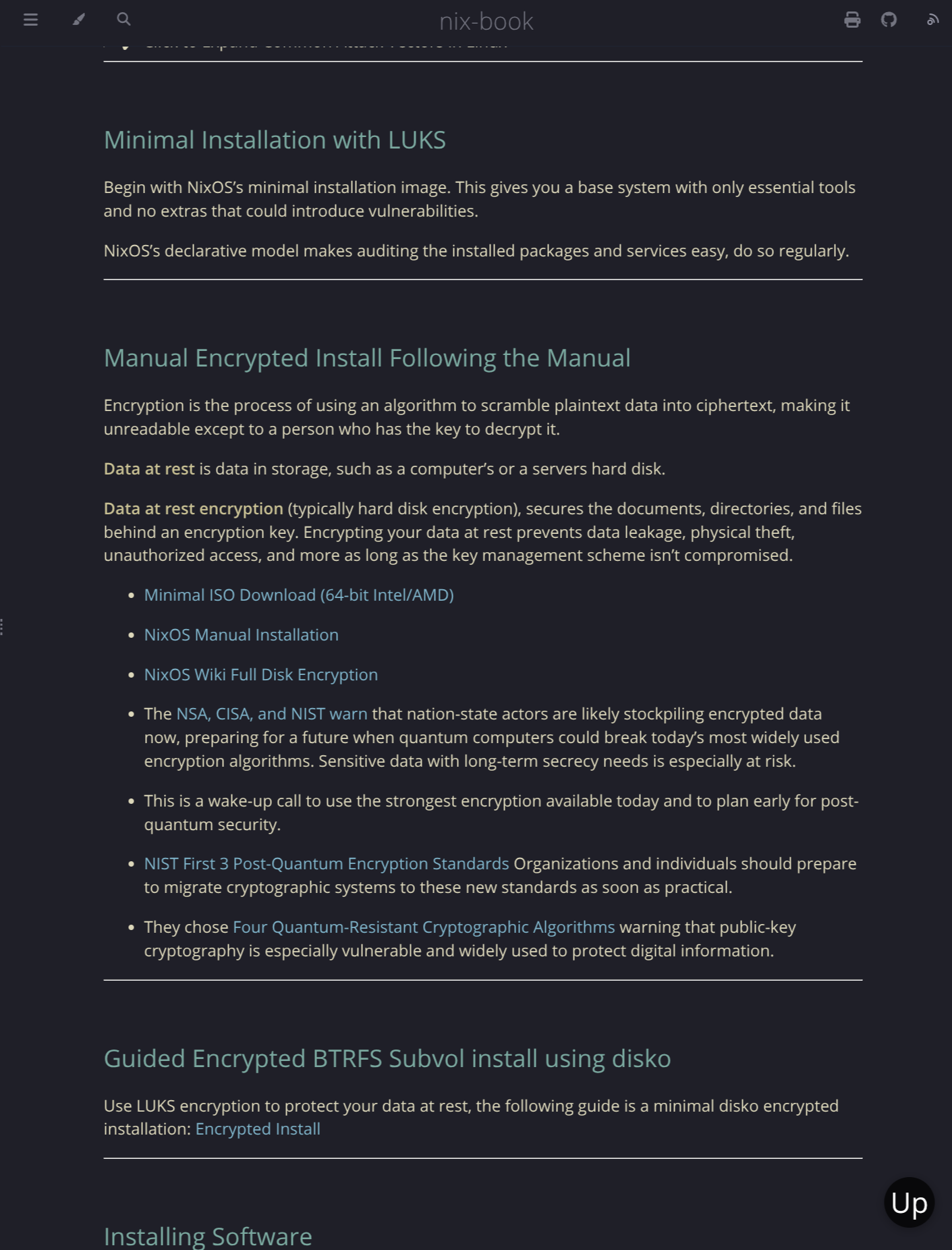
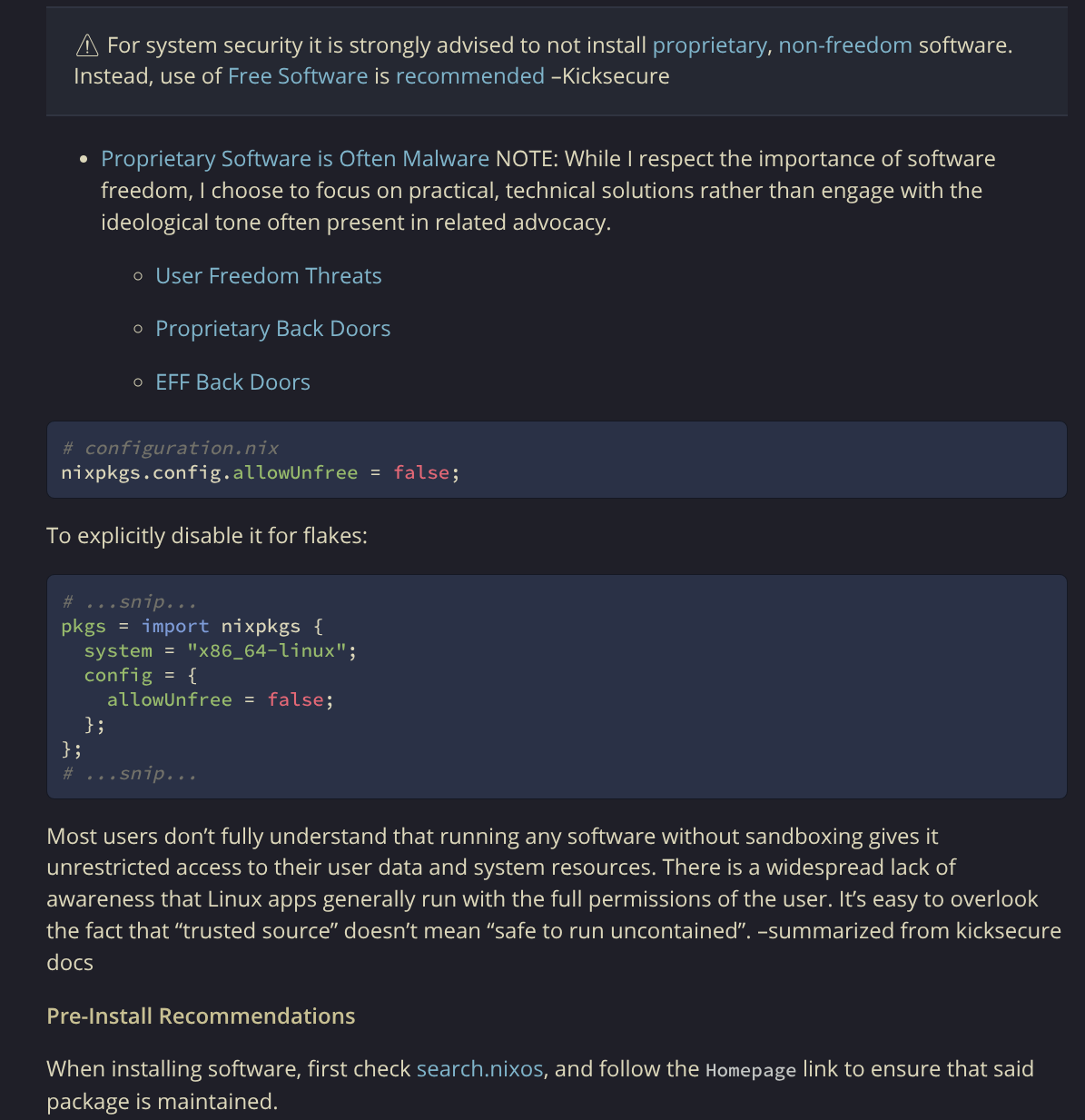
✔️ Code block kanagawa syntax highlighting
Installation
This section assumes that you already have mdbook installed.
cargo install mdbook-kanagawa-theme
# Install the themes dependencies
cargo install mdbook-content-collections
cargo install mdbook-content-loader
# You'll probably want to strip the frontmatter
# cargo install mdbook-frontmatter-strip
Version check:
mdbook-kanagawa-theme --version
mdbook-kanagawa-theme -V
Add the preprocessor to your book.toml. (I've included the other dependencies
for clarity, you'll still want to set your site-url and whatever else your
site requires):
[book]
title = "My Kanagawa Book"
authors = ["Your Name"]
description = "Docs with a configurable Kanagawa-inspired landing page"

[build]
# Optional, just to keep builds tidy
build-dir = "book"

[preprocessor.content-collections]
renderers = ["html"]

[preprocessor.content-loader]
command = "mdbook-content-loader"
renderers = ["html"]
after = ["content-collections"]
# inject_all = true

[preprocessor.kanagawa-theme]
renderers = ["html"]
before = ["content-loader", "content-collections"]
# Landing page text
landing_title    = "My Docs"
landing_subtitle = "Notes, posts, and more"

# Column headers
header_latest = "Latest posts"
header_notes  = "Recent notes"
header_tags   = "Popular tags"


# Use bigger cards and top-over-bottom layout in full-screen view
# card_layout = "wide"  # or "compact" # side-by-side layout

# Optional: prepend an @import to the generated theme/css/chrome.css
# Path is relative to the built book root (same as other mdBook theme files).
# css_import = "/assets/dracula.css"
# css_import = "/assets/tokyo-night.css"
# css_import = "/assets/catppuccin-mocha.css"

# Optional: if true, the preprocessor will NOT write theme/css/chrome.css
# (use this if you want to maintain your own chrome.css instead)
# disable_builtin_css = true

# Optional: prepend an @import to the code theme CSS
# code_css_import = "theme/custom-code.css"

# Optional: support mdbook-kanagawa-theme in footer
# support_footer = true # Displays "Made with mdbook-kanagawa-theme" in footer and links to the repo
# Optionally override to a different link
# support_footer_href = "https://github.com/wolfpack1/bigDog's-project"
# support_footer_text = "Made in the U.S.A."


[output.html]
# Do NOT use additional-css for the main theme override.
# default-theme still controls which theme class is set (rust, coal, navy, …)
# Kanagawa overrides the "navy" pallette specifically
default-theme = "navy"
preferred-dark-theme = "navy"
# Also add kanagawa syntax highlightiing to the code blocks
additional-css = ["theme/css/kanagawa-code.css"]
You can change the header names to whatever you prefer.
On each build, the preprocessor:
-
Overwrites
index.mdwith the Kanagawa landing page HTML. -
Writes
theme/css/chrome.css, built from a template copy of mdBook’s ownchrome.cssplus Kanagawa variables and extra styles.
You do not need additional-css = ["theme/kanagawa.css"]; the theme is
injected by replacing theme/css/chrome.css directly. This was required for the
theme to be respected in the latest mdbook versions.
The additional-css shown above is strictly for the code block syntax
highlighting and is completely optional.
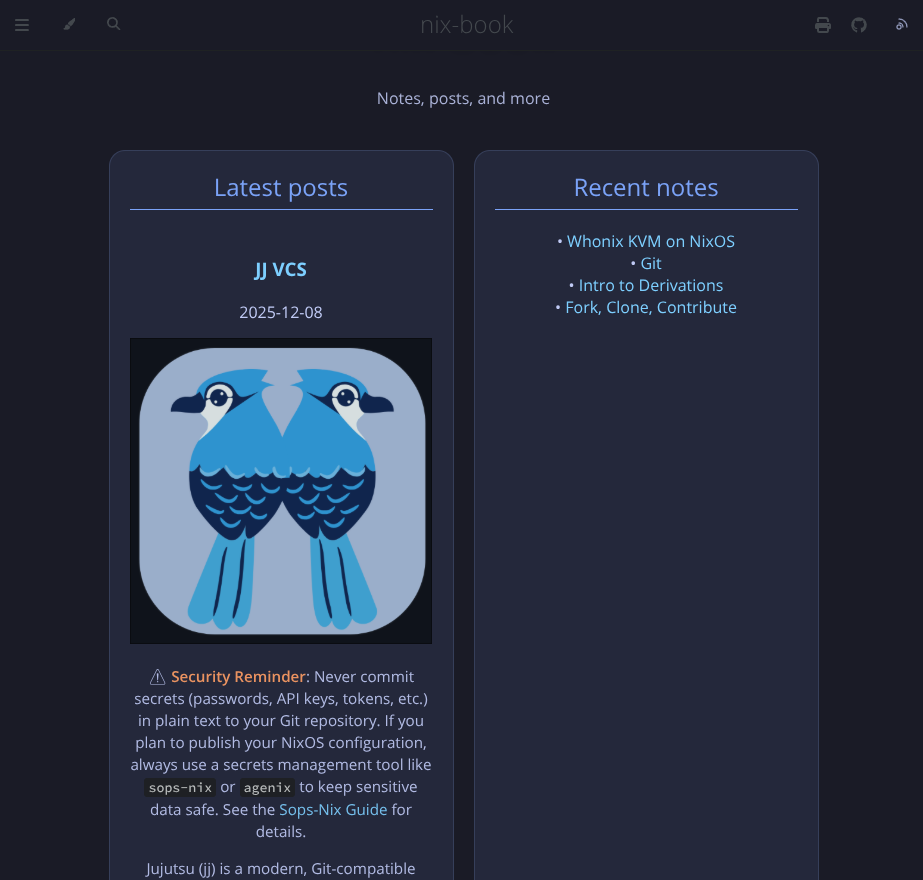
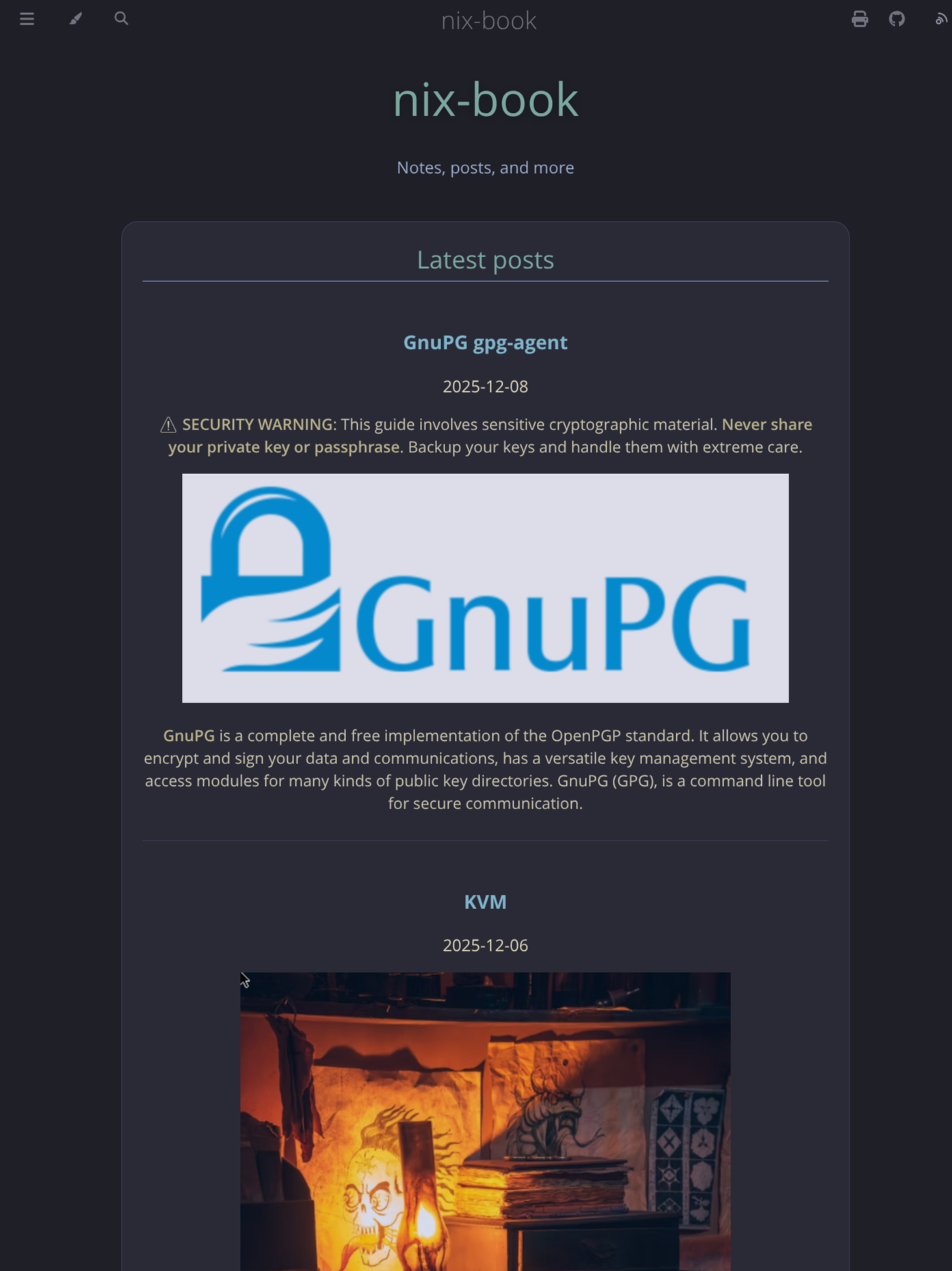
✔️ card_layout = "wide"
This only changes the cards width on bigger screens, the look is the same for phones:
Usage
The theme can use a blank or titled index.md for the landing page, you can
create one by adding the following to your SUMMARY.md as the first line:
[](index.md)
Or
[Introduction](index.md)
Kanagawa syntax highlighting (optional)
In addition to the main Kanagawa UI theme, the preprocessor can also generate a matching code theme for fenced code blocks. When enabled, it writes:
theme/css/chrome.css– the Kanagawa layout and UI chrome (as before)theme/css/kanagawa-code.css– Kanagawa-flavored syntax highlighting targeting mdBook’s defaulthighlight.jsclasses (such as.hljs,.hljs-keyword,.hljs-string,.hljs-comment, etc.)
To apply the code theme, add it to your HTML output configuration:
[output.html]
additional-css = ["theme/css/kanagawa-code.css"]
chrome.css is still injected automatically by the preprocessor; only the code
theme needs to be listed in additional-css.
Frontmatter
- Adding the
dateis strongly recommended but not necessary, entries with nodatefall back to timestamps.
Latest posts
The "Latest posts" card is tied to the blog collection.
This theme works by filtering and sorting your frontmatter. For example, to add links/overviews/pics to the "Latest posts" card, your frontmatter would look like this:
---
title: Nix Pull Requests
date: 2025-11-27
author: saylesss88
collection: "blog"
tags: ["nixos", "nixpkgs"]
draft: false
---
Now the chapter with the above frontmatter will be added to the "Latest posts" card.
If you place an image above the first header, it will be shown in this card along with the date and overview. I may add the author to each chapter shown in "Latest posts" in the future but currently the author isn't listed.
Recent notes
The "Recent notes" card is tied to the notes collection:
---
title: Intro to Derivations
date: 2025-11-21
author: saylesss88
collection: "notes"
tags: ["notes", "derivations"]
---
Now this chapter will be added to the "Recent notes" card. This card only lists
the links rather than the complete overview like "Latest posts" does. The
frontmatter is fairly forgiving but in this case, "notes" must be quoted.
Popular tags
Popular tags is automatically populated from the tags key in the frontmatter.
You can click the tag to bring up the overviews of the chapters associated with the said tag.
Run mdbook build, and the theme is automatically injected and applied.
Overriding the palette (Dracula, Tokyo-Night, etc.)
Dracula is just an example, the idea is to allow overriding to whatever you
prefer, just change the values in the provided dracula.css to what you like.
✔️ Dracula Override
You can still override the color palette while keeping the Kanagawa layout.
Create your-book/src/assets/dracula.css:
/* src/assets/dracula.css */

:root.coal,
.coal,
html.coal,
body.coal {
  /* Core page colors */
  --bg: #282a36;
  --bg-alt: #44475a;
  --fg: #f8f8f2;
  --fg-light: #cfcfd9;

  --code-bg: #363a4f;

  /* Waves / accent palette */
  --wave-1: #282a36;
  --wave-2: #343746;
  --wave-3: #44475a;

  --accent: #bd93f9; /* main accent (purple) */
  --red: #ff5555;
  --blue: #8be9fd;

  /* Sidebar */
  --sidebar-bg: #282a36;
  --sidebar-fg: #f8f8f2;
  --sidebar-non-existant: #6272a4;
  --sidebar-active: #bd93f9;
  --sidebar-spacer: #44475a;

  /* Content links / headings / bold */
  --links: #8be9fd; /* cyan links */
  --heading: #bd93f9; /* purple headings */
  --sidebar-title: #bd93f9; /* purple headings */
  --bold: #ffb86c; /* warm emphasis */

  /* Optional extras */
  --quote-bg: #343746;
  --quote-border: #44475a;
  --table-header-bg: #44475a;
  --table-alternate-bg: #343746;
}

.coal pre code.hljs,
.coal code.hljs,
.coal .hljs {
  background: var(--code-bg) !important;
  color: var(--fg) !important;
}
When you run mdbook build this file will be placed in
your-book/book/assets/dracula.css.
This only overrides the coal color-scheme from the dropdown. The other themes will still use the Kanagawa defaults.
Also override the code blocks with dracula syntax highlighting, create a
your-book/theme/css/dracula-code.css:
/* theme/css/dracula-code.css */

/* Base code block look: distinct but still Dracula */
.hljs {
  background: #282a36 !important; /* Dracula background */
  color: #f8f8f2 !important; /* Dracula foreground */
}

pre code.hljs,
code.hljs {
  background: #282a36 !important;
  color: #f8f8f2 !important;
}

/* Tokens */
.hljs-keyword,
.hljs-selector-tag,
.hljs-type {
  color: #ff79c6 !important; /* pink */
}

.hljs-string,
.hljs-attribute,
.hljs-attr {
  color: #f1fa8c !important; /* yellow */
}

.hljs-number,
.hljs-literal {
  color: #bd93f9 !important; /* purple */
}

.hljs-variable,
.hljs-tag,
.hljs-regexp,
.hljs-symbol,
.hljs-bullet {
  color: #8be9fd !important; /* cyan */
}

.hljs-comment {
  color: #6272a4 !important;
  font-style: italic !important;
}

/* Block code only */
pre code.hljs {
  background: var(--code-bg); /* or #24283b if you prefer */
  color: #c0caf5;
  border: 1px solid rgba(0, 0, 0, 0.5);
  border-radius: 6px;
}

/* Optional: make inline highlighted code look normal */
:not(pre) > code.hljs {
  background: transparent;
  border: none;
  padding: 0;
}
And in book.toml:
[preprocessor.kanagawa-theme]
renderers = ["html"]
before = ["content-loader", "content-collections"]

landing_title = "My mdBook"
landing_subtitle = "Notes, posts, and more"

# These strings can be changed to whatever you prefer
header_latest = "Latest posts"
header_notes = "Recent notes"
header_tags = "Popular tags"

css_import = "/assets/dracula.css"
disable_builtin_css = false

[output.html]
# automatically switch to the override
default-theme = "coal"
additional-css = ["kanagawa-code.css", "dracula-code.css"]
With this setup:
-
mdBook still builds the book as usual, and
mdbook-kanagawa-themegeneratestheme/css/chrome.csswith the Kanagawa layout and variable hooks. -
The preprocessor adds an
@import "/assets/dracula.css";(fromcss_import) at the top of that generatedchrome.css, so your Dracula file runs after the built‑in variable defaults. -
Because
dracula.cssredefines the same CSS custom properties used by the Kanagawa theme (--bg,--fg,--accent, sidebar colors, etc.), the page keeps the Kanagawa layout and landing page, but all colors for thecoaltheme class come from your Dracula palette instead. Kanagawa provides the layout and default palette. -
The dracula theme only overrides the
coaltheme from the dropdown, this way you can easily switch between the normal themes with dracula and kanagawa added.
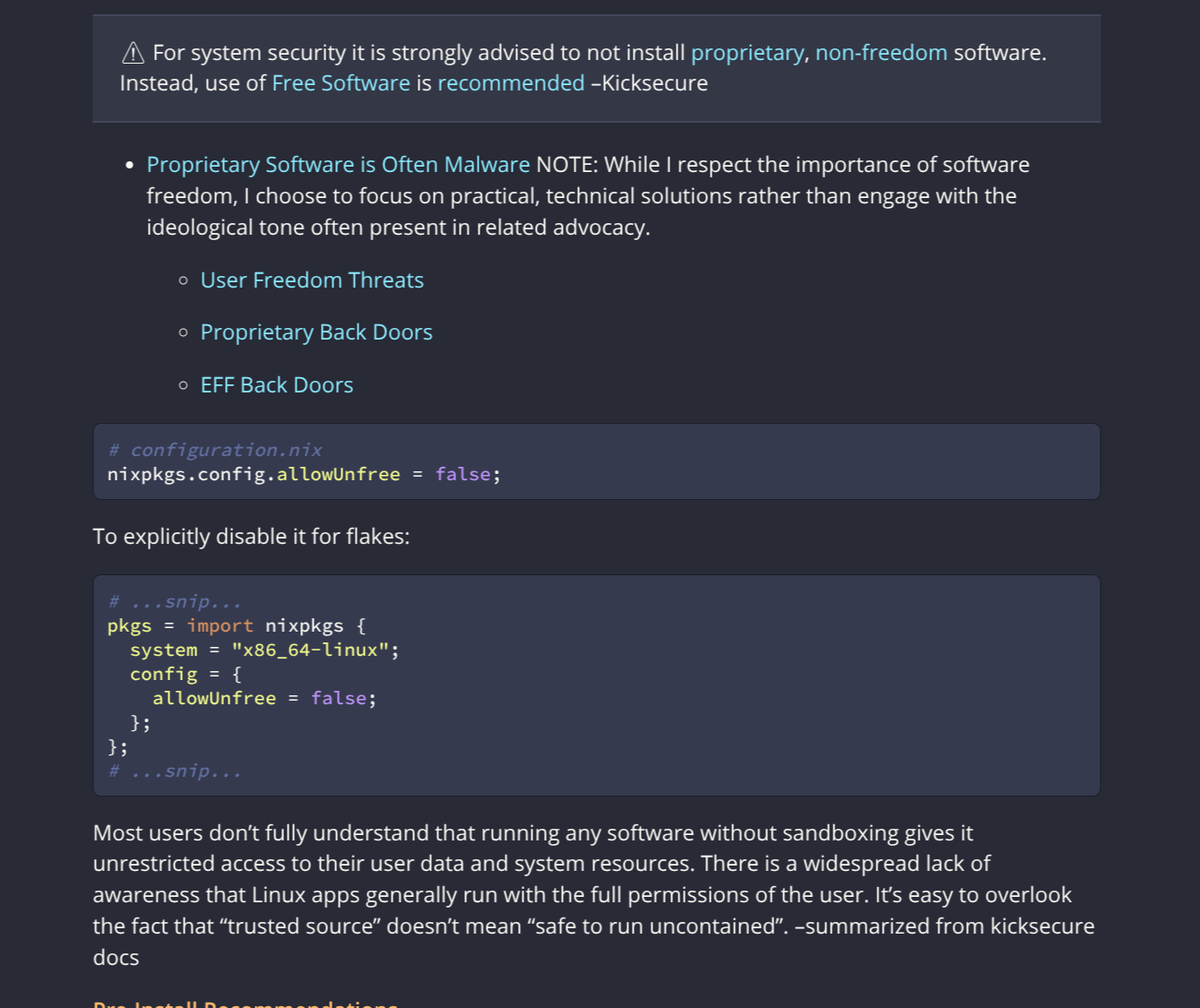
Tokyo-Night
✔️ Tokyo-Night Override
Create your-book/src/assets/tokyo-night.css:
/* src/assets/tokyo-night.css */

:root.coal,
.coal,
html.coal,
body.coal {
  /* Core page colors (Tokyo Night-ish) */
  --bg: #1a1b26;
  --bg-alt: #24283b;
  --fg: #c0caf5;
  --fg-light: #a9b1d6; /* lighter foreground */
  --code-bg: #292e42; /* slightly brighter/darker than card */

  /* Waves / accent palette */
  --wave-1: #1a1b26; /* deepest background */
  --wave-2: #24283b; /* normal background */
  --wave-3: #292e42; /* slightly raised panels */

  --accent: #7aa2f7; /* main accent (blue) */
  --red: #f7768e; /* error / destructive */
  --blue: #7dcfff; /* secondary accent / info */

  /* Sidebar */
  --sidebar-bg: #1a1b26;
  --sidebar-fg: #c0caf5;
  --sidebar-non-existant: #565f89; /* dimmed items */
  --sidebar-active: #7aa2f7;
  --sidebar-spacer: #24283b;

  /* Content links / headings / bold */
  --links: #7dcfff; /* cyan-ish links */
  --heading: #7aa2f7; /* blue headings */
  --sidebar-title: #7aa2f7; /* blue sidebar-title */
  --bold: #ff9e64; /* warm emphasis */

  /* Optional extras */
  --quote-bg: #24283b;
  --quote-border: #292e42;
  --table-header-bg: #292e42;
  --table-alternate-bg: #24283b;
}
/* Make code blocks use the dedicated code background on coal theme */
.coal pre code.hljs,
.coal code.hljs,
.coal .hljs {
  background: var(--code-bg) !important;
  color: var(--fg) !important;
}
Add tokyo-night code block syntax highlighting, create a
your-book/theme/css/tokyo-night-code.css:
/* theme/css/tokyo-night-code.css */

/* Base code block look: a bit lighter than page bg */
.hljs {
  background: #24283b; /* Tokyo Night panel */
  color: #c0caf5;
}

pre code.hljs,
code.hljs {
  background: #24283b; /* Tokyo Night panel */
  color: #c0caf5;
}

/* Token colors */
.hljs-keyword,
.hljs-selector-tag,
.hljs-type {
  color: #bb9af7 !important; /* purple */
}

.hljs-string,
.hljs-attribute,
.hljs-attr {
  color: #9ece6a !important; /* green */
}

.hljs-number,
.hljs-literal {
  color: #ff9e64 !important; /* orange */
}

.hljs-variable,
.hljs-tag,
.hljs-regexp,
.hljs-symbol,
.hljs-bullet {
  color: #7dcfff !important; /* cyan-ish / accent */
}

.hljs-comment {
  color: #565f89 !important;
  font-style: italic !important;
}

/* Block code only */
pre code.hljs {
  background: var(--code-bg); /* or #24283b if you prefer */
  color: #c0caf5;
  border: 1px solid rgba(0, 0, 0, 0.5);
  border-radius: 6px;
}

/* Optional: make inline highlighted code look normal */
:not(pre) > code.hljs {
  background: transparent;
  border: none;
  padding: 0;
}
Add this to your book.toml along with what's been shown so far. The overrides
only apply to the coal theme from the dropdown:
css_import = "/assets/tokyo-night.css"
disable_builtin_css = false

[output.html]
# automatically switch to the override
default-theme = "coal"
additional-css = ["kanagawa-code.css", "tokyo-night-code.css"]
- The other themes will still use the Kanagawa defaults.
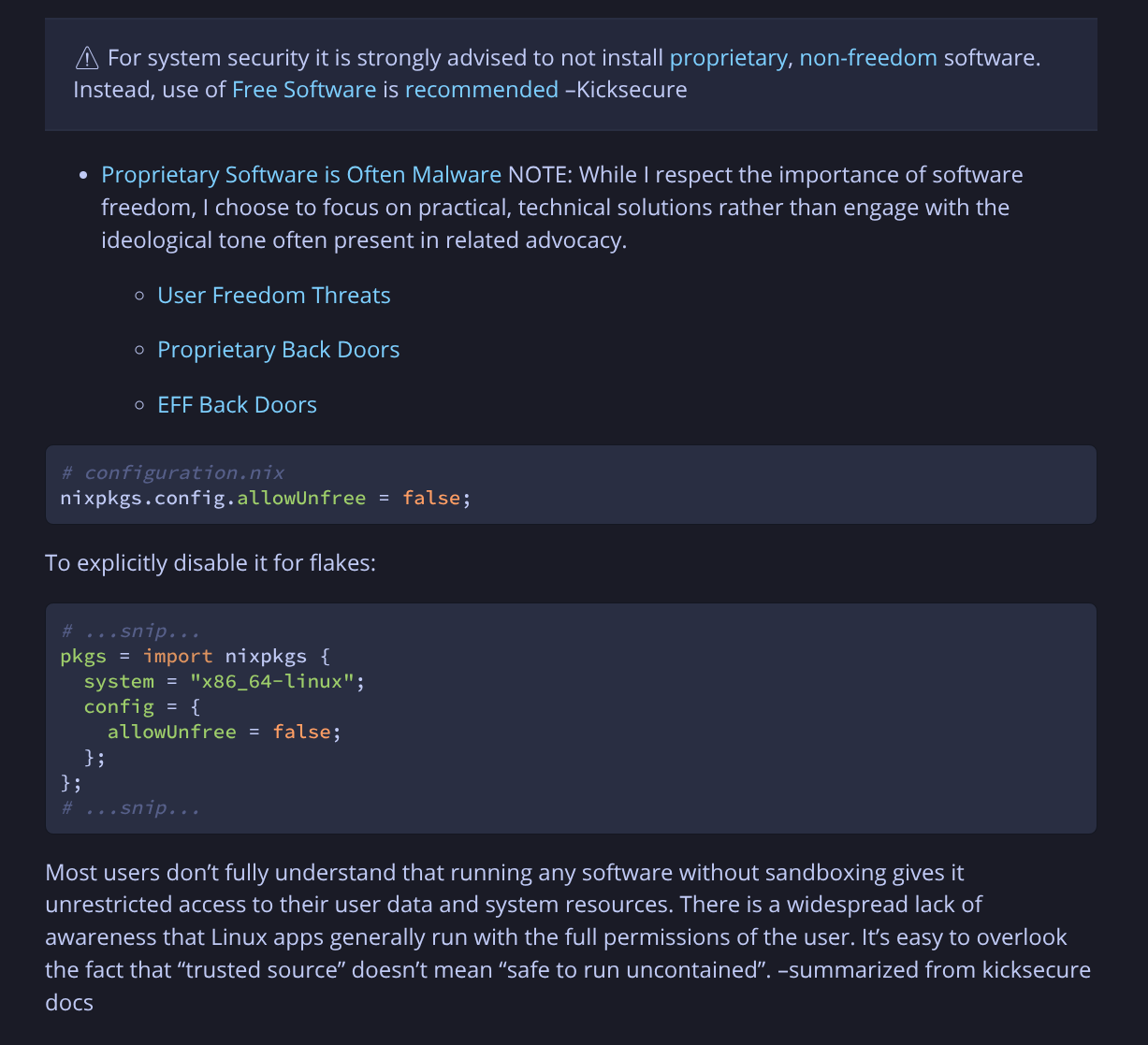
Catppuccin Mocha
✔️ Catppuccin-Mocha Override
Create your-book/src/assets/catppuccin-mocha.css
/* src/assets/catppuccin-mocha.css */

:root.coal,
.coal,
html.coal,
body.coal {
  /* Core page colors (Catppuccin Mocha-inspired) */
  --bg: #1e1e2e; /* base */
  --bg-alt: #313244; /* surface0 */
  --fg: #cdd6f4; /* text */
  --fg-light: #a6adc8; /* subtext1 */
  --code-bg: #45475a; /* code block bg */

  /* Waves / accent palette */
  --wave-1: #1e1e2e; /* base */
  --wave-2: #313244; /* surface0 */
  --wave-3: #45475a; /* surface1 */

  --accent: #89b4fa; /* blue */
  --red: #f38ba8; /* red */
  --blue: #89b4fa; /* blue */

  /* Sidebar */
  --sidebar-bg: #1e1e2e; /* base */
  --sidebar-fg: #cdd6f4; /* text */
  --sidebar-non-existant: #6c7086; /* overlay1 */
  --sidebar-active: #89b4fa; /* blue */
  --sidebar-spacer: #313244; /* surface0 */

  /* Content links / headings / bold */
  --links: #89b4fa; /* blue links */
  --heading: #cba6f7; /* mauve headings */
  --sidebar-title: #cba6f7; /* mauve sidebar-titles */
  --bold: #f9e2af; /* yellow emphasis */

  /* Optional extras */
  --quote-bg: #313244; /* surface0 */
  --quote-border: #45475a; /* surface1 */
  --table-header-bg: #45475a; /* surface1 */
  --table-alternate-bg: #313244; /* surface0 */
}

.coal pre code.hljs,
.coal code.hljs,
.coal .hljs {
  background: var(--code-bg) !important;
  color: var(--fg) !important;
}
Add this to your book.toml along with what's been shown so far. The overrides
only apply to the coal theme from the dropdown:
Also apply catppuccin-mocha syntax highlighting for code blocks:
Create your-book/theme/css/catppuccin-mocha-code.css:
/* theme/css/catppuccin-mocha-code.css */

/* Base code block look: a bit lighter than page bg */
.hljs {
  background: #313244; /* surface0 */
  color: #cdd6f4;
}

pre code.hljs,
code.hljs {
  background: #313244; /* surface0 */
  color: #cdd6f4;
}

/* Tokens */
.hljs-keyword,
.hljs-selector-tag,
.hljs-type {
  color: #cba6f7 !important; /* mauve */
}

.hljs-string,
.hljs-attribute,
.hljs-attr {
  color: #a6e3a1 !important; /* green */
}

.hljs-number,
.hljs-literal {
  color: #fab387 !important; /* peach */
}

.hljs-variable,
.hljs-tag,
.hljs-regexp,
.hljs-symbol,
.hljs-bullet {
  color: #f38ba8 !important; /* red/pink */
}

.hljs-comment {
  color: #585b70 !important;
  font-style: italic !important;
}

/* Block code only */
pre code.hljs {
  background: var(--code-bg); /* or #24283b if you prefer */
  color: #c0caf5;
  border: 1px solid rgba(0, 0, 0, 0.5);
  border-radius: 6px;
}

/* Optional: make inline highlighted code look normal */
:not(pre) > code.hljs {
  background: transparent;
  border: none;
  padding: 0;
}
css_import = "/assets/catppuccin-mocha.css"
disable_builtin_css = false

[output.html]
# automatically switch to the override
default-theme = "coal"
additional-css = [
	"theme/css/kanagawa-code.css",
	"theme/css/catppuccin-mocha-code.css",
]
-
"theme/css/kanagawa-code.css"isn't required. -
The other themes continue to use the Kanagawa palette.
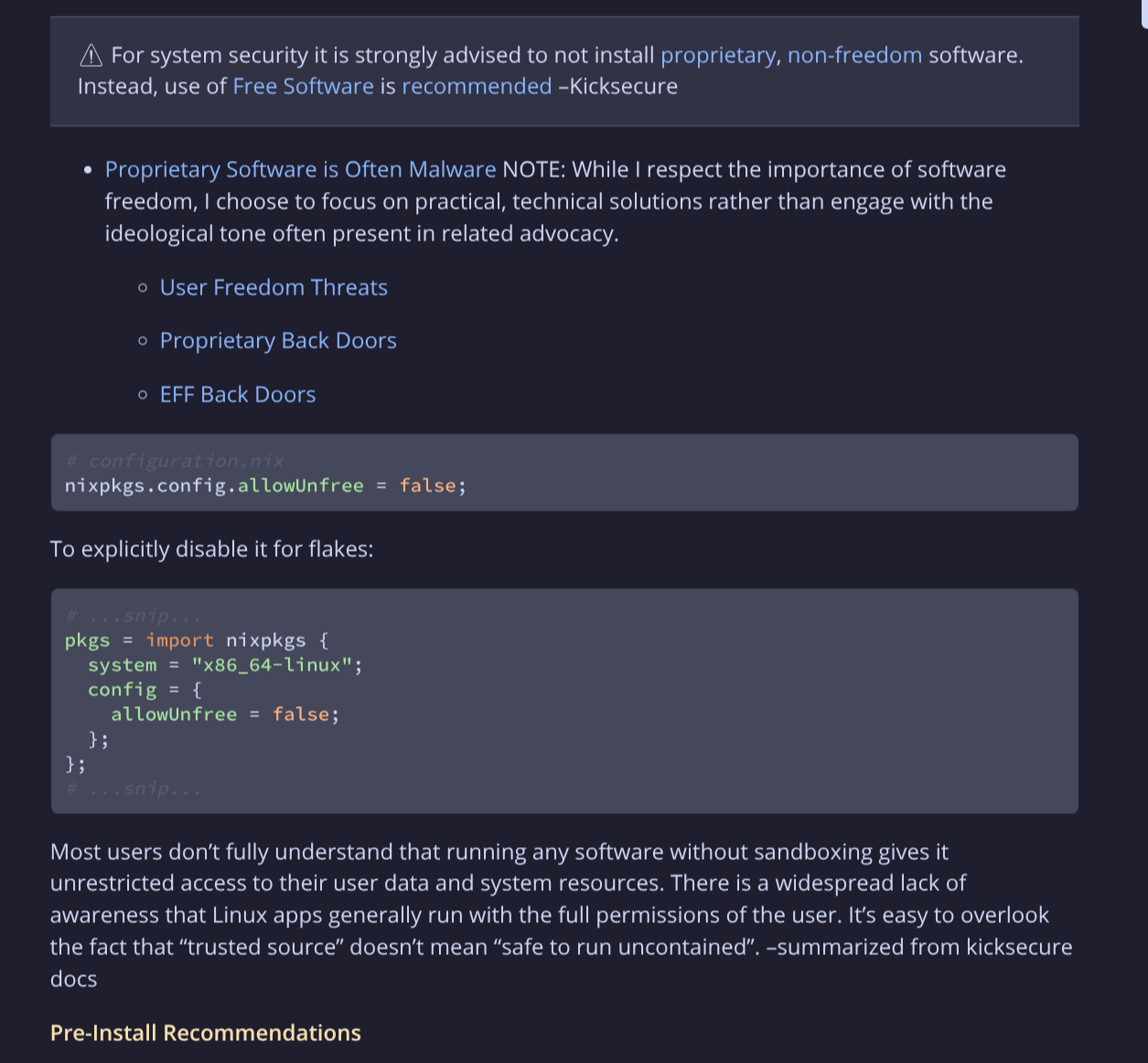
Light/Dark and default-theme behavior
Because this crate replaces theme/css/chrome.css, it effectively owns the
visual theme for all built‑in modes (light, rust, coal, navy). The
mdBook theme dropdown and your default-theme / preferred-dark-theme still
control which class is applied to the page, but the palette for each of those
classes is defined by the Kanagawa (or Dracula/Tokyo-Night/Catppuccin
overridden) variables.
Stripping the Frontmatter
mdBook does not parse or strip YAML frontmatter, so the raw block (e.g. any YAML
keys like title:, date:, etc.) appears in the HTML.
To avoid this, you can use: