metapac
| Crates.io | metapac |
| lib.rs | metapac |
| version | 0.9.0 |
| created_at | 2024-10-20 20:40:50.647287+00 |
| updated_at | 2026-01-25 14:01:24.632055+00 |
| description | multi-backend declarative package manager |
| homepage | |
| repository | https://github.com/ripytide/metapac |
| max_upload_size | |
| id | 1416617 |
| size | 286,946 |
 InnocentZero (InnocentZero)
documentation
README
metapac
multi-backend declarative package manager
metapac allows you to maintain a consistent set of packages and repos,
across multiple machines. It also makes setting up a new system with your
preferred packages and repos from your preferred package managers much
easier.
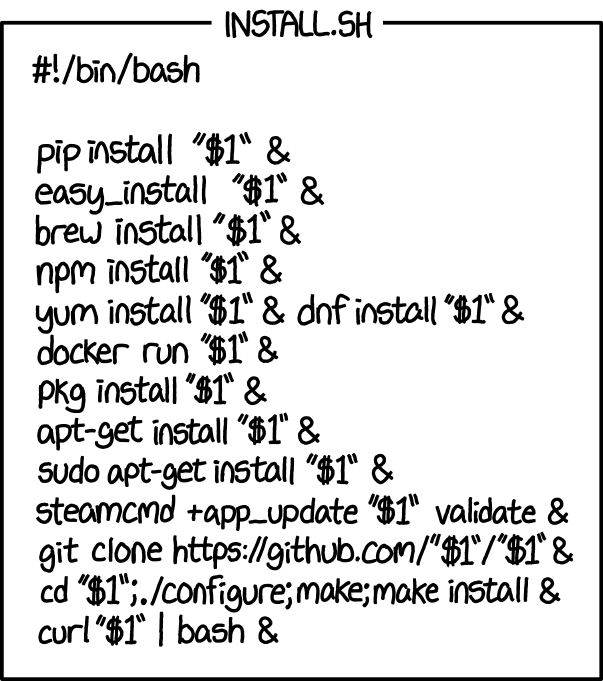
Obligatory XKCDs

Installation
With Cargo
cargo install metapac
With Arch User Repository
paru -S metapac
Meta
metapac is a meta package manager, that means it does not directly
implement the functionality to install packages on your system, instead it
provides a standardised interface for installing packages from other
package managers. See the Supported Backends section
for a list of the currently supported backend package managers.
Declarative
metapac is also a declarative package manager, that means that you
declare in .toml group files the packages and repos you would like
installed on your system and then run one of the metapac commands which
read these group files and then operate on your system to do some function
such as install packages and repos in your group files that are not present
on your system yet (metapac sync), or remove packages and repos present
on your system but not in your group files (metapac clean).
The group files are then stored with your other system configuration files and so can be tracked with version control.
Usage
Enable backends
By default all backends are disabled. Enable the backends you want
metapac to manage in the config file. See the Config section
for more details.
Migrating a default system into metapac
Run metapac unmanaged and save the output into a group file in
metapac's groups/ folder, see the Group Files
section for the exact location of this folder on your operating system.
For example, on linux:
mkdir -p ~/.config/metapac/groups
metapac unmanaged > ~/.config/metapac/groups/all.toml
Now metapac won't try to remove any of your explicitly installed packages
when you run metapac clean.
[!CAUTION] If you run
metapac cleanwithout first configuring your group files with the packages you want installed thenmetapacwill attempt to remove all of your packages and repos from your enabled backends.
metapac cleanwill always show you which packages and repos it intends to remove and ask for confirmation, so make sure to double check that the expected packages and repos are being removed before confirming.
Adding a new package/repo
Use a text editor to add the package/repo to an existing group file or
create a new group file and add the package/repo to it. See the Group Files section for the group file syntax.
You can then run metapac sync and metapac will install the package if
it is not already present on your system.
Removing a package/repo
Do the opposite of Adding a new package. But
instead use metapac clean after editing your group files to remove all
packages/repos on your system not in your group files.
Hooks
Hooks are commands that you can add per-package or per-repo in your group
files. They get run by metapac at various stages in some of metapac's
commands.
One of the main use-cases for hooks is to allow you to declaratively
maintain your enabled systemd services alongside each package in your
group files. See the Group Files section for some
examples.
before_install: Run before a package/repo is installed. Only applies to themetapac synccommand.after_install: Run after a package/repo is installed. Only applies to themetapac synccommand.before_sync: Run before installing any packages/repos, regardless of whether the package/repo was already installed or not. Only applies to themetapac synccommand.after_sync: Run after installing all packages/repos, regardless of whether the package/repo was already installed or not. Only applies to themetapac synccommand.
Repo/package hooks are run before/after installing all repos/packages, not between each repo/package.
Enable more logs for debugging
You can enable additional log levels by setting the RUST_LOG environment
variable, this can be useful to see which commands are being run on the
backends by metapac. For example, RUST_LOG=trace metapac unmanaged. See
https://docs.rs/env_logger for more information.
Advanced usage
For more advanced usage read through the remaining sections, especially the
Config section. You can also run metapac --help to get a
list of all of the available commands.
Supported Backends
At the moment, these are the supported backends. Pull requests and issues for additional backends are always welcome!
| Backend |
|---|
apt |
arch |
brew |
bun |
cargo |
dnf |
flatpak |
mas |
mise |
npm |
pipx |
pnpm |
scoop |
snap |
uv |
vscode |
winget |
xbps |
yarn |
zypper |
apt
Standard usage.
arch
Package Groups
Arch has two special types of packages called meta packages and package
groups. (See
https://wiki.archlinux.org/title/Meta_package_and_package_group).
metapac only supports meta packages in group files since they are "real"
packages whereas groups are not "real". This is because meta packages are
normal PKGBUILD files with no content of themselves but which have several
dependencies, whereas package groups are special cases that don't have a
corresponding PKGBUILD file. For example, running pacman -Si nerd-fonts
returns "error: package 'nerd-fonts' was not found".
If you still want the behavior of a meta package you have two options.
Firstly, consider creating your own meta package with the same packages as
the group. Consider also publishing this package to the AUR so other users
can also benefit from it. Convention has it that meta packages end in
-meta, for example, the meta package version of nerd-fonts might be
called nerd-fonts-meta (Although nerd-fonts-meta does not yet exist at
the time of writing, 2025-09-03).
Alternatively, you could create a new group file using the packages from
the package group, which you can get from the command: pacman -Sgq <group_name>.
Yay Bug
Due to a bug in yay: https://github.com/Jguer/yay/issues/2288,
metapac will sometimes keep trying to install some packages when doing
metapac sync. To fix this, either switch to paru or use pacman to
mark the packages in question as installed explicitly using pacman --database --asexplicit <packages...>.
Reported in #152.
brew
Standard usage.
bun
Standard usage.
cargo
Standard usage.
dnf
Standard usage.
flatpak
Standard usage.
mas
Standard usage.
mise
Standard usage.
npm
If on linux you might need to first run npm config set prefix ~/.local.
pipx
Standard usage.
pnpm
You might need to first run pnpm setup.
scoop
scoop doesn't differentiate between implicit and explicit packages.
Therefore, you will need to list all packages and their dependencies in
your group files. See
https://github.com/ScoopInstaller/Scoop/issues/4276.
snap
Standard usage.
uv
Standard usage.
vscode
Standard usage.
winget
Standard usage.
xbps
Standard usage.
yarn
Standard usage.
zypper
Standard usage.
Config
# metapac's config.toml file (like this one) should be placed in the following location
# dependent on the operating system as specified in the `dirs` crate:
# | Platform | Value                                                 | Example                                                      |
# | -------- | ----------------------------------------------------- | ------------------------------------------------------------ |
# | Linux    | $XDG_CONFIG_HOME or $HOME/.config/metapac/config.toml | /home/alice/.config/metapac/config.toml                      |
# | macOS    | $HOME/Library/Application Support/metapac/config.toml | /Users/Alice/Library/Application Support/metapac/config.toml |
# | Windows  | {FOLDERID_RoamingAppData}\metapac\config.toml         | C:\Users\Alice\AppData\Roaming\metapac\config.toml           |

# Backends to enable. These will be merged with any hostname-specific backends
# from the [hostname_enabled_backends] config table.
# Default: []
enabled_backends = ["arch", "cargo"]

# If this is `false` all toml files recursively found in the groups folder
# will be used as group files.
# If this is `true` then the [hostname_groups] config table will be used to
# decide which group files to use per hostname.
# Default: false
hostname_groups_enabled = false

# Backends to enable per hostname. These will be merged with the base
# `enabled_backends` config.
# Default: None
[hostname_enabled_backends]
pc = ["winget", "cargo"]
laptop = ["arch", "cargo"]
server = ["apt"]

# Which group files will be used per hostname. Subject to `hostname_groups_enabled`.
# Relative paths are relative to the groups folder.
# Default: None
[hostname_groups]
pc = ["relative_group", "/etc/absolute_group"]
laptop = ["relative_group"]
server = ["relative_group"]

[arch]
# Since pacman, pamac, paru, pikaur and yay all operate on the same package database
# they are mutually exclusive and so you must pick which one you want
# metapac to use.
# Must be one of: ["pacman", "pamac", "paru", "pikaur", "yay"]
# Default: "pacman"
package_manager = "paru"

[brew]
# If this is `true` then brew packages default to using the `--quarantine`
# option.
# If this is `false` then brew packages default to using the `--no-quarantine`
# option.
# Default: true
quarantine = true

[cargo]
# Whether to default to installing cargo packages with the `--locked` option.
# Default: false
locked = false

# Whether to use `cargo-binstall` instead of `cargo install` for installing packages.
# When `true`, metapac will use `cargo binstall --no-confirm` instead of `cargo install`.
# This can be faster for installing packages as it downloads pre-built binaries.
# Default: false
binstall = false

[vscode]
# Since VSCode and VSCodium both operate on the same package database
# they are mutually exclusive and so you must pick which one you want
# metapac to use.
# Must be one of: ["code", "codium"]
# Default: "code"
variant = "code"

[zypper]
# Since OpenSUSE Leap and Tumbleweed should be updated with different commands
# (see https://en.opensuse.org/System_Updates for more details), you can set how
# metapac updates system packages.
# If this is `false` then the system is updated with the subcommand `update` (`up`).
# If this is `true` then the system is updated with the subcommand `dist-upgrade` (`dup`).
# Default: false
distribution_upgrade = false
Group Files
# metapac's group files (like this one) should be placed in the following location
# dependent on the operating system as specified in the `dirs` crate:
# | Platform | Value                                             | Example                                                  |
# | -------- | ------------------------------------------------- | -------------------------------------------------------- |
# | Linux    | $XDG_CONFIG_HOME or $HOME/.config/metapac/groups/ | /home/alice/.config/metapac/groups/                      |
# | macOS    | $HOME/Library/Application Support/metapac/groups/ | /Users/Alice/Library/Application Support/metapac/groups/ |
# | Windows  | {FOLDERID_RoamingAppData}\metapac\groups\         | C:\Users\Alice\AppData\Roaming\metapac\groups\           |
#
# The packages for each backend in group files can come in two formats, short-form
# and long-form:
#
# short-form syntax is simply a string of the name of the package.
#
# long-form syntax is a table which contains several fields which can
# optionally be set to specify install options on a per-package basis.
# The "package" field in the table specifies the name of the package.
#
# For example, the following two packages are equivalent:
# arch = [
#  "metapac",
#  { package = "metapac" }
# ]

apt = { packages = ["package1", { name = "package2" }] }
arch = {
  packages = [
    "package1",
    { name = "package2" },
    {
      name = "syncthing",
      hooks = {
        after_sync = [
          "sudo",
          "systemctl",
          "enable",
          "--now",
          "syncthing@ripytide",
        ]
      }
    },
    {
      name = "openssh",
      hooks = {
        after_sync = [
          "sudo",
          "systemctl",
          "enable",
          "--now",
          "sshd",
        ]
      }
    },
    {
      name = "fastfetch",
      hooks = {
        before_install = [
          "echo",
          "before_install",
        ],
        after_install = [
          "echo",
          "after_install",
        ],
        before_sync = [
          "echo",
          "before_sync",
        ],
        after_sync = [
          "echo",
          "after_sync",
        ]
      }
    },
  ]
}
brew = {
  packages = [
    "package1",
    { name = "package2", options = { quarantine = false } }
  ]
}
bun = { packages = ["package1", { name = "package2" }] }
cargo = {
  packages = [
    "package1",
    {
      name = "package2",
      options = {
        git = "https://github.com/ripytide/metapac",
        all_features = true,
        no_default_features = false,
        features = [
          "feature1",
        ],
        locked = true
      }
    },
  ]
}
dnf = {
  repos = [
    "copr.fedorainfracloud.org/ripytide/package1",
    {
      name = "copr.fedorainfracloud.org/ripytide/package2",
      hooks = {
        before_install = [
          "echo",
          "hooks still work with repos too!",
        ],
      }
    },
  ],
  packages = ["package1", { name = "package2" }]
}
flatpak = {
  repos = [
    {
      name = "system:flathub",
      options = { url = "https://dl.flathub.org/repo/" }
    },
    {
      name = "user:ykc",
      options = { url = "https://flatpak.yellowkeycard.net/ykc.flatpakrepo" }
    },
    {
      name = "custom_installation:flathub_beta",
      options = {
        url = "https://flathub.org/beta-repo/flathub-beta.flatpakrepo"
      }
    },
  ],
  packages = [
    { name = "system:org.gimp.GIMP", options = { remote = "flathub" } },
    { name = "user:io.github.sonicgalactic", options = { remote = "ykc" } },
    {
      name = "custom_installation:org.mozilla.firefox",
      options = { remote = "flathub_beta" }
    },
  ]
}
mas = { packages = ["package1", { name = "package2" }] }
mise = {
  packages = [
    "package1",
    { name = "package2", options = { version = "1.0.0" } },
    { name = "package3", options = { version = "lts" } },
  ]
}
npm = { packages = ["package1", { name = "package2" }] }
pipx = { packages = ["package1", { name = "package2" }] }
pnpm = { packages = ["package1", { name = "package2" }] }
scoop = { packages = ["main/metapac1", { name = "main/package2" }] }
snap = {
  packages = [
    "package1",
    { name = "package2" },
    { name = "package3", options = { confinement = "strict" } },
    { name = "package4", options = { confinement = "classic" } },
    { name = "package5", options = { confinement = "dangerous" } },
    { name = "package6", options = { confinement = "devmode" } },
    { name = "package7", options = { confinement = "jailmode" } },
  ]
}
uv = {
  packages = ["package1", { name = "package2", options = { python = "3.11" } }]
}
vscode = { packages = ["package1", { name = "package2" }] }
winget = { packages = ["ripytide.package1", { name = "ripytide.package2" }] }
xbps = { packages = ["package1", { name = "package2" }] }
yarn = { packages = ["package1", { name = "package2" }] }
zypper = { packages = ["package1", { name = "package2" }] }
Wishlist
Here is a list of package managers we would like to support along with any reasons why we can't yet if any. Feel free to add to this list if you know of any other package managers we should be aware of.
apk: no attempt made yetcygwin: no attempt made yetchoco: no attempt made yetdeno: can't list installed global packages https://github.com/denoland/deno/discussions/28230emerge: no attempt made yetguix: no attempt made yetnala: no attempt made yetnix: no attempt made yetopkg: no attempt made yetpip: we supportpipxinstead which only allows you to install cli programs which makes sense for a global package managerpkg: no attempt made yetports: no attempt made yetpkgsrc: no attempt made yetsdk: can't list installed packages https://github.com/sdkman/sdkman-cli/issues/466. The project is being rewritten in rust with the intention to implement the command in the new version https://github.com/sdkman/sdkman-cli-native, also see https://github.com/ripytide/metapac/issues/86yum: project deprecated in favor ofdnf
Similar Projects
- decman: written in python, archlinux specific, supports installing dotfiles
- declaro: written in shell script,
currently provides support for
apt,dnf,pacman,paruandyaybut is extensible - pacdef: written in rust, custom
file format, unmaintained, supported
pacman,apt,dnf,flatpak,pip,cargo,rustupandxbps - upt: written in rust, supports 28 package managers! Designed for manual package management rather than declarative.
Credits
This project was forked from https://github.com/steven-omaha/pacdef so credits to the author(s) of that project for all their prior work.