netbeat
| Crates.io | netbeat |
| lib.rs | netbeat |
| version | 0.1.0 |
| created_at | 2025-08-24 03:46:15.68766+00 |
| updated_at | 2025-08-24 03:46:15.68766+00 |
| description | A fast, minimal, & lightweight tool for testing network upload and download speeds between a client and server, written entirely in Rust. |
| homepage | https://github.com/jakepenzak/netbeat |
| repository | https://github.com/jakepenzak/netbeat |
| max_upload_size | |
| id | 1808061 |
| size | 3,038,253 |
 Jacob Pieniazek (jakepenzak)
documentation
https://docs.rs/netbeat
README

Netbeat
A fast, minimal, & lightweight tool for testing network upload and download speeds between a client and server, written entirely in Rust.
Netbeat provides both a command-line interface and a library for measuring network performance, monitoring connectivity, and analyzing network behavior, primarily oriented towards hobbyists and home lab enthusiasts.
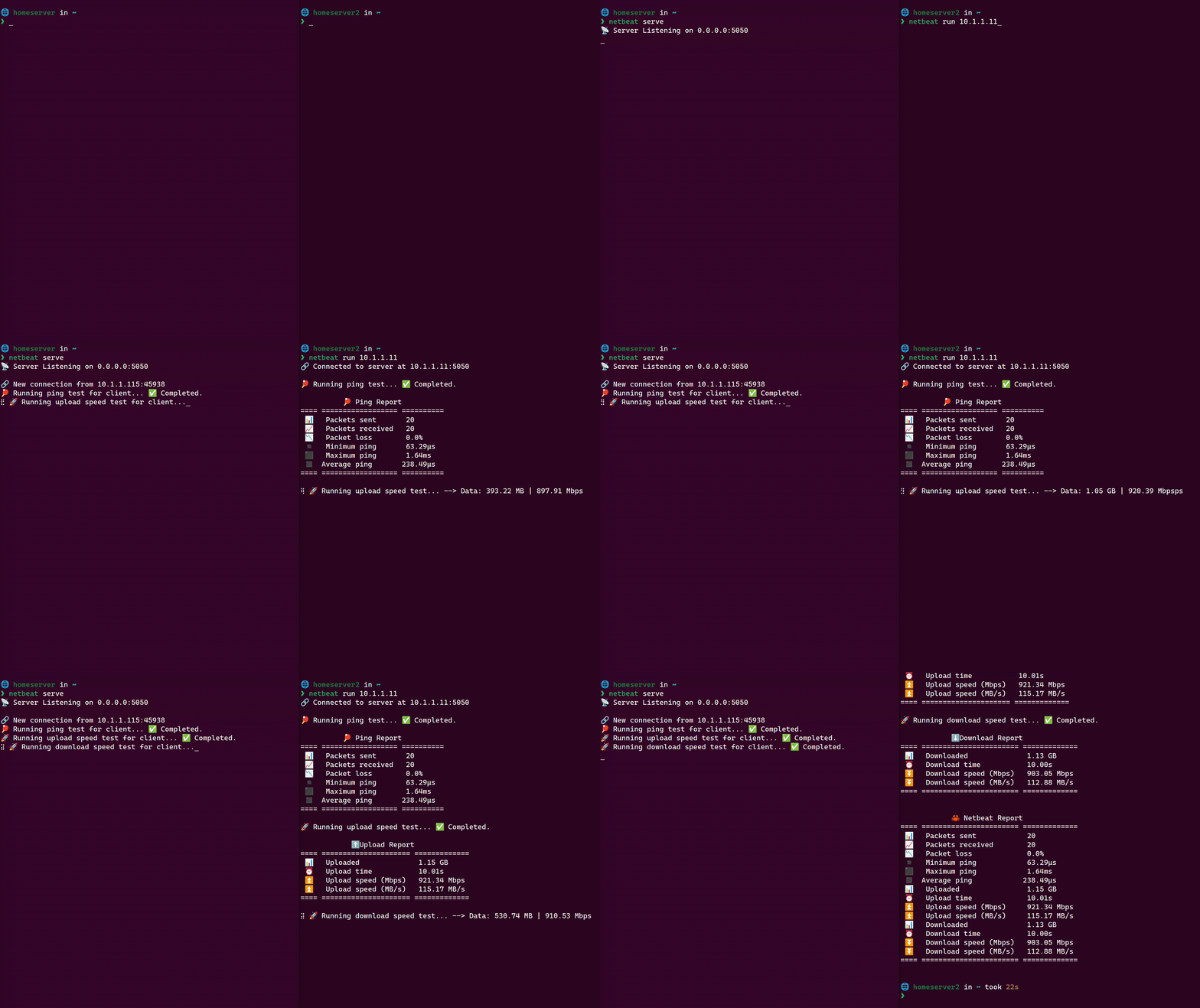
Features
- 🚀 Fast: Optimized for high-performance network testing written in pure Rust
- 🔧 Configurable: Options for customizing speed tests
- 📊 Detailed Metrics: Upload/download speeds, latency, and more
- 🌐 Cross-platform: Works on Linux, macOS, and Windows
- 📝 JSON Output: Perfect for automation and scripting
Use Cases
- Home Lab Testing: Validate network performance between home servers
- Network Troubleshooting: Identify bandwidth bottlenecks
- Infrastructure Monitoring: Automated network performance checks
Installation
Requires Rust toolchain.
Binary Crate (CLI)
cargo install netbeat
Library Crate
cargo add netbeat
Quick Start
- Install:
cargo install netbeat - Start a server:
netbeat serve - Run a test from another machine:
netbeat run <server-ip>
Usage
Command Line Interface
$ netbeat --help
A fast, minimal, & lightweight Rust tool for testing network upload and download speeds between a client and server.

Usage: netbeat <COMMAND>

Commands:
  run    Run a speed test against a target server
  serve  Start listening for incoming connections on a target server
  help   Print this message or the help of the given subcommand(s)

Options:
  -h, --help     Print help
  -V, --version  Print version
Running Speed Tests
Run a basic speed test:
$ netbeat run 10.1.1.11
🔗 Connected to server at 10.1.1.11:5050

🏓 Running ping test... ✅ Completed.

          🏓 Ping Report
==== ================== ==========
 📊   Packets sent       20
 📈   Packets received   20
 📉   Packet loss        0.0%
 ◾    Minimum ping       72.76µs
 ⬛    Maximum ping       363.34µs
 ◼️    Average ping       115.91µs
==== ================== ==========

🚀 Running upload speed test... ✅ Completed.

            ⬆️ Upload Report
==== ===================== =============
 📊   Uploaded              1.15 GB
 ⏰   Upload time           10.01s
 ⏫   Upload speed (Mbps)   921.38 Mbps
 ⏫   Upload speed (MB/s)   115.17 MB/s
==== ===================== =============

🚀 Running download speed test... ✅ Completed.

            ⬇️ Download Report
==== ======================= =============
 📊   Downloaded              1.13 GB
 ⏰   Download time           10.00s
 ⏬   Download speed (Mbps)   906.71 Mbps
 ⏬   Download speed (MB/s)   113.34 MB/s
==== ======================= =============


            🦀 Netbeat Report
==== ======================= =============
 📊   Packets sent            20
 📈   Packets received        20
 📉   Packet loss             0.0%
 ◾    Minimum ping            72.76µs
 ⬛    Maximum ping            363.34µs
 ◼️    Average ping            115.91µs
 📊   Uploaded                1.15 GB
 ⏰   Upload time             10.01s
 ⏫   Upload speed (Mbps)     921.38 Mbps
 ⏫   Upload speed (MB/s)     115.17 MB/s
 📊   Downloaded              1.13 GB
 ⏰   Download time           10.00s
 ⏬   Download speed (Mbps)   906.71 Mbps
 ⏬   Download speed (MB/s)   113.34 MB/s
==== ======================= =============
Run Command Options
$ netbeat run --help
Run a speed test against a target server

Usage: netbeat run [OPTIONS] <TARGET>

Arguments:
  <TARGET>  Target server IP address or hostname

Options:
  -p, --port <PORT>              Target port on server (1-65535) [default: 5050]
  -t, --time <TIME>              Time limit per test direction in seconds (1-3600) [default: 10]
  -d, --data <DATA>              Target size of data to be uploaded/downloaded in the speed test including units (eg, 10MB, 1GB, 2GB). Instead of time
  -c, --chunk-size <CHUNK_SIZE>  Buffer size for read/write operations (eg, 32KiB, 64KiB, 128KiB) [default: 64KiB]
      --ping-count <PING_COUNT>  Number of pings to perform for ping test (1-1000) [default: 20]
  -j, --json                     Return results as json to stdout
      --timeout <TIMEOUT>        Connection timeout in seconds [default: 30]
      --retries <RETRIES>        Number of retry attempts on connection failure [default: 3]
  -q, --quiet                    Suppress progress output (results & errors only)
  -v, --verbose                  Enable verbose output
  -h, --help                     Print help
Starting a Server
Start server on all interfaces:
$ netbeat serve
📡 Server Listening on 0.0.0.0:5050

🔗 New connection from 10.1.1.115:60588
🏓 Running ping test for client... ✅ Completed.
🚀 Running upload speed test for client... ✅ Completed.
🚀 Running download speed test for client... ✅ Completed.
Serve Command Options
$ netbeat serve --help
Start listening for incoming connections on a server.

Usage: netbeat serve [OPTIONS]

Options:
  -i, --interface <INTERFACE>      Network interface to bind server to: 'all' (0.0.0.0) or 'localhost' (127.0.0.1) [default: all]
  -p, --port <PORT>                Port to listen on (1-65535) [default: 5050]
  -c, --chunk-size <CHUNK_SIZE>    Buffer size for data transfer (eg, 32KiB, 64KiB, 128KiB) [default: 64KiB]
      --connections <CONNECTIONS>  Maximum concurrent connections [default: 50]
  -q, --quiet                      Suppress all output (errors only)
  -v, --verbose                    Enable verbose output
  -h, --help                       Print help
Library API
Server Setup
use netbeat::{Server, Result, BindInterface};

fn main() -> Result<()> {
    let server = Server::builder()
        .interface(BindInterface::All)
        .port(5050)
        .max_connections(100)
        .build()?;

    server.listen()?;

    Ok(())
}
Basic Client Usage
use netbeat::{Client, Result, NetbeatReport};

fn main() -> Result<()> {
    let client = Client::builder("10.1.1.11")
        .port(5050)
        .time(30)
        .build()?;

    let report: NetbeatReport = client.contact()?;

    Ok(())
}
Security
- Netbeat is designed for trusted networks
- Consider appropriate firewall rules when exposing the server
- Please open an issue if you find any security vulnerabilities
Contributing
- Fork the repository
- Create a new branch for your feature or bug fix
- Make your changes and commit them
- Optionally, install pre commit hooks via
make install-hooks
- Optionally, install pre commit hooks via
- Push your changes to your fork
- Submit a pull request, using conventional commit messages as PR title
Notice
This is my first Rust project, and I'm still learning the language. Please be patient with me and feel free to provide feedback and suggestions for improvement 😁 Contributions are welcome!