nix-options-search
| Crates.io | nix-options-search |
| lib.rs | nix-options-search |
| version | 0.3.5 |
| created_at | 2024-03-08 18:51:59.172695+00 |
| updated_at | 2025-12-09 00:55:31.666345+00 |
| description | A tool to fuzzy find nix-darwin and nixOS configuration options |
| homepage | |
| repository | https://github.com/madsbv/nix-options-search |
| max_upload_size | |
| id | 1167212 |
| size | 114,564 |
 Mads Bach Villadsen (madsbv)
documentation
README
Nox


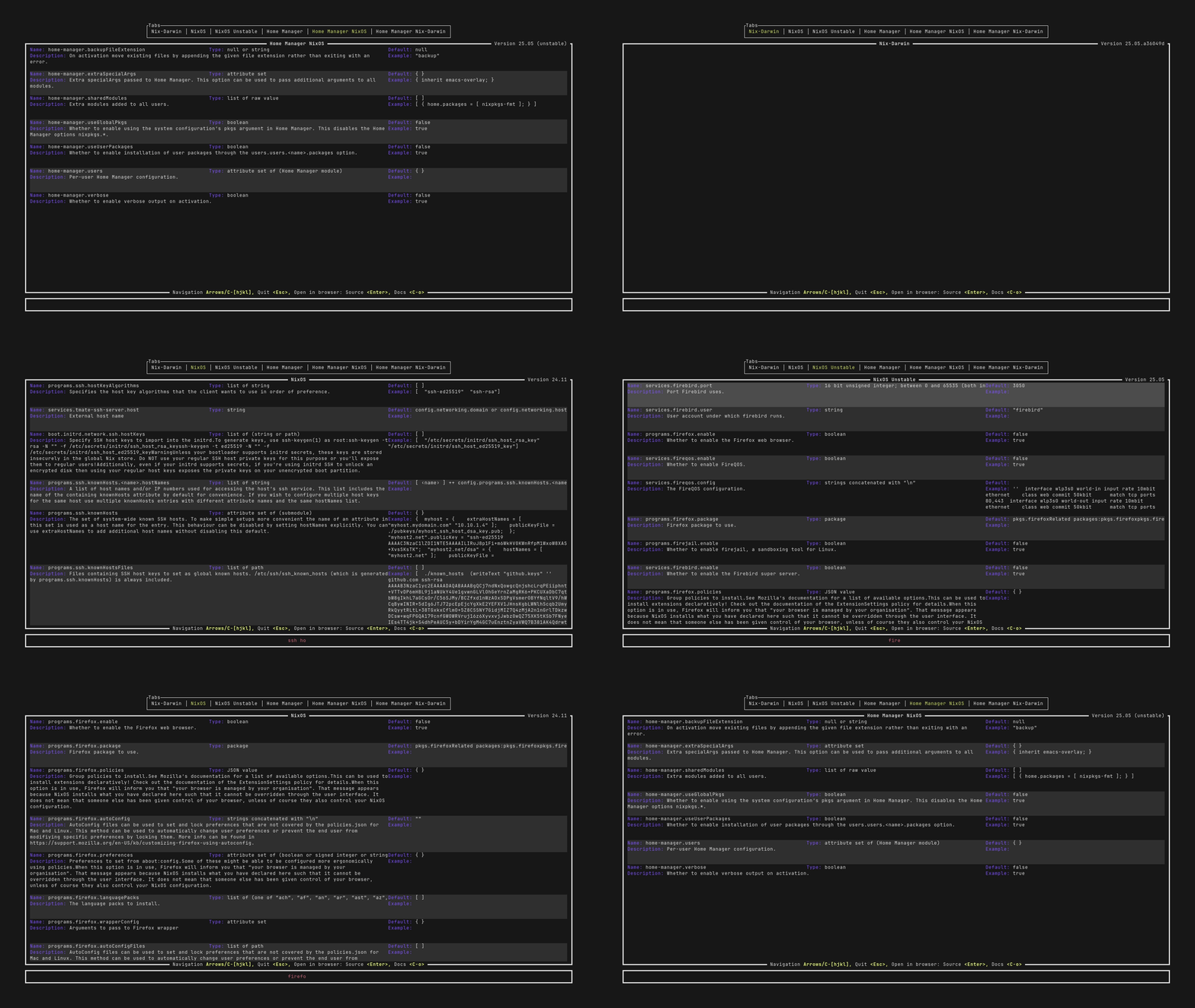
A fast and convenient command-line tool to look up options for configuring nix-darwin, nixOS, and home-manager quickly, with fuzzy finding.
Motivation
Setting up any part of a system using nixos, nix-darwin or home-manager involves a significant amount of time spent looking through the docs to figure out the names of all the relevant options and what kind of input they expect. However, the only convenient first-party methods for accessing the docs are through man pages or corresponding static webpages (like the nixos manual; ~20MB of html!). This means you have to either scroll through a huge alphabetized list, or be able to search for an exact substring of the option name you want.
Nox is built with fuzzy searching so you don't have to know exactly what you're looking for to find it. It is also fast: After the first run, it uses an internal cache to provide basically instantaneous startup, and the search results likewise update instantly on every keystroke.
Quick start
Install using the Rust toolchain/Cargo
cargo install nix-options-search
If you don't already have the Rust toolchain installed, get it from your favorite package manager, or following the official rust-lang guide.
Run
nox
Other installation methods
Nix flakes
Run nox using nix with flakes enabled with nix run github:madsbv/nix-options-search.
To add nox to a nixOS, nix-darwin or home-manager configuration using flakes, add this repository as a flake input and add inputs.nox.packages.${system}.default to your package list. For example, for a nixOS system with hostname ${hostname} and system type ${system} (one of x86_64-linux, aarch64-linux, x86_64-darwin, aarch64-darwin):
inputs = {
    nixpkgs.url = "github:nixos/nixpkgs/nixos-unstable";
    nox = {
        url = "github:madsbv/nix-options-search";
        inputs.nixpkgs.follows = "nixpkgs";
    };
};
outputs = inputs: {
    nixosConfigurations.${hostname} = nixpkgs.lib.nixosSystem {
        system = ${system}
        modules = [{
                environment.systemPackages = [ inputs.nox.packages.${system}.default ];
        }];
    };
};
Prebuilt binaries
See Releases.
Usage
Nox works mainly through fuzzy searching on option names. Navigate to the tab you want (nix-darwin, nixos, home-manager etc.) with arrows or <ctrl+h> or <ctrl+l>, then start typing!
You can scroll through the results list with
The first startup might take a while; the nixos documentation alone is ~20MB of data that has to be retrieved. After that however, the data is cached locally and only refreshed occasionally.
Contributing
Clone the repo
git clone https://github.com/madsbv/nix-options-search
cd nix-options-search
Build the project
cargo build
Run the project
cargo run
Run the tests
cargo test
Some tests are gated behind the online-test feature flag since they require a functioning network connection to pass, which is not necessarily available in the nix sandbox.
Run all tests with
cargo test --features online-tests
Submit a pull request
If you'd like to contribute, please fork the repository and open a pull request to the main branch.
License
Licensed under either of
- Apache License, Version 2.0 (LICENSE-APACHE or http://www.apache.org/licenses/LICENSE-2.0)
- MIT license (LICENSE-MIT or http://opensource.org/licenses/MIT)
at your option.
Contribution
Unless you explicitly state otherwise, any contribution intentionally submitted for inclusion in the work by you, as defined in the Apache-2.0 license, shall be dual licensed as above, without any additional terms or conditions.
See CONTRIBUTING.md.