organize-rs
| Crates.io | organize-rs |
| lib.rs | organize-rs |
| version | 0.4.1 |
| created_at | 2023-05-15 02:02:25.477327+00 |
| updated_at | 2023-06-05 19:09:01.298609+00 |
| description | organize - a file management automation tool |
| homepage | |
| repository | https://github.com/organize-rs/organize |
| max_upload_size | |
| id | 864585 |
| size | 155,001 |
 (simonsan)
documentation
README
organize 


A file management automation tool.
Current Status
This is in really early development. Please come back later!
Background
The Python organize is a file management automation tool.
From their docs:
Your desktop is a mess? You cannot find anything in your downloads and documents? Sorting and renaming all these files by hand is too tedious? Time to automate it once and benefit from it forever. organize is a command line, open-source alternative to apps like Hazel (macOS) or File Juggler (Windows).
This is a Rust implementation of the same concept.
Examples
-
Filter
files, which aresmaller than20KB in one location:organize filter size -l C:\Users\dailyuse\dev-src\organize\docs\screenshots -t files --range ..20KBThis filter uses the
rangesyntax (always inclusive) of Rust:..11MB=> smaller than15MB..=> bigger than10KB..20MiB=> bigger than 10 KB, but smaller than 20 MiB
NOTE: You can use
decimal(metric) andbinary(IEC) multiple-byte units. E.g.,KiBorKB,GBorGiB. They will be converted accordingly and are case-insensitive. -
Filter
filesby their mimetype:organize filter mimetype -l C:\organize\docs\screenshots -t files --mimetype image/jpeg -
Filter
filesby their creation date (created in the last 5 days), ignore paths that havetarget\in their name, recursive, maximum4levels deep.organize filter -r -m 4 created -l . -t files --ignore-path target\ --range ..5d -
Filter
files, which file stem ends withgo, recursive, maximum2levels deep:organize filter -r -m 2 name -l "C:\organize\" -t files --ends-with "go" -
Filter
filesintwo locations, which extensions matchrsortoml, recursive, maximum2levels deeporganize filter -r -m 2 extension -l C:\organize -l D:\folders -t files --exts rs --exts toml -
Filter
filesandfolders, which are empty (0 bytesorno filesin directory), recursive, maximum4levels deep, ignoregitin path namesorganize filter -r -m 4 empty -l "C:\organize\" -t both --ignore-path git -
Filter
filesandfolders, which are empty (0 bytesorno filesin directory), recursive, maximum4levels deep, ignoregitonly in file namesorganize filter -r -m 4 empty -l "C:\organize\" -t both --ignore-name git
Media
Be aware: This is WIP. Not all functionality is implemented, (yet).
Main

Filters

Actions
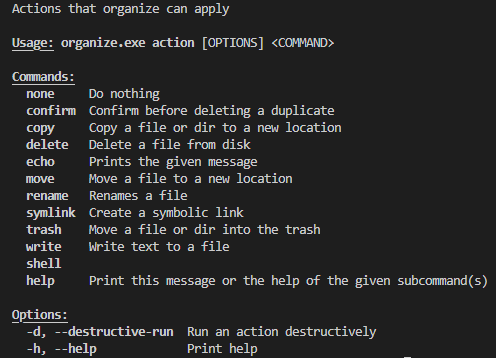
Goals
For now the first goal for this Rust version of organize is to have feature parity with its Python equivalent.
BUT: I want to take another approach on tackling the problem. It is also relatively complicated to map all the stuff
within a config file, because we are bound to the syntax of yaml/json/toml/ron.
Maybe this is exactly the problem to solve!
Basically you want to have a configuration file, which replaces a mini scripting language.
With predefined filters and actions that are applied to the items that the filter spits out.
Basically almost everything in the configuration files are parameters for functions/methods.
This makes everything more complicated.
-
What if we implement rusty
organizein a way, that we can callorganize filter extension --ext "exe, msi, apk" --path {}and it spits out all the paths that match thisprecodedfilter? This way we can already utilize it easily within shell scripts. -
On the second implementation stage, we can embed a scripting engine like rhai, where we expose some functionality of rusty
organizeasfunctionsand register them with therhaiengine. -
Instead of pressing everything in a complicated configuration file syntax, we can utilize a scripting language and boil it down to its minimum syntax.
That being said, a big factor for the Rust reiteration for me is that I like Rust. I want to reimplement organize's approach in a language that has better error handling, and makes it easier to maintain software. That is fast and at the same time makes development less error prone.
I'm the first user of the Rust implementation, and will be going to use it with my private files. Thus an important goal for me is stability.
License
AGPL-3.0-or-later; see LICENSE.