osnma-longan-nano
| Crates.io | osnma-longan-nano |
| lib.rs | osnma-longan-nano |
| version | 0.11.4 |
| created_at | 2025-12-15 10:38:47.888854+00 |
| updated_at | 2025-12-19 09:57:41.262545+00 |
| description | Galileo OSNMA demo in a Longan Nano board |
| homepage | https://github.com/daniestevez/galileo-osnma/ |
| repository | https://github.com/daniestevez/galileo-osnma/ |
| max_upload_size | |
| id | 1985839 |
| size | 39,896 |
 Daniel Estévez (daniestevez)
documentation
README
osnma-longan-nano
This is a demo of the galileo-osnma library running in a Longan nano GD32VF103CBT6 board. The GD32VF103CBT6 is a RISC-V microcontroller with 128 KiB of flash and 32 KiB of RAM. It is similar to the STM32F103 ARM Cortex-M3 microcontroller. This board is well supported in Rust through the longan-nano BSP crate and gd32vf103xx-hal HAL crate, so it is a good board to demonstrate that galileo-osnma can run in small embedded microcontrollers.
Usage
Building
Building the firmware requires the following:
-
Rust riscv32imac toolchain. This can be installed with
rustup target add riscv32imac-unknown-none-elf.
The OSNMA ECDSA P-256 public key and the Merkle tree root are embedded in the
binary during the build process. The public key is taken from the pubkey.pem
file found in the root folder of this crate, and its Public Key ID is taken from
the pubkey_id.txt file. The Merkle tree root is taken from the
merkle_tree_root.txt file. Mock versions of these files containing random data
are provided so that osnma-longan-demo can be built without access to the real
cryptographic material. A binary built with this mock cryptographic material
will not work with the Galileo signal-in-space.
The mock pubkey.pem needs to be replaced with the real key, using the same PEM
file format. Instructions about how to obtain the authentic public key can be
found in the galileo-osnma
README.
Likewise the Public Key ID in pubkey_id.txt needs to be replaced by the
correct one, and the Merkle tree root needs to be written to the file
merkle_tree_root.txt.
The firmware is built by running
just osnma-longan-nano
Flashing
The firmware can be flashed by running
just osnma-longan-nano-flash
This requires dfu-util. When this is run, the microcontroller should be in DFU
mode and connected by USB to the computer. DFU mode is entered by holding the
BOOT0 button on the board while the board boots (either from a powered off state
or from a reset button press).
Serial port connection
The osnma-longan-nano demo uses the UART0 serial port of the GD32VF103 to communicate with the host computer. The host computer sends INAV frames to the microcontroller and the microcontroller gives information about the OSNMA authentication status using the serial port.
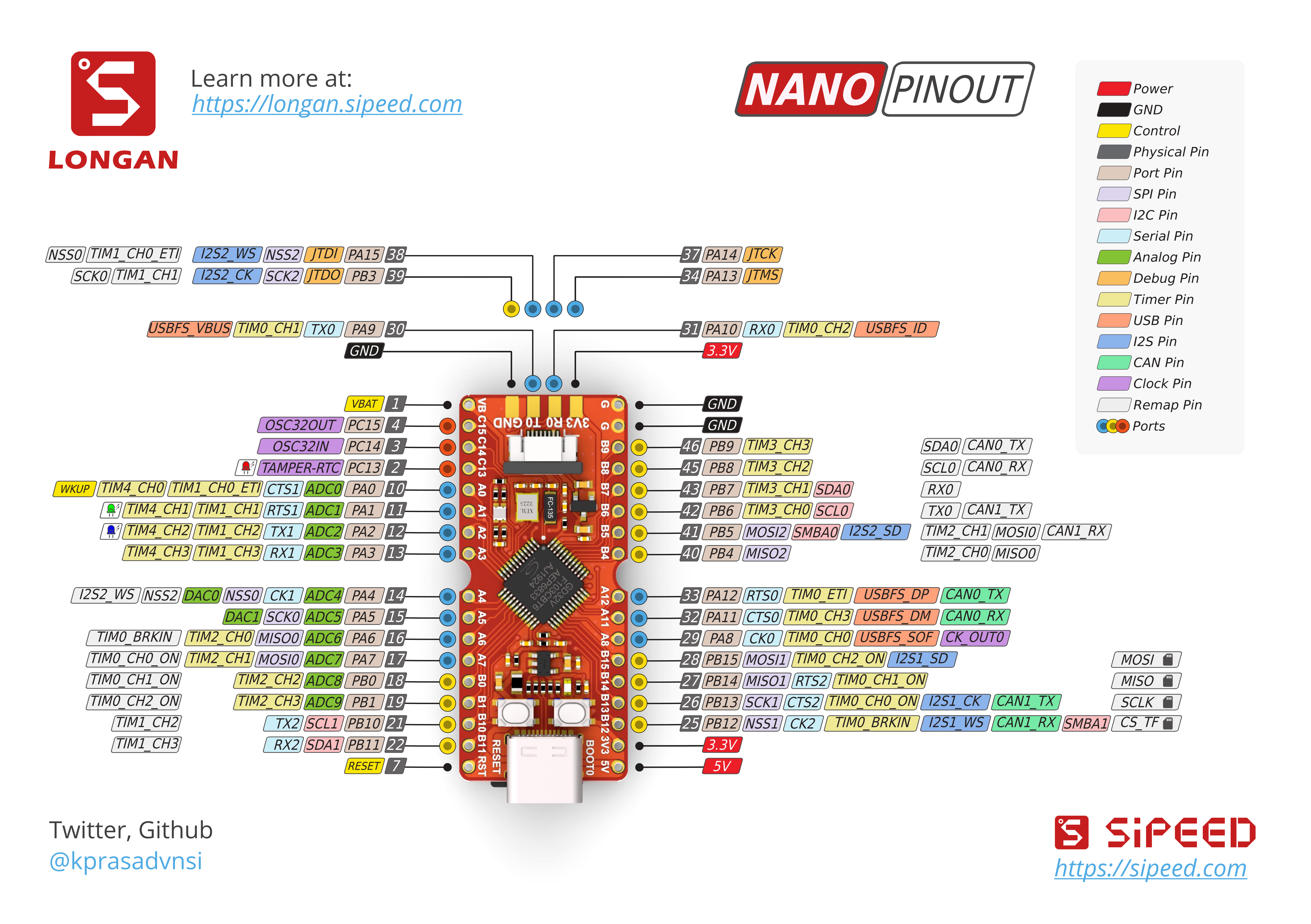
The UART0 port is routed to the JTAG pin header. See this pinout diagram. The pins are identified as RX0 and TX0 in the diagram, and as R0 and T0 in the silkscreen of the board. The UART port uses 3V3 TTL levels. A suitable UART to USB converter such as this device should typically be used to connect the UART to the host computer.
Running the serial port client
The serial port client that runs on the host computer can be found in the galileo-osnma crate.
The binary in this crate must be run by indicating the path to the computer
serial port to use (for instance /dev/ttyACM0 or /dev/ttyUSB0) and feeding to its
standard input data using the Galmon transport protocol, in the same way as with the
galmon-osnma application (see
these instructions).
The serial port client will send the INAV and OSNMA data to the board and print to the standard output all the lines received from the microcontroller through the UART. The UART communication is described below.
For example,
just osnma-longan-nano-live-feed /dev/ttyUSB0
can be run to send data from the Galmon live feed to the serial port
/dev/ttyUSB0.
After starting the serial port client, the microcontroller should be reset or powered on to start running the demo.
Theory of operation
The serial port client and the firmware running in the microcontroller use a simple ASCII line-based protocol to communicate (the lines are terminated by CRLF).
The client can send an INAV word by sending a line such as
19 1176 120939 1 2a2aaaaaaaaaaaaaaaaaa80327fd4618
The first number indicates the SVN (E19), the second number indicates the week number, the third number indicates the time of week in seconds, the fourth number indicates the band, and after this the data in the INAV word is included in hex.
Similarly, OSNMA data is sent by the client with a line such as
19 1176 120939 1 6d0309ba0b
The microcontroller indicates to the client that it is ready to receive a new piece of data (either an INAV page or OSNMA data) by sending the line
READY
This implements a simple but effective flow control. After successfully receiving an INAV word, the microcontroller sends back
E19 WN 1176 TOW 120939 E1B INAV
and after receiving OSNMA data it sends back
E19 WN 1176 TOW 120939 E1B OSNMA
After receiving any piece of data, the microcontroller also reports the authentication status of the data it is holding on its storage memory. This is reported as
AUTH ADKD=4 TOW E18 121110 E27 TOW 121080
indicating that successfully authenticated ADKD=4 corresponding to the satellite E18 subframe TOW 121110 and satellite E27 subframe TOW 121080 is now available, or as
AUTH ADKD=4 NONE
reporting that no ADKD=4 in the microcontroller memory is authenticated yet. Similarly, the ADKD=0 authentication status is reported as
AUTH ADKD=0 E18 TOW 121080 E27 TOW 121080
by listing the SVNs and TOWs of the data that is authenticated, or
AUTH ADKD=0 NONE
if the data is currently not authenticated.
The storage memory is sized to be small, according to the small SRAM available
in the microcontroller, so the authentication state alternates between having
some authenticated data and NONE as the authenticated data is erased make room
for newer (not yet authenticated) data.