oxidate-fsm
| Crates.io | oxidate-fsm |
| lib.rs | oxidate-fsm |
| version | 0.1.0 |
| created_at | 2026-01-11 02:25:58.771226+00 |
| updated_at | 2026-01-11 02:25:58.771226+00 |
| description | FSM framework with GUI visualization - Mermaid-like DSL to Rust code generator |
| homepage | https://github.com/JoseClaudioSJr/Oxidate |
| repository | https://github.com/JoseClaudioSJr/Oxidate |
| max_upload_size | |
| id | 2035111 |
| size | 469,270 |
 José Cláudio da Silva Junior (JoseClaudioSJr)
documentation
README
Oxidate
FSM Framework with GUI Visualization
Oxidate is a Rust-based tool for designing, visualizing, and generating code from Finite State Machines (FSMs). It features a Mermaid-like DSL, an interactive GUI editor with simulation capabilities, and code generation for Standard Rust.


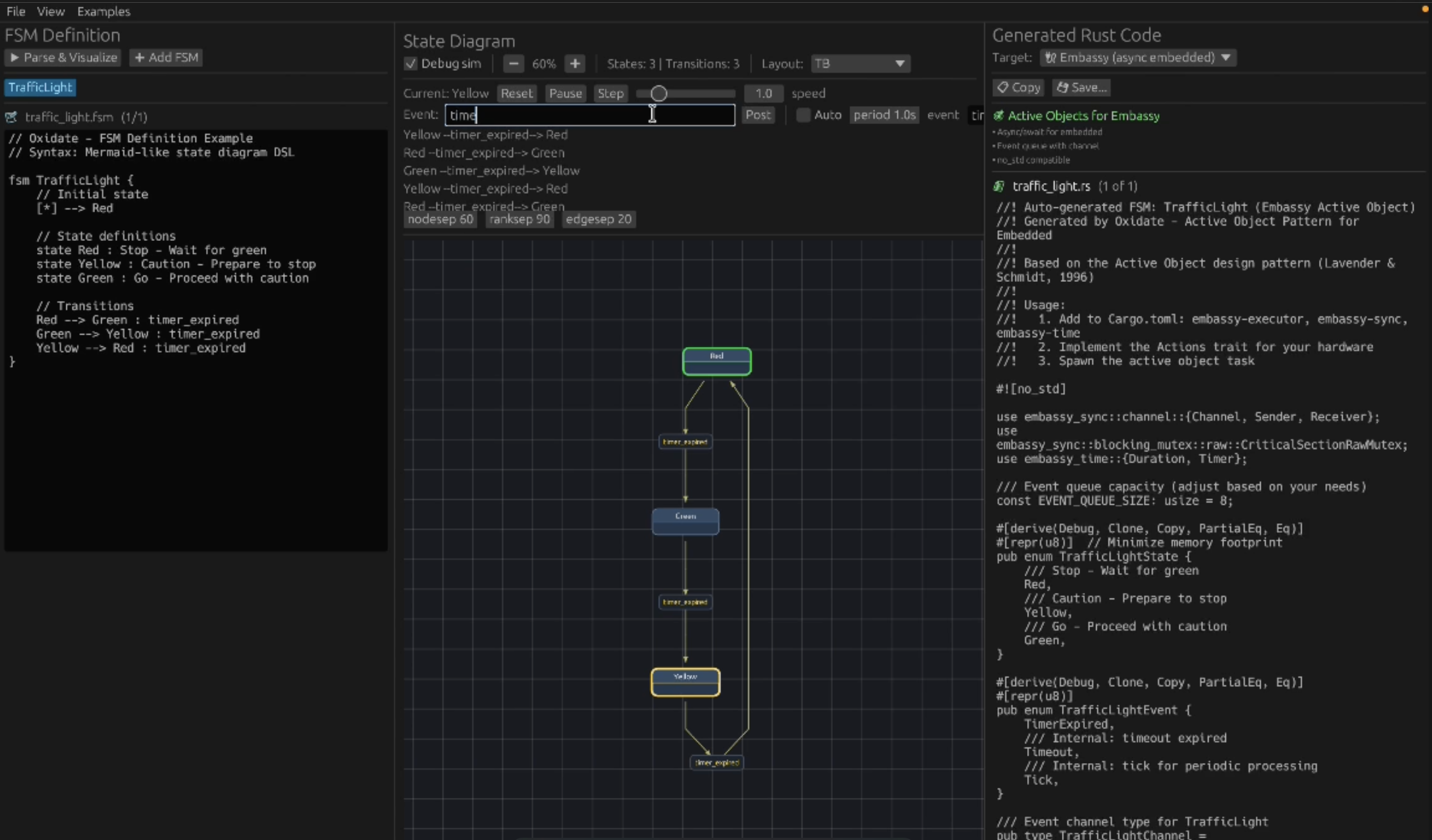
GUI Demo
Features
- Visual FSM Editor — Interactive GUI built with egui/eframe
- Mermaid-like DSL — Familiar, readable syntax for defining state machines
- Live Preview — Real-time visualization as you type
- Debug/Simulation Mode — Step through states, fire events, watch transitions animate
- Auto-layout — Dagre-powered graph layout with orthogonal edge routing
- Code Generation — Export to Standard Rust
- Timers & Choice Points — First-class support for timeouts and conditional branching
- Cross-platform — macOS, Linux, Windows
🚀 Oxidate Pro
For embedded development, Oxidate Pro is available separately. Contact to purchase/access:
-
Embassy — Async Active Object pattern for embedded
-
RTIC — Real-time event queues with priorities
-
Events with Payload — Typed data with events
-
HSM — Hierarchical State Machines
Quick Start
Prerequisites
- Rust 1.70+ (
rustup install stable) - Node.js 18+ (for Dagre layout engine)
Installation
# Install from crates.io
# GUI app + CLI (default features)
cargo install oxidate-fsm

# CLI-only (no GUI deps)
cargo install oxidate-fsm --no-default-features

# Clone the repository
git clone https://github.com/JoseClaudioSJr/Oxidate.git
cd oxidate

# Install JS layout dependencies
cd tools/dagre-svg-demo && npm install && cd ../..

# Run the GUI
cargo run --release
CLI Usage
# Parse and validate an FSM file
cargo run --bin oxidate-cli -- examples/traffic_light.fsm
DSL Syntax
Oxidate uses a Mermaid-inspired DSL for defining FSMs:
fsm TrafficLight {
    // Initial state
    [*] --> Red

    // State definitions
    state Red: "Stop signal" {
        entry / turn_on_red()
        exit / turn_off_red()
    }

    state Yellow: "Caution signal"
    state Green: "Go signal"

    // Transitions
    Red --> Green : timer_expired
    Green --> Yellow : timer_expired
    Yellow --> Red : timer_expired
}
States
// Simple state
state Idle

// State with description
state Running: "System is active"

// State with entry/exit actions
state Active {
    entry / initialize()
    exit / cleanup()
}
Transitions
// Basic transition
StateA --> StateB

// Transition with event trigger
StateA --> StateB : button_press

// Transition with guard condition
StateA --> StateB : event [guard_condition]

// Transition with action
StateA --> StateB : event / do_something()

// Full syntax
StateA --> StateB : event [guard] / action()
Timers
// Define a timer
timer blink_timer = 500 -> Tick periodic
timer timeout = 3000 -> Timeout

// Control timers in states
state Waiting {
    entry / start_timer(timeout)
    exit / stop_timer(timeout)
}
Choice Points (Decision Nodes)
choice CheckCondition {
    [condition1] -> StateA / action1()
    [condition2] -> StateB
    [else] -> DefaultState
}

// Transition to choice point
StateX --> <<CheckCondition>> : evaluate
GUI Features
Editor Panel (Left)
- Syntax-highlighted DSL editor
- Real-time parsing with error feedback
- Load/Save FSM files
Visualization Panel (Right)
- Interactive state diagram
- Pan and zoom
- Click states to select
- Animated transitions during simulation
Toolbar
- Layout Settings — Direction (TB/LR), spacing
- Code Generation — Export to Rust (Standard/Embassy/RTIC)
- Debug Mode — Simulation controls
Simulation Mode
- Click Debug to enter simulation mode
- Current state highlights in green
- Available transitions show as buttons
- Click an event to fire it and watch the transition animate
- Use Auto-run for automatic event cycling
Code Generation
Oxidate generates idiomatic Rust code for three targets:
Standard Rust
pub enum TrafficLightState {
    Red,
    Yellow,
    Green,
}

pub enum TrafficLightEvent {
    TimerExpired,
}

impl TrafficLight {
    pub fn handle_event(&mut self, event: TrafficLightEvent) {
        // Generated transition logic
    }
}
Embassy (Async Embedded)
#![no_std]compatible- Async state machine with
embassy_time::Timer - Suitable for Embassy executor
RTIC
#![no_std]compatible- RTIC task structure
- Hardware abstraction layer hooks
Project Structure
oxidate/
├── src/
│   ├── main.rs          # GUI application
│   ├── cli.rs           # Command-line interface
│   ├── lib.rs           # Library exports
│   ├── fsm/             # FSM data structures
│   │   └── mod.rs
│   ├── parser/          # DSL parser (pest)
│   │   ├── mod.rs
│   │   └── fsm.pest     # Grammar definition
│   └── codegen/         # Code generators
│       └── mod.rs
├── tools/
│   ├── dagre-svg-demo/  # Node.js Dagre layout backend
│   ├── gen_icon.py      # Icon generator
│   └── package/         # Packaging scripts
├── assets/
│   ├── oxidate.icns     # macOS icon
│   ├── oxidate.png      # PNG icon
│   └── linux/           # Linux desktop integration
├── docs/
│   └── RELEASING.md     # Release/packaging guide
└── Cargo.toml
Architecture
flowchart TB
subgraph GUI["GUI - egui"]
E["Editor Panel"]
V["Visualizer Panel"]
S["Simulator Controls"]
end

P["Parser - pest DSL"]
F["FsmDefinition<br/>states, transitions, etc"]
L["Layout - Dagre/JS"]
C["Codegen - Rust"]
Sim["Simulation Runtime"]

E --> P --> F
F --> C
F --> L --> V
S --> Sim
F --> Sim
Sim --> V
Layout Pipeline
The visualization uses a strict separation:
- FSM → Graph — Convert states/transitions to graph nodes/edges
- Graph → Layout Engine — Dagre (via Node.js subprocess) computes positions
- Layout → Renderer — egui draws nodes and pre-computed edge routes
This ensures consistent, professional layouts without heuristic edge routing.
Environment Variables
| Variable | Description |
|---|---|
OXIDATE_DAGRE_DIR |
Override path to tools/dagre-svg-demo |
OXIDATE_NODE |
Override path to Node.js binary |
Building & Packaging
See docs/RELEASING.md for detailed packaging instructions.
Quick Build
# Development
cargo run

# Release
cargo build --release

# macOS .app bundle
cargo bundle --release

# Linux .deb
cargo deb
Contributing
Contributions are welcome! Please:
- Fork the repository
- Create a feature branch
- Submit a pull request
License
MIT License — see LICENSE for details.