pingcolor
| Crates.io | pingcolor |
| lib.rs | pingcolor |
| version | 0.1.3 |
| created_at | 2025-12-20 09:45:40.910121+00 |
| updated_at | 2025-12-20 09:45:40.910121+00 |
| description | Colored ping output utility that supports multiplatform (Windows, Linux, macOS) with color configuration via TOML file. |
| homepage | https://github.com/cumulus13/pingcolor |
| repository | |
| max_upload_size | |
| id | 1996273 |
| size | 51,497 |
 cumulus13 (cumulus13)
documentation
https://docs.rs/pingcolor
README
PingColor 🎨
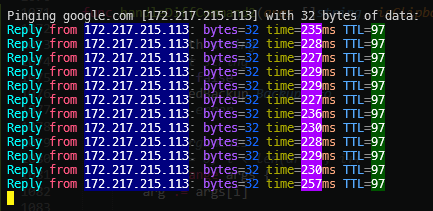
Colored ping output utility that supports multiplatform (Windows, Linux, macOS) with color configuration via TOML file.
Features
-
✅ Multiplatform: Windows, Linux, macOS
-
🎨 True Color Support: Uses hex color (#RRGGBB)
-
⚙️ Configurable: All colors can be configured via
pingcolor.toml -
🎲 Smart Random Colors: The same value gets the same color consistently
-
🔄 Auto Config: Automatically creates
pingcolor.tomlif it doesn't already exist
Installation
# Clone or copy files
cargo build --release
# Binary is in target/release/pingcolor

# Or

cargo install pingcolor
Usage
# Basic usage
pingcolor google.com
pingcolor 8.8.8.8

# Windows (continuous ping)
pingcolor google.com

# Linux/macOS (default behavior)
pingcolor google.com
Configuration
The file pingcolor.toml will be automatically created with default colors:
# Windows specific colors
reply = "#00FFFF"
timeout = "#FFFF00"
unreachable_fg = "#FFFFFF"
unreachable_bg = "#FF0000"
from = "#FF557F"
ip_fg = "#FFFFFF"
ip_bg = "#00007F"
bytes = "#AA55FF"
time = "#AAAA00"
time_value_fg = "#FFFFFF"
time_value_bg = "#AA00FF"
ms = "#FFAA7F"
ttl = "#55AAFF"
ttl_value_fg = "#FFFFFF"
ttl_value_bg = "#005500"

# Linux/Mac specific
icmp_seq = "#00FFAA"
transmitted = "#AAFFAA"
received = "#AAFFAA"
packet_loss = "#FFAA55"
statistics = "#55AAFF"
ping_statistics = "#55AAFF"

# Random colors for dynamic values (bytes, icmp_seq, etc)
random_colors = ["#FFAA00", "#0055FF", "#AAFFFF"]

# Generic
equals = "#777777"
general_text = "#CCCCCC"
Color Mapping
Windows Output
Reply from 172.217.215.101: bytes=32 time=232ms TTL=101
- Reply → Cyan (#00FFFF)
- from → Pink (#FF557F)
- 172.217.215.101 → White on Blue (#FFFFFF on #00007F)
- bytes → Purple (#AA55FF)
- 32 → Random dari 3 warna, konsisten per nilai
- time → Yellow (#AAAA00)
- 232 → White on Purple (#FFFFFF on #AA00FF)
- ms → Orange (#FFAA7F)
- TTL → Light Blue (#55AAFF)
- 101 → White on Green (#FFFFFF on #005500)
Linux/macOS Output
64 bytes from 172.217.215.101: icmp_seq=1 ttl=57 time=15.2 ms
- 64 → Random dari 3 warna, konsisten per nilai
- bytes → Purple (#AA55FF)
- from → Pink (#FF557F)
- 172.217.215.101 → White on Blue
- icmp_seq → Aqua (#00FFAA)
- 1 → Random warna
- ttl → Light Blue (#55AAFF)
- 57 → White on Green (#FFFFFF on #005500)
- time → Yellow (#AAAA00)
- 15.2 → White on Purple (#FFFFFF on #AA00FF)
- ms → Orange (#FFAA7F)
Platform Differences
Windows
- Output:
Reply from x.x.x.x: bytes=32 time=15ms TTL=64 - Errors:
Request timed out,Destination host unreachable - Ping continuous by default dengan flag
-t
Linux
- Output:
64 bytes from x.x.x.x: icmp_seq=1 ttl=64 time=15.2 ms - Errors:
Destination Host Unreachable,Request timeout - Lowercase keywords (ttl, icmp_seq)
macOS
- Similar to Linux
- Output:
64 bytes from x.x.x.x: icmp_seq=0 ttl=57 time=15.234 ms
Smart Random Colors
The same value will get the same color during the session:
- If
bytes=32gets color #FFAA00 - As long as the value remains 32, the color remains #FFAA00
- If you change to 64, you get a new color (random from the pool)
Dependencies
colored = "2.1"      # True color support
serde = "1.0"        # Serialization
toml = "0.8"         # Config parsing
regex = "1.10"       # Pattern matching
rand = "0.8"         # Random color selection
Notes
- Terminal should be support true color (24-bit color)
- Modern terminals such as Windows Terminal, iTerm2, or GNOME Terminal are supported
- If the color does not appear, check the terminal emulator usedused
License
MIT
👤 Author


Created with ❤️ using Rust