planar_geo
| Crates.io | planar_geo |
| lib.rs | planar_geo |
| version | 0.1.3 |
| created_at | 2025-12-26 12:00:26.824661+00 |
| updated_at | 2025-12-31 22:47:07.062703+00 |
| description | A Rust library for 2D geometry: geometric objects, algorithms and visualization |
| homepage | |
| repository | https://github.com/StefanMathis/planar_geo.git |
| max_upload_size | |
| id | 2005632 |
| size | 973,551 |
 (StefanMathis)
documentation
README
planar_geo
A Rust library for 2D geometry: geometric objects, algorithms and visualization.
Overview
This library is based on the basic "point" [f64; 2] type, whose first element
represents its x-coordinate and the second element represents its y-coordinate.
Building upon this, a variety of Primitive and Composite types are
defined:
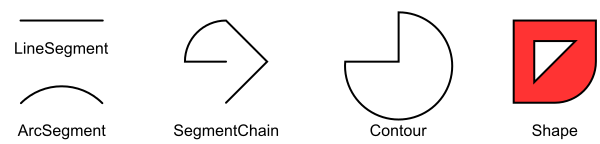
This image was created with examples/type_overview.rs
The "segment" types are so-called Primitives: Simple straight
(LineSegment) or arc (ArcSegment) connections between two points. They
form the basis for the Composite types SegmentChain, Contour (a
closed segment chain) and Shape (composed of one or more contours).
For these types, this crate offers the following features:
- Property calculation (e.g. length, surface area, centroids),
Transformation(scaling, shifting, rotation, mirroring),- Intersection calculation between all combinations of the aforementioned types,
see the
PrimitiveandCompositetraits.
If the corresponding features are activated, it is also possible to serialize and deserialize (using serde) and to visualize (using gtk-rs) these types. See the Features section for more.
One distinct feature of this library is the treatment of arcs: Arcs are not approximated as polylines (i.e. a connected series of line segments), but instead being represented as "true" arcs (see e.g. the examples for surface area calculation below). In fact, this is the reason why this library was written in the first place.
Since the "point" type is defined using the floating-point type f64, a lot of
operations (i.e. intersection calculation) are prone to rounding-errors. These
operations therefore require specifying an absolute tolerance epsilon and a
maximum units in last place tolerance max_ulps, which are used as inputs
for ulps_eq (from the approxim crate) to e.g. determine whether two points
are approximately equal. It is recommended to use the "default" tolerances
DEFAULT_EPSILON and DEFAULT_MAX_ULPS unless there is a good reason to
use other values.
The following paragraphs will provide some examples for the aforementioned features.
Construction and property calculation
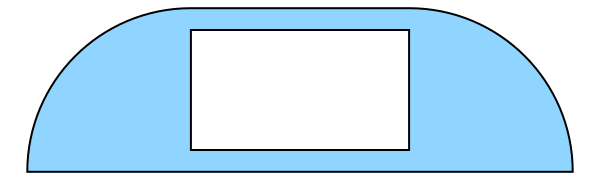
The following code snippet shows how to construct the shape shown in the image
below and calculate some of its properties, e.g. centroid and surface area. The
image itself has been created by running examples/shape.rs.
use planar_geo::prelude::*;
use std::f64::consts::{PI, FRAC_PI_2};
use approx;

// For brevity
let e = DEFAULT_EPSILON;
let m = DEFAULT_MAX_ULPS;

// Construct an arc, a line and another arc using various constructors. These
// constructors can fail for invalid input data, see the expect() strings.
let first_arc =
    ArcSegment::from_center_radius_start_offset_angle([1.5, 0.0], 1.5, PI, -FRAC_PI_2, e, m)
        .expect("radius is positive and offset angle is not zero");
let line = LineSegment::new([1.5, 1.5], [3.5, 1.5], e, m)
    .expect("segment length is not zero");
let second_arc = ArcSegment::from_start_center_angle([3.5, 1.5], [3.5, 0.0], -FRAC_PI_2, e, m)
    .expect("radius is positive and offset angle is not zero");

// Build a segment chain from these three segments
let mut chain = SegmentChain::new();

// Initially, the chain is empty (has no segments)
assert_eq!(chain.num_segments(), 0);

// Now add the three segments
chain.push_back(first_arc.into());
chain.push_back(line.into());
chain.push_back(second_arc.into());
assert_eq!(chain.num_segments(), 3);

// Create a contour out of the chain. If start and end of the chain are not
// identical, a line segment is automatically added.
let contour = Contour::new(chain);

// During the conversion to a contour, a line segment has been added which closes the chain
assert_eq!(contour.num_segments(), 4);

// Create a second contour by creating multiple line segments directly from vertices.
let hole = Contour::new(SegmentChain::from_points(&[[1.5, 0.2], [3.5, 0.2], [3.5, 1.3], [1.5, 1.3]]));

// First element of the vector is interpreted as outer contour, all further
// elements are holes. The resulting shape is visualized below the code snippet.
let shape = Shape::new(vec![contour, hole]).expect("inputs form a valid shape");

// Calculate the surface area: Area of outer contour minus hole area
let quarter_circle_area = 0.25 * PI * (1.5f64).powi(2);
let center_rect_area = 1.5 * 2.0;
let hole_area = 1.1 * 2.0;

// Exact match except for floating point rounding errors (arcs are not
// approximated as polylines)
approx::assert_abs_diff_eq!(shape.area(), 2.0 * quarter_circle_area + center_rect_area - hole_area, epsilon = 1e-15);

// Length of the hole contour
approx::assert_abs_diff_eq!(shape.holes()[0].length(), 2.0 * (1.1 + 2.0), epsilon = 1e-15);

// Length of the first arc -> Is the first segment of the contour
// 0.5 * 1.5 * PI = Quarter circle circumference times radius.
approx::assert_abs_diff_eq!(shape.contour()[0].length(), 0.5 * 1.5 * PI, epsilon = 1e-15);

// Centroid of the hole
approx::assert_abs_diff_eq!(shape.holes()[0].centroid(), [2.5, 0.75], epsilon = 1e-15);
Transformation
The Transformation trait allows translating, rotating, scaling and mirroring
of all Primitive and Composite types:
use planar_geo::prelude::*;
use std::f64::consts::PI;

// For brevity
let e = DEFAULT_EPSILON;
let m = DEFAULT_MAX_ULPS;

// Translate a point
let mut pt = [2.0, 2.0];
pt.translate([1.0, 2.0]);

assert_eq!(pt, [3.0, 4.0]);

// Rotate a line segment
let mut ls = LineSegment::new([1.0, 0.0], [2.0, 0.0], e, m).expect("points are not equal");
ls.rotate([1.0, 1.0], PI);

approx::assert_abs_diff_eq!(ls.start(), [1.0, 2.0], epsilon = 1e-15);
approx::assert_abs_diff_eq!(ls.stop(), [0.0, 2.0], epsilon = 1e-15);

// Scale a segment chain
let mut chain = SegmentChain::from_points(&[[0.0, 0.0], [1.0, 0.0], [1.0, 1.0]]);
chain.scale(3.0);

let mut pts = chain.points();
assert_eq!(pts.next(), Some([0.0, 0.0]));
assert_eq!(pts.next(), Some([3.0, 0.0]));
assert_eq!(pts.next(), Some([3.0, 3.0]));

// Mirror a contour
let mut contour = Contour::new(chain);
contour.line_reflection([0.0, 0.0], [0.0, 1.0]);

let mut pts = contour.points();
assert_eq!(pts.next(), Some([0.0, 0.0]));
assert_eq!(pts.next(), Some([-3.0, 0.0]));
assert_eq!(pts.next(), Some([-3.0, 3.0]));
Intersections
A major feature of this crate are the various methods available to find collisions and intersections between different geometric types.
For example, the following code shows intersections between the segments shown in this image:
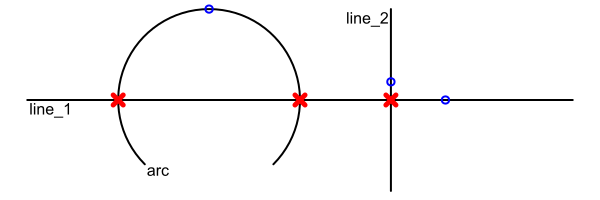
This image was created with examples/intersection_segments.rs
use planar_geo::prelude::*;
use std::f64::consts::PI;

// Abbreviated to make examples more concise
let e = DEFAULT_EPSILON;
let m = DEFAULT_MAX_ULPS;

let line_1: Segment = LineSegment::new([0.0, 0.0], [3.0, 0.0], e, m)
    .expect("segment length is not zero").into();
let line_2: Segment = LineSegment::new([2.0, -0.5], [2.0, 0.5], e, m)
    .expect("segment length is not zero").into();
let arc: Segment = ArcSegment::from_center_radius_start_offset_angle(
    [1.0, 0.0],
    0.5,
    -0.25*PI,
    1.5*PI,
    e,
    m,
).expect("offet angle is not zero").into();

// Are the following points part of the respective segment?
let pt1 = [2.3, 0.0];
let pt2 = [2.0, 0.1];
let pt3 = [1.0, 0.5];

assert!(line_1.contains_point(pt1, e, m));
assert!(!line_1.contains_point(pt2, e, m));
assert!(line_2.contains_point(pt2, e, m));
assert!(arc.contains_point(pt3, e, m));

// Find intersections between the segments. The order doesn't matter, i.e.
// line_1.intersections_primitive(&line_2) produces the same result as
// line_2.intersections_primitive(&line_1).

// line_1 and line_2 intersect once in point (2, 0)
assert_eq!(line_1.intersections_primitive(&line_2, e, m), PrimitiveIntersections::One([2.0, 0.0]));

// line_1 and arc intersect twice (in (0.5, 0.0) and (1.5, 0.0))
assert_eq!(line_1.intersections_primitive(&arc, e, m), PrimitiveIntersections::Two([[1.5, 0.0], [0.5, 0.0]]));

// line_2 and arc don't intersect at all
assert_eq!(line_2.intersections_primitive(&arc, e, m), PrimitiveIntersections::Zero);
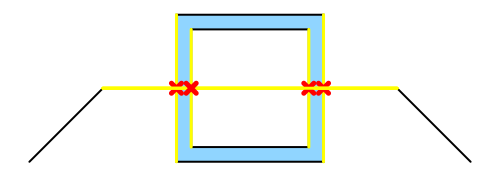
It is also possible to calculate the intersections between composite types, as
shown in examples/intersection_composites.rs:
Features
Serialization and deserialization
When the serde feature is enabled, all geometric objects can be serialized and
deserialized using the serde crate.
Visualization
When the cairo feature is enabled, all geometric objects have a draw
method which can be used to draw them onto a
cairo Context.
See the [module-level documentation](link to module) for more. All images used
in the documentation were created using this functionality.
Documentation
The full API documentation is available at https://docs.rs/planar_geo/0.1.3/planar_geo/.