rasciichart
| Crates.io | rasciichart |
| lib.rs | rasciichart |
| version | 0.2.17 |
| created_at | 2025-12-08 08:36:51.917021+00 |
| updated_at | 2025-12-15 09:00:18.230557+00 |
| description | ASCII chart library for Rust with smooth line rendering, inspired by asciichartpy |
| homepage | https://github.com/cumulus13/rasciichart |
| repository | https://github.com/cumulus13/rasciichart |
| max_upload_size | |
| id | 1972979 |
| size | 84,502 |
 cumulus13 (cumulus13)
documentation
README
rasciichart



Beautiful ASCII line charts in Rust with smooth rendering, inspired by asciichartpy.
Features
-
📊 Smooth line rendering with Unicode box-drawing characters
-
🎨 Highly customizable - height, width, colors, symbols, labels
-
🚀 Zero dependencies - lightweight and fast
-
💪 Type-safe - leverages Rust's type system
-
📝 Well documented - comprehensive examples and API docs
-
🔧 Helper functions - for common use cases
-
🎯 Production ready - proper error handling and edge cases
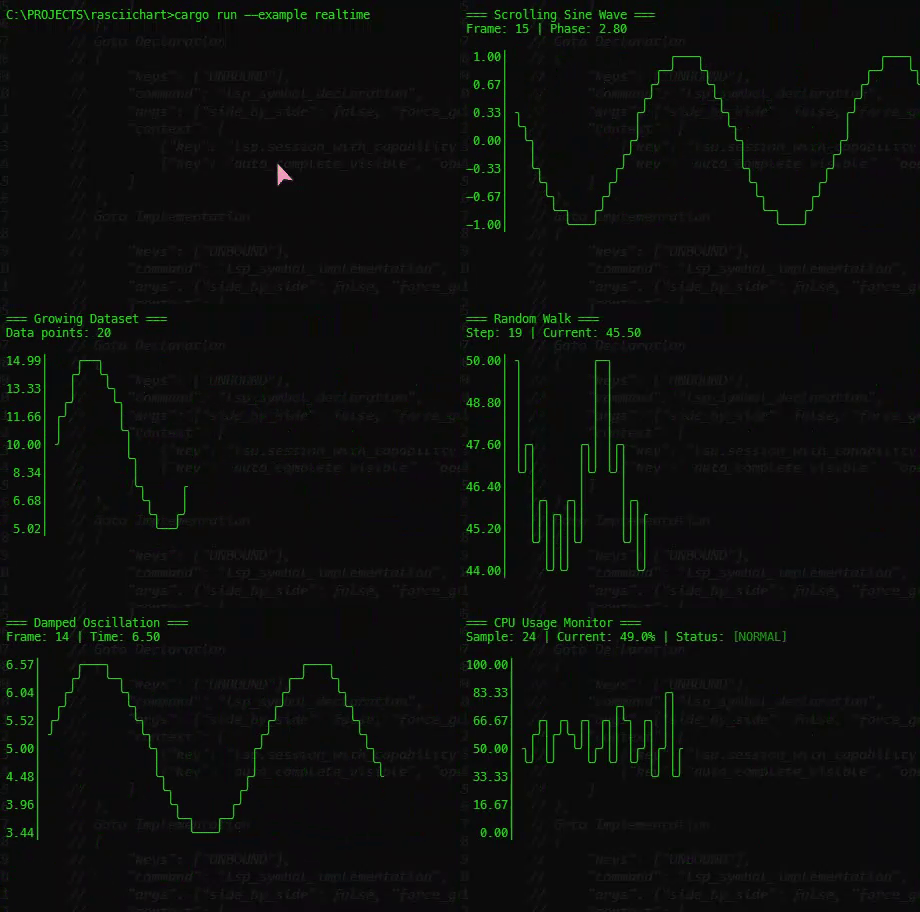
Demo
Installation
Add this to your Cargo.toml:
cargo add rasciichart
or
[dependencies]
rasciichart = "0.2.9"
Quick Start
use rasciichart::plot;

fn main() {
    let data = vec![1.0, 2.0, 3.0, 4.0, 5.0, 4.0, 3.0, 2.0, 1.0];
    println!("{}", plot(&data));
}
Output:
5.00 │   ╭╮
     │   ││
4.20 │   ││
     │  ╭╯╰╮
3.40 │  │  │
     │ ╭╯  ╰╮
2.60 │ │    │
     │ │    │
1.80 │╭╯    ╰╮
     ││      │
1.00 │╯      ╰
Examples
Basic Usage
use rasciichart::plot;

let data = vec![1.0, 2.0, 3.0, 4.0, 5.0];
println!("{}", plot(&data));
Custom Size
use rasciichart::plot_sized;

let data = vec![1.0, 2.0, 3.0, 4.0, 5.0];
println!("{}", plot_sized(&data, 15, 60)); // height: 15, width: 60
Custom Range
use rasciichart::plot_range;

let data = vec![5.0, 6.0, 7.0, 8.0, 9.0];
println!("{}", plot_range(&data, 0.0, 10.0)); // min: 0, max: 10
Without Labels
use rasciichart::plot_no_labels;

let data = vec![1.0, 2.0, 3.0, 4.0, 5.0];
println!("{}", plot_no_labels(&data));
ASCII-only Characters
For better compatibility with terminals that don't support Unicode:
use rasciichart::plot_ascii;

let data = vec![1.0, 2.0, 3.0, 4.0, 5.0];
println!("{}", plot_ascii(&data));
Advanced Configuration
use rasciichart::{plot_with_config, Config};

let data = vec![1.0, 2.0, 3.0, 4.0, 5.0];
let config = Config::new()
    .with_height(20)
    .with_width(80)
    .with_min(0.0)
    .with_max(10.0)
    .with_label_ticks(6)
    .with_label_format("{:.1}".to_string());

match plot_with_config(&data, config) {
    Ok(chart) => println!("{}", chart),
    Err(e) => eprintln!("Error: {}", e),
}
Generate Test Data
use rasciichart::{generate_sine, generate_cosine, plot};

// Sine wave
let sine_data = generate_sine(80, 2.0, 0.0);
println!("Sine wave:\n{}", plot(&sine_data));

// Cosine wave
let cosine_data = generate_cosine(80, 2.0, 0.0);
println!("\nCosine wave:\n{}", plot(&cosine_data));
Multiple Series (Overlaid)
use rasciichart::plot_multiple;

let series1 = vec![1.0, 2.0, 3.0, 4.0, 5.0];
let series2 = vec![5.0, 4.0, 3.0, 2.0, 1.0];
println!("{}", plot_multiple(&[&series1, &series2]));
Configuration Options
| Option | Type | Default | Description |
|---|---|---|---|
height |
usize |
10 |
Height of the chart in rows |
width |
usize |
80 |
Width of the chart in columns |
offset |
usize |
3 |
Left margin for labels |
min |
Option<f64> |
None |
Minimum Y-axis value (auto if None) |
max |
Option<f64> |
None |
Maximum Y-axis value (auto if None) |
show_labels |
bool |
true |
Show Y-axis labels |
label_ticks |
usize |
5 |
Number of Y-axis label ticks |
label_format |
String |
"{:.2}" |
Format string for labels |
symbols |
Symbols |
Unicode | Characters for drawing |
API Reference
Main Functions
plot(series: &[f64]) -> String- Simple plot with defaultsplot_sized(series: &[f64], height: usize, width: usize) -> String- Plot with custom sizeplot_range(series: &[f64], min: f64, max: f64) -> String- Plot with custom rangeplot_no_labels(series: &[f64]) -> String- Plot without Y-axis labelsplot_ascii(series: &[f64]) -> String- Plot with ASCII-only charactersplot_multiple(series: &[&[f64]]) -> String- Plot multiple seriesplot_with_config(series: &[f64], config: Config) -> Result<String>- Plot with full configuration
Helper Functions
generate_sine(points: usize, frequency: f64, phase: f64) -> Vec<f64>- Generate sine wavegenerate_cosine(points: usize, frequency: f64, phase: f64) -> Vec<f64>- Generate cosine wavegenerate_random_walk(points: usize, start: f64, volatility: f64) -> Vec<f64>- Generate random walk
Types
Config- Chart configuration with builder patternSymbols- Custom drawing charactersChartError- Error types for the library
Running Examples
The library includes several examples:
# Simple example
cargo run --example simple

# Advanced configuration
cargo run --example advanced

# Multiple series
cargo run --example multiple_series

# Real-time simulation
cargo run --example realtime

# Stock chart simulation
cargo run --example stock_chart
Error Handling
The library provides proper error handling:
use rasciichart::{plot_with_config, Config, ChartError};

let data = vec![];
let config = Config::new();

match plot_with_config(&data, config) {
    Ok(chart) => println!("{}", chart),
    Err(ChartError::EmptyData) => println!("No data to plot"),
    Err(e) => println!("Error: {}", e),
}
Edge Cases Handled
- Empty data sets
- Single data point
- NaN and Infinity values
- Invalid ranges (min >= max)
- Zero dimensions
- Very large or very small numbers
Performance
The library is designed to be fast and memory-efficient:
- No heap allocations in hot paths
- Efficient string building
- Minimal copies of data
- O(n) time complexity where n is the number of data points
Comparison with asciichartpy
| Feature | rasciichart | asciichartpy |
|---|---|---|
| Language | Rust | Python |
| Dependencies | 0 | 0 |
| Type Safety | ✅ Strong | ❌ Dynamic |
| Performance | ⚡ Fast | 🐌 Slower |
| Error Handling | ✅ Result |
❌ Exceptions |
| Unicode Support | ✅ Yes | ✅ Yes |
| ASCII Fallback | ✅ Yes | ✅ Yes |
Contributing
Contributions are welcome! Please feel free to submit a Pull Request.
- Fork the repository
- Create your feature branch (
git checkout -b feature/amazing-feature) - Commit your changes (
git commit -am 'Add some amazing feature') - Push to the branch (
git push origin feature/amazing-feature) - Open a Pull Request
License
This project is licensed under the MIT License - see the LICENSE file for details.
Author
Hadi Cahyadi - cumulus13@gmail.com


Acknowledgments
- Inspired by asciichartpy by Igor Kroitor
- Unicode box-drawing characters from the Unicode Standard
Changelog
see the CHANGELOG
Support
If you find this library useful, please give it a ⭐ on GitHub!