rdx-stderr
| Crates.io | rdx-stderr |
| lib.rs | rdx-stderr |
| version | 0.8.4 |
| created_at | 2025-07-30 18:30:20.90349+00 |
| updated_at | 2025-08-12 18:23:26.505336+00 |
| description | The Rustadex Stderr Package. An opinionated, ergonomic library for pretty-okay CLI terminal output, made of sticks bubble gum and vintage bash scripts. |
| homepage | |
| repository | https://github.com/rustadex/stderr |
| max_upload_size | |
| id | 1773881 |
| size | 614,420 |
 Qodeninja (qodeninja)
documentation
README
📖 Rustadex Stderr (rdx-stderr)
An opinionated, ergonomic library for pretty-okay CLI terminal output, made of sticks bubble gum and vintage bash scripts.




🎯 What is Stderr?
rdx-stderr is a Rust logging library inspired by years of handcrafted Bash scripts, designed to make your CLI applications beautiful and informative. It provides semantic logging functions, rich formatting utilities, and sophisticated tracing capabilities.
✨ Key Features:
-
📊 Hierarchical Tracing: Visual function call trees with automatic entry/exit
-
🎨 Rich Formatting: Tables, banners, boxes with customizable styling
-
🔧 Interactive Elements: Confirmations, prompts with intelligent defaults
-
⚙️ Modular Architecture: Use only what you need via Cargo features
-
🌈 Context Management: Smart banners for state changes
-
🎭 Customizable Glyphs: Unicode symbols that work everywhere
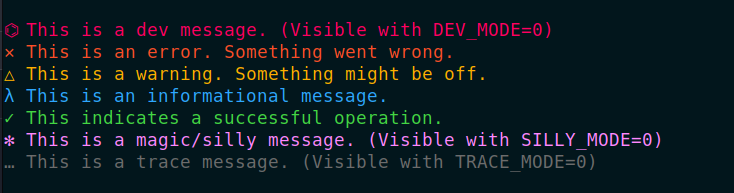
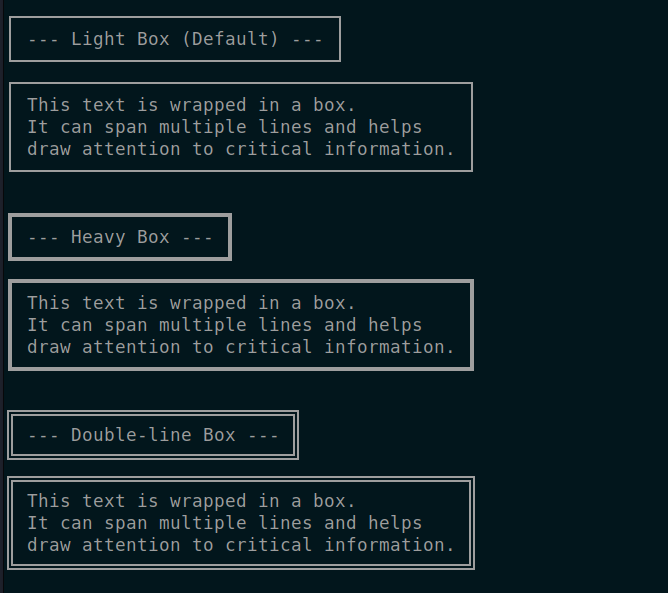
🚀 Quick Start
Add to your Cargo.toml:
[dependencies]
rdx-stderr = "0.8.2"

# Or with specific features:
rdx-stderr = { version = "0.8.2", features = ["trace", "interactive", "formatting"] }
Basic Logging
use rdx_stderr::Stderr;

let mut log = Stderr::new();
log.info("Hello, world!");
log.warn("Something's not quite right");
log.okay("All systems go!");
With Hierarchical Tracing
use rdx_stderr::{Stderr, qtrace_fn};

let mut log = Stderr::new();

qtrace_fn!("parse_config", "starting configuration parsing");
qtrace_fn!("parse_config", "loaded 42 settings");
qtrace_fn!("validate_config", "checking required fields");
qtrace_fn!("validate_config", "validation successful");
Global Logger
use rdx_stderr::logger;

fn main() {
    logger.info("This works from anywhere!");
    logger.warn("Watch out!");
}
✨ What's New (v0.8)
- Hierarchical Tracing: Advanced function call tracing with visual tree structure
- Context Management: Smart context tracking with automatic banner display
- Enhanced Table System: Comprehensive table formatting for CLI data display
- Feature Modularity: Granular feature flags for minimal builds
- Auto Function Names: Optional automatic function name detection for tracing
- Interactive Builders: Flexible confirmation prompts with styling options
- Configurable Glyphs: 80+ Unicode glyphs with customizable sets
- Performance Optimized: Efficient rendering for CLI responsiveness
⚡ Philosophy: Fast, Expressive, Bash DNA
- Terminal output should be beautiful and actionable, not just noise
- Defaults are high signal, but you can theme, override, and hack anything
- Built to match (and outclass) custom Bash stderr libs
- Modular by design - use only what you need
✦ Features
🎯 Core Logging
- 🌈 Drop-in
Stderrlogger or globallogger - 🔥 Rich message types: info, warn, error, okay, debug, trace, magic
- 🧩 Debug pretty-printing for Rust types
- 🌀 Ergonomic API — str, Display, Debug, all accepted
🔍 Advanced Tracing
- 🌲 Hierarchical function call tracing with visual tree structure
- 🏷️ Automatic function name detection (optional feature)
- ⏱️ RAII scoped tracing with automatic entry/exit logging
- 🎨 Labelled trace helpers (add, sub, found, done, item)
🎯 Context Management
- 📍 Smart context tracking with automatic banner display
- 🔄 Context change detection (banners only show when context changes)
- ⚡ Ephemeral context support for temporary operations
- 🎪 Context scoping for isolated operations
📊 Table & Formatting
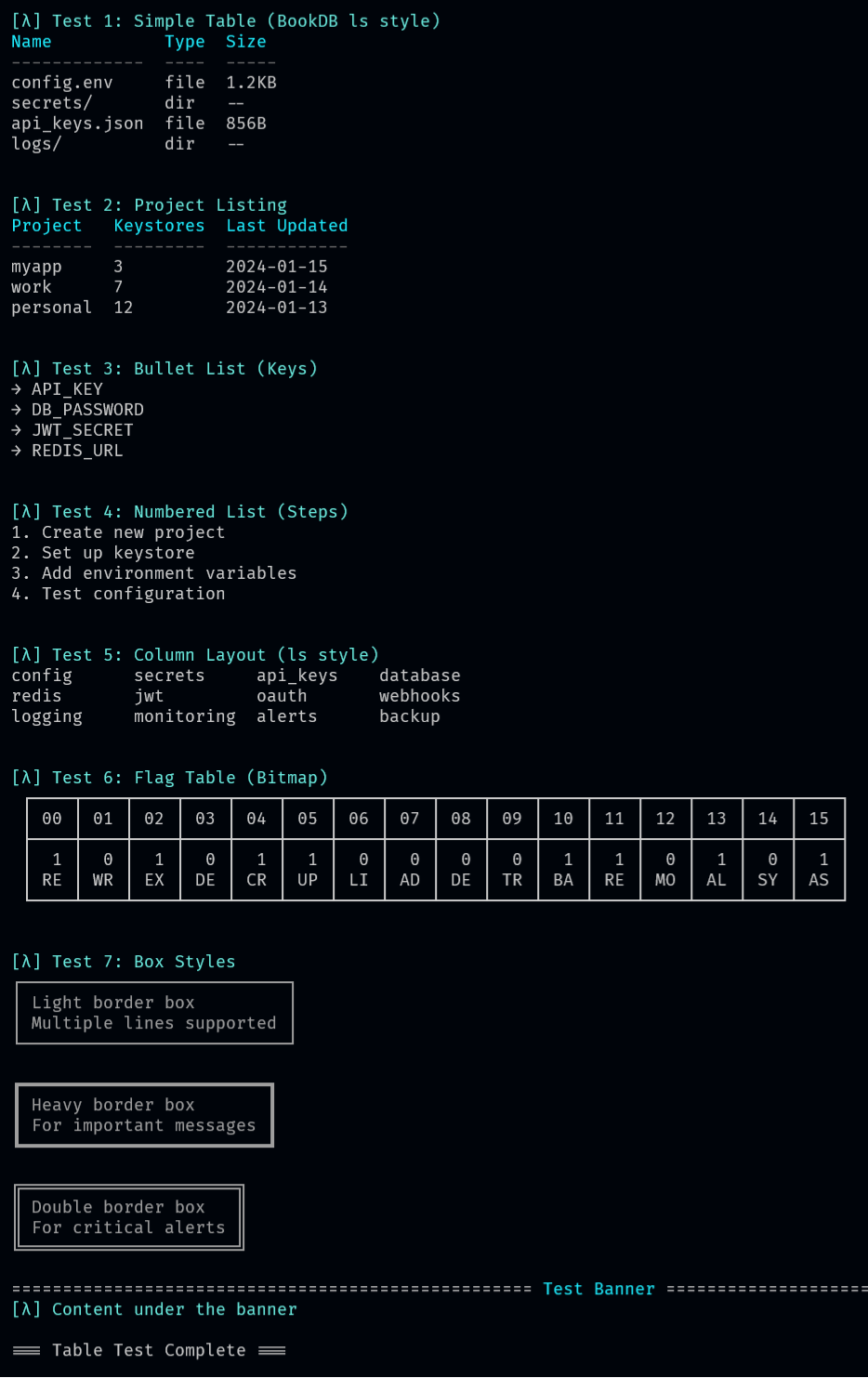
- 📋 Simple tables for data display
- 📏 Column layouts for compact lists
- 🎛️ Flag tables for bitmap visualization
- 📦 Multiple box styles (light, heavy, double)
- 🎨 Banners and dividers
💬 Interactive Features
- ❓ Flexible confirmation prompts with styling
- 📦 Boxed prompts with border customization
- 🎨 Colored prompts and custom styling
- 📝 Help text formatting
🎨 Customization
-
🎭 80+ configurable Unicode glyphs
-
🎨 Custom color schemes
-
🏷️ Application labeling
-
⚙️ Runtime configuration toggles
🧩 Modular Features
rdx-stderr uses Cargo features for modular functionality:
default: Includes all features (trace,interactive,formatting,auto-fn-names)minimal: Just core logging functionalitytrace: Hierarchical function tracing with visual tree structureinteractive: User prompts, confirmations, and interactive elementsformatting: Tables, boxes, banners, and advanced text formattingauto-fn-names: Automatic function name detection for tracing
# Minimal build - just basic logging
rdx-stderr = { version = "0.8.2", default-features = false, features = ["minimal"] }

# Full-featured build
rdx-stderr = { version = "0.8.2", features = ["default"] }
src/
├── lib.rs              # Main library interface
├── rdx/
│   ├── stderr.rs       # Core module with feature re-exports
│   ├── esc/            # Colors, glyphs, styling
│   │   ├── colors.rs
│   │   ├── glyphs.rs
│   │   ├── style.rs
│   │   └── boxes.rs
│   ├── utils/          # Utilities and helpers
│   │   ├── helpers.rs
│   │   ├── flag.rs
│   │   └── grid.rs
│   ├── stderr/         # Feature implementations
│   │   ├── stderr.rs   # Core logging
│   │   ├── trace.rs    # Hierarchical tracing
│   │   ├── interactive.rs # Prompts & confirmations
│   │   ├── formatting.rs  # Tables, banners, boxes
│   │   └── static_logger.rs # Global logger
│   ├── macros.rs       # Convenience macros
│   └── meta.rs         # Version and help info
└── examples/           # Usage demonstrations
Feature Design
The modular architecture allows you to include only what you need:
-
Core (
stderr.rs): Always available - basic logging functions -
Trace Extension: Hierarchical function call tracking
-
Interactive Extension: User prompts and confirmations
-
Formatting Extension: Tables, banners, and advanced layout
-
Auto Function Names: Automatic function name detection
Environment Controls
# Enable different message types
export TRACE_MODE=0    # Show trace messages
export DEBUG_MODE=0    # Show debug messages
export DEV_MODE=0      # Show dev messages
export SILLY_MODE=0    # Show magic/silly messages
export QUIET_MODE=0    # Enable quiet mode

# Run your application
cargo run
📊 Hierarchical Tracing
Track function calls with visual hierarchy:
use rdx_stderr::{qtrace_fn, qtrace_auto, qtrace_scope};

fn process_data() {
    qtrace_fn!("process_data", "starting data processing");

    parse_input();
    validate_data();

    qtrace_fn!("process_data", "processing complete");
}

fn parse_input() {
    qtrace_auto!("parsing user input");  // Uses function name automatically

    // Scoped tracing with automatic entry/exit
    qtrace_scope!("validation", {
        qtrace_auto!("checking format");
        qtrace_auto!("format valid");
    });
}
Output:
λ process_data: starting data processing
├─ λ parse_input: parsing user input
│  └─ λ validation: checking format
│     └─ λ validation: format valid
└─ λ process_data: processing complete
🎨 Rich Formatting
Tables
use rdx_stderr::Stderr;

let mut log = Stderr::new();

log.simple_table(&[
    &["Name", "Age", "City"],
    &["Alice", "30", "New York"],
    &["Bob", "25", "San Francisco"],
    &["Charlie", "35", "Chicago"],
])?;
Banners & Boxes
log.banner("System Status", '=')?;
log.boxed("CRITICAL: System maintenance in progress")?;
Context Banners
// Smart context management - only shows banner when context changes
log.set_context("@myapp.VAR.config");
log.info("First operation");  // Shows context banner

log.info("Second operation"); // No banner (same context)

log.set_context("@myapp.VAR.secrets");
log.info("Third operation");  // Shows new context banner
✅ Interactive Elements
Simple Confirmations
if log.confirm("Delete all files?")?.unwrap_or(false) {
    log.warn("Deleting files...");
} else {
    log.info("Operation cancelled");
}
Styled Confirmations
let critical = "ERASE DISK?\nThis action cannot be undone.";
if log.confirm_builder(critical)
      .boxed(true)
      .style(BorderStyle::Heavy)
      .ask()?
      .unwrap_or(false) {
    log.error("Proceeding with disk erasure");
}
🎭 Customizable Glyphs
Create your own visual style:
use rdx_stderr::{Stderr, GlyphSet, LogLevel};

// Custom emoji glyphs
let custom_glyphs = GlyphSet {
    info: "📋",
    warn: "⚠️",
    error: "❌",
    okay: "✅",
    trace: "🔍",
    debug: "🐛",
    magic: "✨",
};

let mut log = Stderr::new().with_glyphs(custom_glyphs);
log.info("Info with custom emoji glyph");

// Or set individual glyphs
log.set_glyph(LogLevel::Info, "🚀");
log.info("Info with rocket glyph");
🧪 Macro Convenience
Quick logging with macros:
use rdx_stderr::{qinfo, qwarn, qerror, qpretty};

qinfo!("System started successfully");
qwarn!("Configuration file not found");
qerror!(my_error_struct); // Auto pretty-prints Debug types
qpretty!("⚡", &complex_data); // Boxed, multiline pretty-dump
🔍 Debug & Inspection
Beautiful debug output for any type implementing Debug:
#[derive(Debug)]
struct AppState {
    count: u32,
    active: bool,
    users: Vec<String>
}

let state = AppState {
    count: 42,
    active: true,
    users: vec!["alice".into(), "bob".into()]
};

// Pretty debug output
log.info_debug(&state);

// Inspection interface
log.inspect().warn(&state);
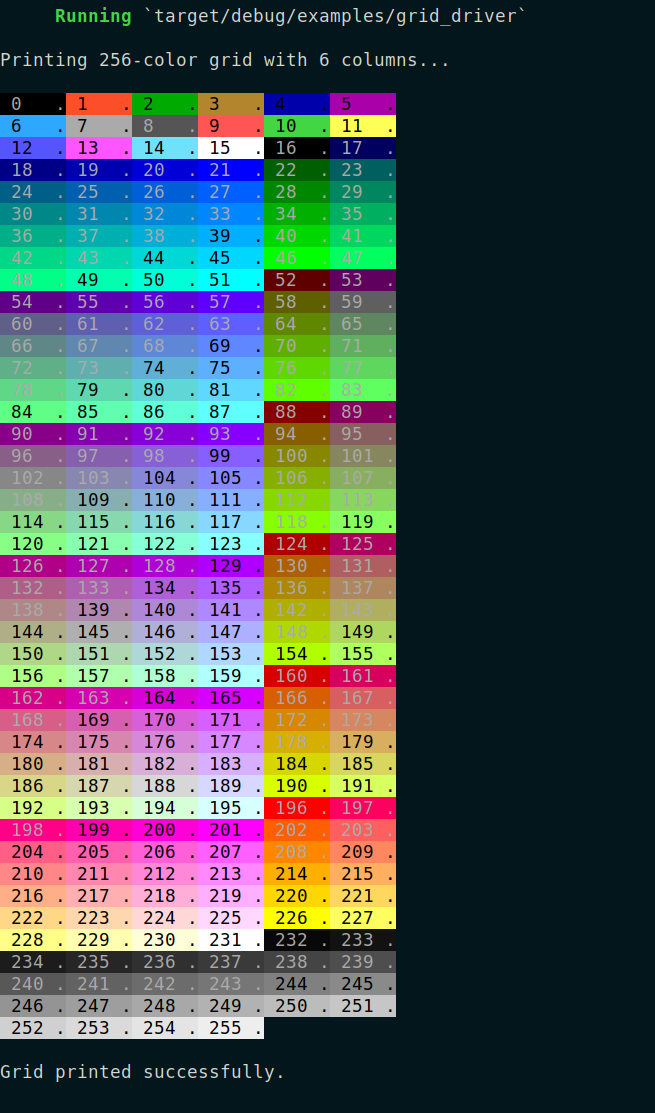
🎨 Color & Style System
Rich color and styling support:
use rdx_stderr::{Color, Glyph, Style};

let mut log = Stderr::new();

// Built-in semantic colors
log.okay("Success message in green");
log.warn("Warning message in yellow");
log.error("Error message in red");

// Custom glyphs
println!("Chess piece: {}", Glyph::PAWN);
println!("Arrow: {}", Glyph::ARROW_RIGHT);
📚 Examples
Basic CLI Application
use rdx_stderr::Stderr;

fn main() {
    let mut log = Stderr::new();

    log.info("Starting application");

    match process_files() {
        Ok(count) => log.okay(&format!("Processed {} files", count)),
        Err(e) => {
            log.error(&format!("Processing failed: {}", e));
            std::process::exit(1);
        }
    }
}
With Rich Output
use rdx_stderr::{Stderr, qtrace_fn};

fn main() -> Result<(), Box<dyn std::error::Error>> {
    let mut log = Stderr::new();

    log.banner("File Processor v1.0", '=')?;

    qtrace_fn!("main", "application started");

    // Show processing status
    log.simple_table(&[
        &["File", "Status", "Lines"],
        &["config.toml", "✓", "42"],
        &["data.json", "✓", "156"],
        &["README.md", "✓", "89"],
    ])?;

    if log.confirm("Process all files?")?.unwrap_or(false) {
        qtrace_fn!("main", "user confirmed processing");
        log.okay("All files processed successfully!");
    } else {
        log.warn("Processing cancelled by user");
    }

    Ok(())
}
🔍 Hierarchical Tracing
Manual Function Tracing
use stderr::Stderr;

fn main() {
    let mut log = Stderr::new();

    log.trace_fn("parse_config", "starting configuration");
    log.trace_fn("parse_config", "reading config file");
    log.trace_fn("validate_settings", "checking database URL");
    log.trace_fn("validate_settings", "database connection OK");
    log.trace_fn("parse_config", "configuration complete");
}
Output:
λ┄┄┄[parse_config]
    ┆
    └┄┄> starting configuration
    └┄┄>> reading config file
λ┄┄┄[validate_settings]
    ┆
    └┄┄> checking database URL
    └┄┄>> database connection OK
λ┄┄┄[parse_config]
    ┆
    └┄┄>> configuration complete
Automatic Function Names
use stderr::{Stderr, qtrace_auto};

#[cfg(feature = "auto-fn-names")]
fn my_function() {
    qtrace_auto!("This automatically shows 'my_function' as the function name");
    qtrace_auto!("Performing some work");

    nested_function();

    qtrace_auto!("Work complete");
}

#[cfg(feature = "auto-fn-names")]
fn nested_function() {
    qtrace_auto!("Inside nested function");
}
Scoped Tracing (RAII)
use stderr::Stderr;

fn complex_operation() {
    let mut log = Stderr::new();

    let mut scope = log.trace_scope("complex_operation");
    scope.step("initializing resources");
    scope.step("processing data");
    scope.step_debug("intermediate result", &some_data);
    scope.step("finalizing");

    // Automatic exit trace when scope is dropped
}
Labelled Trace Helpers
use stderr::Stderr;

fn main() {
    let mut log = Stderr::new();

    log.trace_add("Creating new user account");
    log.trace_found("Located existing preferences");
    log.trace_item("Processing item #42");
    log.trace_done("User account setup complete");
    log.trace_sub("Cleaning up temporary files");
}
🎯 Context Management
Smart Context Banners
use stderr::Stderr;

fn main() {
    let mut log = Stderr::new();

    // First context - shows banner
    log.set_context("@myapp.VAR.config");
    log.info("Working in config context");

    // Same context - no banner
    log.set_context("@myapp.VAR.config");
    log.info("Still in config context");

    // Different context - shows new banner
    log.set_context("@myapp.VAR.secrets");
    log.warn("Switched to secrets context");

    // Clear context
    log.clear_context();
    log.info("Back to neutral context");
}
Output:
╭─────── Context: @myapp.VAR.config ───────╮
[λ] Working in config context
[λ] Still in config context
╭─────── Context: @myapp.VAR.secrets ──────╮
[△] Switched to secrets context
[λ] Back to neutral context
Ephemeral Context
use stderr::Stderr;

fn main() {
    let mut log = Stderr::new();

    log.set_context("@main.VAR.config");
    log.info("In main context");

    // Temporary context without changing persistent cursor
    log.with_context("@temp.VAR.test", || {
        log.info("Temporary operation");
        log.warn("This won't change the main context");
    });

    log.info("Back in main context");
}
📊 Table & Data Formatting
Simple Tables
use stderr::Stderr;

fn main() -> std::io::Result<()> {
    let mut log = Stderr::new();

    log.simple_table(&[
        &["Name", "Type", "Size", "Modified"],
        &["config.env", "file", "1.2KB", "2024-01-15"],
        &["secrets/", "dir", "--", "2024-01-14"],
        &["api_keys.json", "file", "856B", "2024-01-13"],
    ])?;

    Ok(())
}
Column Layouts
use stderr::Stderr;

fn main() -> std::io::Result<()> {
    let mut log = Stderr::new();

    let items = [
        "config", "secrets", "api_keys", "database",
        "redis", "jwt", "oauth", "webhooks",
        "logging", "monitoring", "alerts", "backup"
    ];

    log.columns(&items, 4)?;

    Ok(())
}
Flag Tables (Bitmap Visualization)
use stderr::{Stderr, BorderStyle, flag_table, term_width};

fn main() {
    let mut log = Stderr::new();

    let flags: u32 = 0b1010_1100_0011_0101;
    let labels = &[
        "READ", "WRITE", "EXEC", "DELETE",
        "CREATE", "UPDATE", "LIST", "ADMIN",
        "DEBUG", "TRACE", "BACKUP", "RESTORE",
        "MONITOR", "ALERT", "SYNC", "ASYNC
🏗️ Architecture
src/
├── lib.rs              # Main library interface
├── rdx/
│   ├── stderr.rs       # Core module with feature re-exports
│   ├── esc/            # Colors, glyphs, styling
│   │   ├── colors.rs
│   │   ├── glyphs.rs
│   │   ├── style.rs
│   │   └── boxes.rs
│   ├── utils/          # Utilities and helpers
│   │   ├── helpers.rs
│   │   ├── flag.rs
│   │   └── grid.rs
│   ├── stderr/         # Feature implementations
│   │   ├── stderr.rs   # Core logging
│   │   ├── trace.rs    # Hierarchical tracing
│   │   ├── interactive.rs # Prompts & confirmations
│   │   ├── formatting.rs  # Tables, banners, boxes
│   │   └── static_logger.rs # Global logger
│   ├── macros.rs       # Convenience macros
│   └── meta.rs         # Version and help info
└── examples/           # Usage demonstrations
🧪 Testing & Validation
The library includes comprehensive test drivers and examples:
# Run all examples
cargo run --example trace_driver --all-features
cargo run --example interactive_driver --all-features
cargo run --example formatting_driver --all-features

# Test specific features
cargo test --features trace
cargo test --features interactive
cargo test --features formatting
🤝 Used By
rdx-stderr is actively used by:
- BookDB: Context-aware key-value store with rich CLI output
- Various CLI tools: Where beautiful terminal output matters
- Internal Rustadex projects: Providing consistent UX across tools
Using rdx-stderr in your project? Let us know!
🗺️ Roadmap
Current (v0.8.x)
- ✅ Modular feature architecture
- ✅ Hierarchical tracing system
- ✅ Rich formatting capabilities
- ✅ Interactive confirmations
- ✅ Context management
Future (v0.8.3)
- Progress bars and spinners
- Configuration file support
- Plugin architecture for custom formatters
- Terminal capability detection
- Enhanced color palette support
License
This project is licensed under either of:
- Apache License, Version 2.0 (LICENSE-APACHE or http://www.apache.org/licenses/LICENSE-2.0)
- MIT license (LICENSE-MIT or http://opensource.org/licenses/MIT)
at your option.