riscfetch
| Crates.io | riscfetch |
| lib.rs | riscfetch |
| version | 2.1.0 |
| created_at | 2025-12-13 16:31:05.880046+00 |
| updated_at | 2025-12-20 06:59:22.536681+00 |
| description | RISC-V architecture information display tool - Show off your RISC-V setup! |
| homepage | |
| repository | https://github.com/kako-jun/riscfetch |
| max_upload_size | |
| id | 1983137 |
| size | 70,337 |
 kako-jun (kako-jun)
documentation
README
riscfetch




System information tool for RISC-V. Displays ISA extensions, hart count, hardware IDs, and more.
RISC-V only. Exits on other architectures.
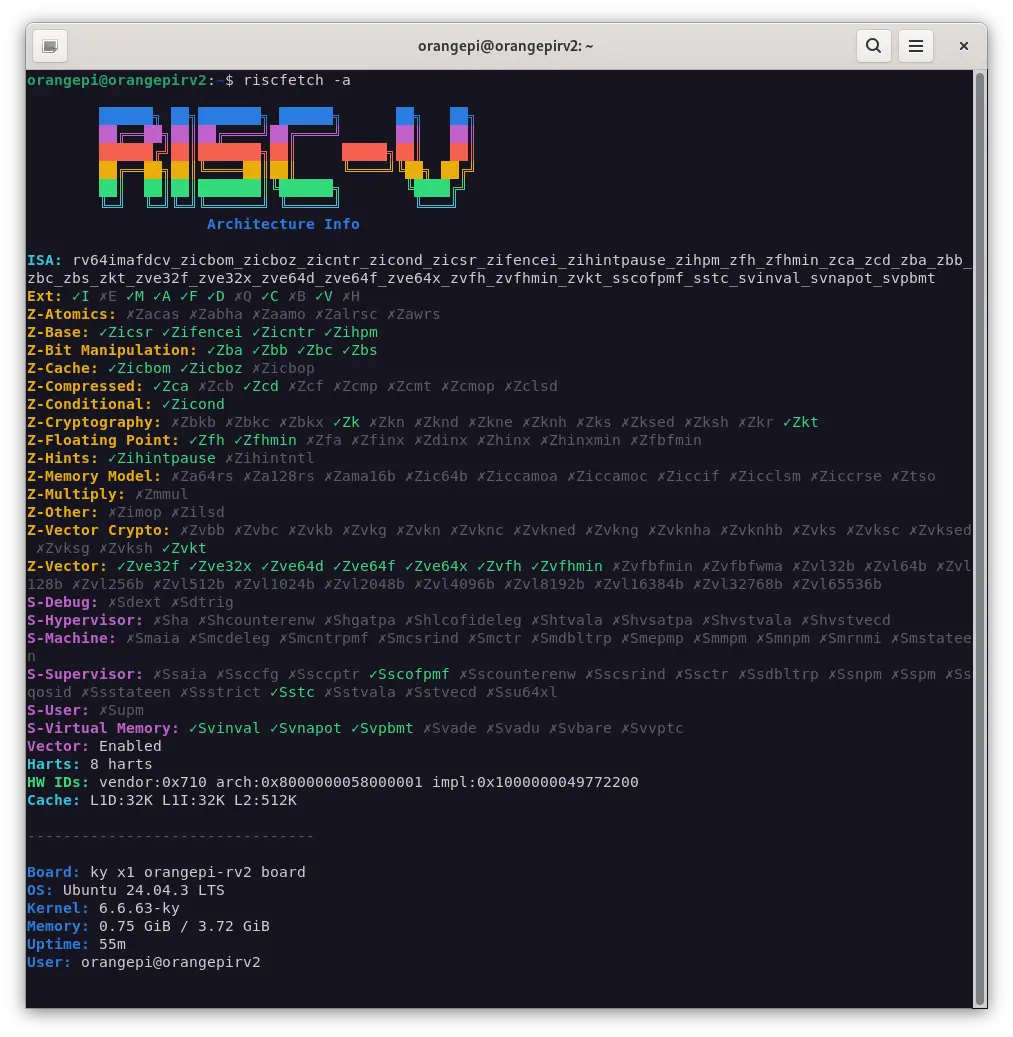
Features
- 144 extensions supported (98 Z-extensions + 46 S-extensions)
- Category-based display for easy reading
- 13 vendor logos including Pine64 and WCH
- JSON output for scripting
- Detailed explanation mode (
-e)
Why RISC-V?
I enjoy anime, movies, and food from all over the world. Just a fan of cool tech and the future. RISC-V is fun to tinker with, and I wanted a neofetch-style tool for it.
Install
From crates.io
cargo install riscfetch
From GitHub Releases
# Download the latest release
curl -LO https://github.com/kako-jun/riscfetch/releases/latest/download/riscfetch-linux-riscv64

# Make it executable
chmod +x riscfetch-linux-riscv64

# Move to PATH
sudo mv riscfetch-linux-riscv64 /usr/local/bin/riscfetch
Usage
riscfetch              # standard output
riscfetch -a           # show all 144 extensions with ✓/✗
riscfetch -a -e        # all extensions with descriptions
riscfetch -r           # RISC-V info only (no OS, memory, etc.)
riscfetch -e           # explain each ISA extension
riscfetch -j           # JSON output
riscfetch -a -j        # JSON with all extensions
riscfetch -b           # run benchmarks
riscfetch -l pine64    # use Pine64 logo
Output
Extensions are grouped by category:
ISA:        rv64imafdcv_zicsr_zifencei_zba_zbb_zbs_sstc...
Ext:        I M A F D C V
Z-Base:     Zicsr Zifencei Zicntr Zihpm
Z-Bit:      Zba Zbb Zbc Zbs
Z-Vector:   Zvl128b Zvl256b
S-Sup:      Sstc
Vector:     Enabled, VLEN>=256
Harts:      4 harts
HW IDs:     vendor:0x489 arch:0x8000000000000007 impl:0x0
Cache:      L1D:32K L1I:32K L2:2048K

--------------------------------

Board:      StarFive VisionFive 2
OS:         Ubuntu 24.04 LTS
Kernel:     6.8.0-riscv64
Memory:     3.45 GiB / 8.00 GiB
Uptime:     3h 42m
User:       user@visionfive2
Options
| Flag | Description |
|---|---|
-r, --riscv-only |
Show only RISC-V specific info (exclude OS, memory, uptime) |
-e, --explain |
Show meaning of each extension |
-a, --all |
Show all 144 extensions with ✓/✗ checkmarks |
-j, --json |
Machine-readable JSON output |
-b, --benchmark |
ISA-specific benchmarks |
-l, --logo <VENDOR> |
Vendor logo (see below) |
--style <STYLE> |
Logo style: normal, small, none |
Supported Vendors (13)
| Vendor | Description |
|---|---|
default |
Generic RISC-V logo |
sifive |
SiFive (HiFive Unmatched, Unleashed) |
starfive |
StarFive (VisionFive 2) |
thead |
T-Head/Alibaba (XuanTie C906, C910) |
milkv |
Milk-V (Duo, Mars, Pioneer) |
sipeed |
Sipeed (Lichee, Maix series) |
pine64 |
Pine64 (Star64, Oz64) |
kendryte |
Kendryte/Canaan (K210, K510) |
allwinner |
Allwinner (D1) |
espressif |
Espressif (ESP32-C3, C6) |
spacemit |
SpacemiT (K1, Orange Pi RV2) |
sophgo |
Sophgo (CV1800B, SG2000) |
wch |
WCH (CH32V003, CH32V103) |
Supported Extensions
Standard Extensions (11)
I, E, M, A, F, D, Q, C, B, V, H
Z-Extensions (98)
Grouped by category: Base, Hints, Cache, Conditional, Bit Manipulation, Cryptography, Floating Point, Compressed, Atomics, Memory Model, Multiply, Vector, Vector Crypto
S-Extensions (46)
Grouped by category: Virtual Memory, Supervisor, Machine, Hypervisor, Debug, User
See SPEC.md for the full list.
Complements fastfetch
riscfetch shows RISC-V specific info. Use with fastfetch for full system details:
fastfetch && riscfetch -r
Contributing
Issues and pull requests are welcome!
- Bug reports
- Feature requests
- Support for new RISC-V boards
- Documentation improvements
Testing Help Wanted
We have limited hardware for testing. If you can test on any of the following, please report your results (working or not):
- RV32E (embedded with 16 registers) - e.g., ESP32-C3, CH32V003
- Non-Vector CPUs - e.g., VisionFive 2, Allwinner D1
- Different VLEN values - VLEN=128, 512, 1024, etc.
Even "it works" reports are valuable! Please open an issue with your /proc/cpuinfo and riscfetch output.
License
MIT