rlt
| Crates.io | rlt |
| lib.rs | rlt |
| version | 0.4.0 |
| created_at | 2024-03-26 15:41:59.27762+00 |
| updated_at | 2026-01-25 17:04:55.055313+00 |
| description | A universal load testing library for Rust, with real-time TUI support |
| homepage | |
| repository | https://github.com/wfxr/rlt |
| max_upload_size | |
| id | 1186584 |
| size | 310,638 |
 Wenxuan (wfxr)
documentation
README
rlt
A Rust Load Testing framework with real-time TUI support.





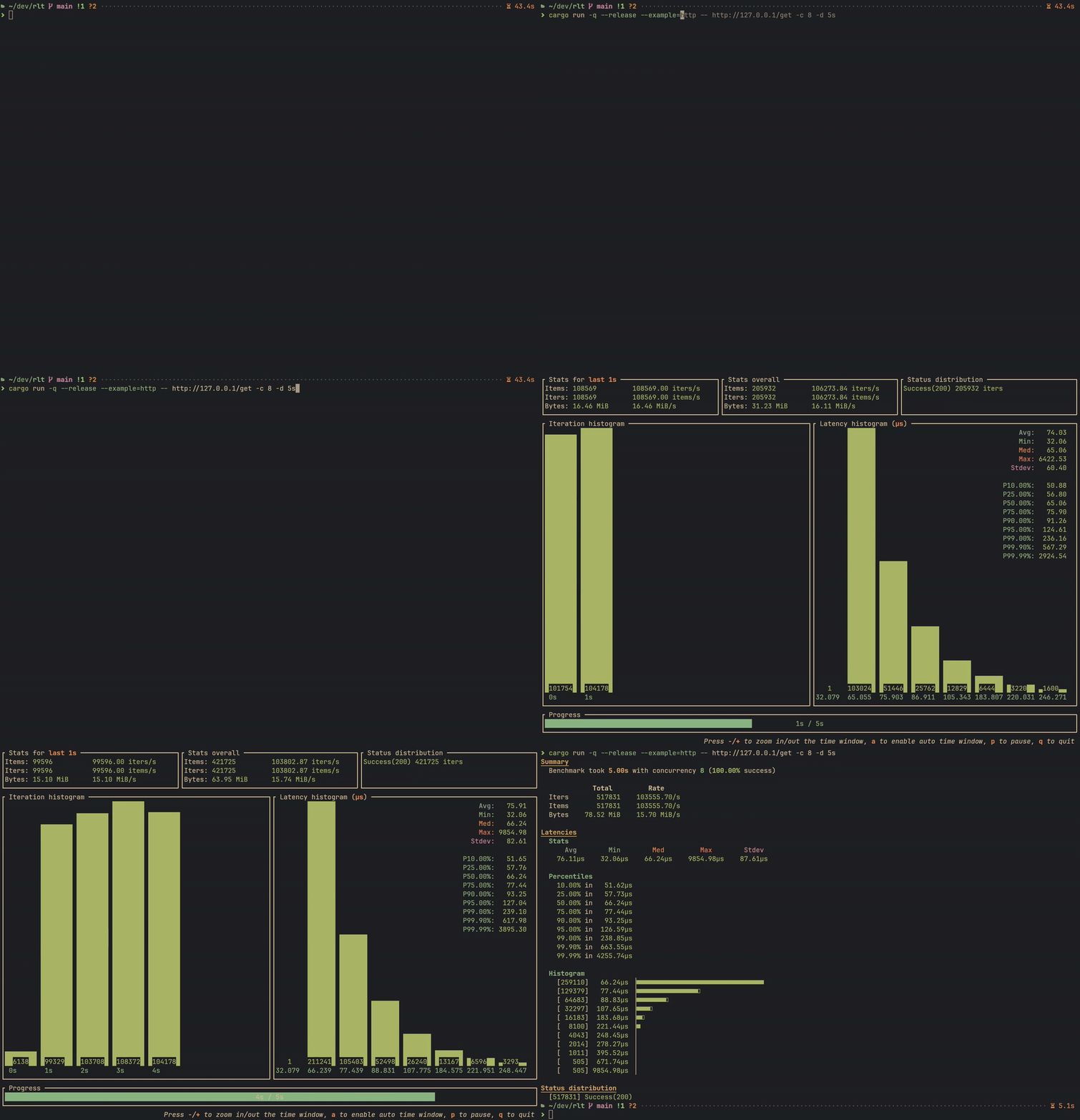
rlt provides a simple way to create load test tools in Rust. It is designed to be a universal load test framework, which means you can use rlt for various services, such as HTTP, gRPC, Thrift, Database, or other customized services.
Features
- Flexible: Customize the workload with your own logic.
- Easy to use: Little boilerplate code, just focus on testing.
- Rich Statistics: Collect and display rich statistics.
- High Performance: Optimized for performance and resource usage.
- Real-time TUI: Monitor testing progress with a powerful real-time TUI.
- Baseline Comparison: Save and compare results to track performance changes.
Quick Start
Run cargo add rlt to add rlt as a dependency to your Cargo.toml:
[dependencies]
rlt = "0.3"
Stateless Benchmark
For simple benchmarks without per-worker state, implement the StatelessBenchSuite trait:
use anyhow::Result;
use async_trait::async_trait;
use clap::Parser;
use rlt::{cli::BenchCli, IterInfo, IterReport, StatelessBenchSuite, Status};
use tokio::time::Instant;

#[derive(Clone)]
struct SimpleBench;

#[async_trait]
impl StatelessBenchSuite for SimpleBench {
    async fn bench(&mut self, _: &IterInfo) -> Result<IterReport> {
        let t = Instant::now();
        // Your benchmark logic here
        Ok(IterReport { duration: t.elapsed(), status: Status::success(0), bytes: 0, items: 1 })
    }
}

#[tokio::main]
async fn main() -> Result<()> {
    rlt::cli::run(BenchCli::parse(), SimpleBench).await
}
Stateful Benchmark
For benchmarks requiring per-worker state (e.g., HTTP clients, DB connections), implement BenchSuite.
The bench_cli! macro helps define CLI options:
bench_cli!(HttpBench, {
    /// Target URL.
    #[clap(long)]
    pub url: Url,
});

#[async_trait]
impl BenchSuite for HttpBench {
    type WorkerState = Client;

    async fn state(&self, _: u32) -> Result<Self::WorkerState> {
        Ok(Client::new())
    }

    async fn bench(&mut self, client: &mut Self::WorkerState, _: &IterInfo) -> Result<IterReport> {
        let t = Instant::now();
        let resp = client.get(self.url.clone()).send().await?;
        let status = resp.status().into();
        let bytes = resp.bytes().await?.len() as u64;
        let duration = t.elapsed();
        Ok(IterReport { duration, status, bytes, items: 1 })
    }
}
You can also create a separate struct to hold the CLI options for more flexibility. There is an example in examples/http_hyper.rs.
Finally, create the main function to run the load test using the bench_cli_run! macro:
#[tokio::main]
async fn main() -> Result<()> {
    bench_cli_run!(HttpBench).await
}
CLI Reference
All benchmarks built with rlt include these CLI options:
Core Options
| Option | Short | Description |
|---|---|---|
--concurrency |
-c |
Number of concurrent workers |
--iterations |
-n |
Stop after N iterations |
--duration |
-d |
Stop after duration (e.g., 10s, 5m, 1h) |
--warmup |
-w |
Warmup iterations (excluded from results) |
--rate |
-r |
Rate limit in iterations per second |
--quiet |
-q |
Quiet mode (implies --collector silent) |
Output Options
| Option | Short | Description |
|---|---|---|
--output |
-o |
Output format: text or json |
--output-file |
-O |
Write report to file instead of stdout |
--collector |
Collector type: tui or silent |
|
--fps |
TUI refresh rate (frames per second) | |
--quit-manually |
Require manual quit (TUI only) |
Baseline Options
| Option | Description |
|---|---|
--save-baseline <NAME> |
Save results as named baseline |
--baseline <NAME> |
Compare against named baseline |
--baseline-file <PATH> |
Compare against baseline JSON file |
--baseline-dir <PATH> |
Baseline storage directory |
--noise-threshold |
Noise threshold percentage |
--fail-on-regression |
Exit with error on regression (CI mode) |
--regression-metrics |
Metrics for regression detection |
Cargo Features
| Feature | Default | Description |
|---|---|---|
tracing |
Yes | Logging support via tui-logger |
rate_limit |
Yes | Rate limiting via governor |
http |
Yes | HTTP status code conversion |
To disable default features:
[dependencies]
rlt = { version = "0.3", default-features = false }
Examples
| Example | Description | Command |
|---|---|---|
simple_stateless |
Basic stateless benchmark | cargo run --example simple_stateless -- -c 4 -d 10s |
http_reqwest |
HTTP with reqwest | cargo run --example http_reqwest -- --url http://example.com -c 10 |
http_hyper |
HTTP with hyper | cargo run --example http_hyper -- --url http://example.com -c 10 |
postgres |
PostgreSQL benchmark | cargo run --example postgres -- --host localhost -c 10 -b 100 |
warmup |
Warmup phase demo | cargo run --example warmup -- -w 10 -n 50 |
baseline |
Baseline comparison demo | cargo run --example baseline -- -c 4 -d 5s --save-baseline v0 |
logging |
Tracing integration | cargo run --example logging -- -c 2 -d 5s |
Baseline Comparison
rlt supports saving benchmark results as baselines and comparing future runs against them:
Save a Baseline
mybench --url http://localhost:8080 -c 10 -d 30s --save-baseline v1.0
Baselines are stored in target/rlt/baselines/ by default.
Customize with --baseline-dir or the RLT_BASELINE_DIR environment variable.
Compare Against Baseline
mybench --url http://localhost:8080 -c 10 -d 30s --baseline v1.0
The comparison displays color-coded deltas:
- Green: Performance improved
- Red: Performance regressed
- Yellow: Within noise threshold (unchanged)
CI/CD Integration
# Fail the pipeline if performance regresses
mybench --baseline main --fail-on-regression

# Customize regression detection metrics
mybench --baseline main --fail-on-regression \
  --regression-metrics latency-p99,success-ratio
Compare and Save
# Compare against v1, then save as v2
mybench --baseline v1 --save-baseline v2
Credits
The TUI layout in rlt is inspired by oha.
License
rlt is distributed under the terms of both the MIT License and the Apache License 2.0.
See the LICENSE-APACHE and LICENSE-MIT files for license details.