rust_xlsxwriter
| Crates.io | rust_xlsxwriter |
| lib.rs | rust_xlsxwriter |
| version | 0.92.4 |
| created_at | 2022-06-17 19:44:08.079196+00 |
| updated_at | 2026-01-24 12:15:58.89803+00 |
| description | A Rust library for writing Excel 2007 xlsx files |
| homepage | https://rustxlsxwriter.github.io |
| repository | https://github.com/jmcnamara/rust_xlsxwriter |
| max_upload_size | |
| id | 608145 |
| size | 5,421,878 |
 John McNamara (jmcnamara)
documentation
README
rust_xlsxwriter
The rust_xlsxwriter library is a Rust crate for writing Excel files in the
xlsx format.
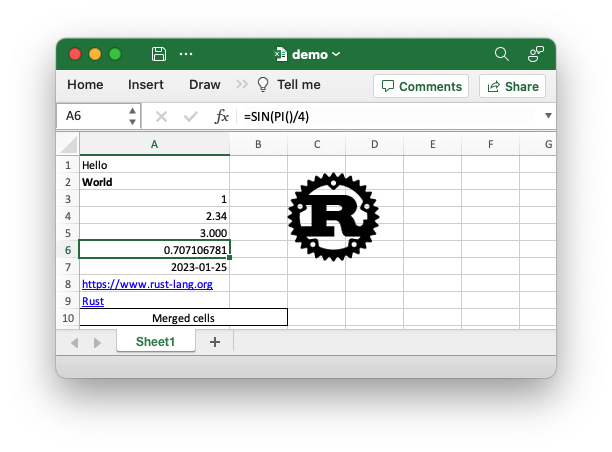
The rust_xlsxwriter crate can be used to write text, numbers, dates, and
formulas to multiple worksheets in a new Excel 2007+ .xlsx file. It has a
focus on performance and fidelity with the file format created by Excel. It
cannot be used to modify an existing file.
Example
Sample code to generate the Excel file shown above.
use rust_xlsxwriter::*;

fn main() -> Result<(), XlsxError> {
    // Create a new Excel file object.
    let mut workbook = Workbook::new();

    // Create some formats to use in the worksheet.
    let bold_format = Format::new().set_bold();
    let decimal_format = Format::new().set_num_format("0.000");
    let date_format = Format::new().set_num_format("yyyy-mm-dd");
    let merge_format = Format::new()
        .set_border(FormatBorder::Thin)
        .set_align(FormatAlign::Center);

    // Add a worksheet to the workbook.
    let worksheet = workbook.add_worksheet();

    // Set the column width for clarity.
    worksheet.set_column_width(0, 22)?;

    // Write a string without formatting.
    worksheet.write(0, 0, "Hello")?;

    // Write a string with the bold format defined above.
    worksheet.write_with_format(1, 0, "World", &bold_format)?;

    // Write some numbers.
    worksheet.write(2, 0, 1)?;
    worksheet.write(3, 0, 2.34)?;

    // Write a number with formatting.
    worksheet.write_with_format(4, 0, 3.00, &decimal_format)?;

    // Write a formula.
    worksheet.write(5, 0, Formula::new("=SIN(PI()/4)"))?;

    // Write a date.
    let date = ExcelDateTime::from_ymd(2023, 1, 25)?;
    worksheet.write_with_format(6, 0, &date, &date_format)?;

    // Write some links.
    worksheet.write(7, 0, Url::new("https://www.rust-lang.org"))?;
    worksheet.write(8, 0, Url::new("https://www.rust-lang.org").set_text("Rust"))?;

    // Write some merged cells.
    worksheet.merge_range(9, 0, 9, 1, "Merged cells", &merge_format)?;

    // Insert an image.
    let image = Image::new("examples/rust_logo.png")?;
    worksheet.insert_image(1, 2, &image)?;

    // Save the file to disk.
    workbook.save("demo.xlsx")?;

    Ok(())
}
rust_xlsxwriter is a rewrite of the Python XlsxWriter library in Rust
by the same author, with additional Rust-like features and APIs. The
supported features are:
-
Support for writing all basic Excel data types.
-
Full cell formatting support.
-
Formula support, including new Excel 365 dynamic functions.
-
Charts.
-
Hyperlink support.
-
Page/Printing Setup support.
-
Merged ranges.
-
Conditional formatting.
-
Data validation.
-
Cell Notes.
-
Textboxes.
-
Checkboxes.
-
Sparklines.
-
Worksheet PNG/JPEG/GIF/BMP images.
-
Workbook themes.
-
Rich multi-format strings.
-
Outline groupings.
-
Defined names.
-
Autofilters.
-
Worksheet Tables.
-
Serde serialization support.
-
Support for macros.
-
Memory optimization mode for writing large files.
Motivation
The rust_xlsxwriter crate was designed and implemented based around the
following design considerations:
- Fidelity with the Excel file format. In most cases the output matches the output from Excel exactly.
- Performance. The library is within 10% of the similar C library and it also supports a constant memory mode for writing large files.
- Comprehensive documentation. There is extensive API documentation as well as user guides, a tutorial, and a cookbook of examples.
- Feature richness. The library supports a wide range of Excel features, including charts, conditional formatting, data validation, rich text, hyperlinks, images, and even sparklines.
- Write only. The library only supports writing Excel files, and not reading or modifying them.
- A family of libraries. The
rust_xlsxwriterlibrary has sister libraries written in C (libxlsxwriter), Python (XlsxWriter), and Perl (Excel::Writer::XLSX), by the same author. Bug fixes and improvements in one get transferred to the others. - No FAQ section. The Rust implementation seeks to avoid some of the required workarounds and API mistakes of the other language variants.
Performance
As mentioned above the rust_xlsxwriter library has sister libraries
written natively in C, Python, and Perl.
A relative performance comparison between the C, Rust, and Python versions is shown below. The Perl performance is similar to the Python library, so it has been omitted.
| Library | Relative to C | Relative to Rust |
|---|---|---|
| C/libxlsxwriter | 1.00 | |
rust_xlsxwriter |
1.14 | 1.00 |
| Python/XlsxWriter | 4.36 | 3.81 |
The C version is the fastest: it is 1.14 times faster than the Rust version and 4.36 times faster than the Python version. The Rust version is 3.81 times faster than the Python version.
See the Performance section for more details.
Crate Features
The following is a list of the features supported by the rust_xlsxwriter
crate.
Default
default: This includes all the standard functionality. The only dependency is thezipcrate.
rust_xlsxwriter can be added to a Rust project as follows:
cargo add rust_xlsxwriter
Optional features
These are all off by default.
constant_memory: Keeps memory usage to a minimum when writing large files. See Constant Memory Mode.serde: Adds support for Serde serialization.chrono: Adds support for Chrono date/time types to the API. SeeIntoExcelDateTime.jiff: Adds support for Jiff date/time types to the API. SeeIntoExcelDateTime.zlib: Improves performance of thezlibcrate but adds a dependency on zlib and a C compiler. This can be up to 1.5 times faster for large files.polars: Adds support for mapping betweenPolarsErrorandrust_xlsxwriter::XlsxError. See alsopolars_excel_writer.wasm: Adds a dependency onjs-sysandwasm-bindgento allow compilation for wasm/JavaScript targets. See also wasm-xlsxwriter.rust_decimal: Adds support for writing therust_decimalDecimal.ryu: Adds a dependency onryu. This speeds up writing numeric worksheet cells for large data files. See the Performance documentation.
A rust_xlsxwriter feature can be enabled in your Cargo.toml file as
follows:
cargo add rust_xlsxwriter -F constant_memory
Release notes
Recent changes:
- Added support for workbook themes.
- Added support for grouped and non-contiguous chart ranges.
See the full Release Notes and Changelog.
See also
- User Guide: Working with the
rust_xlsxwriterlibrary.- Getting started: A simple getting started guide on how to use
rust_xlsxwriterin a project and write a Hello World example. - Tutorial: A larger example of using
rust_xlsxwriterto write some expense data to a spreadsheet. - Cookbook.
- Getting started: A simple getting started guide on how to use
- The rust_xlsxwriter crate.
- The rust_xlsxwriter API docs at docs.rs.
- The rust_xlsxwriter repository.
- Roadmap of planned features.