sax-fingering-chart
| Crates.io | sax-fingering-chart |
| lib.rs | sax-fingering-chart |
| version | 0.2.5 |
| created_at | 2020-08-14 18:56:29.916728+00 |
| updated_at | 2022-08-12 12:24:33.506407+00 |
| description | Takes midi files and outputs fingering charts for a saxophone. |
| homepage | https://github.com/Eolu/sax-fingering-chart |
| repository | https://github.com/Eolu/sax-fingering-chart |
| max_upload_size | |
| id | 276739 |
| size | 77,726 |
 Griffin O'Neill (Eolu)
documentation
README
Saxophone Fingering Chart Generator
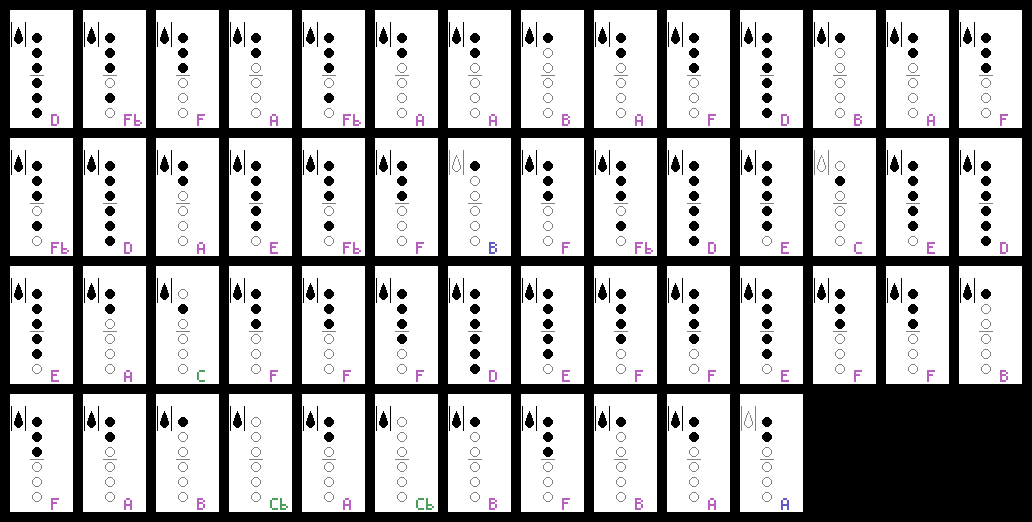
This program takes a MIDI file as input and generates fingering charts for saxophones matching the notes in that midi file. Time, note length, and other musical elements are not preserved, this is just a way to learn the fingering for each note. That said, this may expand and become fancier down the road.
Fingerings are decided by a simple weighted algorithm that picks fingerings for a note based the keys involved in the previous note. There's probably a smarter way to do this, I'm open to ideas.
Usage
- fingering_chart [midi_file...]
Just open a midi file with fingering_chart, and wait for charts to generate! You can also run it via the command-line by specifying one or more midi files as shown above. Make sure the cfg.ron file is in the same directory as fingering_chart. See below for additional settings.
cfg.ron
cfg.ron is the configuration file:
transposition_typeSets the transposition. May useAlto,Tenor,Baritone,Soprano,Bass,CMelody,Contrabass,Sopranino,Subcontrabass, andSopranissimo.output_pathSets the output path. If this is a non-existent directory, will attempt to create.output_formatSets the output format. May useTracks,Rows, orSeparate.Tracksoutputs charts for each midi track as a single file.Rowssplits tracks up into multiple files each containing a horizontal row of notes.Separateoutputs each individual note as a separate file.spacingSets the visual spacing between consecutive notes. Not applicable when usingSeparateoutput format.notes_per_rowSets the number of notes per row. Not applicable when usingSeparateoutput format.notesYou can now fully customize what notes are supported and what fingerings each note will use. Detailed instructions exist inside the cfg.ron file.
Planned Features
- Fingerings for altissimo/trill
- Detect if a midi file has notes out of range, have an option to automatically attempt to transpose the midi file to fit in the sax range (by octave first, then by semitone). Currently notes out of range are just left out with a warning.
Example