solana-stream-sdk
| Crates.io | solana-stream-sdk |
| lib.rs | solana-stream-sdk |
| version | 1.2.0 |
| created_at | 2025-05-29 12:23:43.968718+00 |
| updated_at | 2026-01-08 12:11:47.75029+00 |
| description | Rust SDK for Solana streaming data |
| homepage | https://elsoul.nl/ |
| repository | https://github.com/ValidatorsDAO/solana-stream |
| max_upload_size | |
| id | 1693716 |
| size | 383,761 |
 kishi.sol (KishiTheMechanic)
documentation
README




Solana Stream SDK
A Rust SDK for streaming Solana Data by Validators DAO. This SDK provides a simple and efficient way to connect to Shredstream service and Geyser gRPC service, allowing you to subscribe to real-time Solana entries and transactions.
Features
- Easy-to-use API - Simple wrapper around the Shredstream protocols and Geyser gRPC
- Async Support - Built with tokio for async/await patterns
- Type Safety - Strongly typed Rust interfaces
- Error Handling - Comprehensive error types with proper error propagation
- Streaming - Efficient streaming of Solana entries and transactions
UDP Shreds (Fastest Observation Layer)
If you have ERPC Dedicated Shreds, you can forward raw Shreds over UDP to your own listener. This is Solana’s fastest observation layer—before Geyser gRPC and far ahead of RPC/WebSocket. The SDK includes a simple Rust sample; pump.fun is used only because it’s the most common question we get.
Why this is the fastest path
- Shreds arrive first: validator-to-validator Shreds land before Geyser gRPC or RPC/WebSocket, so latency-critical flows see events earliest.
- UDP keeps overhead tiny: no connection setup, retransmit, or ordering; matches the on-wire format between validators.
- Trade-off: pre-finalization data can be missing/out-of-order/failed—handle that as part of the speed bargain.
- The optional latency monitor uses a DashMap-backed slot tracker to reduce lock contention.
Note: the shared Shreds gRPC endpoint runs over TCP, so it’s slower than UDP Shreds.
Try it with Solana Stream SDK
- Sample code (
shreds-udp-rs, Rust): pump.fun is just a common example—swap in your own target.
https://github.com/ValidatorsDAO/solana-stream/tree/main/temp-release/shreds-udp-rs - Quick start (local): configure
settings.jsonc, set env likeSOLANA_RPC_ENDPOINT, then runcargo run -p shreds-udp-rs - Dedicated Shreds users: point your Shreds sender to the sample’s
ip:portto see detections. - Not on UDP yet? Run it locally or on your own server to explore logs and customize hooks.
Pump.fun example log
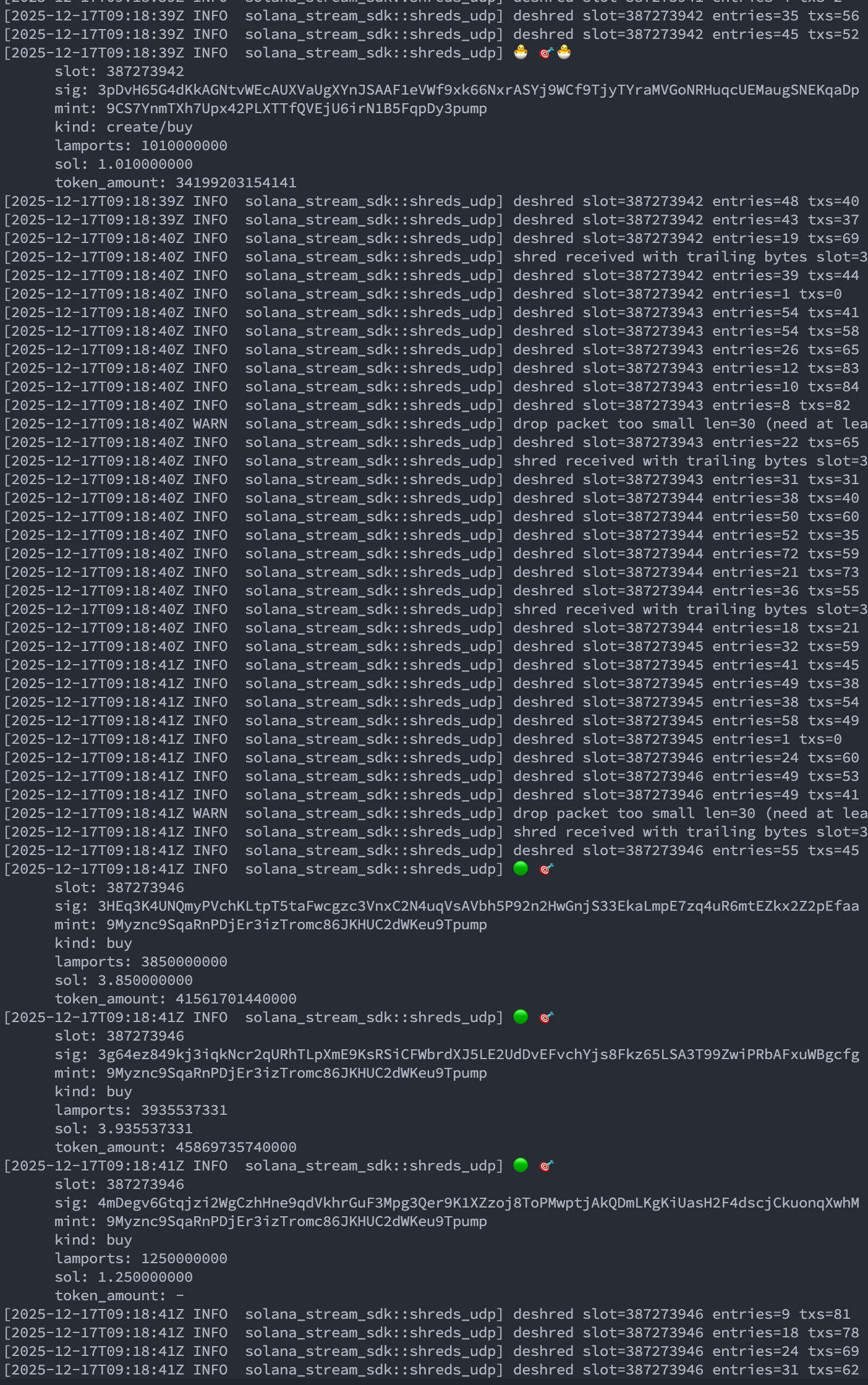
This example comes from the SDK sample; clone and run it to see hits, or swap in your own target.
Installation
Add this to your Cargo.toml:
[dependencies]
solana-stream-sdk = "1.2.0"
tokio = { version = "1", features = ["rt-multi-thread", "macros"] }
dotenvy = "0.15"  # Optional: for loading environment variables from .env files
Usage
Quick Start Guide for Sample Shreds Client
Follow these steps to quickly run the sample client provided in this repository:
- Clone the repository
git clone https://github.com/ValidatorsDAO/solana-stream.git
cd solana-stream
- Create a
.envfile (placed in the project root)
SHREDS_ENDPOINT=https://shreds-ams.erpc.global
⚠️ Please note: This endpoint is a sample and cannot be used as is. Please obtain and configure the appropriate endpoint for your environment.
For Geyser gRPC:
GRPC_ENDPOINT=https://your.geyser.endpoint
X_TOKEN=your_token # Optional
SOLANA_RPC_ENDPOINT="https://edge.erpc.global?api-key=YOUR_API_KEY"
⚠️ Please note: This endpoint is a sample and cannot be used as is. Please obtain and configure the appropriate endpoint for your environment.
- Run the sample client
cargo run -p shreds-rs
Example code:
For Geyser gRPC:
cd client/geyser-rs
RUST_LOG=info cargo run
Example code:
A 7-day free trial for Shreds endpoints is available by joining the Validators DAO Discord community. Please try it out: https://discord.gg/C7ZQSrCkYR
Basic Example
use solana_stream_sdk::{CommitmentLevel, ShredstreamClient};

#[tokio::main]
async fn main() -> Result<(), Box<dyn std::error::Error>> {
    // Connect to the Shredstream proxy
    let mut client = ShredstreamClient::connect("https://shreds-ams.erpc.global").await?;

    // Create a subscription request for a specific account
    let request = ShredstreamClient::create_entries_request_for_account(
        "L1ocbjmuFUQDVwwUWi8HjXjg1RYEeN58qQx6iouAsGF",
        Some(CommitmentLevel::Processed),
    );

    // Subscribe to entries stream
    let mut stream = client.subscribe_entries(request).await?;

    // Process incoming entries
    while let Some(entry) = stream.message().await? {
        println!("Received entry for slot: {}", entry.slot);

        // Deserialize entries
        let entries = bincode::deserialize::<Vec<solana_entry::entry::Entry>>(&entry.entries)?;

        for entry in entries {
            println!("Entry has {} transactions", entry.transactions.len());
        }
    }

    Ok(())
}
Using Environment Variables
Create a .env file in your project root:
SHREDS_ENDPOINT=https://shreds-ams.erpc.global
Then use it in your code:
use solana_stream_sdk::{CommitmentLevel, ShredstreamClient};
use std::env;

#[tokio::main]
async fn main() -> Result<(), Box<dyn std::error::Error>> {
    // Load environment variables from .env file
    dotenvy::dotenv().ok();

    // Get the shreds endpoint from environment variable
    let endpoint = env::var("SHREDS_ENDPOINT")
        .unwrap_or_else(|_| "https://shreds-ams.erpc.global".to_string());

    let mut client = ShredstreamClient::connect(&endpoint).await?;

    let request = ShredstreamClient::create_entries_request_for_account(
        "L1ocbjmuFUQDVwwUWi8HjXjg1RYEeN58qQx6iouAsGF",
        Some(CommitmentLevel::Processed),
    );

    let mut stream = client.subscribe_entries(request).await?;

    while let Some(entry) = stream.message().await? {
        println!("Received entry for slot: {}", entry.slot);

        let entries = bincode::deserialize::<Vec<solana_entry::entry::Entry>>(&entry.entries)?;

        for entry in entries {
            println!("Entry has {} transactions", entry.transactions.len());
        }
    }

    Ok(())
}
UDP pipeline helpers (shreds-udp)
- Layered flow (5 layers): 1) UDP receive/prefilter → 2) FEC buffer → 3) deshred → 4) watcher/detailer → 5) sink (log/hook).
handle_pumpfun_watcher: one-call convenience with pump.fun defaults (watcher + detailer); wrapper over these stages.decode_udp_datagram+insert_shred: tap the pipeline before logging;ShredInsertOutcomereports ready/gated/buffered shreds.deshred_shreds_to_entries: convert a ready batch;collect_watch_events: structured watch hits without emitting logs.ShredsUdpConfig::watch_config_no_defaults(): avoid pump.fun fallbacks; pass your ownMintFinder/MintDetailerviaProgramWatchConfig.ShredsUdpState::{remove_batch, mark_completed, mark_suppressed}: mirror default cleanup.- Pump.fun-free sample:
cargo run -p shreds-udp-rs --bin generic_logger(setGENERIC_WATCH_PROGRAM_IDS/GENERIC_WATCH_AUTHORITIESto watch your own programs).
Why modular? Many users want to do more than print logs (e.g., push to a queue or enrich hits). The layered functions let you plug a custom sink right after detection (collect_watch_events), while handle_pumpfun_watcher stays available for quick, pump.fun-ready runs.
Basic Example (Geyser gRPC)
use solana_stream_sdk::{GeyserGrpcClient, GeyserSubscribeRequest, GeyserCommitmentLevel};
use std::collections::HashMap;
use futures::StreamExt;

#[tokio::main]
async fn main() -> Result<(), Box<dyn std::error::Error>> {
    let endpoint = std::env::var("GRPC_ENDPOINT")?;
    let client = GeyserGrpcClient::build_from_shared(endpoint)?.connect().await?;

    let request = GeyserSubscribeRequest {
        commitment: Some(GeyserCommitmentLevel::Processed as i32),
        accounts: HashMap::new(),
        transactions: HashMap::new(),
        slots: HashMap::new(),
        blocks: HashMap::new(),
        blocks_meta: HashMap::new(),
        entry: HashMap::new(),
        transactions_status: HashMap::new(),
        accounts_data_slice: vec![],
        from_slot: None,
        ping: None,
    };

    let (mut sink, mut stream) = client.subscribe().await?;
    sink.send(request).await?;

    while let Some(update) = stream.next().await {
        println!("Received: {:?}", update?);
    }

    Ok(())
}
Custom Subscription Request
Note: gRPC-side filters are currently disabled. Send empty filter maps and handle filtering downstream (or use the UDP shreds pipeline for filtered workloads).
use solana_stream_sdk::{
    CommitmentLevel, SubscribeEntriesRequest, SubscribeRequestFilterAccounts,
    SubscribeRequestFilterSlots, SubscribeRequestFilterTransactions, ShredstreamClient
};
use std::collections::HashMap;

#[tokio::main]
async fn main() -> Result<(), Box<dyn std::error::Error>> {
    let mut client = ShredstreamClient::connect("https://shreds-ams.erpc.global").await?;

    let request = SubscribeEntriesRequest {
        accounts: HashMap::new(),
        transactions: HashMap::new(),
        slots: HashMap::new(),
        commitment: Some(CommitmentLevel::Confirmed as i32),
    };

    let mut stream = client.subscribe_entries(request).await?;

    while let Some(entry) = stream.message().await? {
        println!("Slot: {}, Entry data: {} bytes", entry.slot, entry.entries.len());
    }

    Ok(())
}
Custom Subscription Request (Geyser gRPC)
Note: gRPC-side filters are currently disabled. Send empty filter maps and handle filtering downstream (or use the UDP shreds pipeline for filtered workloads).
use solana_stream_sdk::{
    GeyserSubscribeRequest,
    GeyserSubscribeRequestFilterAccounts,
    GeyserCommitmentLevel,
    GeyserGrpcClient,
};
use std::collections::HashMap;
use futures::StreamExt;

#[tokio::main]
async fn main() -> Result<(), Box<dyn std::error::Error>> {
    let endpoint = std::env::var("GRPC_ENDPOINT")?;
    let client = GeyserGrpcClient::build_from_shared(endpoint)?.connect().await?;

    let mut accounts = HashMap::new();
    accounts.insert(
        "example".to_string(),
        GeyserSubscribeRequestFilterAccounts {
            account: vec!["EPjFWdd5AufqSSqeM2qN1xzybapC8G4wEGGkZwyTDt1v".to_string()],
            owner: vec![],
            filters: vec![],
            nonempty_txn_signature: None,
        },
    );

    let request = GeyserSubscribeRequest {
        commitment: Some(GeyserCommitmentLevel::Confirmed as i32),
        accounts,
        transactions: HashMap::new(),
        slots: HashMap::new(),
        blocks: HashMap::new(),
        blocks_meta: HashMap::new(),
        entry: HashMap::new(),
        transactions_status: HashMap::new(),
        accounts_data_slice: vec![],
        from_slot: None,
        ping: None,
    };

    let (mut sink, mut stream) = client.subscribe().await?;
    sink.send(request).await?;

    while let Some(update) = stream.next().await {
        println!("Update: {:?}", update?);
    }

    Ok(())
}
API Reference
ShredstreamClient
The main client for connecting to the Shredstream services.
Methods
connect(endpoint: impl AsRef<str>) -> Result<Self>– Connect to a Shredstream endpoint and initialize the client.subscribe_entries(&mut self, request: SubscribeEntriesRequest) -> Result<impl Stream>– Subscribe to real-time Solana entries.create_entries_request_for_account(account: impl AsRef<str>, commitment: Option<CommitmentLevel>) -> SubscribeEntriesRequest– Helper to create account-specific subscription requests.create_empty_entries_request() -> SubscribeEntriesRequest– Create an empty request for further customization.
GeyserGrpcClient
Client for interacting with Solana via the Geyser gRPC service.
Methods
build_from_shared(endpoint: impl Into<String>) -> Result<GeyserGrpcClient>– Initialize the client builder with a shared endpoint URL.connect() -> Result<GeyserGrpcClient>– Establish a connection to the configured gRPC endpoint.subscribe() -> Result<(Sink, Stream)>– Open a bidirectional subscription stream to Geyser for real-time data exchange.
Error Types
The SDK provides a comprehensive SolanaStreamError enum that covers:
Transport– Network or transport errorsStatus– gRPC status errorsSerialization– Data serialization and deserialization errorsConnection– Connection-related issuesConfiguration– Invalid configuration errorsIO– Input/output errorsSerdeJsonc– Errors related to parsing JSONCInvalidUri– URI parsing errorsBuilder– Errors during client builder initializationSendError– Errors during message sendingClient– Errors within the Geyser gRPC clientUrlParse– URL parsing errors
Re-exported Types
For convenience, the following types are re-exported:
Shreds Protocol
CommitmentLevelSubscribeEntriesRequestSubscribeRequestFilterAccountsSubscribeRequestFilterSlotsSubscribeRequestFilterTransactions
Geyser gRPC Protocol
GeyserCommitmentLevelGeyserSubscribeRequestGeyserSubscribeRequestFilterAccountsGeyserSubscribeRequestFilterBlocksGeyserSubscribeRequestFilterBlocksMetaGeyserSubscribeRequestFilterEntryGeyserSubscribeRequestFilterSlotsGeyserSubscribeRequestFilterTransactionsGeyserSubscribeUpdateGeyserSubscribeUpdateAccountInfoGeyserSubscribeUpdateEntryGeyserSubscribeUpdateTransactionInfo
Requirements
- Rust 1.86+
- Tokio runtime for async operations
⚠️ Experimental Filtering Feature Notice
Filtering remains experimental. Geyser gRPC-side filters are not usable right now—requests should send empty filter maps. For workloads that need filtering, prefer the UDP shreds path. Occasionally, data may not be fully available, and filters may not be applied correctly.
If you encounter such cases, please report them by opening an issue at: https://github.com/ValidatorsDAO/solana-stream/issues
Your feedback greatly assists our debugging efforts and overall improvement of this feature.
Other reports and suggestions are also highly appreciated.
You can also join discussions or share feedback on Validators DAO's Discord community: https://discord.gg/C7ZQSrCkYR
License
The package is available as open source under the terms of the Apache-2.0 License.
Code of Conduct
Everyone interacting in the Validators DAO project’s codebases, issue trackers, chat rooms and mailing lists is expected to follow the code of conduct.