spreadsheet-mcp
| Crates.io | spreadsheet-mcp |
| lib.rs | spreadsheet-mcp |
| version | 0.9.0 |
| created_at | 2025-12-11 19:24:04.343929+00 |
| updated_at | 2026-01-08 20:48:26.462096+00 |
| description | An MCP server that lets LLM agents explore and edit spreadsheet workbooks |
| homepage | |
| repository | https://github.com/PSU3D0/spreadsheet-mcp |
| max_upload_size | |
| id | 1980397 |
| size | 6,660,189 |
 Frankie Colson (PSU3D0)
documentation
README
Spreadsheet MCP



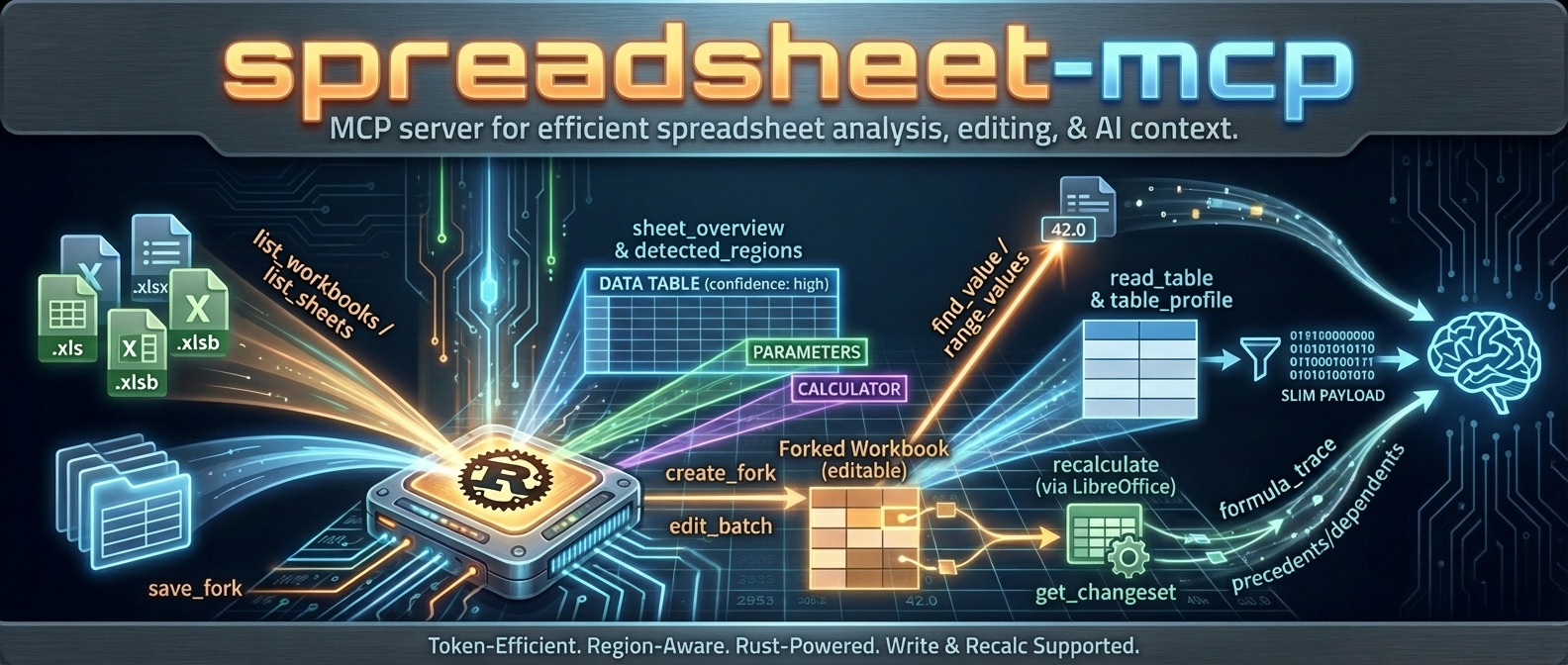
MCP server for spreadsheet analysis and editing. Slim, token-efficient tool surface designed for LLM agents.
Why?
Dumping a 50,000-row spreadsheet into an LLM context is expensive and usually unnecessary. Most spreadsheet tasks need surgical access: find a region, profile its structure, read a filtered slice. This server exposes tools that let agents discover → profile → extract without burning tokens on cells they don't need.
- Full support:
.xlsx,.xlsm(viaumya-spreadsheet) - VBA source inspection (optional):
.xlsmviaSPREADSHEET_MCP_VBA_ENABLED=true/--vba-enabled(parses embeddedxl/vbaProject.binviaovba) - Discovery only:
.xls,.xlsb(enumerated, not parsed)
Architecture
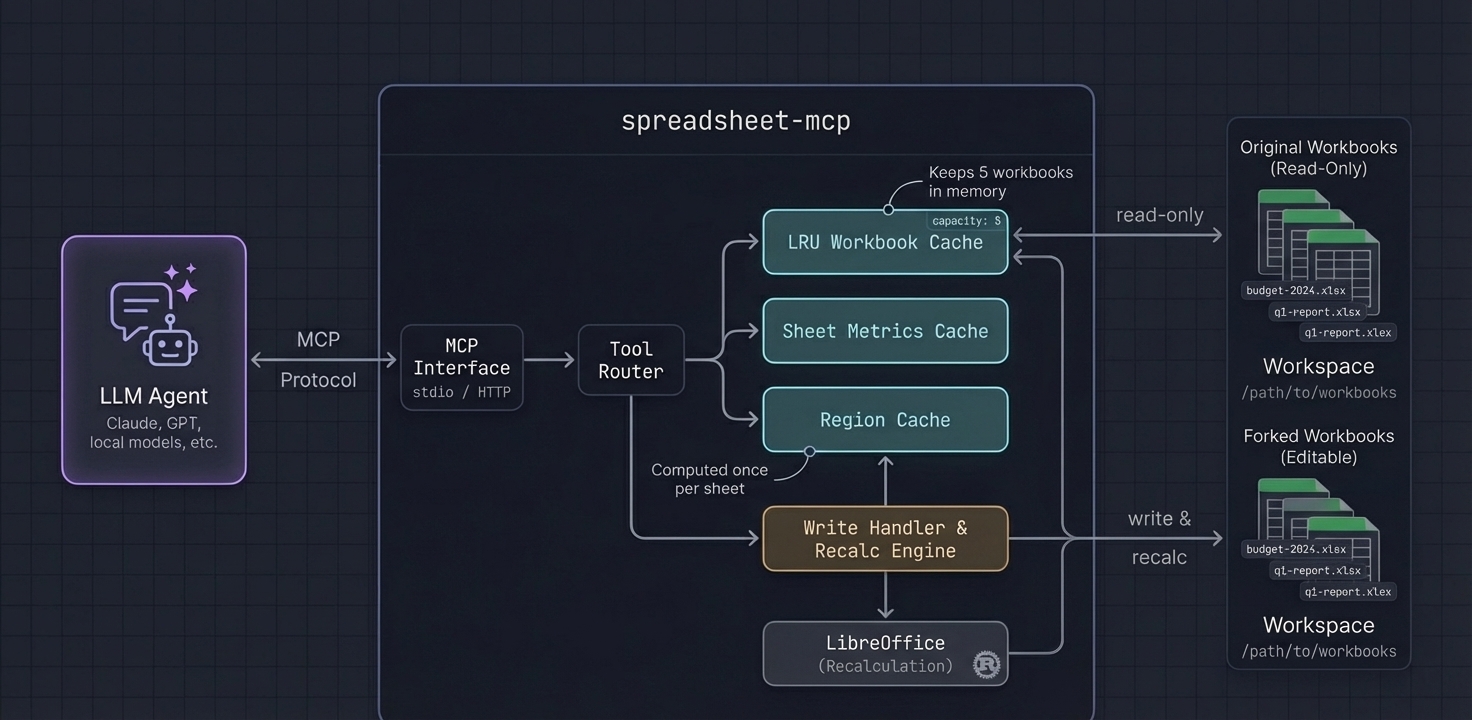
- LRU cache keeps recently-accessed workbooks in memory (configurable capacity)
- Lazy sheet metrics computed once per sheet, reused across tools
- Region detection on demand runs for
sheet_overviewand is cached forregion_idlookups (find_value,read_table,table_profile)
Tool Surface
| Tool | Purpose |
|---|---|
list_workbooks, describe_workbook, list_sheets |
Discover workbooks/sheets and metadata |
workbook_summary, sheet_overview |
Orientation + region detection |
read_table, table_profile |
Structured reads and lightweight profiling |
range_values, sheet_page |
Targeted spot checks / raw paging fallback |
find_value, find_formula |
Search values/labels or formulas |
sheet_statistics |
Quick sheet stats (density, nulls, duplicates hints) |
sheet_formula_map, formula_trace, scan_volatiles |
Formula analysis and tracing |
sheet_styles, workbook_style_summary |
Style inspection (sheet-scoped + workbook-wide) |
named_ranges |
List defined names + tables |
vba_project_summary, vba_module_source |
Read VBA project metadata + module source (disabled by default; .xlsm) |
get_manifest_stub |
Generate manifest scaffold |
close_workbook |
Evict workbook from cache |
VBA Support (Read-Only)
VBA tools are disabled by default. When enabled, the server can extract and parse the embedded VBA project from .xlsm files and return module source code.
Enable via:
- CLI:
--vba-enabled - Env:
SPREADSHEET_MCP_VBA_ENABLED=true
Tools:
vba_project_summary: Lists modules + basic project metadatavba_module_source: Returns paged source for a single module
Notes:
- This does not execute macros; it only reads and returns text.
- Responses are size-limited; page through module source.
Write & Recalc Support
Write tools allow "what-if" analysis: fork a workbook, edit cells, recalculate formulas via LibreOffice, and diff the results. For safety, you can create checkpoints for high‑fidelity rollback and apply previewed (staged) changes explicitly.
Enabling Write Tools
Always use the :full Docker image for write/recalc features:
docker run -v /path/to/workbooks:/data -p 8079:8079 ghcr.io/psu3d0/spreadsheet-mcp:full
The Docker image includes LibreOffice with pre-configured macros required for reliable recalculation. Running outside Docker requires manual LibreOffice setup (macro trust, headless config) and is not recommended.
Write Tools
| Tool | Purpose |
|---|---|
create_fork |
Create a temporary editable copy for "what-if" analysis |
checkpoint_fork, restore_checkpoint |
High-fidelity snapshot + rollback |
edit_batch |
Apply values or formulas to cells in a fork |
transform_batch |
Range-first clear/fill/replace (prefer for bulk edits) |
style_batch |
Batch style edits (range/region/cells) |
apply_formula_pattern |
Autofill-like formula fill over a target range |
structure_batch |
Batch structural edits (rows/cols/sheets + copy/move ranges) |
recalculate |
Trigger LibreOffice to update formula results |
get_changeset |
Diff the fork against the original (cells, tables, named ranges) |
screenshot_sheet |
Render a sheet range to a cropped PNG screenshot |
save_fork |
Save fork to a new path (or overwrite original with --allow-overwrite) |
list_staged_changes, apply_staged_change, discard_staged_change |
Manage previewed/staged changes |
get_edits, list_forks, discard_fork |
Inspect / list / discard forks |
Token-Efficient Write Workflows
find_formula paging
{
  "tool": "find_formula",
  "arguments": {
    "workbook_or_fork_id": "wb-23456789ab",
    "sheet_name": "Calc",
    "query": "SUM(",
    "include_context": false,
    "limit": 20,
    "offset": 0
  }
}
get_changeset summary + filters
{
  "tool": "get_changeset",
  "arguments": {
    "fork_id": "fork-23456789abcd",
    "summary_only": true,
    "exclude_subtypes": ["recalc_result"],
    "limit": 200,
    "offset": 0
  }
}
Docker Paths (Exports + Screenshots)
When running in Docker with --workspace-root /data and a host mount like -v /path/to/workbooks:/data:
- Fork working files live under
/tmp/mcp-forksinside the container (not visible on host). save_fork.target_pathis resolved underworkspace_root(Docker default:/data). Use a relative path likeout.xlsx(orexports/out.xlsx) to write back into the mounted folder on the host.screenshot_sheetwrites PNGs underscreenshots/inworkspace_root(Docker default:/data/screenshots/).
Screenshot Tool
screenshot_sheet captures a visual PNG of a rectangular range, rendered headless via LibreOffice in the :full image. The PNG is auto‑cropped to remove page whitespace and saved under screenshots/ in the workspace. Note: the tool returns a file:// URI on the server filesystem; when running via Docker, treat it as a container path and look for the PNG under your mounted workspace folder (e.g. screenshots/<name>.png).
Arguments:
workbook_or_fork_id(required; accepts a workbook_id or fork_id)sheet_name(required)range(optional, defaultA1:M40)
Limits and behavior:
- Max range per screenshot: 100 rows × 30 columns. If exceeded, the tool fails with suggested tiled sub‑ranges to request instead.
- After export/crop, a pixel guard rejects images that are too large for reliable agent use (default max 4096px on a side or 12MP area). On rejection, the tool returns smaller range suggestions.
- Override pixel guard via env vars:
SPREADSHEET_MCP_MAX_PNG_DIM_PX,SPREADSHEET_MCP_MAX_PNG_AREA_PX.
See docs/RECALC.md for architecture details.
Example
Request: Profile a detected region
{
  "tool": "table_profile",
  "arguments": {
    "workbook_id": "wb-23456789ab",
    "sheet_name": "Q1 Actuals",
    "region_id": 1,
    "sample_size": 10,
    "sample_mode": "distributed"
  }
}
Response:
{
  "sheet_name": "Q1 Actuals",
  "headers": ["Date", "Category", "Amount", "Notes"],
  "column_types": [
    {"name": "Date", "inferred_type": "date", "nulls": 0, "distinct": 87},
    {"name": "Category", "inferred_type": "text", "nulls": 2, "distinct": 12, "top_values": ["Payroll", "Marketing", "Infrastructure"]},
    {"name": "Amount", "inferred_type": "number", "nulls": 0, "min": 150.0, "max": 84500.0, "mean": 12847.32},
    {"name": "Notes", "inferred_type": "text", "nulls": 45, "distinct": 38}
  ],
  "row_count": 1247,
  "samples": [...]
}
The agent now knows column types, cardinality, and value distributions—without reading 1,247 rows.
Recommended Agent Workflow
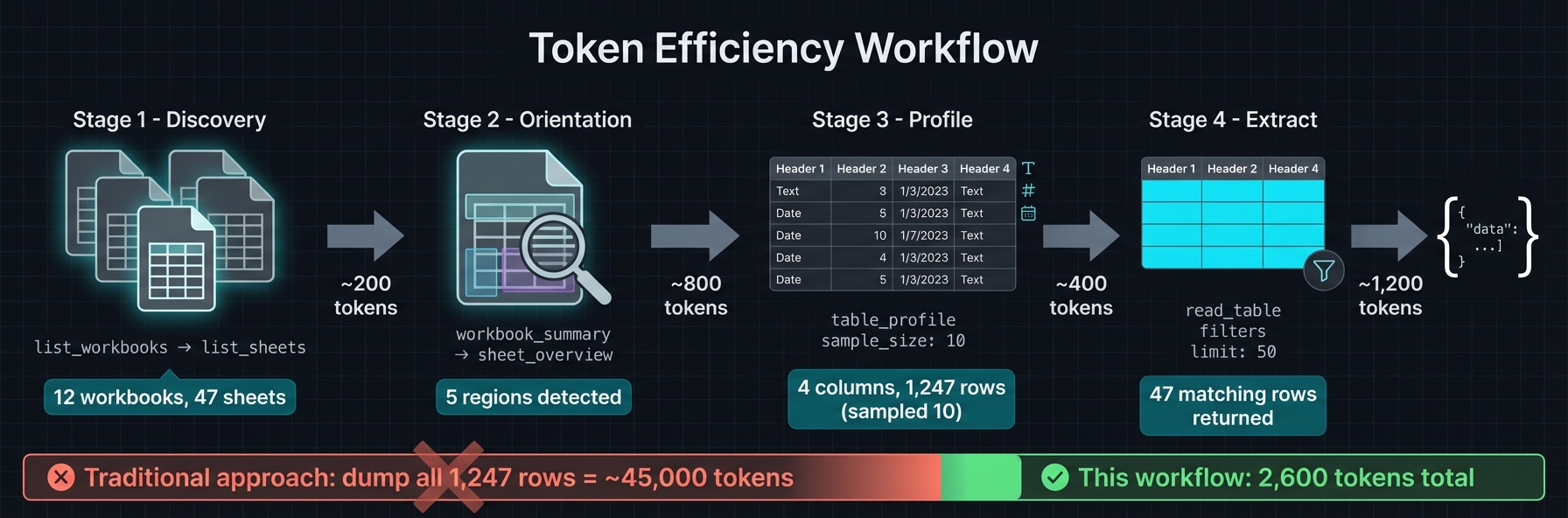
list_workbooks→list_sheets→workbook_summaryfor orientationsheet_overviewto getdetected_regions(ids/bounds/kind/confidence)table_profile→read_tablewithregion_id, smalllimit, andsample_mode(distributedpreferred)- Use
find_value(label mode) orrange_valuesfor targeted pulls - Reserve
sheet_pagefor unknown layouts or calculator inspection; prefercompact/values_only - Keep payloads small; page/filter rather than full-sheet reads
Region Detection
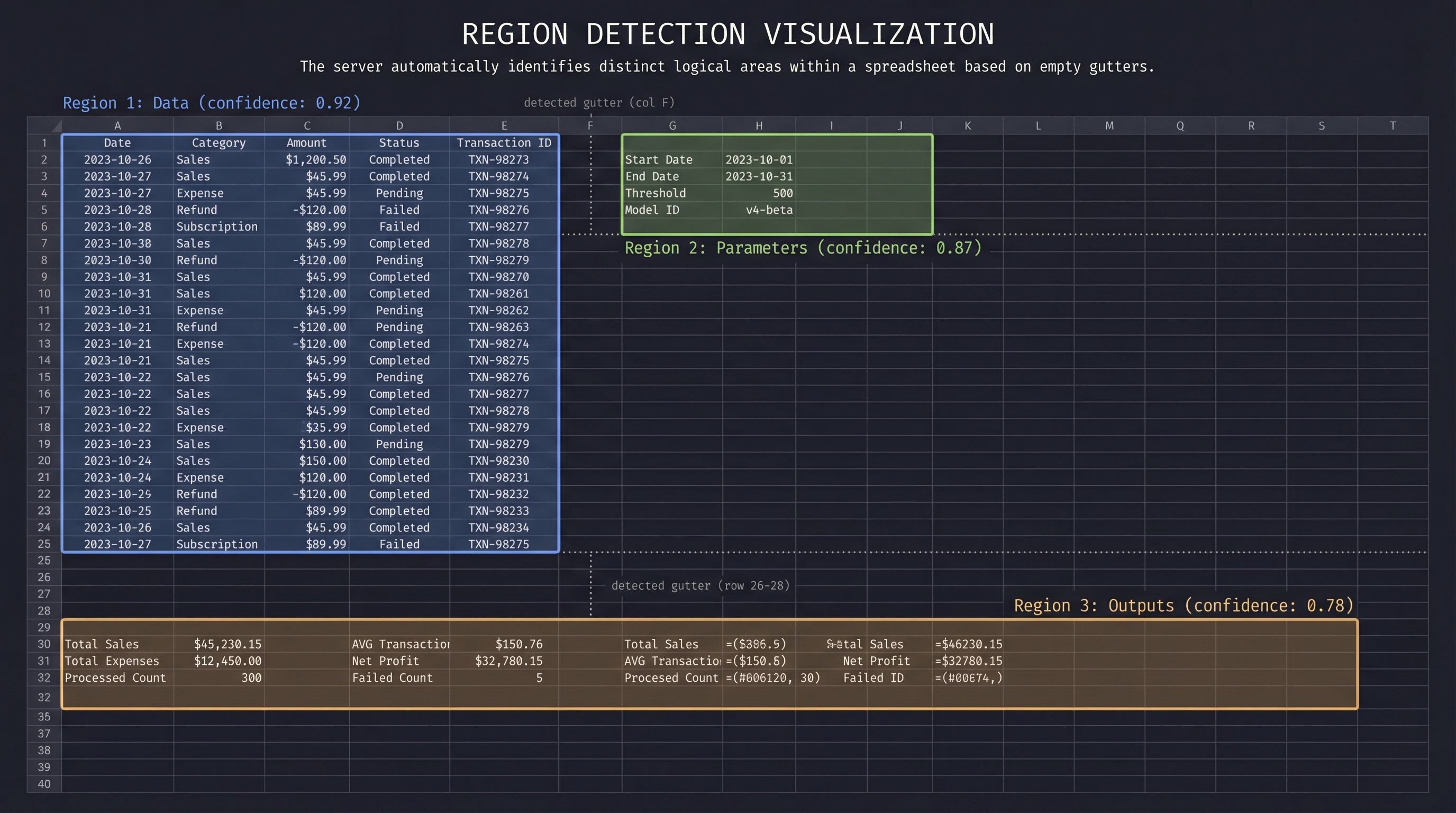
Spreadsheets often contain multiple logical tables, parameter blocks, and output areas on a single sheet. The server detects these automatically:
- Gutter detection — Scans for empty rows/columns that separate content blocks
- Recursive splitting — Subdivides large areas along detected gutters
- Border trimming — Removes sparse edges to tighten bounds
- Header detection — Identifies header rows (including multi-row merged headers)
- Classification — Labels each region:
data,parameters,outputs,calculator,metadata - Confidence scoring — Higher scores for well-structured regions with clear headers
Regions are cached per sheet. Tools like read_table accept a region_id to scope reads without manually specifying ranges.
Quick Start
Docker (Recommended)
Two image variants are published:
| Image | Size | Write/Recalc |
|---|---|---|
ghcr.io/psu3d0/spreadsheet-mcp:latest |
~15MB | No |
ghcr.io/psu3d0/spreadsheet-mcp:latest-full |
~800MB | Yes (includes LibreOffice) |
# Read-only (slim image)
docker run -v /path/to/workbooks:/data -p 8079:8079 ghcr.io/psu3d0/spreadsheet-mcp:latest

# Read-only + VBA tools enabled
docker run -v /path/to/workbooks:/data -p 8079:8079 -e SPREADSHEET_MCP_VBA_ENABLED=true ghcr.io/psu3d0/spreadsheet-mcp:latest

# With write/recalc support (full image)
docker run -v /path/to/workbooks:/data -p 8079:8079 ghcr.io/psu3d0/spreadsheet-mcp:full
Cargo Install
# Read-only
cargo install spreadsheet-mcp
spreadsheet-mcp --workspace-root /path/to/workbooks

# Enable VBA tools
SPREADSHEET_MCP_VBA_ENABLED=true spreadsheet-mcp --workspace-root /path/to/workbooks
Note: For write/recalc features, use the :full Docker image instead of cargo install. The Docker image includes LibreOffice with required macro configuration.
Build from Source
cargo run --release -- --workspace-root /path/to/workbooks
Default transport: HTTP streaming at 127.0.0.1:8079. Endpoint: POST /mcp.
Use --transport stdio for CLI pipelines.
MCP Client Configuration
Claude Code / Claude Desktop
Add to ~/.claude.json or project .mcp.json:
Read-only (slim image):
{
  "mcpServers": {
    "spreadsheet": {
      "command": "docker",
      "args": ["run", "-i", "--rm", "-v", "/path/to/workbooks:/data", "ghcr.io/psu3d0/spreadsheet-mcp:latest", "--transport", "stdio"]
    }
  }
}
Read-only + VBA tools enabled:
{
  "mcpServers": {
    "spreadsheet": {
      "command": "docker",
      "args": ["run", "-i", "--rm", "-v", "/path/to/workbooks:/data", "ghcr.io/psu3d0/spreadsheet-mcp:latest", "--transport", "stdio", "--vba-enabled"]
    }
  }
}
With write/recalc (full image):
{
  "mcpServers": {
    "spreadsheet": {
      "command": "docker",
      "args": ["run", "-i", "--rm", "-v", "/path/to/workbooks:/data", "ghcr.io/psu3d0/spreadsheet-mcp:latest-full", "--transport", "stdio", "--recalc-enabled"]
    }
  }
}
Binary (no Docker):
{
  "mcpServers": {
    "spreadsheet": {
      "command": "spreadsheet-mcp",
      "args": ["--workspace-root", "/path/to/workbooks", "--transport", "stdio"]
    }
  }
}
Cursor / VS Code
Read-only (slim image):
{
  "mcp.servers": {
    "spreadsheet": {
      "command": "docker",
      "args": ["run", "-i", "--rm", "-v", "${workspaceFolder}:/data", "ghcr.io/psu3d0/spreadsheet-mcp:latest", "--transport", "stdio"]
    }
  }
}
With write/recalc (full image):
{
  "mcp.servers": {
    "spreadsheet": {
      "command": "docker",
      "args": ["run", "-i", "--rm", "-v", "${workspaceFolder}:/data", "ghcr.io/psu3d0/spreadsheet-mcp:latest-full", "--transport", "stdio", "--recalc-enabled"]
    }
  }
}
Binary (no Docker):
{
  "mcp.servers": {
    "spreadsheet": {
      "command": "spreadsheet-mcp",
      "args": ["--workspace-root", "${workspaceFolder}", "--transport", "stdio"]
    }
  }
}
HTTP Mode
docker run -v /path/to/workbooks:/data -p 8079:8079 ghcr.io/psu3d0/spreadsheet-mcp:latest
Connect via POST http://localhost:8079/mcp.
Local Development
To test local changes without rebuilding Docker:
cargo build --release
Then point your MCP client to the binary:
{
  "mcpServers": {
    "spreadsheet": {
      "command": "/path/to/spreadsheet-mcp/target/release/spreadsheet-mcp",
      "args": ["--workspace-root", "/path/to/workbooks", "--transport", "stdio"]
    }
  }
}
Configuration
| Flag | Env | Description |
|---|---|---|
--workspace-root <DIR> |
SPREADSHEET_MCP_WORKSPACE |
Workspace root to scan (default: cwd) |
--cache-capacity <N> |
SPREADSHEET_MCP_CACHE_CAPACITY |
Workbook cache size (default: 5) |
--extensions <list> |
SPREADSHEET_MCP_EXTENSIONS |
Allowed extensions (default: xlsx,xls,xlsb) |
--workbook <FILE> |
SPREADSHEET_MCP_WORKBOOK |
Single-workbook mode |
--enabled-tools <list> |
SPREADSHEET_MCP_ENABLED_TOOLS |
Whitelist exposed tools |
--transport <http|stdio> |
SPREADSHEET_MCP_TRANSPORT |
Transport selection (default: http) |
--http-bind <ADDR> |
SPREADSHEET_MCP_HTTP_BIND |
Bind address (default: 127.0.0.1:8079) |
--recalc-enabled |
SPREADSHEET_MCP_RECALC_ENABLED |
Enable write/recalc tools (default: false) |
--max-concurrent-recalcs <N> |
SPREADSHEET_MCP_MAX_CONCURRENT_RECALCS |
Parallel recalc limit (default: 2) |
--tool-timeout-ms <MS> |
SPREADSHEET_MCP_TOOL_TIMEOUT_MS |
Tool request timeout in milliseconds (default: 30000; 0 disables) |
--max-response-bytes <BYTES> |
SPREADSHEET_MCP_MAX_RESPONSE_BYTES |
Max response size in bytes (default: 1000000; 0 disables) |
--allow-overwrite |
SPREADSHEET_MCP_ALLOW_OVERWRITE |
Allow save_fork to overwrite original files (default: false) |
Performance
- LRU workbook cache — Recently opened workbooks stay in memory; oldest evicted when capacity exceeded
- Lazy metrics — Sheet metrics computed on first access, cached for subsequent calls
- Region detection on demand — Runs on
sheet_overview(orregion_idlookups) and is cached thereafter - Sampling modes —
distributedsampling reads evenly across rows without loading everything - Output caps —
sheet_overviewtruncates regions/headers by default; use tool params to request more - Compact formats —
values_onlyandcompactoutput modes reduce response size
Testing
cargo test
Covers: region detection, region-scoped tools, read_table edge cases (merged headers, filters, large sheets), workbook summary.
Local MCP Testing
To test local changes with an MCP client (Claude Code, Cursor, etc.), use the helper script that rebuilds the Docker image on each invocation:
{
  "mcpServers": {
    "spreadsheet": {
      "command": "./scripts/local-docker-mcp.sh"
    }
  }
}
Set WORKSPACE_ROOT to override the default test directory:
WORKSPACE_ROOT=/path/to/workbooks ./scripts/local-docker-mcp.sh
This ensures you're always testing against your latest code changes without manual image rebuilds.
Behavior & Limits
- Read-only by default; write/recalc features require
--recalc-enabledor the:fullimage - XLSX supported for write;
.xls/.xlsbare read-only - Bounded in-memory cache honors
cache_capacity - Prefer region-scoped reads and sampling for token/latency efficiency
screenshot_sheetrequires write/recalc support and is capped to 100×30 cells per image (with split suggestions).