supply-chain-trust-example-crate-000026
| Crates.io | supply-chain-trust-example-crate-000026 |
| lib.rs | supply-chain-trust-example-crate-000026 |
| version | 1.0.21 |
| created_at | 2024-11-03 17:02:25.690267+00 |
| updated_at | 2025-03-18 05:57:42.630304+00 |
| description | Fast floating point to string conversion |
| homepage | |
| repository | |
| max_upload_size | |
| id | 1433978 |
| size | 169,869 |
 MuhammadHassnain (muhammad-hassnain)
documentation
README
Ryū




Pure Rust implementation of Ryū, an algorithm to quickly convert floating point numbers to decimal strings.
The PLDI'18 paper Ryū: fast float-to-string conversion by Ulf Adams includes a complete correctness proof of the algorithm. The paper is available under the creative commons CC-BY-SA license.
This Rust implementation is a line-by-line port of Ulf Adams' implementation in C, https://github.com/ulfjack/ryu.
Requirements: this crate supports any compiler version back to rustc 1.36; it uses nothing from the Rust standard library so is usable from no_std crates.
[dependencies]
ryu = "1.0"
Example
fn main() {
    let mut buffer = ryu::Buffer::new();
    let printed = buffer.format(1.234);
    assert_eq!(printed, "1.234");
}
Performance (lower is better)
You can run upstream's benchmarks with:
$ git clone https://github.com/ulfjack/ryu c-ryu
$ cd c-ryu
$ bazel run -c opt //ryu/benchmark:ryu_benchmark
And the same benchmark against our implementation with:
$ git clone https://github.com/dtolnay/ryu rust-ryu
$ cd rust-ryu
$ cargo run --example upstream_benchmark --release
These benchmarks measure the average time to print a 32-bit float and average time to print a 64-bit float, where the inputs are distributed as uniform random bit patterns 32 and 64 bits wide.
The upstream C code, the unsafe direct Rust port, and the safe pretty Rust API all perform the same, taking around 21 nanoseconds to format a 32-bit float and 31 nanoseconds to format a 64-bit float.
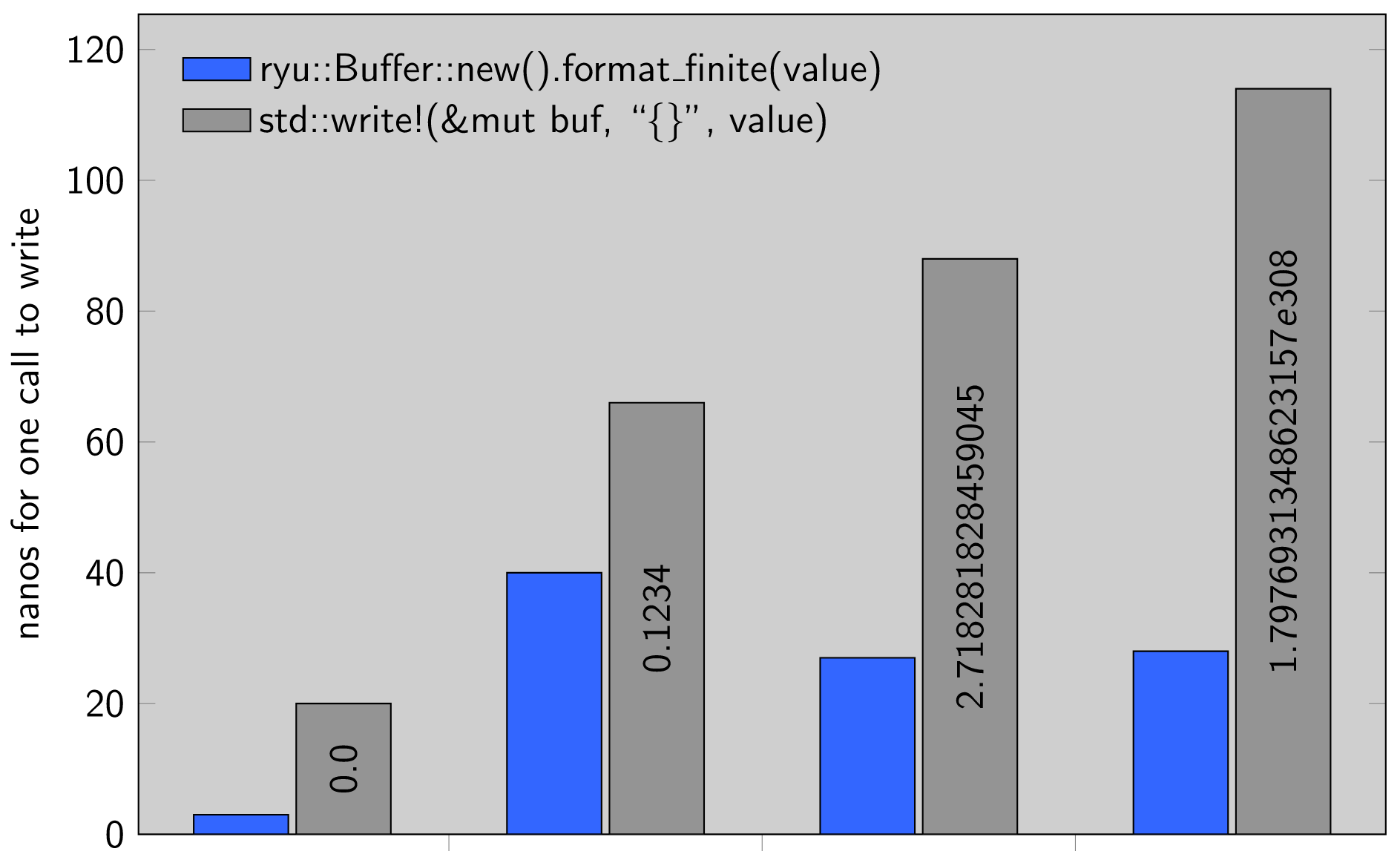
There is also a Rust-specific benchmark comparing this implementation to the standard library which you can run with:
$ cargo bench
The benchmark shows Ryū approximately 2-5x faster than the standard library across a range of f32 and f64 inputs. Measurements are in nanoseconds per iteration; smaller is better.
Formatting
This library tends to produce more human-readable output than the standard library's to_string, which never uses scientific notation. Here are two examples:
- ryu: 1.23e40, std: 12300000000000000000000000000000000000000
- ryu: 1.23e-40, std: 0.000000000000000000000000000000000000000123
Both libraries print short decimals such as 0.0000123 without scientific notation.
License
Licensed under either of Apache License, Version 2.0 or Boost Software License 1.0 at your option.Unless you explicitly state otherwise, any contribution intentionally submitted for inclusion in this crate by you, as defined in the Apache-2.0 license, shall be dual licensed as above, without any additional terms or conditions.