tachyonfx
| Crates.io | tachyonfx |
| lib.rs | tachyonfx |
| version | 0.22.0 |
| created_at | 2024-06-20 15:30:01.64187+00 |
| updated_at | 2026-01-24 17:42:51.922401+00 |
| description | A ratatui library for creating shader-like effects in TUIs. |
| homepage | https://github.com/junkdog/tachyonfx |
| repository | https://github.com/junkdog/tachyonfx |
| max_upload_size | |
| id | 1278080 |
| size | 1,449,110 |
 Adrian Papari (junkdog)
documentation
README
tachyonfx





An effects and animation library for Ratatui applications. Build complex animations by composing and layering simple effects, bringing smooth transitions and visual polish to the terminal.

Try exabind - experience tachyonfx in your browser without installing anything!
Features
- 40+ unique effects — color transformations, text animations, geometric distortions, plus support for custom effects
- Spatial patterns — control effect timing and distribution with radial, diagonal, checkerboard, and organic patterns
- Effect composition — chain and combine effects for sophisticated animations
- Cell-precise targeting — apply effects to specific regions or cells matching custom criteria
- WebAssembly & no_std support — run in browsers and embedded environments
- Interactive browser editor — iterate on effects in real-time with TachyonFX FTL using the built-in DSL
Quick Start
Add tachyonfx to your Cargo.toml:
cargo add tachyonfx
Create your first effect:
use std::{io, time::Instant};

use ratatui::{crossterm::event, prelude::*, widgets::Paragraph};
use tachyonfx::{fx, EffectManager, Interpolation};

fn main() -> io::Result<()> {
    let mut terminal = ratatui::init();
    let mut effects: EffectManager<()> = EffectManager::default();

    // Add a simple fade-in effect
    let fx = fx::fade_to(Color::Cyan, Color::Gray, (1_000, Interpolation::SineIn));
    effects.add_effect(fx);

    let mut last_frame = Instant::now();
    loop {
        let elapsed = last_frame.elapsed();
        last_frame = Instant::now();

        terminal.draw(|frame| {
            let screen_area = frame.area();

            // Render your content
            let text = Paragraph::new("Hello, TachyonFX!").alignment(Alignment::Center);
            frame.render_widget(text, screen_area);

            // Apply effects
            effects.process_effects(elapsed.into(), frame.buffer_mut(), screen_area);
        })?;

        // Exit on any key press
        if event::poll(std::time::Duration::from_millis(16))? {
            if let event::Event::Key(_) = event::read()? {
                break;
            }
        }
    }

    ratatui::restore();
    Ok(())
}
Examples
Explore the examples to see effects in action:
# Basic effects showcase
cargo run -p basic-effects

# Effect timeline visualization
cargo run -p fx-chart

# Minimal setup example
cargo run -p minimal

# Interactive effect registry demo
cargo run -p effect-registry

# Complete effect showcase
cargo run -p effect-showcase

# Tweening examples
cargo run -p tweens
Getting Started
Try it in your browser
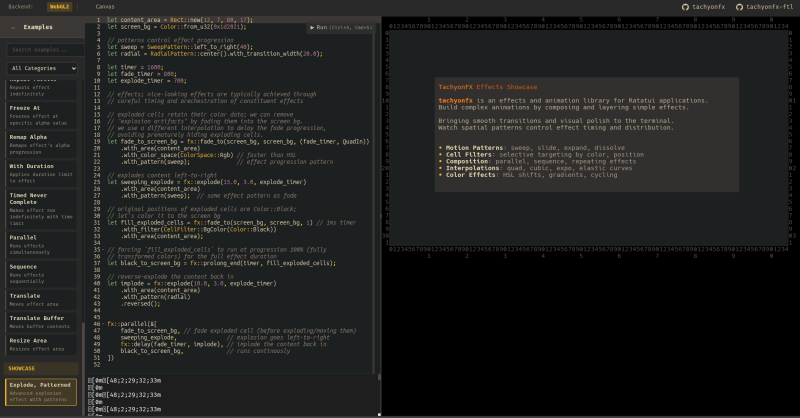
TachyonFX FTL is a browser-based editor for creating and tweaking effects in real-time, using the Effect DSL (don't worry, it mimics rust syntax).
Basic Concepts
- Effects are stateful — Create once, apply every frame
- Effects transform rendered content — Apply after widgets render
- Effects compose — Build complex animations from simple pieces
Simple Example: Fade In
// Create a fade-in effect
let mut fade = fx::fade_from(Color::Black, Color::White,
    EffectTimer::from_ms(500, QuadOut));

// Apply to red text only
fade.set_cell_filter(CellFilter::FgColor(Color::Red));

// In your render loop
fade.process(delta_time, buf, area);
Combining Effects
// Run multiple effects in parallel
let effects = fx::parallel(&[
    fx::fade_from_fg(Color::Red, 500),
    fx::slide_in(Direction::LeftToRight, 800),
]);

// Or sequence them
let effects = fx::sequence(&[
    fx::fade_from_fg(Color::Black, 300),
    fx::coalesce(500),
]);
Using Patterns
Apply spatial patterns to control how effects spread:
// Radial dissolve from center
let effect = fx::dissolve(800)
    .with_pattern(RadialPattern::center());

// Diagonal fade with transition width
let effect = fx::fade_to_fg(Color::Cyan, 1000)
    .with_pattern(
        DiagonalPattern::top_left_to_bottom_right()
            .with_transition_width(3.0)
    );
Using the DSL
Create effects from strings at runtime:
use tachyonfx::dsl::EffectDsl;

let effect = EffectDsl::new()
    .compiler()
    .compile("fx::dissolve(500)")
    .expect("valid effect");
Effect Reference
Below is a non-exhaustive list of built-in effects.
Color Effects
Transform colors over time for smooth transitions.
fade_from/fade_to— Transition colorsfade_from_fg/fade_to_fg— Foreground color transitionshsl_shift/hsl_shift_fg— Animate through HSL color spaceterm256_colors— Downsample to 256-color mode
Text & Motion Effects
Animate text and cell positions for dynamic content.
coalesce/coalesce_from— Text materialization effectsdissolve/dissolve_to— Text dissolution effectsevolve/evolve_into/evolve_from— Character evolution through symbol setsslide_in/slide_out— Directional sliding animationssweep_in/sweep_out— Color sweep transitionsexplode— Particle dispersion effectexpand— Bidirectional expansion from centerstretch— Unidirectional stretching with block characters
Control Effects
Fine-tune timing and behavior.
parallel— Run multiple effects simultaneouslysequence— Chain effects one after anotherrepeat/repeating— Loop effects with optional limits or indefinitelyping_pong— Play forward then reversedelay/sleep— Add pauses before or during effectsprolong_start/prolong_end— Extend effect durationfreeze_at— Freeze effect at specific transition pointremap_alpha— Remap effect progress to smaller rangerun_once— Ensure effect runs exactly oncenever_complete/timed_never_complete— Run indefinitely (with optional time limit)consume_tick— Minimal single-frame delaywith_duration— Override effect duration
Spatial Patterns
Control how effects spread and progress across the terminal.
RadialPattern— Expand outward from center pointDiagonalPattern— Sweep across diagonallyCheckerboardPattern— Alternate cell-by-cell in grid patternSweepPattern— Linear progression in cardinal directionsCoalescePattern/DissolvePattern— Organic, randomized reveals
Geometry Effects
Transform positions and layout.
translate— Move content by offsetresize_area— Scale effect boundstranslate_buf— Copy and move buffer content
Advanced Features
Cell Filtering
Apply effects selectively:
// Only apply to cells with specific colors
fx::dissolve(500)
    .with_filter(CellFilter::FgColor(Color::Red))

// Target specific regions
let filter = CellFilter::AllOf(vec![
    CellFilter::Outer(Margin::new(1, 1)),
    CellFilter::Text,
]);
Custom Effects
Create your own effects:
fx::effect_fn(state, timer, |state, context, cell_iter| {
    // Your custom effect logic
    timer.progress()
})
Alternatively, implement the Shader trait and use it together with .into_effect().
Effect DSL
The DSL supports:
- Most built-in effects (excludes:
effect_fn,effect_fn_buf,glitch,offscreen_buffer,resize_area,translate,translate_buf) - All spatial patterns with method chaining
- Variable bindings
- Method chaining
- Complex compositions
let expr = r#"
    let duration = 300;
    fx::sequence(&[
        fx::fade_from(black, white, duration),
        fx::dissolve(duration)
            .with_pattern(RadialPattern::center())
    ])
"#;
Configuration
Features
-
std— Standard library support (enabled by default) -
crossterm— Crossterm backend support (enabled by default) -
dsl— Effect DSL support (enabled by default) -
sendable— Make effectsSend(but notSync) -
std-duration— Usestd::time::Durationinstead of 32-bit custom type -
wasm— WebAssembly compatibility
Contributing
Contributions welcome! Please check existing issues or create new ones to discuss changes.
License
MIT License - see LICENSE for details.