task-watchdog
| Crates.io | task-watchdog |
| lib.rs | task-watchdog |
| version | 0.1.2 |
| created_at | 2025-03-20 17:12:02.738637+00 |
| updated_at | 2025-03-30 14:25:09.382239+00 |
| description | A robust, flexible watchdog management library for embedded systems that multiplexes multiple task watchdogs into a single hardware watchdog timer, preventing system lockups when tasks fail to respond |
| homepage | |
| repository | https://github.com/piersfinlayson/task-watchdog |
| max_upload_size | |
| id | 1599487 |
| size | 181,442 |
 Piers Finlayson (piersfinlayson)
documentation
README
🛡️ task-watchdog 🐺
A robust, flexible watchdog management library for embedded systems that multiplexes multiple task watchdogs into a single hardware watchdog timer, preventing system lockups when tasks fail to respond.
✨ Key Features
- 🔄 Hardware Agnostic API: Implements a consistent interface across different embedded microcontrollers with extensible trait system for hardware watchdog and clock types
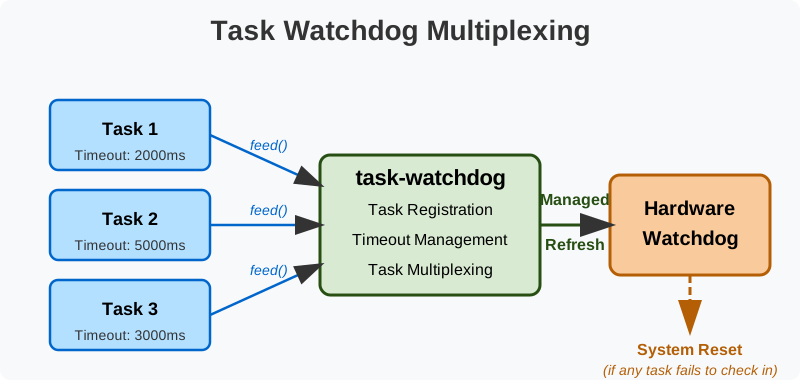
- 🔀 Task Multiplexing: Consolidates multiple independent task watchdogs into a single hardware watchdog, triggering if any task fails to check in
- 🔌 Dynamic Task Management: Tasks can be registered and deregistered at runtime, allowing for flexible monitoring configurations
- ⚡ Async and Sync Support: Works with both synchronous (via device HALs) and asynchronous (Embassy) execution environments
- 📦 No-Alloc Mode: Functions in both
allocandno_allocmodes for environments with or without heap availability - ⏱️ Configurable Timeouts: Individual timeout durations for each registered task
- 🧪
no_stdCompatible: Designed for resource-constrained embedded environments without an operating system
🚀 Quick Start
Examples are provided for async (using embassy-rs) and sync operation of task-watchdog. The async/embassy example supports the Pico, Pico 2 and STM32F103C8 (blue pill). The sync example supports the Pico and Pico 2.
First, install Rust
Add the approriate target(s):
rustup target add thumbv6m-none-eabi         # RP2040/Pico
rustup target add thumbv8m.main-none-eabihf  # RP235x/Pico 2
rustup target add thumbv7m-none-eabi         # STM32
rustup target add thumbv7em-none-eabi        # NRF
Next, install probe-rs
Now connect your Pico/Pico 2/STM321F103C8 device to a connected debug probe, and run one of:
builds/flash-async-pico.sh
builds/flash-async-pico2.sh
builds/flash-async-stm32f103c8.sh
builds/flash-async-nrf52840.sh
To understand how to use task-watchdog yourself, check out one of the examples:
intro.rs- A very basic Pico/Pico 2/STM32/nRF/ESP32 async exampleembassy.rs- Pico/Pico 2/STM32rp-sync.rs- Pico/Pico 2
For ESP32 support see scripts/README.md.
📝 Usage
The library supports both synchronous and asynchronous APIs with a consistent pattern across both styles.
🧠 Core Concepts
- Task Registration: Each monitored task is registered with its own timeout period
- Feeding: Tasks must feed, or pet, the watchdog within their timeout period to prevent a reset
- Task Multiplexing: The library efficiently manages multiple task timeouts through a single hardware watchdog, triggering if any individual task fails to check in
⚡Asynchronous API (Embassy)
For platforms using Embassy, tasks feed the watchdog asynchronously:
// Setup
let watchdog = WatchdogRunner::new(hw_watchdog, config, EmbassyClock);

// Register tasks with individual timeouts
watchdog.register_task(&MainTask, Duration::from_millis(2000)).await;
watchdog.register_task(&SensorTask, Duration::from_millis(5000)).await;

// Spawn the watchdog task itself
spawner.spawn(watchdog_task(watchdog)).unwrap();

// In your application tasks
async fn main_task(watchdog: &'static WatchdogRunnerType) -> ! {
    loop {
        // Do work...
        watchdog.feed(&MainTask).await;
        Timer::after(Duration::from_millis(1000)).await;
    }
}

// Implement other tasks
See complete example at examples/src/embasy.rs
⚙️ Synchronous API (non-Embassy)
For platforms without an async runtime, manually manage the watchdog in your main loop:
// Setup
let mut watchdog = Watchdog::<TaskId, NUM_TASK_IDS, RpHalTaskWatchdog, RpHalClock>::new(
    hw_watchdog, config, RpHalClock::new(timer)
);

// Register tasks with individual timeouts
watchdog.register_task(&TaskId::Main, RpHalDuration::millis(2000));
watchdog.register_task(&TaskId::Sensors, RpHalDuration::millis(3000));

// Start the watchdog
watchdog.start();

// In your main loop
loop {
    // Feed watchdogs for active tasks
    watchdog.feed(&TaskId::Main);

    // Check for starved tasks
    let _ = watchdog.check();
}
See complete example at examples/src/rp-sync.rs
🏗️ Platform Support
The crate is designed to be platform-agnostic via trait implementations, but includes first-class support for:
- RP2040 and RP2350 (Raspberry Pi Pico and Pico 2) via the
rp2040/rp2350features (embassy) andrp2040-hal/rp2350-hal(rp2040-hal/rp235x-hal respectively) - Embassy async runtime via the
embassyfeature
There are many other features - see scripts/build-lib.sh for the valid combinations. The most common are:
embassy,rp2040,defmt- Async, Pico with defmt supportembassy,rp2350,defmt- Async, Pico 2 with defmt supportembassy,stm32,defmt- Async, STM32 with defmt support - you will also needembassy-stm32/your_stm32_board_typeembassy,nrf,defmt- Async, nRF with defmt support - you will also needembassy-nrf/your_nrf_board_type
📜 License
Licensed under either of the following, at your option:
- Apache License, Version 2.0 (LICENSE-APACHE or http://www.apache.org/licenses/LICENSE-2.0)
- MIT license (LICENSE-MIT or http://opensource.org/licenses/MIT)