tauri-plugin-liquid-glass
| Crates.io | tauri-plugin-liquid-glass |
| lib.rs | tauri-plugin-liquid-glass |
| version | 0.1.6 |
| created_at | 2025-12-18 10:22:04.631242+00 |
| updated_at | 2025-12-18 10:51:40.614121+00 |
| description | macOS 26+ Liquid Glass effect support for Tauri |
| homepage | |
| repository | https://github.com/hkandala/tauri-plugin-liquid-glass |
| max_upload_size | |
| id | 1992115 |
| size | 174,858 |
 Harish Kandala (hkandala)
documentation
README
tauri-plugin-liquid-glass
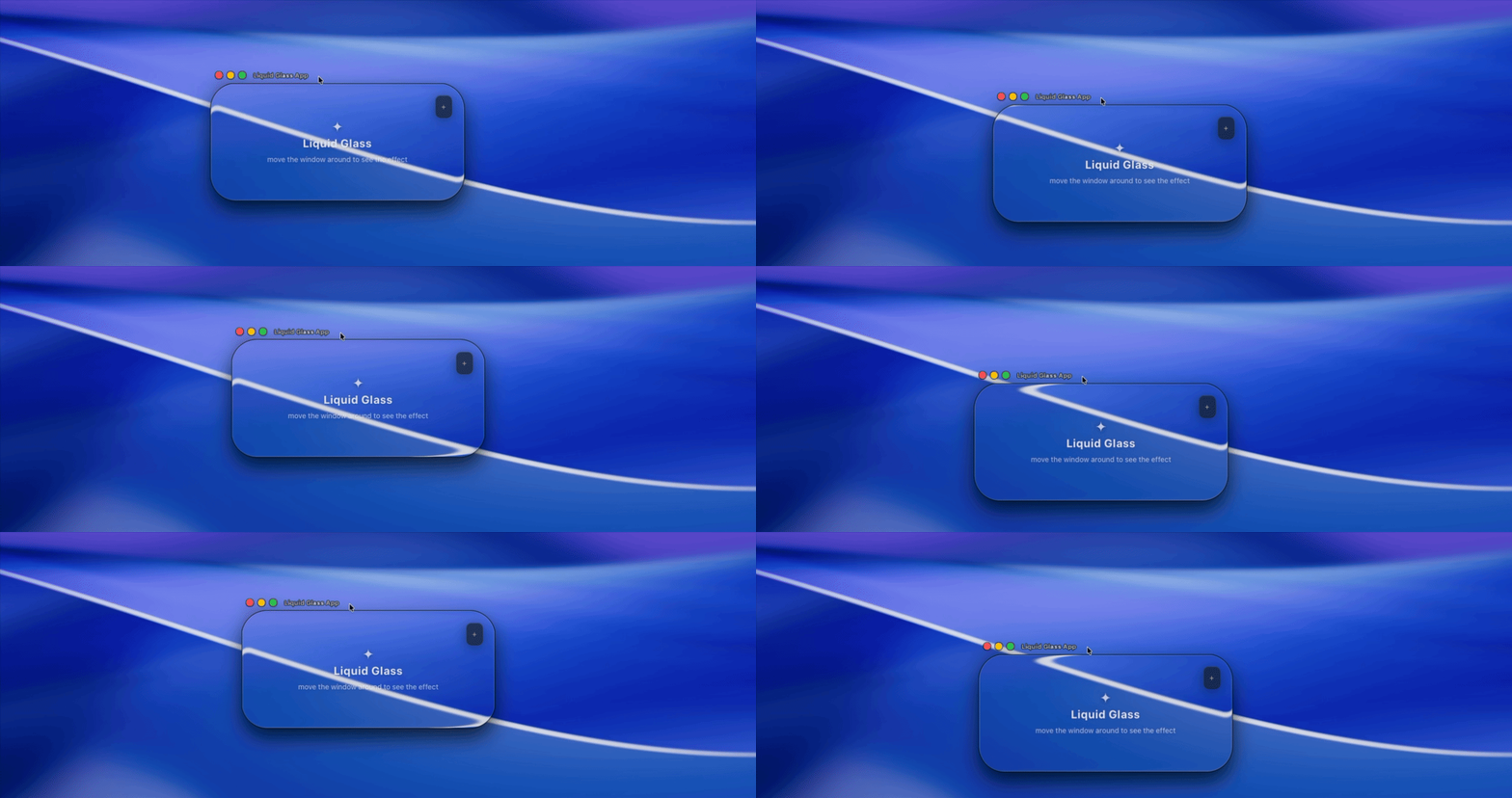
macOS 26+ Liquid Glass effect support for Tauri v2 applications.
This plugin provides native macOS Liquid Glass effects using the private NSGlassEffectView API available in macOS 26 (Tahoe) and later. On older macOS versions, it falls back to NSVisualEffectView.
Features
- Native macOS 26+ Liquid Glass effect
- Graceful fallback to
NSVisualEffectViewon older macOS - 24 material variants (experimental)
- Configurable corner radius and tint color
- Single unified API with automatic window state management
- Safe no-op on non-macOS platforms
Requirements
- Tauri v2.0+
- macOS 26+ for Liquid Glass effect (falls back to vibrancy on older versions)
Installation
Rust
Add the plugin to your Cargo.toml:
[dependencies]
tauri-plugin-liquid-glass = "0.1"
JavaScript/TypeScript
npm install tauri-plugin-liquid-glass-api
# or
yarn add tauri-plugin-liquid-glass-api
# or
pnpm add tauri-plugin-liquid-glass-api
Setup
1. Register the plugin in your Tauri app
// src-tauri/src/lib.rs
pub fn run() {
    tauri::Builder::default()
        .plugin(tauri_plugin_liquid_glass::init())
        .run(tauri::generate_context!())
        .expect("error while running tauri application");
}
2. Configure permissions
Add the plugin permissions to your capability file:
// src-tauri/capabilities/default.json
{
  "identifier": "default",
  "windows": ["main"],
  "permissions": [
    "core:default",
    "liquid-glass:default"
  ]
}
3. Enable transparent window
In your tauri.conf.json, enable macOS private API and window transparency:
{
  "app": {
    "macOSPrivateApi": true,
    "windows": [
      {
        "transparent": true,
      }
    ]
  }
}
And in your HTML/CSS:
html, body {
  background: transparent;
}
Usage
TypeScript API
The current window is automatically detected using Tauri's getCurrentWindow().
import {
  isGlassSupported,
  setLiquidGlassEffect,
  GlassMaterialVariant,
} from "tauri-plugin-liquid-glass-api";

// Check if liquid glass (NSGlassEffectView) is supported
const supported = await isGlassSupported();

// Enable with default settings
await setLiquidGlassEffect({});

// Enable with custom settings
await setLiquidGlassEffect({
  cornerRadius: 24,
  tintColor: "#ffffff20",
  variant: GlassMaterialVariant.Sidebar,
});

// Disable glass effect
await setLiquidGlassEffect({ enabled: false });
Rust API
The plugin exposes a Rust API via the LiquidGlassExt extension trait:
use tauri_plugin_liquid_glass::{LiquidGlassExt, LiquidGlassConfig, GlassMaterialVariant};

// In a Tauri command or setup hook:
#[tauri::command]
fn apply_glass(app: tauri::AppHandle, window: tauri::WebviewWindow) -> Result<(), String> {
    // Check if liquid glass is supported
    let supported = app.liquid_glass().is_supported();

    // Enable with default settings
    app.liquid_glass()
        .set_effect(&window, LiquidGlassConfig::default())
        .map_err(|e| e.to_string())?;

    // Enable with custom settings
    app.liquid_glass()
        .set_effect(&window, LiquidGlassConfig {
            corner_radius: 24.0,
            tint_color: Some("#ffffff20".into()),
            variant: GlassMaterialVariant::Sidebar,
            ..Default::default()
        })
        .map_err(|e| e.to_string())?;

    // Disable glass effect
    app.liquid_glass()
        .set_effect(&window, LiquidGlassConfig {
            enabled: false,
            ..Default::default()
        })
        .map_err(|e| e.to_string())?;

    Ok(())
}
API Reference
Functions
| Function | Description |
|---|---|
isGlassSupported() |
Returns true if running on macOS 26+ with NSGlassEffectView available |
setLiquidGlassEffect(config) |
Apply, update, or remove glass effect on the current window |
LiquidGlassConfig
interface LiquidGlassConfig {
  /** Whether the glass effect is enabled (default: true) */
  enabled?: boolean;
  /** Corner radius for the glass view in pixels (default: 0) */
  cornerRadius?: number;
  /** Tint color in hex format (#RRGGBB or #RRGGBBAA) */
  tintColor?: string;
  /** Glass material variant - experimental, macOS 26+ only (default: Regular) */
  variant?: GlassMaterialVariant;
}
GlassMaterialVariant
24 available variants (macOS 26+ only, ignored on fallback):
| Value | Variant |
|---|---|
| 0 | Regular |
| 1 | Clear |
| 2 | Dock |
| 3 | AppIcons |
| 4 | Widgets |
| 5 | Text |
| 6 | Avplayer |
| 7 | Facetime |
| 8 | ControlCenter |
| 9 | NotificationCenter |
| 10 | Monogram |
| 11 | Bubbles |
| 12 | Identity |
| 13 | FocusBorder |
| 14 | FocusPlatter |
| 15 | Keyboard |
| 16 | Sidebar |
| 17 | AbuttedSidebar |
| 18 | Inspector |
| 19 | Control |
| 20 | Loupe |
| 21 | Slider |
| 22 | Camera |
| 23 | CartouchePopover |
Example
See the examples/liquid-glass-app directory for a complete example application.
To run the example:
cd examples/liquid-glass-app
pnpm install
pnpm tauri dev
Platform Support
| Platform | Support |
|---|---|
| macOS 26+ | Full Liquid Glass effect with all variants |
| macOS 10.10-25 | Fallback to NSVisualEffectView (variants ignored) |
| Windows | No-op (safe to call) |
| Linux | No-op (safe to call) |
How It Works
-
macOS 26+: Uses the private
NSGlassEffectViewAPI which provides the native Liquid Glass effect with material variants and tint color support. -
macOS 10.10-25: Falls back to
NSVisualEffectViewwithUnderWindowBackgroundmaterial. Tint colors are simulated using an overlay subview. Variants are ignored. -
Other platforms: All API calls are safe no-ops that succeed silently.
Notes
- Private API: This plugin uses Apple's private
NSGlassEffectViewAPI, which is not officially documented and may change in future macOS versions. - App Store: Using private APIs may affect App Store approval. Consider using only the fallback
NSVisualEffectViewfor production apps. - Thread Safety: All native operations are automatically dispatched to the main thread.
- State Management: The plugin automatically manages glass effect state per window. Calling
setLiquidGlassEffecton a window that already has a glass effect will update the existing effect.
Credits
Inspired by electron-liquid-glass by Meridius Labs.
License
MIT License - see LICENSE for details.