term-bench
| Crates.io | term-bench |
| lib.rs | term-bench |
| version | 0.5.1-alpha |
| created_at | 2026-01-09 02:01:17.430629+00 |
| updated_at | 2026-01-09 16:59:29.472534+00 |
| description | A simple render benchmark for terminal throughput measurements. |
| homepage | |
| repository | https://github.com/jzombie/term-wm |
| max_upload_size | |
| id | 2031431 |
| size | 64,838 |
 Jeremy Harris (jzombie)
documentation
README
term-bench




term-bench is a small, render-heavy benchmark that repeatedly renders a colorful noise field to the terminal and records statistics about frames, frame time, and cell updates.
It's useful for comparing terminal backends, drivers, or clients and for estimating rendering throughput on different systems.
Used in term-wm for comparing window manager rendering performance to native terminal rendering.
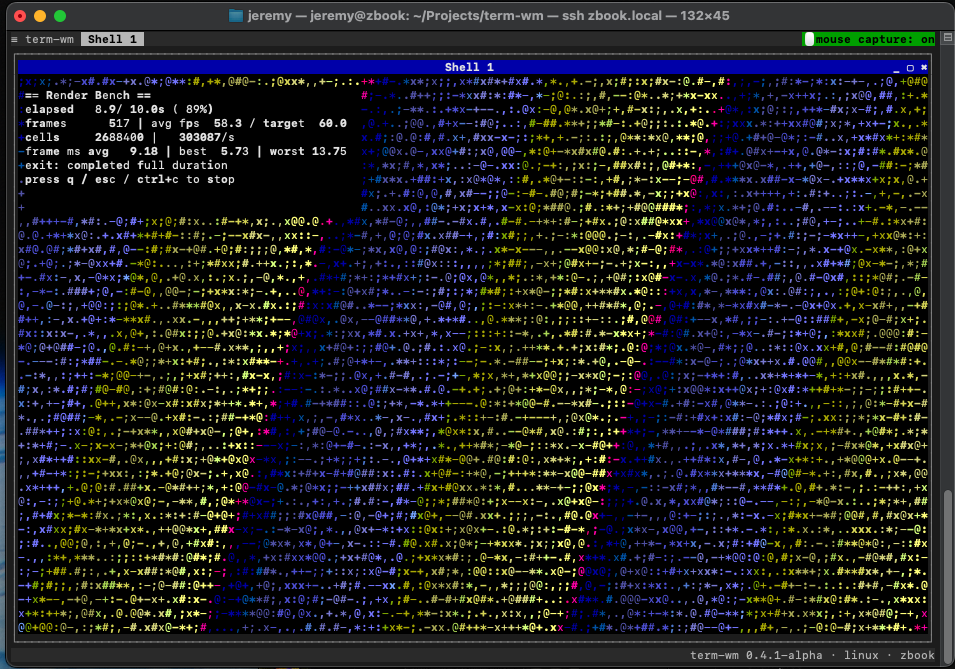
term-bench 0.4.1-alpha Linux running in term-wm over SSH on macOS
Requirements
- A terminal supporting alternate-screen and raw mode (most modern terminals).
If building from source:
-
Rust toolchain (stable) for building from source.
Build
From the workspace root you can build or run the crate directly:
cargo build -p term-bench --release
cargo run -p term-bench --release -- --duration 10.0 --fps 60.0
Note: when using cargo run pass -- before CLI args so cargo does not treat them as cargo flags.
Usage
Assuming term-bench is built from source with Cargo:
cargo run -p term-bench --release -- <OPTIONS>
Otherwise, if running a binary:
# Unix
./term-bench <OPTIONS>

# Windows
term-bench.exe <OPTIONS>
Options:
-d, --duration <SECONDS>: How long to run the benchmark (default:10.0). Valid range:0.5—600.0seconds.-f, --fps <FPS>: Target frames per second to pace rendering (default:60.0). Valid range:1.0—240.0.
Stopping keys: press q, Esc, or Ctrl-C to stop early.
Output
When the run completes the tool prints a summary report to stdout with:
- Exit status (completed or stopped by user)
- Duration
- Frames rendered and average FPS
- Average / best / worst frame times (ms)
- Total cell updates and approximate updates/sec
Example final report:
Render bench completed full duration.
Duration: 10.00s (target 10.00s)
Frames: 600 | Avg FPS: 60.0 (target 60.0)
Avg frame: 16.67 ms | Best: 10.23 ms | Worst: 50.12 ms
Cell updates: 1234567 total (~123456/s)
Examples
- Run for 30 seconds at 120 FPS:
cargo run -p term-bench --release -- --duration 30.0 --fps 120.0
- Run a quick 5-second debug run:
cargo run -p term-bench -- --duration 5.0
Troubleshooting
- If the program cannot enter the alternate screen or behaves oddly, ensure your terminal emulator supports ANSI/VT sequences and that
TERMis set appropriately. - If you see very low FPS or large frame times, try a release build to avoid instrumentation overhead:
cargo build -p term-bench --release.
License
term-bench is primarily distributed under the terms of both the MIT license and the Apache License (Version 2.0).
See LICENSE-APACHE and LICENSE-MIT for details.