tudiff
| Crates.io | tudiff |
| lib.rs | tudiff |
| version | 0.1.2 |
| created_at | 2025-09-30 08:11:19.648941+00 |
| updated_at | 2025-12-12 06:38:31.378161+00 |
| description | A high-performance terminal directory comparison tool written in Rust - bringing Beyond Compare's intuitive interface to the command line. |
| homepage | https://github.com/withoutsalsu/tudiff |
| repository | https://github.com/withoutsalsu/tudiff |
| max_upload_size | |
| id | 1860756 |
| size | 241,890 |
 (withoutsalsu)
documentation
README
tudiff



A high-performance terminal directory comparison tool written in Rust - bringing Beyond Compare's intuitive interface to the command line.
🇰🇷 한글 문서
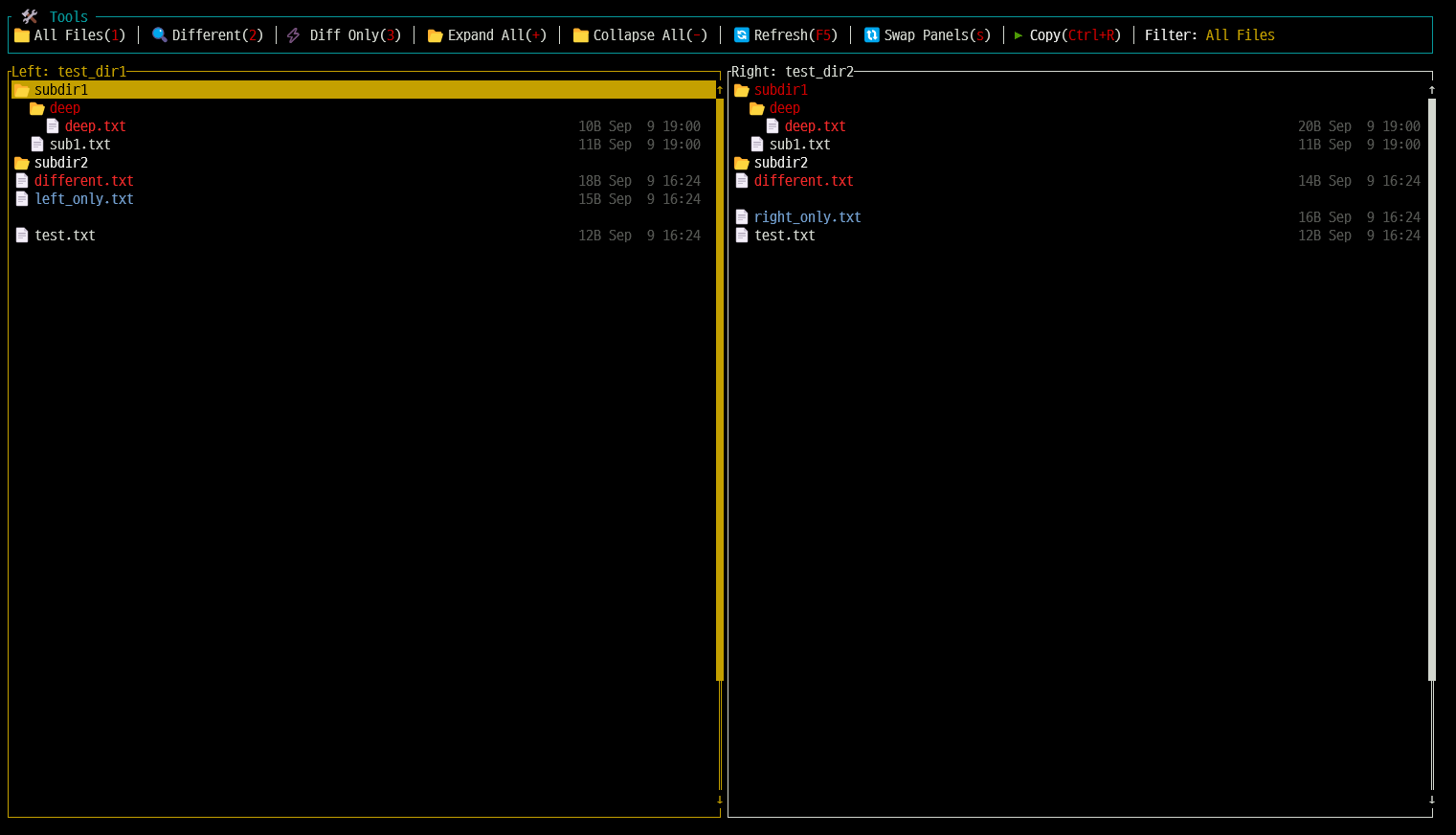
Screenshot
Features
- Dual-panel directory trees: Side-by-side directory comparison for easy visualization
- Smart color coding:
- Gray: Identical files/folders
- Red: Files with different content
- Blue: Files/folders on one side only
- Folder navigation: Expand or collapse folders with Enter key for quick exploration
- Synchronized scrolling: Scroll position and folder expansion automatically synced between panels
- Fast file comparison: View file differences instantly with vimdiff
- Three filter modes:
- Full view: Display all files and folders
- Difference view: Show only changed items
- Diff only: Show files that exist on both sides but differ
- Interactive toolbar: Click toolbar buttons with your mouse
- Smart file copy: Copy files while preserving state
- Keeps cursor position and folder expansion after copy
- Preserves file attributes (timestamps, permissions)
- Safe terminal management: Restores cursor state even on abnormal exit
Installation and Usage
Requirements
- Rust (1.70+)
- vim or nano (for file comparison)
- Terminal with Unicode support (for emoji icons)
Install from crates.io
cargo install tudiff
Install from Source
git clone https://github.com/withoutsalsu/tudiff.git
cd tudiff

# Build only
cargo build --release

# Or install to cargo bin directory
cargo install --path .
Usage
# For development
cargo run -- <dir1> <dir2>

# If built from source
./target/release/tudiff <dir1> <dir2>

# If installed with cargo install
tudiff <dir1> <dir2>

# Use simple text output instead of TUI (for scripting/piping)
tudiff --simple <dir1> <dir2>
cargo run -- --simple <dir1> <dir2>

# Enable verbose logging (creates tudiff.log file)
tudiff --verbose <dir1> <dir2>
tudiff -v <dir1> <dir2>
cargo run -- --verbose <dir1> <dir2>
Example:
# Compare two project directories
tudiff ./project-v1 ./project-v2

# Compare backup with original
tudiff ~/Documents /backup/Documents

# Use simple text output for scripting or piping
tudiff --simple ./project-v1 ./project-v2 | grep "\[L\]"

# Enable verbose logging for debugging
tudiff --verbose ./project-v1 ./project-v2
Controls
Mouse Controls
- Toolbar clicking: Click on toolbar buttons to activate functions
- Filter modes: Click on "All Files", "Different", or "Diff Only" to switch filter modes
- Actions: Click on "Expand All", "Collapse All", "Refresh", or "Swap Panels"
- Mouse wheel: Scroll up/down to navigate through files
Keyboard Navigation
Up/Downorj/k: Navigate files/foldersLeft/Rightorh/l: Switch between left/right panelsEnter:- For folders: expand/collapse
- For files: compare with vimdiff (if exists on both sides) or open single file with vim
PageUp/PageDownorCtrl+B/Ctrl+F: Half-page scroll (based on terminal height)Ctrl+Home: Scroll to topCtrl+End: Scroll to bottom1: Show all files2: Show only different files3: Show only different files (no orphans)+: Expand all folders-: Collapse all foldersF5: Refresh directoriess: Swap panel contentsCtrl+R/Ctrl+L: Copy selected file (left-to-right / right-to-left)qorEsc: Exit
Screen Layout
┌────────── 🛠️  Tools ──────────────────────────────────────────────────────────┐
│ 📁 All Files(1) │ 🔍 Different(2) │ ⚡ Diff Only(3) │ 📂 Expand All(+) │
│ 📁 Collapse All(-) │ 🔄 Refresh(F5) │ 🔃 Swap Panels(s) │ ▶️Copy(Ctrl+R) │
│ Filter: All Files                                                         │
└───────────────────────────────────────────────────────────────────────────────┘
┌─────────── Left: /path/to/dir1 ──────────┐┌─────────── Right: /path/to/dir2 ─────────┐
│ 📁 folder1                   2.5K Mar 15││ 📁 folder1                   2.5K Mar 15│
│   📄 file1.txt               1.2K Mar 10││   📄 file1.txt               1.2K Mar 10│
│   📄 file2.txt               3.4K Mar 12││                                         │
│ 📁 folder2                   5.1K Mar 14││ 📁 folder2                   8.2K Mar 16│
│                                         ││   📁 subfolder               1.8K Mar 16│
│                                         ││     📄 newfile.txt           1.8K Mar 16│
└─────────────────────────────────────────┘└─────────────────────────────────────────┘
File Comparison Algorithm
Fast and accurate comparison using step-by-step processing:
- Stage 1: File size comparison (fastest) - Different sizes mean different files
- Stage 2: Empty file handling - 0-byte files are considered identical
- Stage 3: Small files (< 4KB) - Full content comparison
- Stage 4: Medium files (< 1MB) - Fast CRC32 hash comparison
- Stage 5: Large files (≥ 1MB) - Compare first 4KB only for quick processing
Note: This approach provides both speed and accuracy even for large directories.
UI Enhancements
User-friendly Interface
- Mouse support: Click any toolbar button with your mouse
- Shortcut hints: Shortcuts highlighted in red for easy reference (e.g., (1), (2), (3))
- File information: File size and modification date shown next to each item
- Color-coded status: Different colors for different file states for easy recognition
Default Sorting
- Folder-first sorting: Directories always appear before files
- Case-insensitive alphabetical: Files and folders sorted alphabetically ignoring case
Advanced Features
Smart Folder Status
Folder colors reflect the status of their contents:
- Red: One or more items inside have been changed
- Blue: Folder exists on one side only
- Gray: All items inside are identical
This helps you quickly find folders with changes.
Terminal State Management
- Automatic cursor restoration: Terminal cursor automatically restored on exit
- Safe exit: Terminal state restored even on crashes
- Cross-platform: Works on Linux, macOS, and Windows
Performance Optimizations
- Background scanning: Large directories scanned in background with progress display
- Memory efficient: Streaming approach saves memory when processing large directories
- Load on demand: Tree nodes created only when needed to reduce initial load time
- Scroll sync: Both panels scroll together automatically for easy comparison
Error Handling
- Smart editor selection:
- File comparison: vimdiff → vim -d → diff (automatically picks available editor)
- Single file view: vim → vi → nano → cat (adapts to your system)
- Permission handling: Skips inaccessible files and continues scanning
- Network filesystems: Handles slow or unstable network drives gracefully
- Minimal requirements: Works with basic system tools only
Use Cases
Development Workflow
# Compare branches
tudiff ./main-branch ./feature-branch

# Before/after refactoring
tudiff ./before-refactor ./after-refactor

# Compare deployed vs local
tudiff ./local-project /mnt/server/deployed-project
System Administration
# Configuration drift detection
tudiff /etc/nginx /backup/etc/nginx

# Backup verification
tudiff /home/user /backup/home/user

# System state comparison
tudiff /var/log /backup/var/log
Data Migration
# Verify file transfers
tudiff /source/data /destination/data

# Compare directory structures
tudiff /old-system/files /new-system/files
Troubleshooting
Common Issues
Terminal cursor not blinking after exit:
- This is automatically handled by tudiff's terminal restoration
- If issues persist, run:
tput cnorm
Unicode icons not displaying:
- Ensure your terminal supports Unicode/UTF-8
- Most modern terminals support this by default
Performance with very large directories:
- Use the "Different Only" filter (key
2) to reduce displayed items - The tool is optimized for directories with 100K+ files
Permission errors:
- The tool will continue scanning and mark inaccessible files appropriately
- Run with appropriate permissions for full access
Dependencies
Key Rust crates:
ratatui: TUI interface frameworkcrossterm: Cross-platform terminal manipulationclap: Command line argument parsingwalkdir: Efficient directory traversalsimilar: Text difference algorithmscrc32fast: Fast CRC32 checksum calculationanyhow: Error handling and context
License
MIT License
Similar Tools
tudiff vs other directory comparison tools:
- Beyond Compare: Commercial, GUI-based, more features but not terminal-native
- diff -r: Command line, text output only, no interactive navigation
- meld: GUI-based, requires X11/desktop environment
- kdiff3: GUI-based, heavy dependency requirements
tudiff provides the best of both worlds: powerful comparison features in a lightweight, terminal-native interface.