vba_extract
| Crates.io | vba_extract |
| lib.rs | vba_extract |
| version | 0.2.0 |
| created_at | 2024-07-15 23:31:46.724525+00 |
| updated_at | 2024-08-21 20:29:20.053304+00 |
| description | Utility to extract a vbaProject.bin binary from an Excel xlsm macro file for insertion into an rust_xlsxwriter file. |
| homepage | |
| repository | https://github.com/jmcnamara/vba_extract-rs |
| max_upload_size | |
| id | 1304427 |
| size | 37,114 |
 John McNamara (jmcnamara)
documentation
README
vba_extract
The vba_extract command line application is a simple utility to extract a
vbaProject.bin binary from an Excel xlsm file for insertion into an
rust_xlsxwriter file.
If the macro is digitally signed the utility will also extract a
vbaProjectSignature.bin file.
See Working with VBA Macros in
rust_xlsxwriter.
Usage
Usage: vba_extract [OPTIONS] <FILENAME_XLSM>

Arguments:
  <FILENAME_XLSM>
          Input Excel xlsm filename

Options:
  -o, --output-macro-filename <OUTPUT_MACRO_FILENAME>
          Output vba macro filename

          [default: vbaProject.bin]

  -s, --output-sig-filename <OUTPUT_SIG_FILENAME>
          Output vba signature filename (if present in the parent file)

          [default: vbaProjectSignature.bin]

  -h, --help
          Print help (see a summary with '-h')

  -V, --version
          Print version
Installation
cargo install vba_extract
Adding VBA macros to a rust_xlsxwriter file
Once the vbaProject.bin file has been extracted it can be added to the
rust_xlsxwriter workbook using the
Workbook::add_vba_project()
method:
use rust_xlsxwriter::{Workbook, XlsxError};

#[allow(unused_variables)]
fn main() -> Result<(), XlsxError> {
    let mut workbook = Workbook::new();

    workbook.add_vba_project("examples/vbaProject.bin")?;

    Ok(())
}
Here is a complete example which adds a macro file with a dialog. It also uses a
button, via Worksheet::insert_button(), to
trigger the macro:
use rust_xlsxwriter::{Button, Workbook, XlsxError};

fn main() -> Result<(), XlsxError> {
    // Create a new Excel file object.
    let mut workbook = Workbook::new();

    // Add the VBA macro file.
    workbook.add_vba_project("examples/vbaProject.bin")?;

    // Add a worksheet and some text.
    let worksheet = workbook.add_worksheet();

    // Widen the first column for clarity.
    worksheet.set_column_width(0, 30)?;

    worksheet.write(2, 0, "Press the button to say hello:")?;

    // Add a button tied to a macro in the VBA project.
    let button = Button::new()
        .set_caption("Press Me")
        .set_macro("say_hello")
        .set_width(80)
        .set_height(30);

    worksheet.insert_button(2, 1, &button)?;

    // Save the file to disk. Note the `.xlsm` extension. This is required by
    // Excel or it raise a warning.
    workbook.save("macros.xlsm")?;

    Ok(())
}
The macro in this example is the following VBA code:
Sub say_hello()
    MsgBox ("Hello from Rust!")
End Sub
Output file after running macro:
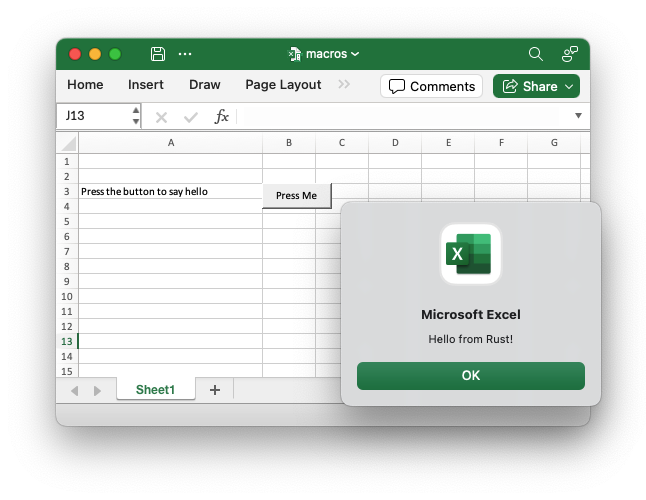
If the VBA file contains functions you can then refer to them in calculations
using Worksheet::write_formula():
use rust_xlsxwriter::{Workbook, XlsxError};

fn main() -> Result<(), XlsxError> {
    let mut workbook = Workbook::new();

    workbook.add_vba_project("examples/vbaProject.bin")?;

    let worksheet = workbook.add_worksheet();

    worksheet.write_formula(0, 0, "=MyMortgageCalc(200000, 25)")?;

    // Note the `.xlsm` extension.
    workbook.save("macros.xlsm")?;

    Ok(())
}
Note: Excel files that contain functions and macros must use an .xlsm
extension or else Excel will complain and possibly not open the file.
use rust_xlsxwriter::{Workbook, XlsxError};

#[allow(unused_variables)]
fn main() -> Result<(), XlsxError> {
    let mut workbook = Workbook::new();

    workbook.add_vba_project("examples/vbaProject.bin")?;

    let worksheet = workbook.add_worksheet();

    // Note the `.xlsm` extension.
    workbook.save("macros.xlsm")?;

    Ok(())
}
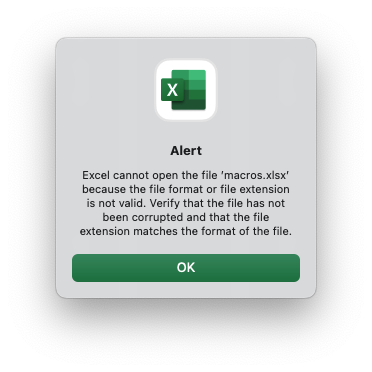
Here is the dialog that appears when a valid xlsm file is incorrectly given a
xlsx extension:
Setting the VBA object names
VBA macros generally refer to workbook and worksheet objects via names such as
ThisWorkbook and Sheet1, Sheet2 etc.
If the imported macro uses other names you can set them using the
Workbook::set_vba_name()
and
Worksheet::set_vba_name()
methods as follows.
use rust_xlsxwriter::{Workbook, XlsxError};

fn main() -> Result<(), XlsxError> {
    let mut workbook = Workbook::new();

    workbook.add_vba_project("examples/vbaProject.bin")?;
    workbook.set_vba_name("MyWorkbook")?;

    let worksheet = workbook.add_worksheet();
    worksheet.set_vba_name("MySheet1")?;

    // Note the `.xlsm` extension.
    workbook.save("macros.xlsm")?;

    Ok(())
}
Note: If you are using a non-English version of Excel you need to pay particular attention to the workbook/worksheet naming that your version of Excel uses and add the correct VBA names. You can find the names that are used in the VBA editor:
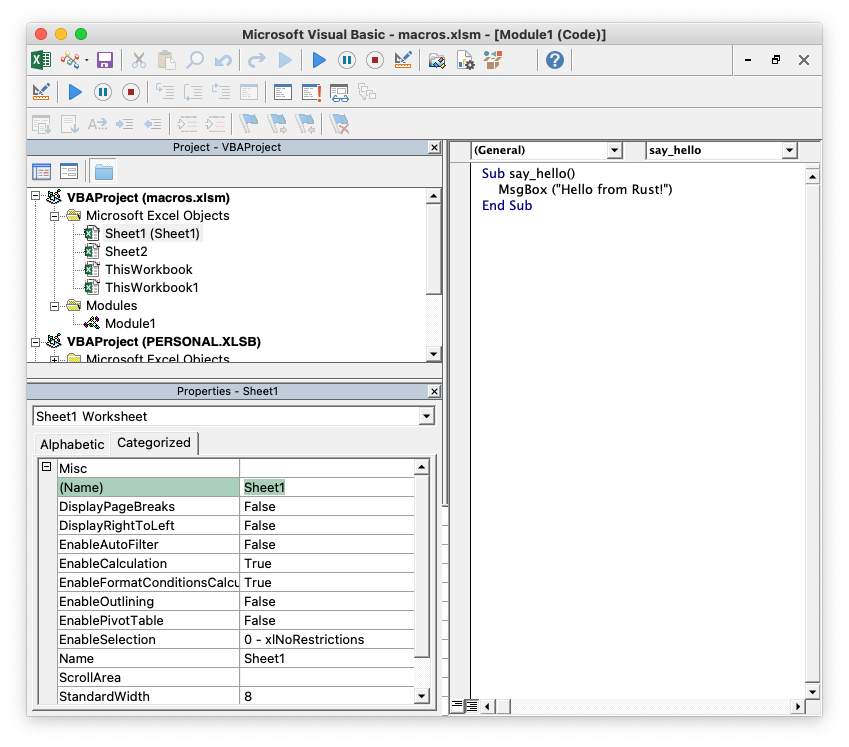
You can also find them by unzipping the xlsm file and grepping the component
XML files. The following shows how to do that using system unzip and libxml's
xmllint to format the XML for clarity
$ unzip myfile.xlsm -d myfile
$ xmllint --format `find myfile -name "*.xml" | xargs` | grep "Pr.*codeName"

    <workbookPr codeName="MyWorkbook" defaultThemeVersion="124226"/>
    <sheetPr codeName="MySheet"/>
Adding a VBA macro signature file to an rust_xlsxwriter file
VBA macros can be signed in Excel to allow for further control over execution.
The signature part is added to the xlsm file in another binary called vbaProjectSignature.bin.
The vba_extract utility will extract the vbaProject.bin and
vbaProjectSignature.bin files from an xlsm file with signed macros.
These files can be added to a rust_xlsxwriter file using the
Workbook::add_vba_project_with_signature()
method:
use rust_xlsxwriter::{Workbook, XlsxError};

#[allow(unused_variables)]
fn main() -> Result<(), XlsxError> {
    let mut workbook = Workbook::new();

    workbook.add_vba_project_with_signature(
        "examples/vbaProject.bin",
        "examples/vbaProjectSignature.bin",
    )?;

    let worksheet = workbook.add_worksheet();

    // Note the `.xlsm` extension.
    workbook.save("macros.xlsm")?;

    Ok(())
}
What to do if it doesn't work
The rust_xlsxwriter test suite contains several tests to ensure that this
feature works and there is a working example shown above. However, there is no
guarantee that it will work in all cases. Some trial and error may be required
and some knowledge of VBA will certainly help. If things don't work out here are
some things to try:
-
Start with a simple macro file, ensure that it works, and then add complexity.
-
Check the code names that macros use to refer to the workbook and worksheets (see the previous section above). In general VBA uses a code name of
ThisWorkbookto refer to the current workbook and the sheet name (such asSheet1) to refer to the worksheets. These are the defaults used byrust_xlsxwriter. If the macro uses other names, or the macro was extracted from an non-English language version of Excel, then you can specify these using the workbook and worksheetset_vba_namemethods.